1. Produs terminatview
The TECKNET TK-KB041 is a versatile, slim wireless keyboard designed for multi-device compatibility and comfortable typing. It offers both 2.4GHz USB-A and Bluetooth connectivity, allowing seamless switching between up to three devices. Its low-profile scissor-switch keys provide a quiet and fluid typing experience, while the integrated numeric keypad enhances productivity. The keyboard features a rechargeable battery with long standby time and power-saving auto-sleep functionality.

Figure 1: TECKNET TK-KB041 Slim Wireless Keyboard.
2. Ce se află în cutie
- Wireless Keyboard (Model TK-KB041) x 1
- Cablu de încărcare USB-C x 1
- Manual de utilizare x 1
- USB-A Receiver (stored in the keyboard's back slot) x 1
3. Instrucțiuni de configurare
3.1 Powering On the Keyboard
- Locate the ON/OFF switch on the side of the keyboard.
- Slide the switch to the "ON" position.

Figure 2: The keyboard's ultra-slim profile, evidențiind designul său compact.
3.2 Connecting via 2.4GHz USB-A Receiver
- Locate the USB-A receiver stored in the magnetic slot on the back of the keyboard.
- Plug the USB-A receiver into an available USB port on your computer or device.
- Tastatura ar trebui să se conecteze automat.

Figure 3: Location of the USB-A receiver slot on the back of the keyboard.
3.3 Conectarea prin Bluetooth
- Asigurați-vă că tastatura este pornită.
- Țineți apăsat butonul Fn și una dintre tastele canalului Bluetooth (Fn + 1, Fn + 2, sau Fn + 3) for 3 seconds. The corresponding Bluetooth indicator light (B1, B2, or B3) on the keyboard will start blinking, indicating it's in pairing mode.
- Pe dispozitivul dvs. (computer, tabletă, smartphone), accesați setările Bluetooth.
- Caută available devices and select "TK-KB041" (or similar name) from the list.
- Follow any on-screen prompts to complete the pairing process. The indicator light on the keyboard will stop blinking and remain solid for a few seconds, then turn off, indicating a successful connection.
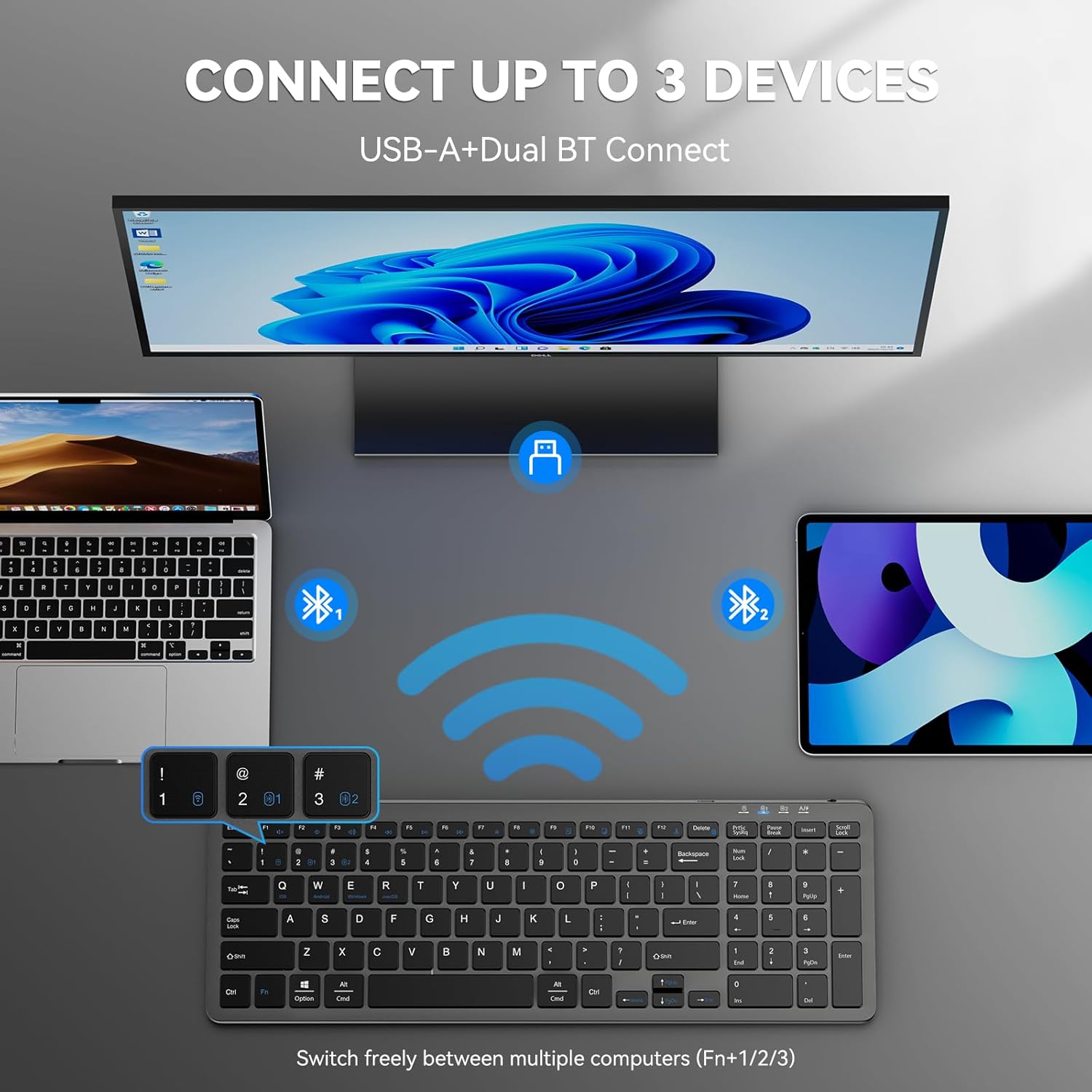
Figure 4: The keyboard connected to multiple devices via Bluetooth and USB-A.
4. Instrucțiuni de utilizare
4.1 Comutarea între dispozitivele conectate
The keyboard supports connecting to up to three devices via Bluetooth and one via 2.4GHz USB-A. To switch between devices:
- For Bluetooth devices: Press Fn + 1, Fn + 2, sau Fn + 3 to switch to the corresponding Bluetooth-paired device.
- For 2.4GHz USB-A device: Press Fn + 4 to switch to the device connected via the USB-A receiver.
4.2 Comutarea sistemului de operare
The keyboard is compatible with Windows, macOS, iOS, and Android. To optimize key functions for your operating system:
- Pentru Windows: Apăsați Fn + W
- For macOS: Press Fn + E
- For iOS: Press Fn + Q
- For Android: Press Fn + R

Figure 5: Keyboard layout highlighting function keys and OS switch keys.
4.3 Multimedia Function Keys (F1-F12)
The F1-F12 keys have secondary multimedia functions. To use these functions, press the Fn simultan cu tasta F dorită.
- F1: Home
- F2: Caută
- F3: Selectați Toate
- F4: Copiere
- F5: Lipește
- F6: Tăiere
- F7: Piesa anterioară
- F8: Redare/Pauză
- F9: Următoarea piesă
- F10: Mut
- F11: Reducerea volumului
- F12: Creștere volum

Figure 6: Illustration of the multimedia function keys (F1-F12).
4.4 Indicatoare luminoase
The keyboard features several indicator lights:
- B1/B2/B3: Bluetooth connection indicators. Blink during pairing, solid when connected, then turn off.
- Majuscule: Se aprinde când Caps Lock este activă.
- Num Lock: Se aprinde când tasta Num Lock este activă.
- Starea de încărcare: A red light indicates charging. A green light indicates fully charged.
- Baterie descărcată: The charging state indicator will blink blue when the battery is low, signaling that a recharge is needed.
5. Întreținere
5.1 Încărcarea tastaturii
The keyboard has a built-in 280mAh rechargeable battery. To charge:
- Connect the provided USB-C charging cable to the USB-C port on the keyboard.
- Conectați celălalt capăt al cablului la o sursă de alimentare USB (de exemplu, portul USB al computerului, adaptorul USB de perete).
- The charging indicator light will illuminate red during charging and turn green when fully charged.
- A full charge takes approximately 2 hours and provides up to 200 hours of use or 90 days of standby time. The keyboard can be used while charging.

Figure 7: USB-C charging port on the keyboard.
5.2 Curățare
- Opriți tastatura înainte de curățare.
- Folosiți un moale, damp o lavetă pentru a șterge suprafața tastaturii.
- Evitați utilizarea substanțelor chimice dure sau a materialelor abrazive.
- For cleaning between keys, use compressed air or a soft brush.
5.3 Modul de economisire a energiei
The keyboard automatically enters sleep mode after 10 minutes of inactivity to conserve power. Press any key to wake it up.
6. Depanare
6.1 Tastatura nu se conectează
- Asigurați-vă că tastatura este pornită.
- Verificați nivelul bateriei; reîncărcați dacă este necesar.
- For 2.4GHz connection: Ensure the USB-A receiver is securely plugged into your device. Try a different USB port.
- Pentru conexiune Bluetooth:
- Asigurați-vă că Bluetooth este activat pe dispozitivul dvs.
- Put the keyboard into pairing mode (Fn + 1/2/3 for 3 seconds).
- Remove any previous "TK-KB041" pairings from your device's Bluetooth list and try pairing again.
- Ensure the keyboard is within the 33ft (10m) operating range.
6.2 Tastele nu răspund
- Check the connection (USB-A or Bluetooth) as described above.
- Asigurați-vă că bateria tastaturii este încărcată.
- Reporniți dispozitivul și încercați să îl reconectați.
6.3 Incorrect Key Output
- Ensure the correct operating system mode is selected (Fn + Q/W/E/R).
- Check your device's language and keyboard layout settings.
7. Specificațiile produsului
| Caracteristică | Detaliu |
|---|---|
| Numărul de model | TK-KB041 |
| Tehnologia de conectivitate | 2.4GHz USB-A, Bluetooth |
| Dispozitive compatibile | PC, Laptop, Mac, MacBook, Tablet, Smartphone, iPhone, iPad (Windows, macOS, iOS, Android) |
| Capacitatea bateriei | 280mAh (reîncărcabil) |
| Timp de încărcare | Aproximativ. 2 ore |
| Timp de funcționare | Până la 200 ore |
| Timp de așteptare | Până la 90 de zile |
| Interval de operare | Până la 33 de picioare (10 metri) |
| Tip tastatură | Low-profile Comutator cu foarfece |
| Dimensiunile produsului | 14.42 x 5 x 0.46 inchi (36.63 x 12.7 x 1.17 cm) |
| Greutatea articolului | 14.1 uncii (400 grame) |
| Material | Plastic |
| Culoare | Negru |
8. Garanție și asistență
TECKNET provides 36-Month Support for registered products. If you encounter any problems in using the product, please reach out to the TECKNET professional customer service team for assistance.
For further support and warranty registration, please visit the official TECKNET website-ul lor sau contactați direct serviciul lor de asistență pentru clienți.

Figure 8: TECKNET's commitment to technology and customer support.
9. Ghid video
Video 1: Official product video demonstrating the features and usage of the Tecknet Slim Rechargeable Bluetooth Wireless Keyboard.


