1. Produs terminatview
The GIGABYTE B760M DS3H WIFI6E GEN5 is an M-ATX motherboard designed to support 14th and 13th Generation Intel Core Processors. It features an LGA 1700 socket and is built with a focus on performance and connectivity for modern computing needs.
Caracteristici cheie:
- Soclu Intel LGA 1700: Acceptă procesoare Intel Core din seria a 14-a și a 13-a generație.
- Compatibilitate DDR5: Features Dual Channel DDR5 memory support across 4 DIMM slots.
- Design robust al puterii: Equipped with a Hybrid 8+2+1 Phases Digital VRM Solution for stable power delivery.
- Conectivitate de ultimă generație: Includes PCIe 5.0, M.2 slots, and USB 3.2 Gen 2x2 Type-C ports.
- Rețea de mare viteză: Integrated Intel Wi-Fi 6E and 2.5GbE LAN for fast and reliable network connections.
- Caracteristici ușor de utilizat: Incorporates Smart Fan 6 for advanced cooling control and Q-Flash Plus for BIOS updates without CPU, memory, or GPU installation.

Figura 1.1: De sus în jos view of the GIGABYTE B760M DS3H WIFI6E GEN5 motherboard, showing the LGA 1700 socket, DDR5 DIMM slots, PCIe slots, and M.2 slots.
2. Configurare și instalare
This section provides general guidelines for installing your GIGABYTE B760M DS3H WIFI6E GEN5 motherboard. Always refer to the detailed instructions provided with your CPU, cooler, and other components for specific installation steps.
2.1 Component Installation Order
- Instalare CPU: Carefully open the LGA 1700 socket lever, align the CPU with the triangular mark on the socket, place the CPU gently, and close the lever to secure it.
- Instalarea coolerului procesorului: Install your chosen CPU cooler according to its manufacturer's instructions. Ensure proper thermal paste application.
- Instalare memorie (RAM): Insert DDR5 memory modules into the DIMM slots. For dual-channel operation, refer to the motherboard manual for recommended slot configurations (typically slots A2 and B2 first). Press firmly until the clips on both ends lock the module in place.
- Instalare SSD M.2: Locate the M.2 slots on the motherboard. Insert the M.2 SSD at an angle and secure it with the provided screw or EZ-Latch mechanism.
- Instalarea plăcii grafice (GPU): Insert your graphics card into the primary PCIe 5.0 x16 slot. Ensure it is fully seated and secured by the PCIe EZ-Latch.
- Conexiune la sursa de alimentare: Conectați conectorul de alimentare ATX cu 24 de pini și conectorul de alimentare CPU cu 8 pini de la sursa de alimentare la placa de bază.
- Dispozitive SATA: Connect SATA data cables to your storage drives (HDDs/SSDs) and the SATA 6Gb/s ports on the motherboard.
- Conectori panoului frontal: Connect the case's front panel headers (power button, reset button, USB ports, audio jacks) to the corresponding pins on the motherboard. Refer to the motherboard's silkscreen labels for correct orientation.
- Instalarea antenei: For Wi-Fi functionality, screw the included Wi-Fi antennas onto the rear I/O panel's antenna connectors (WiFi EZ-Plug).

Figure 2.1: Motherboard layout diagram highlighting key connectors such as USB ports, Wi-Fi antenna connectors, HDMI, DisplayPort, LAN, and audio jacks.
3. Instrucțiuni de utilizare
3.1 Initial Boot-Up and BIOS/UEFI Access
- După asamblarea sistemului, conectați un monitor, o tastatură și un mouse.
- Porniți sistemul. În timpul procesului de pornire, apăsați în mod repetat butonul DEL pentru a accesa utilitarul de configurare BIOS/UEFI.
- In the BIOS/UEFI, you can configure boot order, enable/disable features, adjust fan speeds (Smart Fan 6), and monitor system status.
3.2 Instalarea driverului
- After installing your operating system, install the necessary drivers for the motherboard components.
- Drivers can be found on the official GIGABYTE website for your specific motherboard model. Key drivers include chipset, LAN, Wi-Fi, audio, and USB drivers.
3.3 BIOS Update with Q-Flash Plus
- The Q-Flash Plus feature allows you to update the BIOS without installing the CPU, memory, or graphics card.
- Descărcați cel mai recent BIOS file de la GIGABYTE website-ul și redenumiți-l în GIGABYTE.bin.
- Copiați BIOS-ul redenumit file to a USB flash drive (FAT32 format).
- Introduceți unitatea flash USB în portul USB Q-Flash Plus corespunzător de pe panoul I/O din spate.
- With the power supply connected and turned on (but the system off), press the Q-Flash Plus button. The LED will flash, indicating the update process. Wait until the LED stops flashing.
4. Întreținere
Întreținerea regulată ajută la asigurarea longevității și a performanței optime a plăcii de bază și a sistemului.
- Îndepărtarea prafului: Periodically clean dust from inside your computer case, especially from heatsinks, fans, and motherboard surfaces, using compressed air. Ensure the system is powered off and unplugged before cleaning.
- Actualizări BIOS: Keep your BIOS updated to the latest version to benefit from performance improvements, bug fixes, and support for new hardware. Use the Q-Flash Plus feature or the BIOS utility.
- Actualizări ale driverului: Verificați periodic GIGABYTE website pentru drivere actualizate pentru componentele plăcii de bază.
- Inspectie fizica: Occasionally inspect all cable connections (power, SATA, front panel) to ensure they are secure.
5. Depanare
Această secțiune abordează problemele frecvente pe care le-ați putea întâmpina.
5.1 Probleme comune și soluții
- Nu există alimentare / Sistemul nu pornește:
- Ensure the power supply is connected to the motherboard (24-pin ATX and 8-pin CPU) and the wall outlet.
- Check if the power supply switch is in the ON position.
- Verificați dacă cablul butonului de alimentare de pe panoul frontal este conectat corect la placa de bază.
- No Display / No POST (Power-On Self-Test):
- Confirm that the monitor is connected to the graphics card (or integrated graphics if applicable) and powered on.
- Reseat the RAM modules firmly in their slots. Try booting with only one RAM module.
- Reseat the graphics card in its PCIe slot. Ensure any required PCIe power cables are connected to the GPU.
- Clear the CMOS by removing the CMOS battery for 5-10 minutes or using the Clear CMOS jumper (refer to the full manual for location).
- Sistemul de operare nu pornește:
- Check the boot order in the BIOS/UEFI to ensure your primary storage drive is selected.
- Verify that the SATA data and power cables are securely connected to your storage drive.
- If using an M.2 SSD, ensure it is properly seated and detected in the BIOS.
- Probleme de conectivitate la rețea:
- For wired LAN, ensure the Ethernet cable is securely connected and the LAN driver is installed.
- For Wi-Fi, ensure the antennas are properly attached to the WiFi EZ-Plug connectors and the Wi-Fi driver is installed.
- Verificați setările de rețea din sistemul dvs. de operare.
If issues persist, consult the comprehensive GIGABYTE user manual or contact technical support.
6. Specificatii tehnice
| Caracteristică | Detaliu |
|---|---|
| Marca | GIGABYTE |
| Numele modelului | B760M DS3H WIFI6E GEN5 |
| Soclu CPU | LGA 1700 |
| Procesoare compatibile | 14th, 13th Gen Intel Core Series Processors |
| Chipset | Chipset Intel B760 Express |
| Tehnologia memoriei RAM | DDR5 |
| Sloturi de memorie | 4 x socluri DIMM DDR5 (Dual Channel) |
| Viteză maximă de memorie | Până la 5600 MHz (OC) |
| Sloturi PCIe | 1 slot PCIe 5.0 x16, 2 sloturi PCIe 3.0 x1 |
| Conectori M.2 | 2 x conectori M.2 (PCIe 4.0 x4) |
| Porturi SATA | 4 x conectori SATA 6Gb/s |
| Porturi USB (spate) | 1 x USB 3.2 Gen 2x2 Type-C, 1 x USB 3.2 Gen 2, 2 x USB 3.2 Gen 1, 4 x USB 2.0/1.1 |
| Rețele | Intel Wi-Fi 6E, 2.5GbE LAN |
| Audio | CODEC audio Realtek (audio de înaltă definiție) |
| Ieșiri video | 1 x HDMI, 1 x DisplayPort (requires CPU with integrated graphics) |
| Factor de formă | Micro ATX (M-ATX) |
| Dimensiuni (Lxlxh) | 8.82 x 8.82 x 1 inci |
| Greutatea articolului | 2 lire sterline |
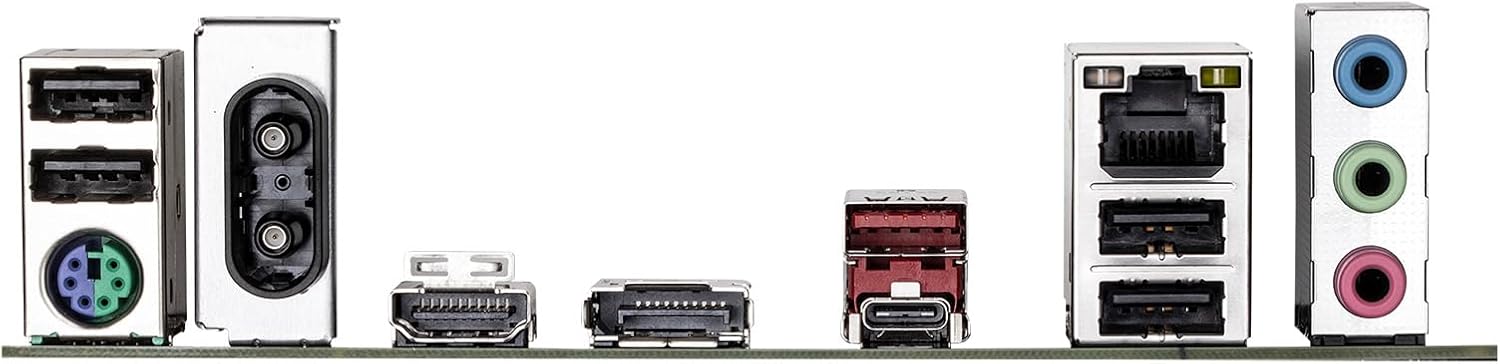
Figure 6.1: Rear I/O panel showing various ports including USB, LAN, Wi-Fi antenna connectors, HDMI, DisplayPort, and audio jacks.
7. Informații despre garanție
GIGABYTE products are covered by a limited warranty. For detailed and up-to-date warranty terms, conditions, and registration procedures, please refer to the official GIGABYTE website or the warranty card included with your product. Warranty periods may vary by region and product type.
8. Suport tehnic
For technical assistance, driver downloads, BIOS updates, FAQs, and further product information, please visit the official GIGABYTE support website:
Before contacting support, please have your motherboard model name (B760M DS3H WIFI6E GEN5) and serial number ready.


