Introducere
Thank you for choosing the GOBOULT Soniq Over Ear Bluetooth Headphones. These headphones are designed to provide a superior audio experience with features like 70 hours of playtime, 40mm bass drivers, Zen™ ENC microphone, Type-C fast charging, and dual device pairing. This manual will guide you through the setup, operation, and maintenance of your new headphones to ensure optimal performance.
Ce este în cutie
Vă rugăm să verificați conținutul pachetului pentru a vă asigura că toate articolele sunt prezente:
- Soniq Headphone
- Cablu de încărcare de tip C
- Manual de utilizare
- Pernițe pentru urechi (preinstalate)
- Card de garanție
Caracteristicile produsului S-au terminatview
The GOBOULT Soniq headphones come equipped with several advanced features:
- Timp de redare extins: Până la 70 ore de redare audio cu o singură încărcare.
- Moduri EQ personalizabile: Reglați sunetul profesionalfiles for bass boost, balanced audio, or vocal clarity.
- Anularea zgomotului de mediu (ENC): Îmbunătățește claritatea apelurilor prin reducerea zgomotului de fundal.
- Dual Device Pairing: Seamlessly connect and switch between two devices simultaneously.
- Powerful Audio Drivers: 40mm bass-boosted drivers for rich sound.
- Latest Bluetooth Technology: Bluetooth 5.4 for faster pairing and stable connections.
- Design confortabil: Lightweight build with cushioned earcups for prolonged wear.
- Rezistenta la apa: IPX5 rating for splash, rain, and sweat protection.
- Comenzi tactile: Easy-to-use physical buttons for volume, playback, and mode switching.
- Suport pentru asistent vocal AI: Compatibil cu Asistentul Google și Siri.

Imagine: Pesteview of key features including 70H battery, EQ modes, ENC, dual pairing, 40mm drivers, and Bluetooth 5.4.

Image: Close-up of the GOBOULT Soniq headphone earcup highlighting the 40mm power-packed bass neodymium drivers with BoomX™ Technology and Memory Foam.
Ghid de instalare
1. Încărcarea căștilor
Before first use, fully charge your GOBOULT Soniq headphones. Use the provided Type-C charging cable to connect the headphones to a compatible USB power source.
- O încărcare completă oferă până la 70 de ore de redare.
- Fast charging feature: 10 minutes of charge provides approximately 8 hours of playtime.
- Indicatorul LED va afișa starea de încărcare și se va stinge sau își va schimba culoarea când este complet încărcat.

Image: GOBOULT Soniq headphones connected via Type-C cable, illustrating 70 hours playtime and fast charging capability.
2. Pornire/Oprire
To power on, press and hold the Power button for approximately 3 seconds until the LED indicator lights up. To power off, press and hold the Power button again for 3 seconds until the LED indicator turns off.
3. Asociere Bluetooth
Urmați acești pași pentru a asocia căștile cu un dispozitiv compatibil Bluetooth:
- Asigurați-vă că sunt complet încărcate și oprite căștile.
- Apăsați și țineți apăsat butonul de pornire timp de 5-7 secunde, până când indicatorul LED clipește alternativ în roșu și albastru, indicând modul de asociere.
- Pe dispozitivul dvs. (smartphone, tabletă, laptop), activați Bluetooth și căutați dispozitivele disponibile.
- Select "GOBOULT Soniq" from the list of found devices.
- După conectare, indicatorul LED va clipi lent în albastru sau va rămâne albastru continuu.

Image: GOBOULT Soniq headphones highlighting Bluetooth 5.4 for fast and stable connection.
Instrucțiuni de operare
1. Controale de bază
The headphones feature tactile buttons for easy control:
- Buton de alimentare: Apăsați și mențineți apăsat pentru a porni/opri. Apăsați scurt pentru redare/pauză.
- Creștere volum (+): Apăsați scurt pentru a crește volumul. Apăsați lung pentru următoarea piesă.
- Volum scăzut (-): Apăsare scurtă pentru a reduce volumul. Apăsare lungă pentru piesa anterioară.
- Multi-function Button (often combined with Power or a dedicated button): Answer/End calls, activate voice assistant.

Image: Close-up of the right earcup showing tactile button controls for volume and play/pause.
2. Moduri EQ
Customize your audio experience with multiple EQ modes. Press the dedicated EQ button (or a specific combination, refer to quick start guide if available) to cycle through modes:
- Mod amplificare bas: Enhances low frequencies for a deeper bass sound.
- Mod echilibrat: Oferă un sunet neutru profesionalfile potrivit pentru diverse genuri.
- Mod vocal: Optimizează frecvențele medii pentru voci mai clare.
- Mod joc: Reduces latency for a more synchronized gaming audio experience (60ms ultra-low latency).
- Modul muzical: Audio profesional standardfile for general music listening.
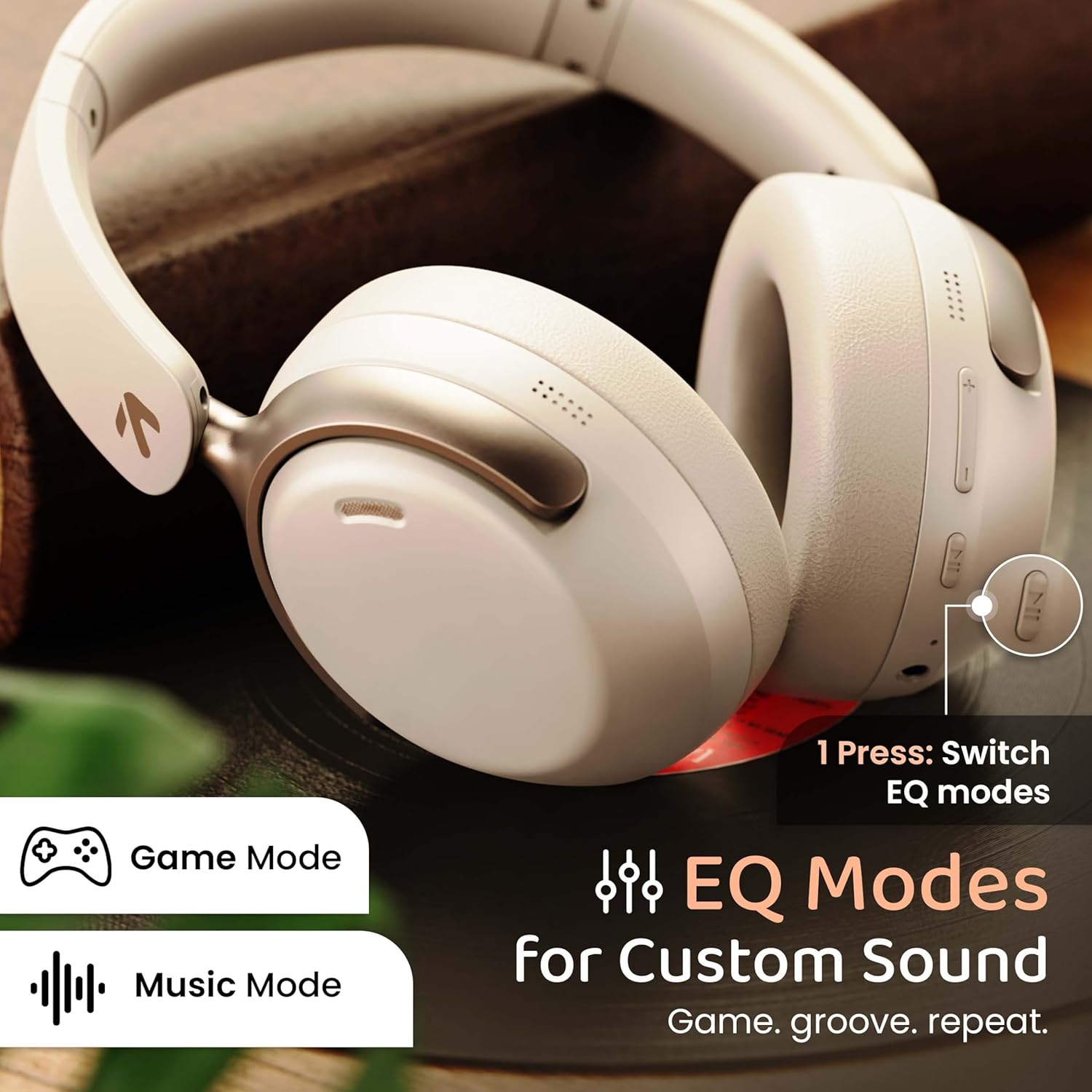
Image: GOBOULT Soniq headphones illustrating the EQ modes for custom sound, including Game Mode and Music Mode.

Image: GOBOULT Soniq headphones highlighting Combat™ Gaming Mode with 60ms ultra-low latency, tailored for mobile gaming and real-time sound accuracy.
3. Împerecherea a două dispozitive
The headphones support dual device pairing, allowing you to connect to two devices simultaneously and switch between them seamlessly.
- Pair the headphones with the first device as described in the "Bluetooth Pairing" section.
- Dezactivați Bluetooth pe primul dispozitiv.
- Asociați căștile cu al doilea dispozitiv.
- Reactivați Bluetooth pe primul dispozitiv. Căștile ar trebui să se conecteze automat la ambele dispozitive.
- Audio will play from the device currently active. To switch, pause audio on the first device and start playing on the second.

Image: GOBOULT Soniq headphones demonstrating dual device connectivity with a laptop and a smartphone.
4. Mod cu fir (AUX)
For a wired connection, use a standard 3.5mm AUX cable (not included) to connect the headphones to your audio source. In wired mode, the headphones operate passively, and the built-in microphone will not function.

Image: GOBOULT Soniq headphones showing the option for wireless mode and an optional wired mode via AUX cable, noting that the mic is off in wired mode.
5. Anularea zgomotului ambiental (ENC) pentru apeluri
The Zen™ ENC microphone technology helps reduce ambient noise during calls, ensuring clearer conversations. This feature is automatically active during phone calls.

Image: Close-up of the GOBOULT Soniq headphone earcup highlighting the Zen™ ENC Mic for processed calling, ambient noise isolation, enhanced call experience, and sharper voice clarity.
6. Asistent vocal
Activate your device's voice assistant (Google Assistant or Siri) by pressing the multi-function button (or specific button, refer to quick start guide) for approximately 2 seconds.

Image: GOBOULT Soniq headphones with icons for Google Assistant and Siri, indicating personalized AI assistant support.
Întreținere și îngrijire
- curatenie: Ștergeți căștile cu o lavetă moale și uscată. Nu folosiți substanțe de curățare abrazive sau solvenți.
- Rezistenta la apa: The headphones are IPX5 water resistant, meaning they are protected against splashes, rain, and sweat. Do not submerge them in water or expose them to strong jets of water.
- Depozitare: Când nu le utilizați, depozitați căștile într-un loc răcoros și uscat, ferit de lumina directă a soarelui și de temperaturi extreme. Designul pliabil permite depozitarea compactă.
- Îngrijirea bateriei: Pentru a prelungi durata de viață a bateriei, evitați descărcarea completă frecventă a căștilor. Încărcați-le regulat, chiar dacă nu le utilizați constant.
Image: GOBOULT Soniq headphones illustrating IPX5 water resistance, indicating protection against splash, rain, and sweat.

Image: GOBOULT Soniq headphones showcasing their adjustable headband, foldable design, and movable earcups for maximum comfort and portability.
Depanare
| Problemă | Soluție posibilă |
|---|---|
| Căștile nu pornesc. | Ensure the headphones are charged. Connect to a power source using the Type-C cable. |
| Nu se poate realiza asocierea cu dispozitivul. |
|
| Niciun sunet sau volum redus. |
|
| Microfonul nu funcționează în modul cu fir. | The built-in microphone is not active when using the AUX wired connection. This is normal operation. |
| Conexiune intermitentă. |
|
Specificații
| Caracteristică | Detaliu |
|---|---|
| Numele modelului | AirBass |
| Tehnologia de conectivitate | Bluetooth, Wired, Wireless |
| Tehnologia comunicațiilor fără fir | Bluetooth 5.4 |
| Gama Bluetooth | 10 metri |
| Dimensiunea driverului audio | 40 Milimetri |
| Tip de driver audio | Driver dinamic |
| Durata de viață a bateriei | 40 de ore |
| Port de încărcare | Mufă de încărcare rapidă de tip C |
| Controlul zgomotului | Anularea zgomotului de mediu (ENC) |
| Nivel de rezistență la apă | IPX5 (Splash, Rain, Sweat Proof) |
| Latență audio | 60 de milisecunde (modul Joc) |
| Forma căștilor | Peste ureche |
| Material | Memory Foam (Ear Cushions) |
| Greutatea articolului | 227 grame |
| Dimensiunile produsului (Lxlxh) | 17 x 5.5 x 19 centimetri |
| Tip controler | Button, Google Assistant |
| Impedanta | 32 ohmi |
| Sensibilitate | 118 dB |
Garanție și suport
Your GOBOULT Soniq Over Ear Bluetooth Headphones come with a 1 ani garanție producător from the date of purchase. This warranty covers manufacturing defects and ensures the reliability of your product.
For warranty claims, technical support, or any inquiries, please refer to the contact information provided on the warranty card included in your package or visit the official GOBOULT support website-ul.
Vă rugăm să păstrați bonul fiscal ca dovadă a achiziției pentru validarea garanției.


