Introducere
The TECKNET TK-KB030 Wireless Ergonomic Keyboard is designed to provide a comfortable and efficient typing experience. Featuring a split layout, curved key arrangement, and an integrated wrist rest, this keyboard aims to reduce strain during extended use. It offers versatile connectivity options including 2.4GHz wireless and Bluetooth 5.0, allowing connection to multiple devices.
Conținutul pachetului
Vă rugăm să verificați conținutul pachetului la despachetare:
- TECKNET Wireless Ergonomic Keyboard (TK-KB030)
- USB-A Receiver (for 2.4GHz connection)
- Cablu de încărcare USB-C
- Manual de utilizare
Caracteristicile produsului
Ergonomic Key Layout
The keyboard features a split layout and a curved key arrangement designed to align with the natural arc of your fingers. This design promotes a neutral wrist posture and allows your hands to rest at shoulder-width distance, reducing lateral stretching and typing strain.
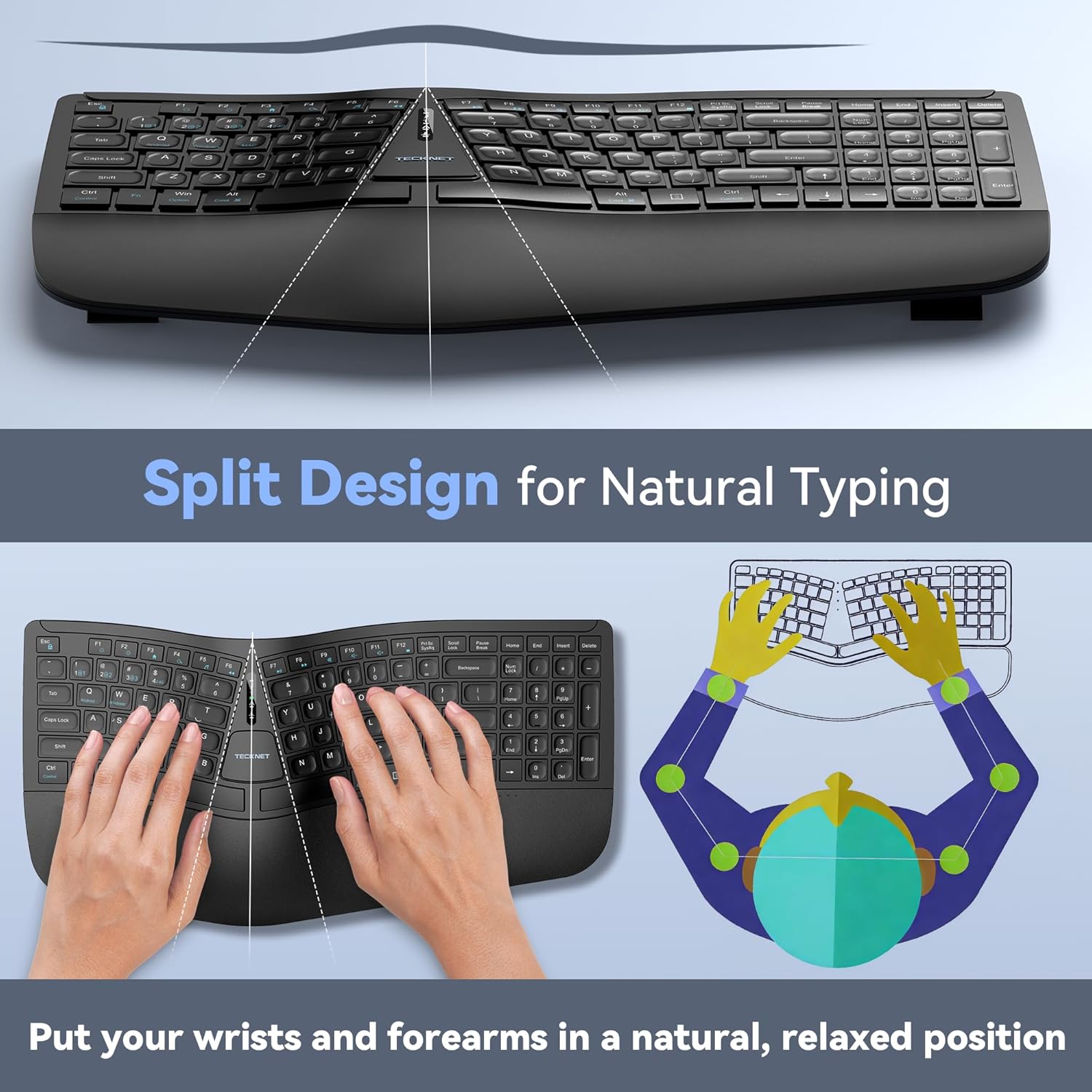
Image: The keyboard's split design, illustrating how it allows for natural hand and wrist positioning to reduce strain.
Integrated High-Density Memory Foam Wrist Rest
A built-in dual-density wrist rest provides support and comfort. The bottom layer offers stable support, while the top layer of slow-rebound memory foam conforms to your hands, distributing pressure evenly.
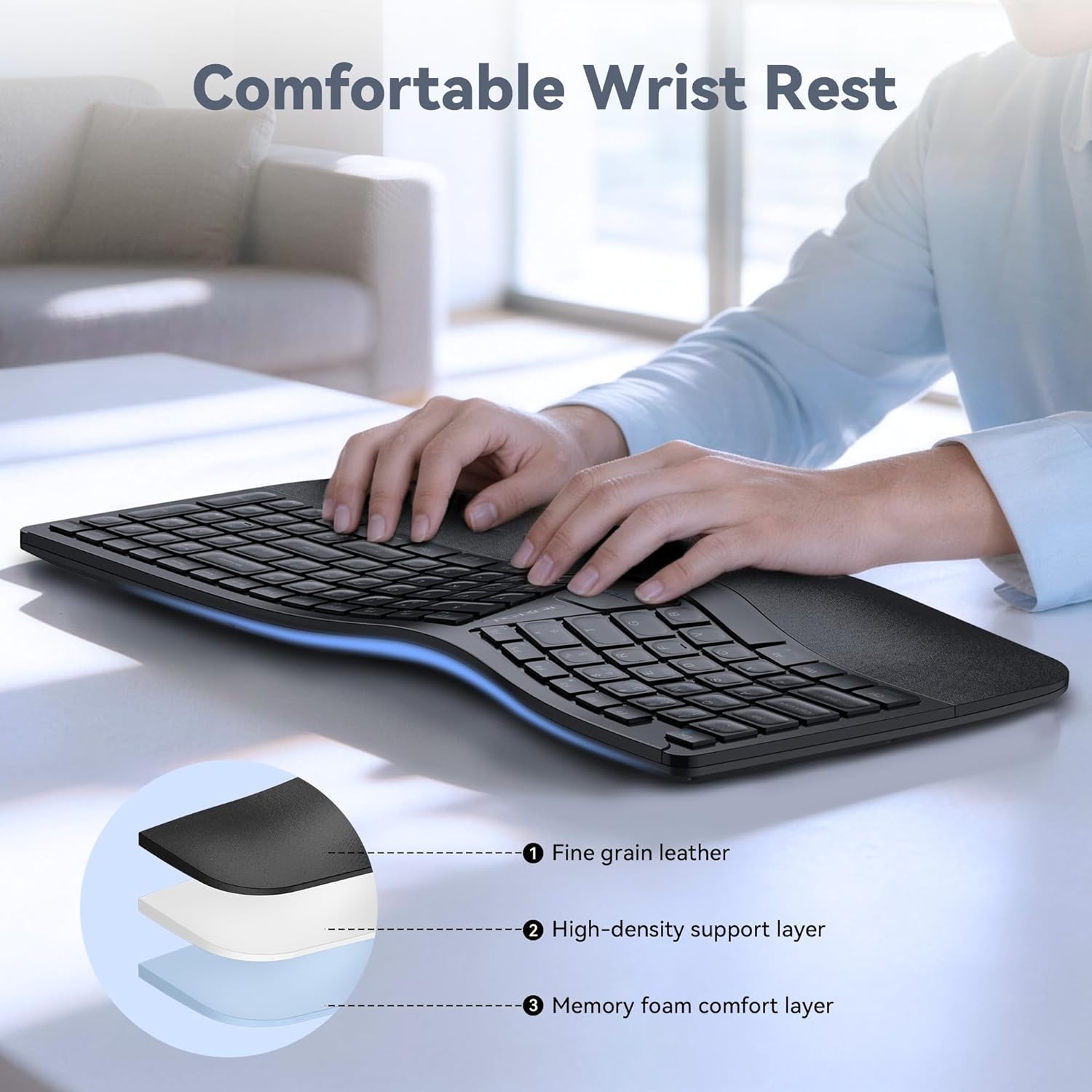
Image: Diagram showing the layers of the integrated wrist rest: fine grain leather, high-density support layer, and memory foam comfort layer.
Bluetooth + 2.4GHz Wireless Connectivity
The keyboard supports Bluetooth 5.0 with pairing memory for up to 3 devices and includes a USB wireless dongle for 2.4GHz connectivity. This allows connection to up to 4 devices (1 via 2.4GHz, 3 via Bluetooth) and seamless switching between them.
Durată lungă de viață a bateriei și încărcare rapidă
Equipped with a 500mAh rechargeable lithium battery, the keyboard fully charges in approximately 4 hours and provides up to 200 hours of continuous use. The USB-C port supports simultaneous charging and use.
Ajustare cu mai multe unghiuri
The keyboard base features 4-stage adjustable feet, offering tilt options of 0°, 1.2°, 3°, and 6.2° to accommodate various working scenarios and personal preferences.
Înființat
Conexiune wireless de 2.4 GHz
- Locate the USB-A receiver, typically stored in a compartment on the keyboard.
- Conectați receptorul USB-A la un port USB disponibil al computerului.
- Turn on the keyboard using the power switch (usually located on the back or side).
- The keyboard should automatically connect to your device. The 2.4G indicator light may illuminate briefly.
Bluetooth Connection (BT1, BT2, BT3)
- Porniți tastatura.
- Țineți apăsat butonul BT1, BT2, sau BT3 key for 3-5 seconds until the corresponding Bluetooth indicator light flashes rapidly. This indicates the keyboard is in pairing mode.
- Pe dispozitivul dvs. (computer, tabletă, smartphone), accesați setările Bluetooth și căutați dispozitive noi.
- Select "TECKNET Keyboard" or a similar name from the list of available devices.
- Urmați orice instrucțiuni de pe ecran pentru a finaliza procesul de asociere. Indicatorul luminos va înceta să clipească și va rămâne aprins constant timp de câteva secunde după conectarea reușită.
- Repeat these steps for BT2 and BT3 to pair with additional devices.

Image: The keyboard connected to multiple devices (PC via 2.4G, tablet via BT1, laptop via BT2, smartphone via BT3), demonstrating its versatile connectivity.
Instrucțiuni de operare
Comutarea între dispozitivele conectate
To switch between connected devices, simply press the corresponding connectivity key: 2.4G, BT1, BT2, sau BT3. The keyboard will switch to the selected device within a few seconds.
Încărcarea tastaturii
When the battery is low, the battery indicator light will flash. Connect the supplied USB-C charging cable to the keyboard's USB-C port and the other end to a USB power source (e.g., computer USB port, wall adapter). The indicator light will show charging status and turn off when fully charged.
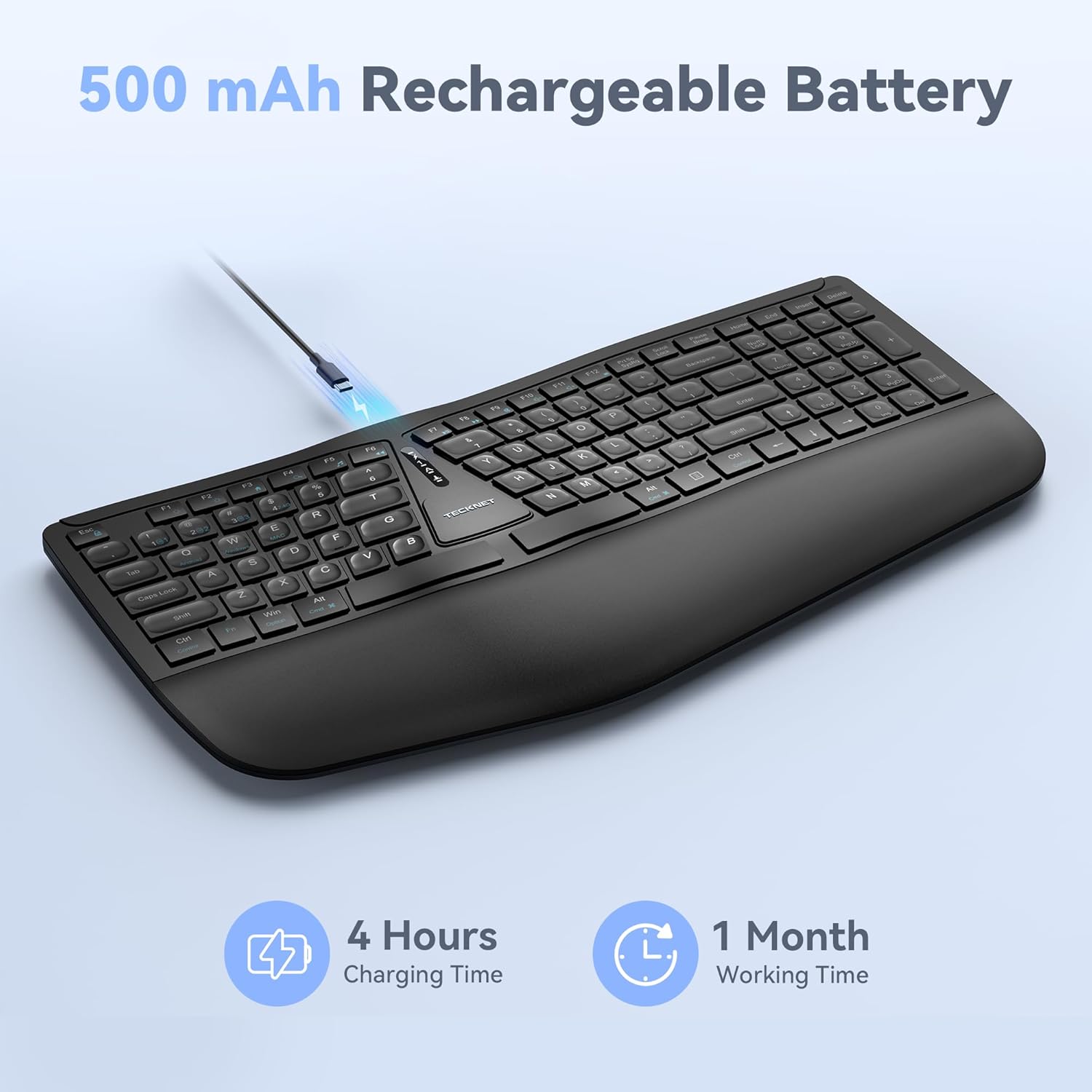
Image: The keyboard connected via a USB-C cable for charging, with an icon indicating 4 hours charging time for 1 month working time.
Adjusting Keyboard Tilt
The keyboard features adjustable feet on the underside. You can adjust the tilt to one of four positions: 0° (flat), 1.2° (backward tilt), 3° (rear stand open), or 6.2° (front tripod open). Experiment with different angles to find the most comfortable typing position for your setup.
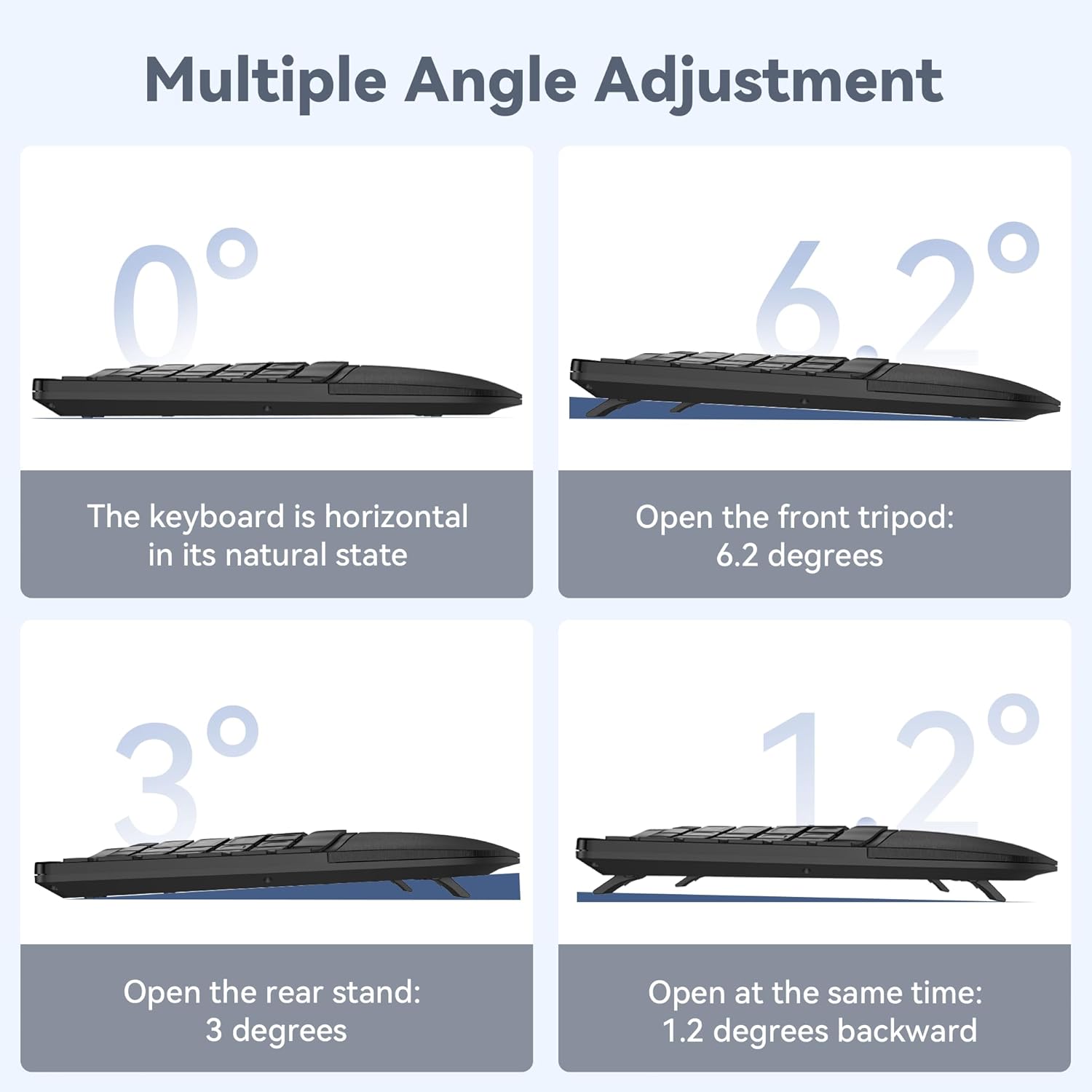
Image: Four diagrams illustrating the different tilt angles (0°, 1.2°, 3°, 6.2°) achievable with the keyboard's adjustable feet.
Întreţinere
- curatenie: Folosiți un moale, damp cloth to clean the keyboard surface. Avoid harsh chemicals or abrasive materials.
- Depozitare: Depozitați tastatura într-un loc uscat și răcoros, ferit de lumina directă a soarelui și de temperaturi extreme.
- Îngrijirea bateriei: Pentru a prelungi durata de viață a bateriei, evitați descărcarea completă frecventă a tastaturii. Încărcați-o când apare indicatorul de baterie descărcată.
Depanare
Tastatura nu se conectează
- Asigurați-vă că tastatura este pornită și complet încărcată.
- For 2.4GHz connection, verify the USB receiver is securely plugged into your device. Try a different USB port.
- For Bluetooth connection, ensure Bluetooth is enabled on your device and the keyboard is in pairing mode (flashing BT indicator). Remove previous pairings on your device and try pairing again.
- Încearcă să repornești computerul sau dispozitivul.
Cheile nu răspund
- Verificați nivelul bateriei și încărcați tastatura dacă este necesar.
- Ensure the keyboard is connected to the correct device (check the 2.4G/BT indicator).
- If specific keys are not working, gently clean around the keycaps to remove any debris.
Conexiune intermitentă sau întârziere
- Mutați tastatura mai aproape de dispozitiv pentru a reduce interferențele.
- Avoid placing the keyboard near other wireless devices (e.g., Wi-Fi routers, cordless phones) that might cause interference.
- Asigurați-vă că driverele dispozitivului dvs. sunt actualizate.
Specificații
| Numărul de model | TK-KB030 |
| Tehnologia de conectivitate | Wireless 2.4 GHz, Bluetooth 5.0 |
| Capacitatea bateriei | Baterie cu litiu de 500 mAh |
| Timp de încărcare | Aproximativ. 4 ore |
| Timp de utilizare continuă | Până la 200 ore |
| Dimensiuni tastatură (L x l x Î) | 43.3 cm x 22.6 cm x 3 cm (17 in x 8.9 in x 1.2 in) |
| Greutatea articolului | 790 g (1.7 lbs) |
| Dispozitive compatibile | PC, Laptop, Tablet, Smartphone (Windows compatible) |
| Material | Plastic |

Image: Keyboard dimensions (length, width, height) and a hand size guide (S, M, L) with recommended keyboard size for M-L hands.
Garanție și suport
The TECKNET Wireless Ergonomic Keyboard TK-KB030 comes with a Garanție de 36 luni fără griji. This warranty covers any issues encountered during normal use of the product.
For technical assistance, troubleshooting, or warranty claims, please contact TECKNET customer service. Refer to the contact information provided on the product packaging or the official TECKNET website-ul pentru detalii de asistență.


