1. Introducere
This manual provides essential information for the safe and efficient operation of your Hisense 85E63NT 85-inch 4K UHD Smart TV. Please read it thoroughly before using the television and retain it for future reference. Your Hisense TV features a 4K Ultra HD display, VIDAA U7 Smart TV platform, Dolby Vision, HDR10+, DTS Virtual:X audio, Game Mode Plus, and integrated voice control with Alexa and VIDAA Voice.
2. Ce se află în cutie
Carefully unpack your Hisense 85E63NT TV and ensure all items listed below are present and undamaged.
- Televisore (Television)
- Cavo di Alimentazione (cablu de alimentare)
- Telecomandă (Telecomandă)
- Manual de utilizare
- Batterie telecomando (baterii pentru telecomandă)
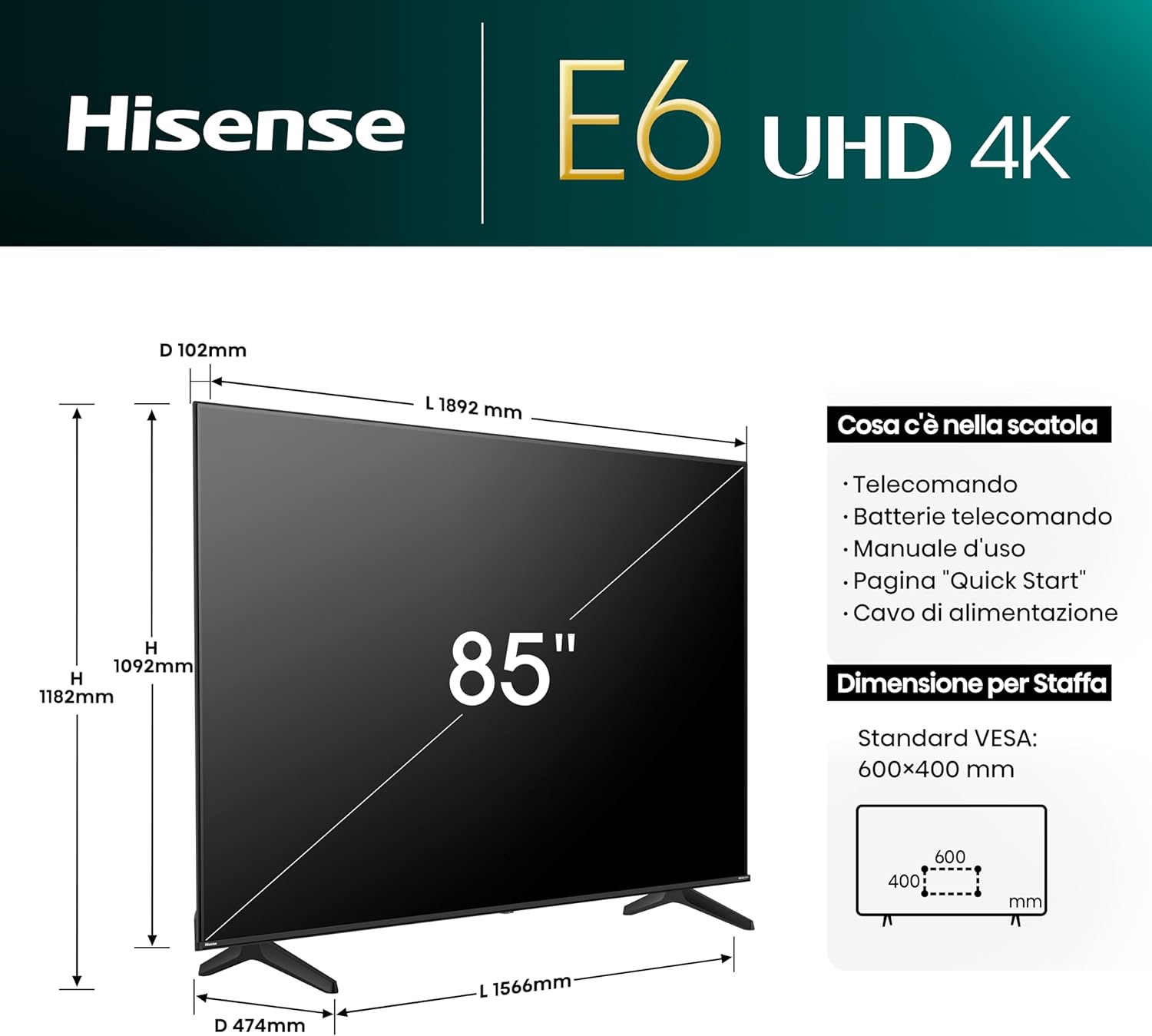
Image: The contents of the Hisense 85E63NT TV box are displayed, showing the television, remote control, power cable, and user manual. The image also illustrates the TV's dimensions (width, height, depth) and VESA mounting specifications.
3. Configurare
3.1. Instalarea standului
Place the TV screen face down on a soft, flat surface to prevent damage. Attach the included stands to the designated slots on the bottom of the TV using the provided screws. Ensure the stands are securely fastened.
3.2. Montare pe perete
If you choose to wall mount your TV, use a VESA-compatible wall mount kit (not included). The Hisense 85E63NT supports a VESA standard of 600x400mm. Follow the instructions provided with your wall mount kit for proper installation. Always ensure the wall can support the weight of the TV.
3.3. Conectarea perifericelor
Connect your external devices to the appropriate ports on the back of the TV. Refer to the image below for port locations.
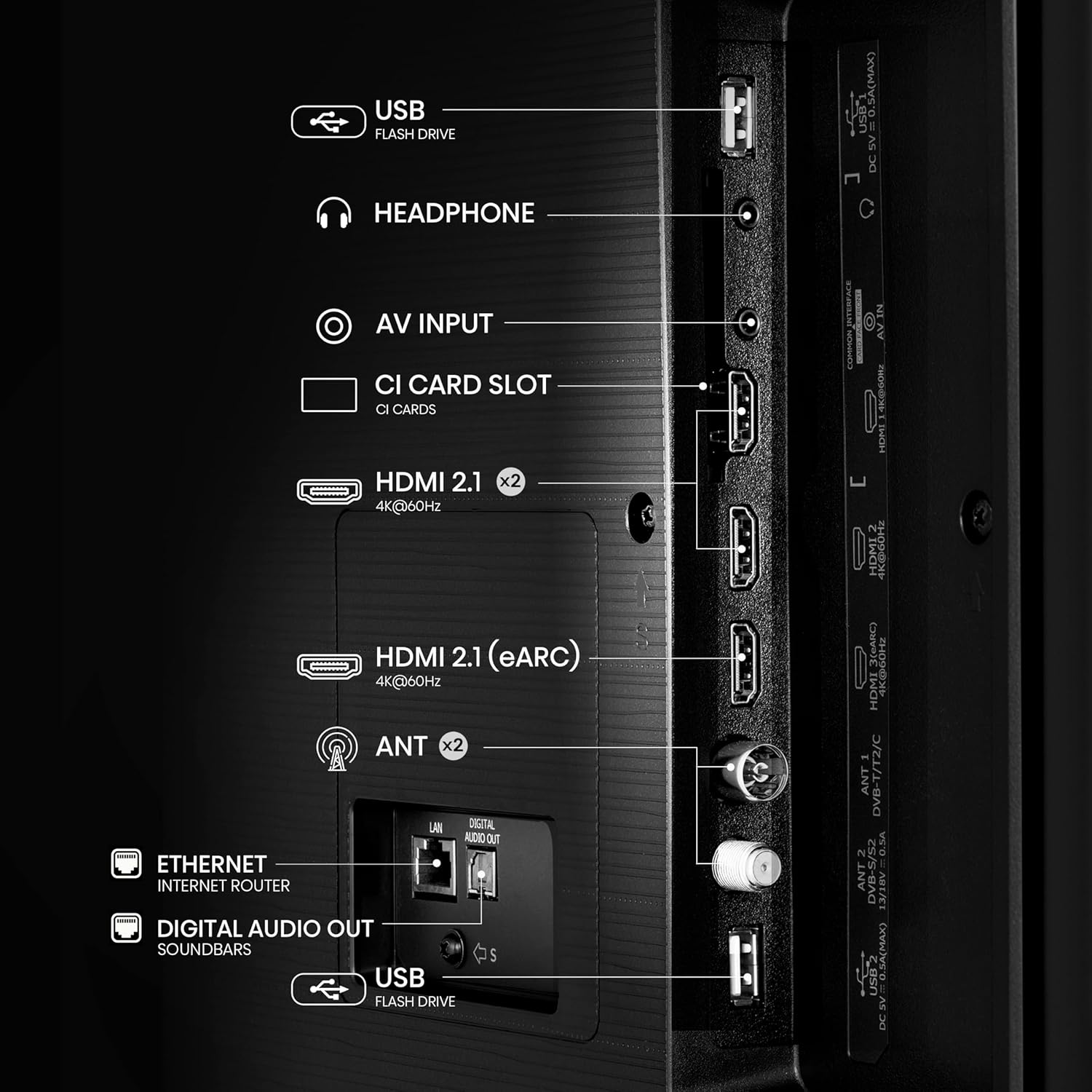
Imagine: O imagine detaliată view of the rear panel of the Hisense 85E63NT TV, highlighting the various connectivity options including USB, Headphone, AV Input, CI Card Slot, multiple HDMI 2.1 ports (one with eARC), Antenna inputs, Ethernet, and Digital Audio Out.
- HDMI 2.1 (x3): Connect Blu-ray players, game consoles, and other HDMI devices. One port supports eARC for enhanced audio return channel functionality. These ports also support ALLM (Auto Low Latency Mode) and VRR (Variable Refresh Rate) for gaming.
- USB: Conectați unități flash USB pentru redarea fișierelor media.
- Ethernet (LAN): Pentru conexiune la rețea prin cablu.
- ANT (x2): Connect your terrestrial (DVB-T2) and satellite (DVB-S2) antennas.
- Ieșire audio digitală (optică): Pentru conectarea la sisteme audio externe.
- Căști: Pentru conectarea căștilor.
- Intrare AV: Pentru conectarea dispozitivelor mai vechi folosind cabluri video compozite și audio stereo.
- Slot pentru card CI: For inserting a Conditional Access Module (CAM) with a smart card for encrypted digital TV services.
3.4. Pornirea inițială
After connecting all necessary cables, plug the power cable into an electrical outlet. Press the power button on the remote control or on the TV. The TV will guide you through the initial setup process, including language selection, network connection, and channel scanning.
4. Operarea televizorului
4.1. Telecomanda
The included remote control provides full functionality for your Hisense TV. It features dedicated buttons for popular streaming services and voice control capabilities.

Image: The Hisense remote control is shown, highlighting its layout with power, input, volume, channel, and navigation buttons. It also features one-touch access buttons for services like Disney+, YouTube, Prime Video, Netflix, and a dedicated voice control button with Alexa Built-in and VIDAA Voice logos.
- Buton de alimentare: Pornește sau oprește televizorul.
- Buton de intrare: Selectează sursa de intrare.
- Butoane de navigare (Sus/Jos/Stânga/Dreapta/OK): Navigați prin meniuri și selectați opțiuni.
- Volum sus/jos: Reglează volumul.
- Canal sus/jos: Schimbă canalele TV.
- Butoane de acces cu o singură atingere: Direct access to streaming applications like Netflix, Prime Video, YouTube, Disney+, etc.
- Butonul de voce: Activates Alexa Built-in or VIDAA Voice for voice commands.
4.2. VIDAA U7 Smart TV
Your Hisense TV runs on the VIDAA U7 operating system, providing a fast, intuitive, and secure smart TV experience. Access a wide range of international and local content, applications, and streaming services.

Image: The VIDAA Smart TV home screen is displayed, featuring a clean interface with icons for popular streaming applications such as Netflix, YouTube, Disney+, Prime Video, and more. The Hisense logo is prominent at the top.
4.3. Voice Control (Alexa Built-in & VIDAA Voice)
Control your TV and smart home devices using your voice. Press the voice button on your remote and speak commands to change channels, adjust volume, search for content, or interact with virtual assistants.

Image: A person is shown on a sofa, holding the Hisense remote and using voice commands. Speech bubbles indicate commands like "fast forward," "pause," and "volume down," demonstrating the voice control feature.
4.4. Setări și îmbunătățiri ale imaginii
Your Hisense TV offers advanced picture technologies for an optimized viewexperiență.
- Dolby Vision / HDR10+ / HLG: Acceptă mai multe formate HDR pentru contrast, luminozitate și detalii de culoare îmbunătățite.
- Culoare de precizie: Delivers a wider range of colors for a more vibrant and realistic picture.
- Upscaler 4K cu inteligență artificială: Enhances lower-resolution content to near 4K quality, providing sharper details and improved clarity.
- Mișcare fluidă cu MEMC: Motion Estimation, Motion Compensation technology reduces motion blur and judder in fast-moving scenes, ensuring a fluid viewexperiență.
- Modul regizor: Preserves the original aspect ratio, colors, and frame rates of content, allowing you to experience movies and TV shows as the director intended.
- Senzor de lumină ambientală: Automatically adjusts screen brightness based on the ambient light in your room for optimal viewing comfort day or night.

Image: A graphic illustrating key features of the Hisense E6 UHD 4K TV, including Precision Colour, Dolby Vision, VIDAA, 4K AI Upscaler, Smooth Motion with MEMC, and Game Mode Plus with VRR ALLM.
4.5. Setări sunet
Experience immersive audio with DTS Virtual:X technology, creating a multi-dimensional sound experience without additional speakers. You can also connect Bluetooth headphones for private listening.

Image: A Hisense TV screen displaying a concert scene, with text overlays highlighting "dts:X" and "Dolby Audio," indicating advanced sound technologies for an enhanced entertainment experience.
4.6. Caracteristici de joc
The Hisense 85E63NT is equipped with features to enhance your gaming experience.
- Mod joc Plus: Combines a 60Hz panel with Variable Refresh Rate (VRR) and Auto Low Latency Mode (ALLM) to reduce input lag and screen tearing, providing a smoother and more responsive gaming experience.
- Bara de jocuri: Provides quick access to game-related settings and information during gameplay.

Image: A dynamic image of a spaceship game displayed on a Hisense TV, with text highlighting "Game Mode Plus" and "60Hz VRR ALLM," emphasizing the TV's features for a fluid gaming experience.
4.7. Connectivity and Screen Sharing
Connect your mobile devices and share content seamlessly.
- AirPlay2 + Android Screen Sharing: Wirelessly cast content from your Apple or Android devices directly to your TV.
- Wi-Fi și Bluetooth: Built-in Wi-Fi for wireless internet access and Bluetooth for connecting wireless audio devices like headphones or soundbars.
5. Întreținere
5.1. Curățarea televizorului
Pentru a curăța ecranul, ștergeți-l ușor cu o lavetă moale, fără scame. Pentru petele persistente, ștergeți ușor.ampen the cloth with water or a specialized screen cleaner. Never spray liquid directly onto the screen. For the TV body, use a soft, dry cloth. Avoid abrasive cleaners or solvents.
5.2. Actualizări software
Your TV may receive software updates periodically to improve performance and add new features. Ensure your TV is connected to the internet to receive these updates. You can usually check for updates manually in the TV's settings menu.
6. Depanare
Dacă întâmpinați probleme cu televizorul, consultați următoarele soluții comune:
- Fără putere: Asigurați-vă că cablul de alimentare este conectat corect atât la televizor, cât și la priză. Verificați dacă priza funcționează.
- Fără imagine/sunet: Verify that the correct input source is selected. Check all cable connections (HDMI, antenna, etc.). Try restarting the TV by unplugging it for a few minutes and then plugging it back in.
- Telecomanda nu funcționează: Înlocuiți bateriile din telecomandă. Asigurați-vă că nu există obstacole între telecomandă și senzorul IR al televizorului.
- Probleme de conexiune la rețea: Pentru Wi-Fi, asigurați-vă că routerul este pornit și se află în raza de acțiune. Pentru conexiunile prin cablu, verificați cablul Ethernet. Încercați să reporniți routerul și modemul.
- Calitate slabă a imaginii: Check the broadcast signal strength or the quality of the source content. Adjust picture settings (brightness, contrast, sharpness, color) in the TV menu.
If the problem persists, consult the full electronic user manual or contact Hisense customer support.
7. Specificații
Below are the key technical specifications for the Hisense 85E63NT 85-inch 4K UHD Smart TV.
| Caracteristică | Caietul de sarcini |
|---|---|
| Numărul de model | 85E63NT |
| Dimensiunea ecranului | 85 inchi |
| Rezoluţie | 4K Ultra HD (3840x2160) |
| Tehnologia de afișare | LED |
| Rata de reîmprospătare | 60 Hz |
| Suport HDR | Dolby Vision, HDR10+, HLG |
| Platforma Smart TV | VIATA U7 |
| Asistenți vocali | Alexa încorporată, control vocal VIDAA |
| Tehnologia audio | DTS Virtual:X |
| Conectivitate | Wi-Fi, Bluetooth, Ethernet, 3x HDMI 2.1 (eARC, ALLM, VRR), USB |
| Tuner | DVB-T2/S2 HEVC 10 |
| Caracteristici speciale | Game Mode Plus, AirPlay2 + Android Screen Sharing, Filmmaker Mode, Ambient Light Sensor, Precision Colour, 4K AI Upscaler, Smooth Motion with MEMC |
| Dimensiuni (fara suport) | 10.2 x 189.2 x 109.2 cm |
| Greutate | 53.4 kg |
| Compatibilitate VESA | 600x400mm |
Image: A comparison table detailing specifications for Hisense E6N and E7N series TVs, including screen sizes, display technology (UHD 4K), refresh rate (60 Hz), color technology (Precision Colour), HDR support (Dolby Vision), gaming features (Game Mode Plus), voice assistants (Alexa Built-in/VIDAA VOICE), and connectivity (HDMI 2.1).
8. Garanție și asistență
Pentru informații despre garanție, asistență tehnică sau solicitări de service, vă rugăm să consultați cardul de garanție inclus împreună cu produsul sau să vizitați site-ul oficial Hisense. website for your region. You can also find additional support resources and frequently asked questions online.