1. Introducere
This instruction manual provides essential information for the safe and effective use of your Nikon D850 DSLR Camera. Please read this manual thoroughly before using the camera and keep it accessible for future reference. The Nikon D850 is a high-performance full-frame DSLR designed for professional photographers, featuring a 45.7MP BSI CMOS sensor, 4K UHD video recording, and a robust autofocus system.
This bundle includes the Nikon D850 camera body, a Nikon AF-S NIKKOR 24-120mm f/4G ED VR Lens, a Shot-Gun Microphone, a Photo Software Package, a camera case, 128GB memory, a slave flash, and a tripod.
2. Conținutul pachetului
Before proceeding with setup, verify that all items listed below are present in your package:
- Corpul camerei DSLR Nikon D850
- Nikon AF-S NIKKOR 24-120mm f/4G ED VR Lens
- Nikon EN-EL15a Rechargeable Lithium-Ion Battery
- Extra High Capacity Battery
- Nikon MH-25A Battery Charger
- Cablu USB Nikon UC-E22
- Nikon AN-DC18 Camera Strap
- COMMANDER Deluxe Starter Kit (Mini Tripod, 5 Sensor Swabs, Cleaning Cloth, 2 Universal Screen Protectors, Memory Card Wallet, Lens Cap Keeper)
- COMMANDER 50 inch DSLR Tripod
- 2 x 64GB Sandisk Memory Cards (Total 128GB)
- Cititor de carduri USB
- Husă de transport pentru cameră
- 3PC Filter Kit (UV, CPL, FLD Filters) with Filter Case
- Shot-Gun Microphone
- Photo Software Package
- Lens Pen and Lens Blower
- Slave Flash
- Nikon DK-17F Eyepiece Cap
- Nikon DK-19 Rubber Eyecup
- Nikon BF-1B Body Cap
- Nikon Snap-On Lens Cap
- Capac spate pentru obiectivul Nikon LF-4
3. Configurare
3.1. Încărcarea bateriei
- Insert the Nikon EN-EL15a battery into the MH-25A battery charger.
- Conectați încărcătorul la o priză. Încărcătorulamp will blink during charging and turn off when charging is complete.
- O încărcare completă durează de obicei aproximativ 2 ore.
3.2. Introducerea bateriei și a cardurilor de memorie
Ensure the camera is turned off before inserting or removing batteries or memory cards.
- Open the battery chamber cover on the bottom of the camera.
- Insert the charged EN-EL15a battery with the contacts facing the correct direction until it clicks into place.
- Deschideți capacul slotului pentru cardul de memorie de pe partea laterală a camerei.
- Insert the 64GB Sandisk memory cards into the designated slots (one XQD/CFexpress slot and one SD card slot) until they click. Ensure the cards are oriented correctly.
- Închideți bine ambele capace.
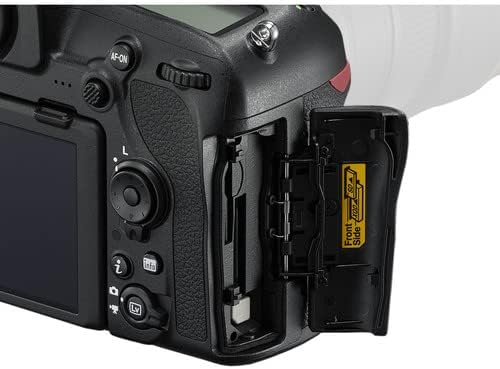
Image: Memory card and battery compartment access.
3.3. Atașarea lentilei
- Remove the body cap from the camera and the rear lens cap from the NIKKOR 24-120mm lens.
- Aliniați marcajul de montare de pe obiectiv cu marcajul de montare de pe corpul camerei.
- Rotiți lentila în sens invers acelor de ceasornic până când se fixează în poziție cu un clic.

Image: Nikon AF-S NIKKOR 24-120mm f/4G ED VR Lens.
3.4. Setări inițiale ale camerei
- Porniți camera folosind comutatorul de alimentare.
- Urmați instrucțiunile de pe ecran pentru a seta limba, data, ora și fusul orar.
4. Operarea camerei
4.1. Comenzi de bază și afișaj
Familiarize yourself with the camera's buttons and dials. The D850 features a 3.2-inch tilting touchscreen LCD for intuitive control and review.

Imagine: Spate view of the Nikon D850 with its control layout.

Image: Nikon D850 with the tilting LCD screen in an extended position.
4.2. Realizarea de fotografii
- Selectați un mod de fotografiere: Rotate the mode dial (P, S, A, M) to choose your desired exposure mode.
- P (Mod automat programat): Camera setează viteza obturatorului și diafragma pentru o expunere optimă.
- S (Prioritate declanșator automat): Tu setezi viteza obturatorului, camera setează diafragma.
- A (Automat cu prioritate diafragmă): Tu setezi diafragma, camera setează viteza obturatorului.
- M (Manual): Controlezi atât viteza obturatorului, cât și diafragma.
- Focus: Privește prin viewfinder sau utilizați Live View on the LCD. Press the shutter-release button halfway to activate autofocus. The D850 features a 153-point AF system for precise focusing.
- Compune: Încadrează-ți fotografia.
- Trage: Press the shutter-release button fully to take the picture. The camera can shoot at 7 frames per second (fps) or up to 9 fps with an optional battery grip.
4.3. Înregistrarea videoclipurilor
The Nikon D850 supports UHD 4K video recording at 30 fps.
- Switch to Live View mode using the Lv button.
- Apăsați butonul roșu de înregistrare video pentru a începe înregistrarea.
- Apăsați din nou butonul pentru a opri înregistrarea.
4.4. Connecting to Smart Devices (SnapBridge)
The D850 features SnapBridge Bluetooth and Wi-Fi connectivity for transferring images to smart devices and remote control.
- Install the SnapBridge app on your smartphone or tablet.
- Enable Bluetooth and Wi-Fi on both the camera and your smart device.
- Follow the instructions in the SnapBridge app to pair your devices.
5. Întreținere
5.1. Curățarea camerei și a obiectivului
- Folosiți o lavetă moale, fără scame, pentru a curăța corpul camerei.
- For the lens, use the included lens pen and blower to remove dust. For smudges, use a specialized lens cleaning solution and cloth.
- Avoid touching the sensor directly. If sensor cleaning is required, it is recommended to have it performed by a professional Nikon service center.
5.2. Îngrijirea bateriei
- Depozitați bateriile într-un loc răcoros și uscat atunci când nu sunt utilizate.
- Nu expuneți bateriile la temperaturi extreme.
- Recharge batteries before long periods of storage to maintain their health.
5.3. Depozitare
- When storing the camera for extended periods, remove the battery.
- Store the camera and lens in a dry, well-ventilated area, preferably in the included camera case, to prevent mold and mildew.
6. Depanare
If you encounter issues with your Nikon D850, refer to the following common solutions:
- Camera nu pornește: Asigurați-vă că bateria este complet încărcată și introdusă corect. Verificați poziția comutatorului de alimentare.
- Autofocalizarea nu funcționează: Verify the lens is securely attached and the AF/M switch on the lens is set to AF. Check camera's focus mode settings.
- Imaginile sunt neclare: Check shutter speed (too slow can cause blur), aperture (too wide can reduce depth of field), and focus. Ensure Vibration Reduction (VR) is enabled on the lens if needed.
- Eroare card de memorie: Reinsert the memory card. If the error persists, try a different card. Ensure the card is not locked.
- Nicio imagine pe LCD: Check if the display is turned off or if the camera is in viewfinder-only mode.
For more detailed troubleshooting or issues not covered here, please consult the official Nikon D850 reference manual or contact Nikon support.
7. Specificații
| Caracteristică | Caietul de sarcini |
|---|---|
| Tip senzor | 45.7MP FX-Format BSI CMOS |
| Procesor de imagine | EXPEED 5 |
| Interval ISO | Native 64-25600, Extended 32-102400 |
| Înregistrare video | UHD 4K at 30 fps, 1080p |
| Sistem de focalizare automată | Multi-CAM 20K 153-Point AF System |
| Ecran LCD | 3.2" 2.36m-Dot Tilting Touchscreen LCD |
| Fotografiere continuă | 7 fps (up to 9 fps with optional grip) |
| Montura pentru obiectiv | Montura Nikon F |
| Lentilă inclusă | Nikon AF-S NIKKOR 24-120mm f/4G ED VR Lens |
| Conectivitate | SnapBridge Bluetooth and Wi-Fi, HDMI, USB |
| Stocare de memorie | 128GB (2 x 64GB SD cards) |
| Greutate | Approx. 1.05 Pounds (Body Only) |
8. Garanție și asistență
8.1. Informații despre garanție
This Nikon D850 camera bundle comes with a 90-day limited warranty from the seller. Please retain your proof of purchase for any warranty claims. For specific details regarding coverage and terms, refer to the warranty documentation provided at the time of purchase or contact the seller directly.
8.2. Asistență pentru clienți
For technical assistance, additional product information, or service inquiries, please visit the official Nikon support website or contact their customer service department. You can find contact information and detailed resources at Asistență Nikon SUA.