1. Introducere
Thank you for choosing the ScopeAround M28 Digital Otoscope. This device is designed to provide a clear visual inspection of the ear canal, teeth, mouth, and other small areas. It features a 3.9mm ultra-thin HD camera with LED lights and a 2.8-inch IPS LCD screen for direct viewing. This manual provides essential information for safe and effective use, setup, operation, and maintenance of your otoscope.
2. Informații importante privind siguranța
WARNING: Read all safety warnings and instructions before use. Failure to follow warnings and instructions may result in electrical shock, fire, and/or serious injury. Save all warnings and instructions for future reference.
- This device is intended for personal visual inspection and earwax removal. Consult a medical professional for diagnosis or treatment of ear conditions.
- Do not insert the otoscope too deeply into the ear canal. Use the included speculums to prevent excessive insertion and avoid injury.
- Always clean the camera lens and accessories with alcohol prep pads before and after each use to maintain hygiene and prevent cross-contamination.
- Keep the device out of reach of children. Adult supervision is required when used by children.
- Nu utilizați dispozitivul dacă este deteriorat sau funcționează defectuos.
- Evitați expunerea dispozitivului la temperaturi extreme sau la lumina directă a soarelui.
- Asigurați-vă că dispozitivul este complet încărcat înainte de utilizare pentru o performanță optimă.
3. Conținutul pachetului
Verificați dacă toate articolele sunt prezente în colet:
- Otoscope Device (Main unit with 2.8" IPS LCD screen)
- Camera Cable with 3.9mm Ultra-Thin HD Camera Lens
- Ear Spoon attachment
- Specula (3 pieces)
- Cablu de încărcare USB de tip C
- Stand magnetic
- Pachet de bețișoare de urechi
- Tampoane de preparare cu alcool
- Manual de utilizare
- Safety Warnings Card

4. Produs terminatview
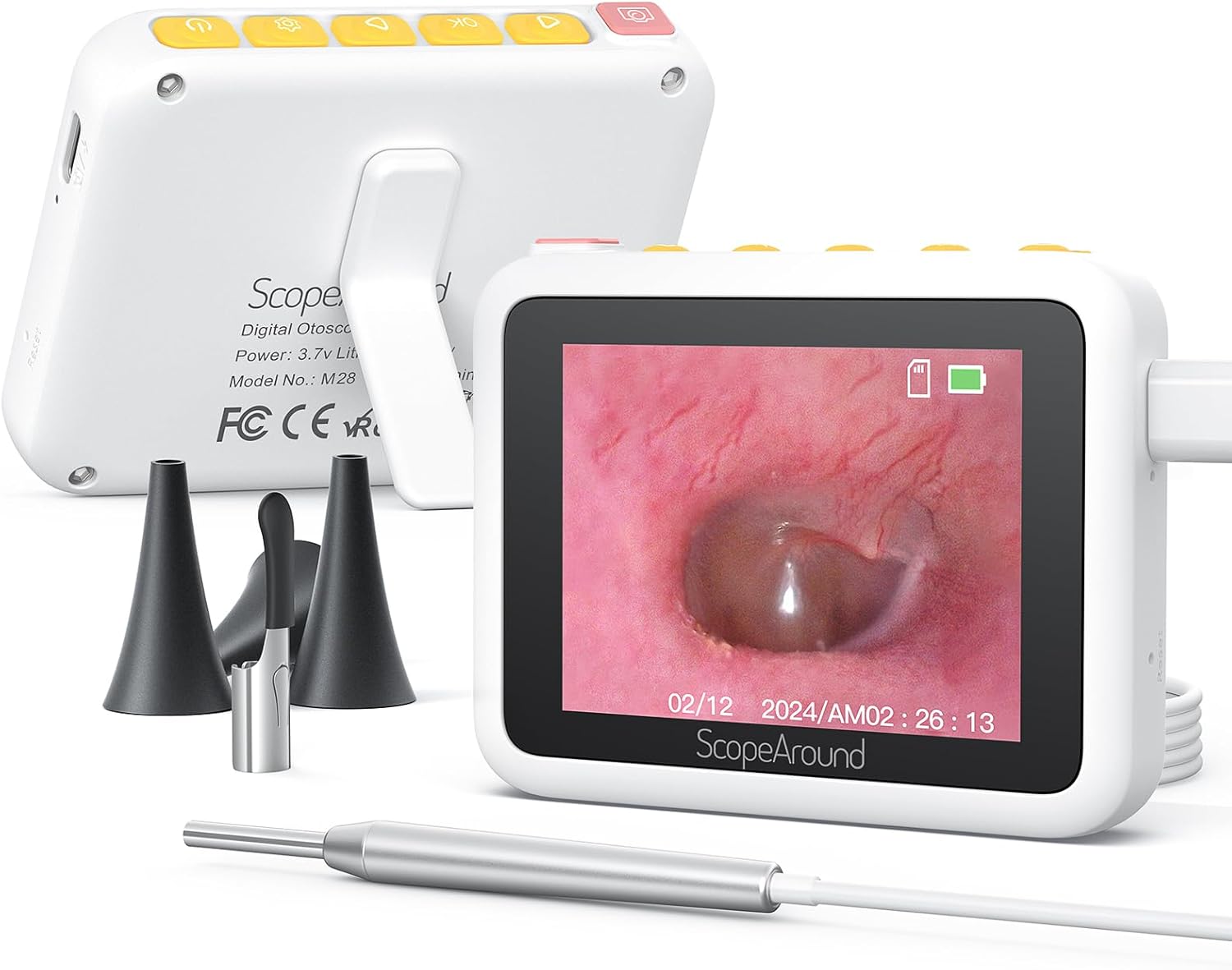
The ScopeAround M28 Digital Otoscope is a compact and user-friendly device designed for visual inspection. Key features include:
- 3.9mm Ultra-Thin Camera Lens: Allows easy entry into narrow ear canals.
- 720P HD Camera with 6 LED Lights: Provides clear, bright images and videos of the inspection area.
- Ecran LCD IPS de 2.8": Offers direct, real-time viewing without external apps or devices.
- Design Plug & Play: Simple operation, no Wi-Fi or app required.
- Magnetic Stand: Enables hands-free operation for convenience.
- Baterie reîncărcabilă de 1200 mAh: Provides 2-3 hours of continuous use.
- Fixed Focal Length: Optimized for sharp images at 0.4 to 0.8 inches.


5. Instrucțiuni de configurare
Follow these steps to set up your ScopeAround M28 Digital Otoscope:
- Încărcați dispozitivul: Before first use, fully charge the otoscope device using the provided USB Type-C charging cable. Connect the cable to the charging port on the device and a compatible USB power source. The battery indicator on the screen will show charging status.
- Atașați sonda camerei: Plug the camera probe cable into the designated port on the otoscope device.
- Selectați și atașați accesoriul: Depending on your intended use, attach either an ear spoon or a speculum to the tip of the camera probe. Ensure it is securely fitted.
- Pornire: Long press the power button (usually located on the top right) to turn on the device. The screen will display the ScopeAround logo and then the live camera feed.
- Attach Magnetic Stand (Optional): For hands-free viewing, attach the magnetic stand to the back of the main unit. It can be positioned to prop up the screen at a comfortable viewunghiul de ing.


6. Instrucțiuni de utilizare
Once the device is set up, you can begin your inspection:
- Trăi View: The 2.8" IPS LCD screen will display a real-time view de la cameră.
- Realizarea de fotografii: Press the Photo/Video button (usually the leftmost button with a camera icon) to capture a still image.
- Înregistrarea videoclipurilor: Hold down the Photo/Video button to start recording a video. Press it again to stop recording.
- Funcția de zoom: Use the Left/Zoom buttons to adjust the magnification of the image on the screen (up to 1.5X zoom).
- Rotația imaginii: Use the Right/Image Rotate buttons to rotate the image 180 degrees for better viewunghiuri de ing.
- Accesarea setărilor: Press the Setting button to enter the device menu. Here you can adjust resolution, language, date/time, and other parameters.
- Reviewing Media: Navigate to the Playback option in the settings menu to view fotografii și videoclipuri capturate.
- Transferul Files: Connect the device to a computer using the USB Type-C cable to transfer captured images and videos.


7. Întreținere și îngrijire
Proper maintenance ensures the longevity and hygiene of your otoscope:
- Curățarea lentilei: Use the provided alcohol prep pads or Q-tips to gently clean the camera lens before and after each use. Ensure no residue remains.
- Accesorii de curățare: The ear spoon and speculums should also be cleaned with alcohol prep pads after each use.
- Depozitare: Store the device and its accessories in a clean, dry place away from direct sunlight and extreme temperatures.
- Îngrijirea bateriei: Charge the device regularly, even if not in frequent use, to maintain battery health. Avoid fully depleting the battery for extended periods.

8. Depanare
If you encounter issues with your ScopeAround M28 Digital Otoscope, try the following:
- Fără putere: Asigurați-vă că dispozitivul este complet încărcat. Conectați-l la o sursă de alimentare și așteptați câteva minute înainte de a încerca să îl porniți din nou.
- Nicio imagine pe ecran: Verify that the camera probe is securely plugged into the device. If the issue persists, try unplugging and re-plugging the camera probe.
- Imagine neclară: Ensure the camera lens is clean. The device has a fixed focal length, so adjust the distance between the camera tip and the object for optimal clarity (0.4-0.8 inches).
- Dispozitivul nu răspunde: Use a thin pin to press the reset button (located near the charging port) to restart the device.
- Nu se poate transfera Files: Ensure the device is properly connected to your computer via the USB Type-C cable. Check your computer's file explorer for the device.
9. Specificații
| Caracteristică | Caietul de sarcini |
|---|---|
| Dimensiunile produsului | 3.94 x 3.94 x 3.94 inci |
| Greutatea articolului | 8.8 uncii |
| Diametrul obiectivului camerei | 3.9mm |
| Ecran de afișare | 2.8" IPS LCD |
| Rezoluție video | 1280 x 720 pixels (720P HD) |
| Capacitatea bateriei | 1200mAh polimer de litiu |
| Timp de lucru | 2-3 hours (continuous usage) |
| Depozitare | Internal (8GB, not expandable) |
| Conectivitate | USB Type-C (for charging and data transfer) |
| Producător | ScopeAround |
10. Garanție și asistență
ScopeAround is committed to customer satisfaction. This product comes with a standard warranty as per the retailer's policy. For any questions, technical support, or warranty claims, please contact our US-based after-sales support team. Contact information can typically be found on our official website sau prin intermediul platformei dvs. de achiziții.
We are dedicated to providing high-quality technology and support for your health and wellness needs.


