1. Introducere
Thank you for choosing the WOOX R4260 Smart Wireless Outdoor Camera. This manual provides comprehensive instructions for the installation, operation, and maintenance of your device. Please read this manual carefully before use to ensure proper functionality and safety. Keep this manual for future reference.
2. Produs terminatview
2.1 Conținutul pachetului
- WOOX R4260 Smart Wireless Outdoor Camera
- Suport de fixare
- Șuruburi de montare și dibluri de perete
- Cablu de încărcare USB
- Manual de utilizare
2.2 Componentele camerei
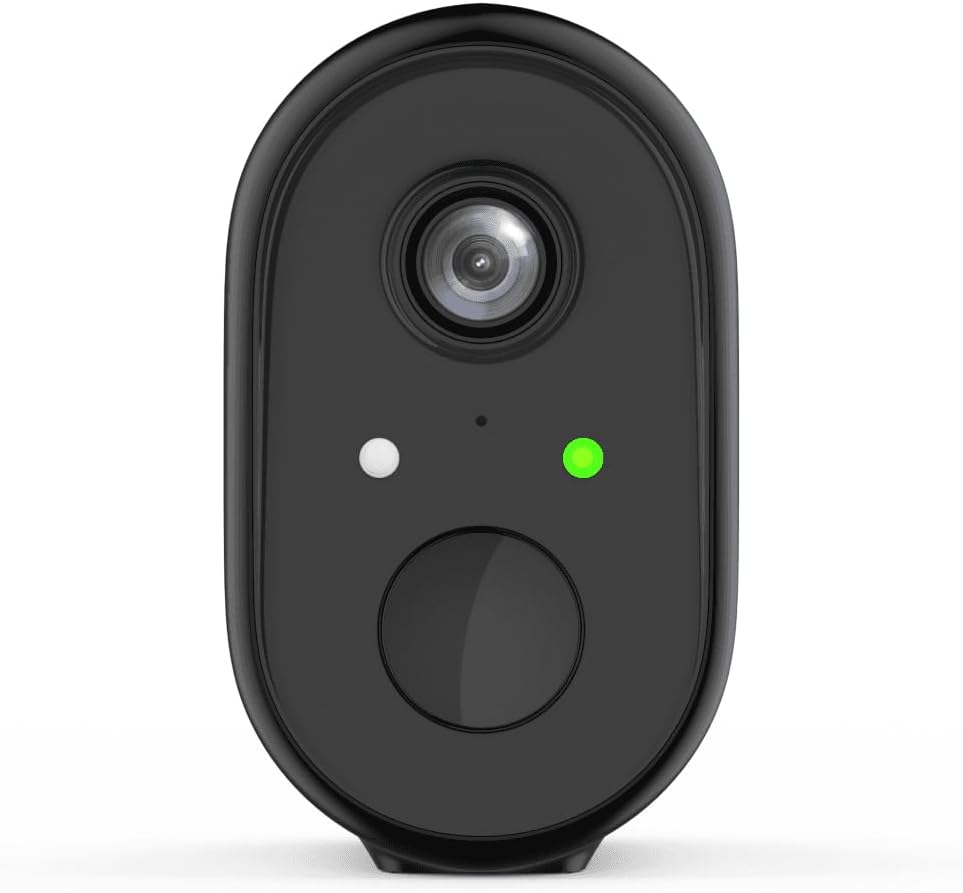
Figura 1: Faţă view of the WOOX R4260 camera, highlighting the camera lens, status indicator LED, and the main button/microphone area.

Figura 2: The WOOX R4260 camera attached to its adjustable wall mounting bracket, showing the overall design and mounting mechanism.
- Obiectivul camerei: Captează video footage.
- LED de stare: Indicates camera status (e.g., pairing mode, connected, charging).
- Microfon/Difuzor: Pentru comunicare audio bidirecțională.
- Punct de montare: Connects to the mounting bracket.
- Port de încărcare USB: For battery charging (usually located on the back or bottom, covered by a rubber flap).
- Buton de resetare: Used to reset the camera to factory settings (often near the charging port or under a cover).
3. Configurare și instalare
3.1 Încărcarea bateriei
Before initial use, fully charge the camera's built-in lithium-ion battery. Connect the provided USB charging cable to the camera's charging port and a standard 5V USB power adapter (not included). The status LED will indicate charging status (e.g., red for charging, green for fully charged).
3.2 Descărcarea aplicației și crearea contului
Download the "WOOX Home" app from the Apple App Store or Google Play Store. Register for a new account or log in with an existing one.
3.3 Asocierea camerei cu aplicația
- Ensure your smartphone is connected to a 2.4GHz Wi-Fi network. The WOOX R4260 camera supports 2.4GHz Wi-Fi only.
- Open the WOOX Home app and tap the "+" icon to add a new device.
- Select "Security Camera" or the specific camera model (R4260) from the device list.
- Follow the on-screen instructions in the app. This typically involves powering on the camera, pressing the reset button until the status LED blinks rapidly (indicating pairing mode), and scanning a QR code generated by the app with the camera's lens.
- Once connected, the status LED will turn solid green, and the camera will appear in your app.
Note: If pairing fails, ensure your Wi-Fi password is correct and does not exceed 20 characters, as some users have reported issues with longer passwords. Ensure the camera is within range of your Wi-Fi router.
3.4 Instalare fizică
The WOOX R4260 can be mounted on a wall, ceiling, or tree. Choose a location that provides the desired viewunghiul de înclinare și se află în raza de acțiune Wi-Fi.
- Mark the drilling points for the mounting bracket.
- Dați găuri și introduceți dibluri de perete dacă montați pe zidărie.
- Fixați suportul de montare pe suprafață folosind șuruburile furnizate.
- Atașați camera la suportul de montare și reglați unghiul după cum este necesar.
- Ensure the camera is securely fastened and has a clear line of sight.
4. Operarea camerei
4.1 În direct View
Open the WOOX Home app and tap on your R4260 camera to access the live video feed. From here, you can monitor your property in real-time.
4.2 Sunet bidirecțional
The camera features two-way audio. In the live view, tap the microphone icon to speak through the camera's speaker, and listen to audio from the camera's microphone.
4.3 Detectarea mișcării și alertele
Configure motion detection settings within the WOOX Home app. You can adjust sensitivity, set detection zones, and schedule alert times. When motion is detected, the camera will record a clip and send a notification to your smartphone.
4.4 Înregistrare și stocare video
The camera supports local storage via a microSD card (not included) and cloud storage (subscription may be required). You can review inregistrat footage prin funcția de redare a aplicației.
5. Întreținere
5.1 Managementul bateriei
The R4260 is powered by a rechargeable Lithium-ion battery. Monitor the battery level in the WOOX Home app and recharge the camera when the battery is low. Battery life can vary based on usage, temperature, and Wi-Fi signal strength.
5.2 Curățare
Periodically clean the camera lens with a soft, dry cloth to ensure clear image quality. Do not use harsh chemicals or abrasive materials.
5.3 de actualizări de firmware
The WOOX Home app will notify you of available firmware updates. It is recommended to keep your camera's firmware updated to ensure optimal performance and security.
6. Depanare
| Problemă | Soluție posibilă |
|---|---|
| Camera nu se conectează la Wi-Fi. |
|
| Calitate video slabă. |
|
| Bateria se descarcă rapid. |
|
| Fără alerte de detectare a mișcării. |
|
7. Specificații
- Model: R4260
- Rezoluția înregistrării video: 1080p
- Effective Video Resolution: 1080
- Rezoluție statică efectivă: 2 Megapixeli
- Tehnologie de conectivitate: IEEE 802.11b/g/n, 2.4GHz Wi-Fi / WLAN
- Tehnologia comunicațiilor fără fir: WLAN
- Caracteristici speciale: Two-way audio, Motion detector
- Utilizare: În aer liber
- Sursa de alimentare: Battery powered (2 Lithium-ion batteries included)
- Voltage: 5 volți
- Putere: 5 wați
- Viewunghi: 110 de grade
- Material: Plastic
- Culoare: Negru
- Dimensiuni (L x l x H): 11.5 x 6 x 9.5 centimetri
- Tip de montare: Wall mount, Ceiling mount, Tree mount
- Tip de instalare: Înșurubat
- Dispozitive compatibile: Smartphone
- Tipul controlerului: Amazon Alexa (via WOOX Home app integration)
8. Garanție și asistență
WOOX products are designed and manufactured to the highest quality standards. For detailed warranty information and technical support, please refer to the official WOOX website-ul web sau contactați direct serviciul lor de asistență pentru clienți. Păstrați bonul fiscal ca dovadă a achiziției.
Producător: WOOX


