1.view
The SINOTIMER TM618 timer module is designed to automatically control the power supply to various electrical apparatus, such as streetlights, neon signs, billboards, and other appliances, based on a preset time schedule. This digital timer switch features a rechargeable internal battery to maintain program settings during power outages.

Figura 1.1: Față view of the TM618 Timer Module.
2. Caracteristici cheie
- Design compact și care economisește spațiu.
- Engineered with advanced digital timing technology.
- High functionality for precise time control.
- Built-in rechargeable battery for program retention.
- Multiple ON/OFF programs for weekly scheduling.
3. Configurare și instalare
3.1. Schema de cablare
Proper wiring is crucial for the safe and correct operation of the TM618 timer module. Refer to the diagram below for connection details. Ensure power is disconnected before performing any wiring.
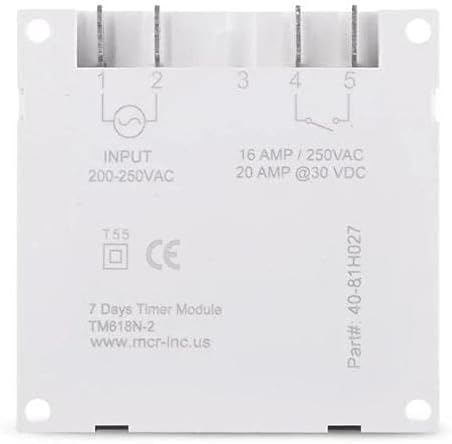
Figure 3.1: Wiring Terminals and Specifications.
- Input (200-250VAC): Connect your main power supply to terminals 1 and 2.
- Output (16 AMP / 250VAC, 20 AMP @30 VDC): Terminals 3, 4, and 5 are for the controlled output. Terminal 3 is common, Terminal 4 is normally open (NO), and Terminal 5 is normally closed (NC). Connect your load to the appropriate terminals based on your application (e.g., between 3 and 4 for normally off, turning on when timed).
3.2. Pornirea inițială și încărcarea bateriei
Upon initial power-up, the timer's internal rechargeable battery (40mAh) will begin charging. This battery saves your programmed settings during power interruptions. Allow the unit to be powered for at least 30 minutes for the battery to gain sufficient charge before programming or disconnecting power.

Figure 3.2: Internal 40mAh Rechargeable Battery.
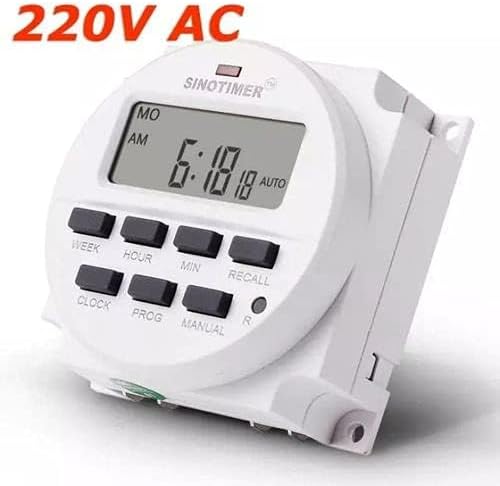
Figure 3.3: TM618 Operating Voltage (220V AC shown).
4. Instrucțiuni de utilizare
The TM618 timer allows for precise control with up to 16 ON/OFF programs per day or week. The buttons on the front panel are used for setting the time and programs.

Figure 4.1: Timer Module with Manual.
4.1. Setarea orei curente
- Apăsați tasta CEAS butonul și țineți-l apăsat.
- În timp ce ține CEAS, apăsați SĂPTĂMÂNĂ pentru a seta ziua curentă a săptămânii.
- În timp ce ține CEAS, apăsați ORĂ pentru a seta ora curentă.
- În timp ce ține CEAS, apăsați MIN pentru a seta minutul curent.
- Eliberați CEAS Buton. Ora este acum setată.
4.2. Programarea timpilor de pornire/oprire
Temporizatorul acceptă până la 16 programe PORNIT/OPRIT. Fiecare program constă dintr-un timp de PORNIRE și un timp de OPRIRE.
- Apăsați tasta PROG Apăsați butonul o dată. Afișajul va afișa „1 ON”.
- Presa SĂPTĂMÂNĂ to select the day(s) for this program (e.g., MO, TU, WE, TH, FR, SA, SU, or combinations like MO-FR, SA-SU, MO-SA, etc.).
- Presa ORĂ pentru a seta ora de pornire dorită.
- Presa MIN pentru a seta minutul de pornire dorit.
- Presa PROG din nou. Afișajul va afișa „1 OFF”.
- Repetați pașii 2-4 pentru a seta ziua (zile), ora și minutul de oprire dorite pentru acest program.
- Presa PROG to advance to the next program ("2 ON") or to exit programming mode if no more programs are needed.
- To clear a program, press REAMIN în timp ce viewing the specific ON or OFF program you wish to clear.
4.3. Anulare manuală
Apăsați tasta MANUAL butonul pentru a comuta între diferitele moduri de operare:
- AUTO ON: Cronometrul este în prezent PORNIT și va urma programul programat.
- OPRIRE AUTOMATA: Cronometrul este în prezent oprit și va urma programul programat.
- PE: The timer is forced ON, overriding any programs.
- OPRIT: The timer is forced OFF, overriding any programs.
4.4. Funcția de rechemare
The REAMIN button (often marked 'R' or 'RESET') is used to clear specific program settings or to reset the timer. A small pinhole button (R) is typically used for a full reset, which clears all programs and resets the time.
5. Întreținere
5.1. Îngrijirea bateriei
The TM618 features a built-in rechargeable battery. To ensure its longevity and proper function, keep the timer connected to power for regular charging. If the timer is stored for extended periods without power, the battery may discharge, requiring a full charge upon reconnection.
5.2. Curatenie
Clean the exterior of the timer module with a soft, dry cloth. Do not use abrasive cleaners or solvents, as these can damage the plastic casing or display. Ensure no liquids enter the device.
6. Depanare
- Afișajul este gol: Check power connections. Ensure the unit has been powered for at least 30 minutes to charge the internal battery.
- Programe care nu se execută: Verify that the current time is set correctly. Check that the timer is in "AUTO ON" or "AUTO OFF" mode, not forced ON/OFF. Review your programmed ON/OFF times for accuracy.
- Timer not responding to buttons: Perform a full reset using the small 'R' pinhole button. If issues persist, ensure proper power supply.
7. Specificații
| Atribut | Valoare |
|---|---|
| Nume de marcă | Sinotimer |
| Numărul de model | TM618N-2 (Item model number: WN-5KCF-8SVQ) |
| Vol. De intraretage | 200-250VAC |
| Capacitate de ieșire | 16 AMP / 250VAC, 20 AMP @30 VDC |
| Numărul de programe | 16 de programe PORNIT/OPRIT |
| Interval de sincronizare | 1 minut până la 168 de ore (7 zile) |
| Baterie internă | 40mAh reîncărcabil |
| Material | Plastic |
| Culoare | Alb |
| Dimensiunile produsului | 25 x 18 x 8 cm; 11 g |
7.1. Dimensiuni
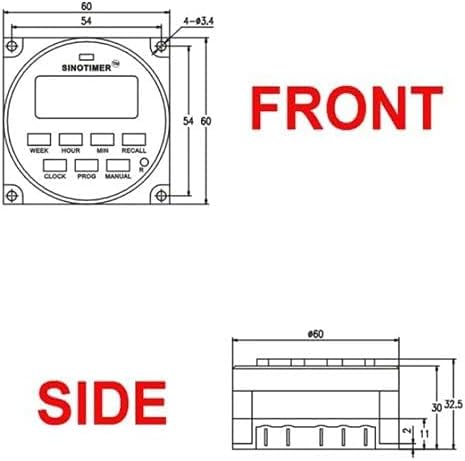
Figure 7.1: Front Dimensions.

Figure 7.2: Side Dimensions.
8. Garanție și asistență
For information regarding product warranty, technical support, or service, please refer to the documentation provided with your purchase or contact your retailer. Keep your proof of purchase for any warranty claims.