Introducere
Thank you for choosing the cimetech EasyTyping KF10 Wireless Keyboard and Mouse Combo. This product is designed to provide a comfortable, quiet, and efficient input experience for your PC, laptop, or Windows-based computer. Featuring silent scissor switch keys and a convenient 2.4G wireless connection, this combo aims to enhance your productivity and comfort.

Image: cimetech EasyTyping KF10 Wireless Keyboard and Mouse Combo in Wine Red. This image displays the full keyboard and mouse set.
Instrucțiuni de configurare
- Instalare baterie:
- For the keyboard: Open the battery compartment on the underside. Insert two (2) AAA batteries, ensuring correct polarity. Close the compartment.
- For the mouse: Open the battery compartment on the underside. Insert one (1) AA battery, ensuring correct polarity. Close the compartment.
- Conexiune receptor USB:
- Locate the Nano USB receiver, typically stored within the mouse's battery compartment.
- Conectați receptorul Nano USB la un port USB disponibil al computerului.
- The keyboard and mouse are designed for plug-and-play functionality and should connect automatically.
- Pornire:
- Ensure the power switch on both the keyboard and mouse is set to the 'ON' position. The power switch for the keyboard is located on the back edge, and for the mouse, it is on the underside.

Image: A diagram illustrating the easy connection process, showing a laptop connected to the keyboard and mouse via a single 2.4GHz USB receiver.

Image: The underside of the mouse, revealing the battery compartment and a convenient storage slot for the Nano USB receiver.
Instrucțiuni de operare
Utilizarea tastaturii
- Taste pentru comutatorul tip foarfecă: The keyboard features scissor switch keys for a comfortable and quiet typing experience. These keys offer uniform force distribution, low sound, and short travel, reducing typing fatigue.
- Taste funcționale: Utilize the 'Fn' key in combination with the F1-F12 keys for various multimedia and system shortcuts. Refer to the keycap legends for specific functions.
- Design ergonomic: The keyboard is designed with an 8-degree tilted angle to help alleviate wrist pressure during extended use.

Imagine: Un prim-plan view of a scissor switch key mechanism, demonstrating its precise and stable design for enhanced typing comfort.

Image: A visual comparison showing the shorter 2.5mm key travel of the EasyTyping keyboard compared to the 5mm travel of traditional keys, indicating reduced effort.

Image: This image depicts a user typing on the keyboard in a quiet environment, with graphics highlighting 90% typing noise reduction, ideal for undisturbed work or home settings.
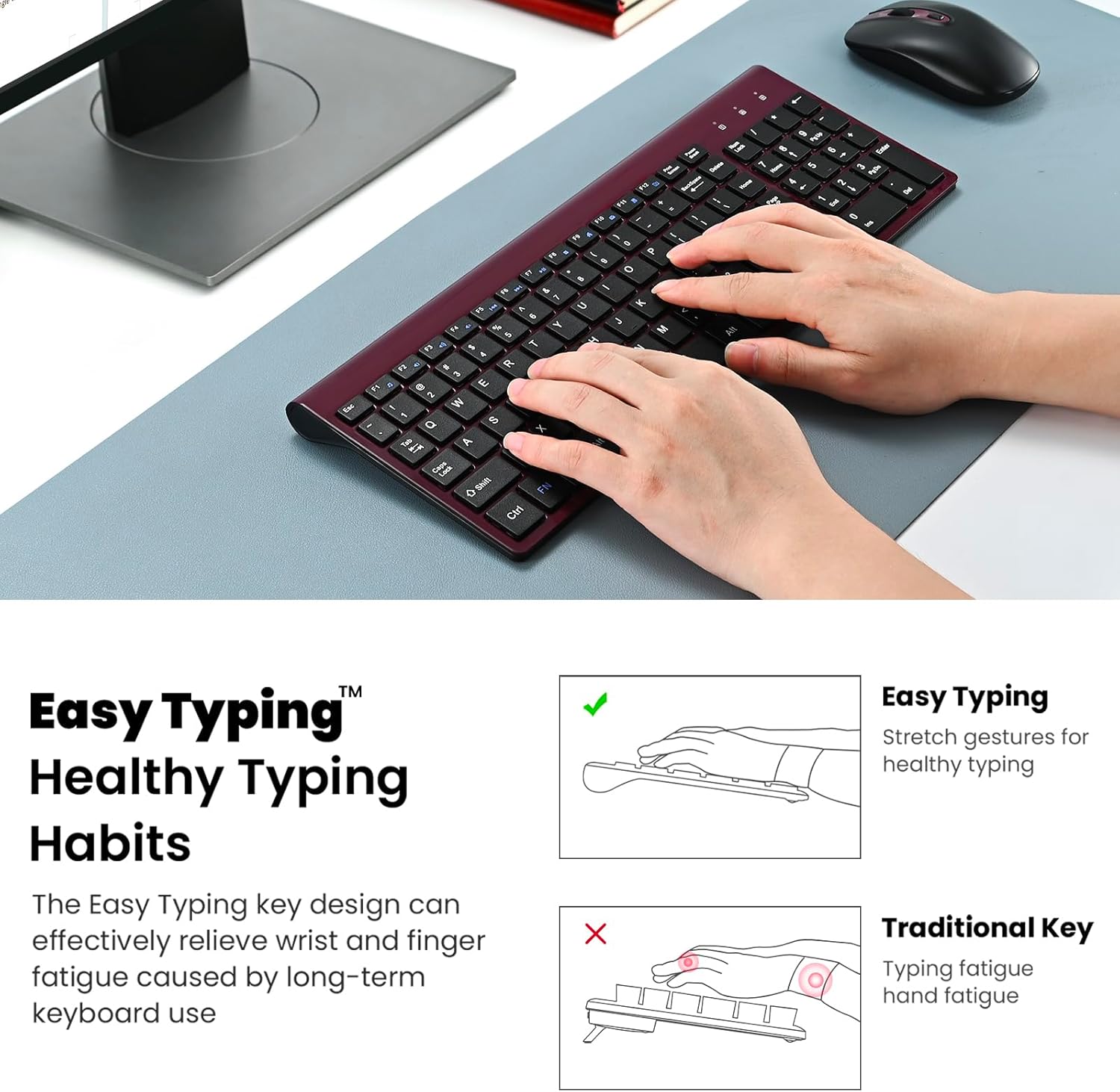
Image: Illustration of proper hand placement on the keyboard, demonstrating how the ergonomic design supports healthy typing habits and minimizes wrist fatigue.
Utilizarea mouse-ului
- Clicuri silențioase: The mouse is designed for silent operation, providing a quiet working environment.
- Setare DPI: The mouse has a default DPI of 1600, offering precise tracking for most tasks.
- Economisire de energie: The mouse features an auto-sleep function that activates after a period of inactivity to conserve battery life. Simply move or click the mouse to wake it up.
Întreţinere
- curatenie: Folosiți o lavetă moale și uscată pentru a curăța suprafețele tastaturii și mouse-ului. Pentru murdăria persistentă, ștergeți ușor.amp Se poate folosi o lavetă cu săpun delicat, asigurându-vă că nu pătrunde lichid în dispozitiv.
- Înlocuire baterie: Replace batteries when performance degrades. Always use fresh batteries of the specified type (AAA for keyboard, AA for mouse).
- Depozitare: When not in use for extended periods, turn off both devices to prolong battery life. The USB receiver can be stored in the mouse's dedicated compartment.
Depanare
- Fără conexiune/Dispozitive care nu răspund:
- Asigurați-vă că bateriile sunt instalate corect și nu sunt descărcate. Înlocuiți-le dacă este necesar.
- Verify that the power switches on both the keyboard and mouse are in the 'ON' position.
- Confirm the USB receiver is securely plugged into a working USB port on your computer. Try a different USB port if issues persist.
- Reporniți computerul.
- Conexiune cu întârziere sau intermitentă:
- Asigurați-vă că dispozitivele se află în raza de operare de 10 metri a receptorului USB.
- Minimize interference from other wireless devices (e.g., Wi-Fi routers, other 2.4GHz devices).
- Avoid placing the receiver near large metal objects that could block the signal.
- Tastele nu funcționează corect:
- Verificați dacă există resturi sub taste.
- Asigurați-vă că tastatura este pornită și conectată.
Specificații
| Caracteristică | Detaliu |
|---|---|
| Numărul de model | KF10 |
| Tehnologia de conectivitate | 2.4GHz Radio Frequency (USB Receiver) |
| wireless Range | Până la 10 metri (33 picioare) |
| Tipul tastei tastaturii | Comutator cu foarfece |
| Mouse DPI | 1600 (implicit) |
| Dimensiunile produsului | 14.37 x 5.51 x 0.24 inci |
| Greutatea articolului | 1.32 lire sterline |
| Dispozitive compatibile | Laptop, Personal Computer (Windows) |
Garanție și suport
cimetech is committed to providing excellent customer service. If you encounter any technical problems or require assistance with your EasyTyping KF10 Wireless Keyboard and Mouse Combo, please contact our sales customer service support team. They are equipped to quickly address any issues you may experience.
For further support, please refer to the official cimetech website-ul web sau contactați comerciantul de unde a fost achiziționat produsul.


