Introducere
This manual provides essential information for the safe and efficient operation of your Dual MCR 4 Portable DAB+/FM Radio. This device offers both digital DAB+ and analog FM radio reception, ensuring a wide range of listening options. Its color TFT display enhances usability by showing station names and additional information. With intuitive controls, auxiliary input, and headphone jack, the MCR 4 is designed for versatile and enjoyable audio experiences.
Informații de siguranță
- Citiți cu atenție toate instrucțiunile înainte de a utiliza dispozitivul.
- Păstrați dispozitivul departe de apă, umiditate și temperaturi ridicate.
- Nu încercați să dezasamblați sau să modificați unitatea. Apelați la personal calificat pentru orice service.
- Use only the provided power adapter or recommended battery types.
- Asigurați o ventilație adecvată în jurul dispozitivului în timpul funcționării.
- Aruncați bateriile în mod responsabil, conform reglementărilor locale.
Conținutul pachetului
Vă rugăm să verificați dacă toate articolele sunt prezente în colet:
- Dual MCR 4 Main Unit
- Adaptor de alimentare
- Manual de utilizare
Produs terminatview
The Dual MCR 4 features a compact design with intuitive controls for easy access to its functions. Key components include:
- Ecran TFT color: Afișează informații despre stație, ora și opțiunile din meniu.
- Buton rotativ: For tuning, volume control, and menu navigation.
- Butoane de memorie: To save and recall your favorite radio stations.
- Antena telescopica: For optimal radio signal reception.
- Auxiliary Input (AUX-IN): Located at the back, for connecting external audio devices.
- Jack pentru căști: Located at the back, for private listening.
- Mechanical On/Off Switch: Located at the back, for direct power control.
- Passive Membrane: Located at the back, contributing to exceptional sound quality.
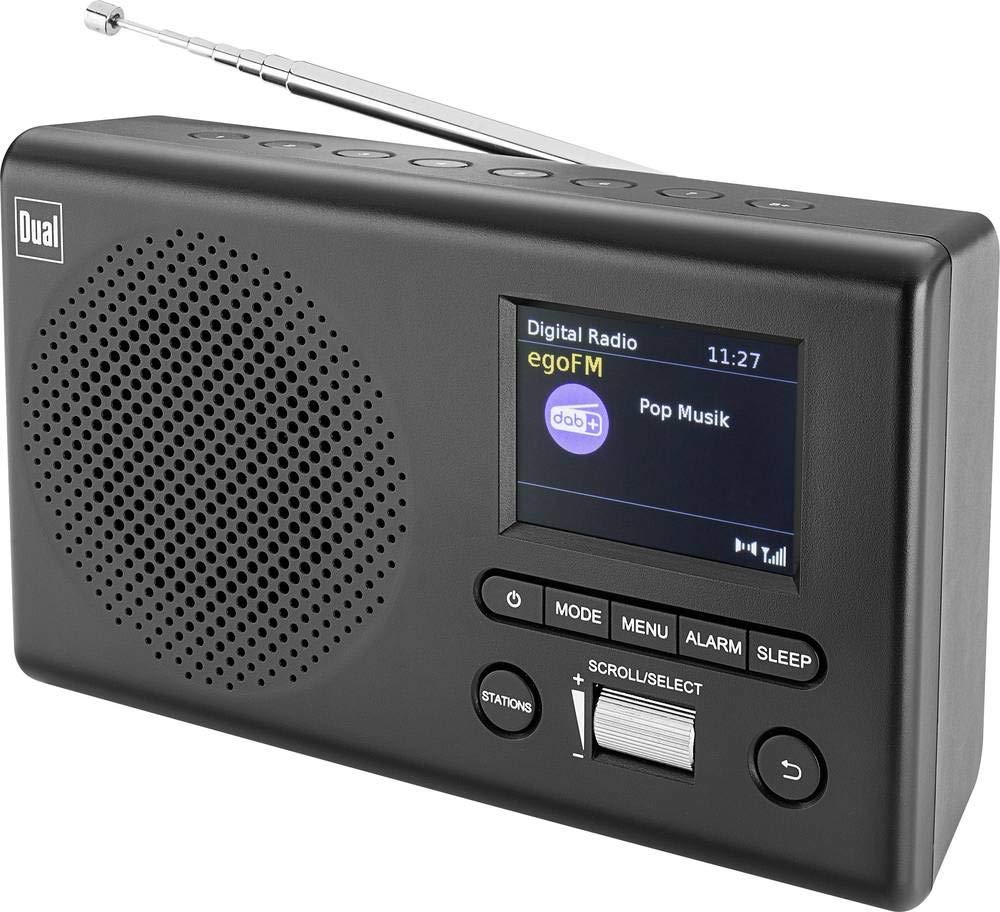
Imagine: față view of the Dual MCR 4 Portable DAB+/FM Radio, showing the color TFT display, rotary knob, and control buttons. The radio has a black and silver finish.
Înființat
1. Alimentarea Dispozitivului
The Dual MCR 4 can be powered by either the included AC power adapter or batteries, offering portability.
- Folosind adaptorul AC: Connect the power adapter to the DC IN port on the back of the radio and plug the other end into a standard wall outlet.
- Utilizarea bateriilor: Open the battery compartment on the bottom/back of the radio and insert the required batteries (type and quantity usually specified inside the compartment or in the full manual). Ensure correct polarity.
2. Reglarea antenei
Extend the telescopic antenna fully for optimal reception of both DAB+ and FM radio signals. Adjust its position for the best signal quality.
3. Initial Power On and Station Scan
After connecting power, switch on the radio using the mechanical ON/OFF switch at the back. The radio will typically perform an automatic station scan upon first use, searching for available digital (DAB+) and analog (FM) radio stations. This process may take a few moments.
Instrucțiuni de operare
1. Operare de bază
- Pornire/Oprire: Use the mechanical switch at the back. For standby, a dedicated button on the front might be available (refer to physical unit).
- Controlul volumului: Rotate the main rotary knob to adjust the listening volume.
2. Mod radio DAB+
- Selecting DAB+ Mode: Press the MODE button (if available) or navigate through the menu using the rotary knob until DAB+ mode is selected.
- Selectarea stației: After an automatic scan, use the rotary knob to scroll through the list of available DAB+ stations. Press the knob to confirm your selection.
- Salvarea presetărilor: Tune to your desired station. Press and hold a memory button (e.g., 1-5) until the display confirms the station is saved.
- Reamintirea presetărilor: Briefly press the corresponding memory button to recall a saved station.
- Afișați informații: The color TFT display will show station name, program information (DLS), and potentially station logos or slideshows.
3. Modul radio FM
- Selecting FM Mode: Press the MODE button or navigate through the menu until FM mode is selected.
- Reglare manuală: Rotate the tuning knob to manually adjust the frequency.
- Scanare automată: Press and hold the tuning knob or a dedicated scan button to automatically search for the next available FM station.
- Salvarea presetărilor: Tune to your desired FM station. Press and hold a memory button until the display confirms the station is saved.
- Reamintirea presetărilor: Briefly press the corresponding memory button to recall a saved station.
4. Intrare auxiliară (AUX-IN)
Connect an external audio device (e.g., smartphone, MP3 player) to the AUX-IN port on the back of the radio using a 3.5mm audio cable. Select AUX mode on the radio to play audio from the connected device.
5. Utilizarea căștilor
For private listening, plug standard 3.5mm headphones into the headphone jack located on the back of the unit. The internal speaker will automatically mute.
Întreţinere
- curatenie: Ștergeți radioul cu o cârpă moale și uscată. Nu folosiți substanțe de curățare abrazive sau solvenți.
- Depozitare: If storing for an extended period, remove batteries and store the unit in a cool, dry place.
- Îngrijirea antenei: Manevrați antena telescopică cu grijă pentru a preveni deteriorarea.
Depanare
| Problemă | Soluție posibilă |
|---|---|
| Fără putere |
|
| Recepție radio slabă |
|
| Fără sunet din difuzoare |
|
Specificații
| Marca | Dual |
| Numărul de model | 76074 |
| Culoare | Negru, Argintiu |
| Tehnologie de reglare | DAB+, FM |
| Tehnologia de conectivitate | Auxiliary (AUX-IN) |
| Caracteristici speciale | Portable, Color TFT Display |
| Dispozitive compatibile | Headphones, External Audio Devices (via AUX-IN) |
| Sursa de alimentare | Mains (AC Adapter), Battery Powered |
| Componente incluse | Main Unit, Power Adapter, User Manual |
| Utilizare recomandată | Muzică |
Garanție și suport
For warranty information and technical support, please refer to the specific warranty card included with your product or contact Dual customer service. The included user manual provides detailed instructions and contact information.


