Introducere
Thank you for choosing the NEDIS Wi-Fi Smart Fan Heater. This manual provides essential information for the safe and efficient operation of your new device. Please read these instructions carefully before use and retain them for future reference. Proper use and maintenance will ensure optimal performance and longevity of the product.
Instrucțiuni de siguranță
Pentru a reduce riscul de incendiu, electrocutare sau vătămare corporală, respectați întotdeauna aceste măsuri de siguranță de bază:
- Citiți toate instrucțiunile înainte de a utiliza acest încălzitor.
- Nu utilizați acest încălzitor în imediata apropiere a unei băi, a unui duș sau a unei piscine.
- Nu acoperiți încălzitorul. Acoperirea încălzitorului poate provoca supraîncălzirea și incendiul.
- Keep combustible materials such as furniture, pillows, bedding, papers, clothes, and curtains at least 1 meter (3 feet) from the front of the heater and keep them away from the sides and rear.
- Deconectați întotdeauna încălzitorul atunci când nu îl utilizați.
- Nu utilizați niciun încălzitor cu un cablu sau un ștecher deteriorat sau după ce încălzitorul funcționează defectuos, a fost scăpat sau deteriorat în vreun fel.
- Nu treceți cablul sub covor. Nu acoperiți cablul cu covoare, șervețele sau acoperiri similare. Aranjați cablul departe de zona de trafic și de unde nu se va împiedica.
- Este necesară prudență extremă atunci când orice încălzitor este folosit de copii sau invalizi sau în apropierea acestora și ori de câte ori încălzitorul este lăsat în funcțiune și nesupravegheat.
- This heater is equipped with a tip-over protection switch that automatically shuts off the heater if it is accidentally knocked over.
- Asigurați-vă că încălzitorul este așezat pe o suprafață stabilă și plană.
- Numai pentru uz interior.
Produs terminatview
Familiarize yourself with the main components of your NEDIS Wi-Fi Smart Fan Heater.
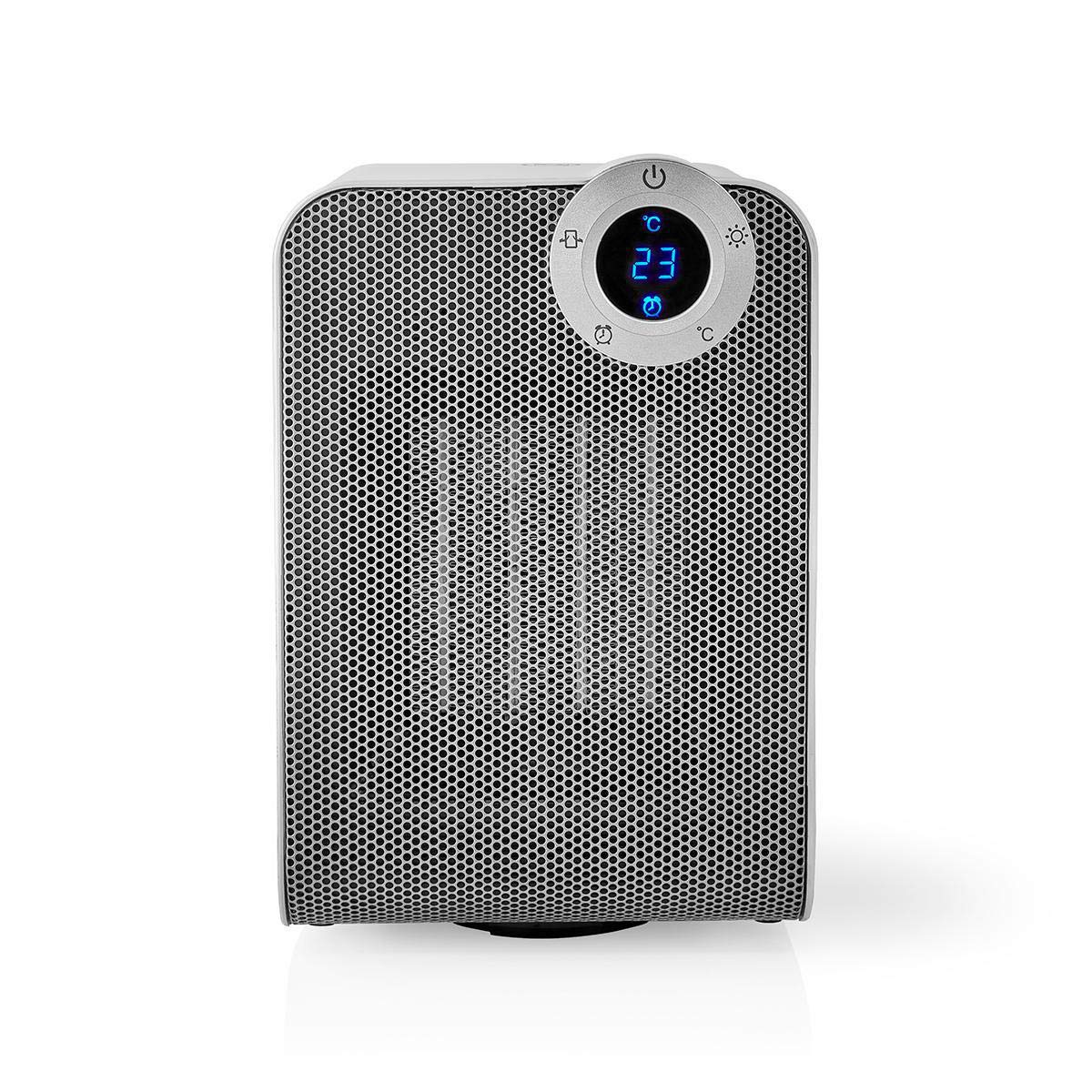
The front panel features a digital display that shows the current temperature and settings. Surrounding the display are touch-sensitive buttons for power, mode selection, oscillation, and timer functions.

The rear of the heater includes the main power switch (often a rocker switch) and the air intake grille. Ensure this area is not obstructed for proper airflow.

The compact design of the heater allows for easy placement in various indoor settings.
Înființat
Despachetarea
- Scoateți cu grijă încălzitorul din ambalaj.
- Verificați dacă există deteriorări în timpul transportului. Dacă este deteriorat, nu îl utilizați și contactați serviciul de asistență pentru clienți.
- Păstrați ambalajul pentru depozitare sau transport viitor.
Plasarea
- Așezați încălzitorul pe o suprafață fermă și plană.
- Ensure there is at least 1 meter (3 feet) of clear space around the heater to allow for proper air circulation and to prevent fire hazards.
- Do not place the heater near curtains, drapes, or other loose fabrics that could block the air intake or outlet.
- Asigurați-vă că cablul de alimentare nu este ciupit sau așezat sub obiecte grele.
Pornirea inițială
- Plug the heater into a suitable electrical outlet (220-240V AC, 50/60Hz).
- Flip the main power switch on the back of the unit to the 'ON' position.
- The digital display on the front will illuminate, indicating the heater is in standby mode.
Wi-Fi Connection & App Setup
The NEDIS Wi-Fi Smart Fan Heater can be controlled via the Nedis SmartLife app, offering advanced features and remote control.
- Descărcați Nedis SmartLife aplicația din App Store (iOS) sau Google Play Store (Android).
- Înregistrează-te pentru un cont nou sau autentifică-te dacă ai deja unul.
- Asigurați-vă că smartphone-ul dvs. este conectat la o rețea Wi-Fi de 2.4 GHz.
- În aplicație, atinge pictograma „+” pentru a adăuga un dispozitiv nou.
- Follow the on-screen instructions in the app to connect your heater to your Wi-Fi network. This usually involves putting the heater into pairing mode (refer to the app for specific instructions, often by pressing and holding a button on the heater).
- Once connected, you can control the heater from anywhere using the app.
Instrucțiuni de operare
Control manual
The heater can be operated directly using the touch buttons on the front panel:
- Buton de alimentare: Apăsați pentru a porni sau opri încălzitorul.
- Butonul de mod: Cycle through heating modes (e.g., High Heat 1800W, Low Heat 900W, Fan Only).
- Reglarea temperaturii: Use the '+' and '-' buttons (or similar) to set the desired temperature. The heater will operate at 1800W for rapid heating and automatically switch to 900W once the set temperature is approached.
- Buton de oscilație: Press to activate or deactivate the horizontal oscillation feature, distributing heat across a wider area.
- Buton cronometru: Set a timer for the heater to automatically turn off after a specified duration.
SmartLife App Control
Once connected to the Nedis SmartLife app, you can access advanced control features:
- Pornire/Oprire de la distanță: Controlează încălzitorul de oriunde.
- Reglarea temperaturii: Precisely set and monitor the room temperature.
- Selectarea modului: Choose between different heating levels or fan-only mode.
- Controlul oscilației: Activați sau dezactivați funcția de oscilație.
- Programare: Create custom heating schedules for different times of the day or week.
- Funcția de cronometru: Set a countdown timer for automatic shutdown.
Control vocal
The heater supports voice control through popular smart assistants. To enable this, link your Nedis SmartLife account with your preferred voice assistant (Google Home or Amazon Alexa) via their respective apps. Once linked, you can use voice commands such as:
- "Hey Google, turn on the heater."
- "Alexa, set the heater to 22 degrees."
- "Hey Google, turn off the heater."
Întreţinere
Curatenie
Curățarea regulată ajută la menținerea eficienței încălzitorului și îi prelungește durata de viață.
- Deconectați întotdeauna încălzitorul și lăsați-l să se răcească complet înainte de curățare.
- Ștergeți suprafețele exterioare cu un material moale, damp pânză. Nu utilizați agenți de curățare abrazivi sau solvenți.
- Folosiți un aspirator cu perie pentru a îndepărta praful de pe grilele de admisie și evacuare a aerului.
- Asigurați-vă că nu pătrunde apă în interiorul încălzitorului.
Depozitare
Când nu este utilizat pentru perioade lungi de timp:
- Deconectați încălzitorul și curățați-l așa cum este descris mai sus.
- Depozitați încălzitorul în ambalajul original sau într-o cutie adecvată pentru a-l proteja de praf și deteriorări.
- A se păstra într-un loc răcoros și uscat, ferit de lumina directă a soarelui și de umiditate.
Depanare
Dacă întâmpinați probleme cu încălzitorul, consultați următoarele probleme comune și soluții:
| Problemă | Cauza posibila | Soluţie |
|---|---|---|
| Încălzitorul nu pornește. | No power, main switch off, tip-over switch activated. | Check power outlet, ensure main switch is ON, place heater upright on a stable surface. |
| Fara iesire de caldura. | Incorrect mode, thermostat setting too low. | Select a heating mode (High/Low), increase the thermostat setting above the current room temperature. |
| Conexiunea Wi-Fi eșuează. | Incorrect Wi-Fi password, 5GHz network, distance from router. | Verify Wi-Fi password, ensure you are on a 2.4GHz network, move heater closer to the router, try re-pairing. |
| Încălzitorul se oprește pe neașteptate. | Overheating protection, tip-over protection, timer activated. | Ensure heater is not covered, clear obstructions, place upright, check timer settings. Allow to cool before restarting. |
Specificații
| Caracteristică | Caietul de sarcini |
|---|---|
| Numărul de model | WIFIFNH20CWT |
| Sursa de alimentare | Electric cu fir |
| Putere de ieșire | 1800 W (înalt), 900 W (scăzut) |
| Metoda de încălzire | Convecție |
| Dimensiuni (L x l x H) | 16.5 x 14.5 x 25 cm |
| Greutatea articolului | 1.8 kg |
| Culoare | Alb / Argintiu |
| Caracteristici speciale | On/Off Timer, Oscillation, Tip-over Protection, Thermostat, Wi-Fi, App Control, Voice Control (Alexa, Google Home) |
| Tip de instalare | Montare pe podea |
| Utilizare recomandată | Interior, Acasă, Cameră de studiu |
| Bateriile necesare | Nu |
Garanție și suport
Your NEDIS Wi-Fi Smart Fan Heater is covered by a manufacturer's warranty. Please refer to the warranty card included with your purchase for specific terms and conditions, including the warranty period and coverage details.
For technical support, troubleshooting assistance, or warranty claims, please contact NEDIS customer service. Contact information can typically be found on the product packaging, the NEDIS website-ul sau chitanța dumneavoastră de achiziție.


