Introducere
This manual provides detailed instructions for the installation, setup, and operation of your JVC KD-X260BT Digital Media Receiver. This unit is designed to provide high-quality audio playback and hands-free communication in your vehicle, featuring Bluetooth connectivity, USB input, and a 13-band equalizer. Please note, this unit does not play CDs. Read this manual thoroughly before use to ensure proper operation and to prevent damage.

Imagine: față view of the JVC KD-X260BT Digital Media Receiver, showing the display and control buttons.
Informații de siguranță
- Do not operate the unit in a way that distracts you from driving. Always keep your attention on the road.
- Ensure proper wiring connections to prevent short circuits or damage to the vehicle's electrical system.
- Evitați expunerea unității la umiditate sau temperaturi extreme.
- Nu încercați să dezasamblați sau să modificați unitatea. Apelați la personal calificat pentru orice service.
- Use only accessories specified by JVC.
Conținutul pachetului
Verificați dacă toate articolele sunt prezente în colet:
- Receptor media digital JVC KD-X260BT
- Ham de cabluri
- External Wired Microphone
- Hardware de montare
- Manual de instrucțiuni (acest document)
Instalare
Professional installation is recommended for this product. Incorrect installation can lead to damage to the unit or vehicle. The KD-X260BT features a short body design, which facilitates easier installation in various vehicle dashboards.
Conexiuni cablare:
- Connect the wiring harness according to your vehicle's wiring diagram.
- Asigurați-vă că toate conexiunile sunt sigure și izolate pentru a preveni scurtcircuite.
- Connect the external microphone to the designated input for hands-free calling. Position the microphone in a location that provides clear voice pickup.
- Conectați cablul antenei.
- Dacă utilizați extern amplifiers, connect the 2.5V preamp outputs (rear/subwoofer selectable).
Montare:
- Instalați manșonul de montare în deschiderea bordului.
- Slide the receiver into the mounting sleeve until it locks into place.
- Atașați inelul de tăiere.
Înființat
Pornire inițială:
After installation, turn on your vehicle's ignition. The unit should power on. Follow any on-screen prompts for initial setup, such as language selection.
Asociere Bluetooth:
The KD-X260BT supports Bluetooth 3.0+EDR and allows for two phones to be connected full-time. This enables receiving calls from either phone with a push of a key.
- On the receiver, navigate to the Bluetooth menu.
- Selectați „Asociere” sau „Căutare dispozitiv”.
- Pe smartphone, activați Bluetooth și căutați dispozitivele disponibile.
- Select "KD-X260BT" from the list on your phone.
- Confirmați codul de asociere pe ambele dispozitive, dacă vi se solicită.
- După asociere, unitatea va afișa o confirmare.
The unit supports Bluetooth profiles HFP (Hands-Free Profile 1.6 for wideband speech), HSP (Headset Profile), PBAP (Acces la agenda telefonică Profile), A2DP (Advanced Audio Distribution Profile) și AVRCP (Audio/Video Remote Control Profile 1.5).
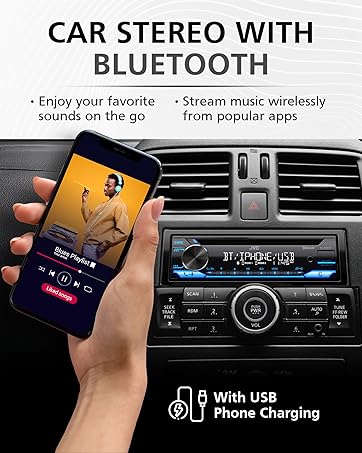
Image: JVC KD-X260BT display indicating Bluetooth connection, with a smartphone showing music playback, illustrating wireless audio streaming.
Aplicația JVC Remote:
Download the "JVC Remote" app (available for iOS and Android) to control the receiver's source directly from your smartphone using simple finger gestures.
Instrucțiuni de operare
Controale de bază:
- Buton de alimentare: Apăsați pentru a porni/opri unitatea.
- Buton de volum: Rotate to adjust the volume level. Press to access menu options.
- Buton sursă: Press to cycle through available audio sources (Tuner, USB, Bluetooth Audio, AUX).
- Buton de afișare: Changes display information (e.g., clock, track title).
Tuner radio:
- Press the Source button to select "Tuner" (AM/FM).
- Folosește butoanele de căutare pentru a găsi posturi de radio.
- Press and hold a preset button (1-6) to store a station.
Redare USB:
Connect a USB device to the front USB port. The unit supports MP3/WMA/WAV/FLAC playback. The USB port also provides high current 1.5A charging for smartphones.
- Insert the USB device. The unit will automatically switch to USB source and begin playback.
- Use the track buttons to skip tracks.
- Use the folder buttons to navigate through folders.
- MP3 ID3 Tag Display (title/artist/album) is supported.
- Android music playback (AOA 2.0) is supported for Android phones (version 4.1 or later).
Streaming audio prin Bluetooth:
Once a Bluetooth device is paired, select "Bluetooth Audio" as the source to stream music wirelessly. Use the receiver's controls or the paired device to manage playback (play, pause, skip, search via AVRCP 1.5).
Apeluri fără mâini:
When a call comes in on a paired phone, the unit will display the caller ID. Press the call button to answer, and the end call button to hang up. The external microphone ensures clear communication.
Audio Settings (Equalizer):
The unit features a 13-Band Graphic Equalizer with 10 preset EQ settings and 1 user-customizable setting. Access the audio menu to adjust:
- Egalizator: Select from preset curves or customize your own.
- amplificare a basului: Enhances low frequencies.
- Loudness: Compensates for perceived loss of bass and treble at low volumes.
- Balans/Fader: Adjusts sound distribution between left/right and front/rear speakers.
- Control subwoofer: Adjust subwoofer output level and frequency if connected.
Internet Radio/Digital Radio Control:
Control Pandora, iHeartRadio, and Spotify directly from the receiver when connected to a compatible Android device via Bluetooth.
Steering Wheel Remote Control:
Factory steering wheel control functions can be retained with a third-party adapter (sold separately).
Întreţinere
- Curățarea unității: Folosiți o lavetă moale și uscată pentru a șterge panoul frontal. Nu utilizați substanțe de curățare abrazive sau solvenți.
- Port USB: Păstrați portul USB fără praf și resturi.
- Actualizări firmware: Verificați JVC-ul website periodically for any available firmware updates for improved performance and features.
Depanare
| Problemă | Soluţie |
|---|---|
| Fără putere | Check vehicle's fuse. Ensure wiring harness is correctly connected. |
| Nici un sunet | Check speaker connections. Verify volume level. Ensure correct source is selected. |
| Bluetooth nu se conectează | Ensure Bluetooth is enabled on both devices. Delete previous pairing and re-pair. Move devices closer. |
| Dispozitivul USB nu este recunoscut | Ensure USB device is formatted correctly (FAT16/32). Check for compatible file tipuri. Încercați un alt dispozitiv USB. |
| Recepție radio slabă | Verificați conexiunea antenei. Asigurați-vă că antena este complet extinsă (dacă este cazul). |
Specificații
| Caracteristică | Detaliu |
|---|---|
| Numărul de model | KD-X260BT |
| Putere de ieșire (vârf) | 50 wați x 4 canale |
| Putere de ieșire (RMS) | 22 wați x 4 canale |
| Afişa | VA LCD Display, Spanish Text Display |
| Intrare USB | Front USB, 1.5A Charging, MP3/WMA/WAV/FLAC Playback, Android AOA 2.0 |
| Intrare auxiliară | 3.5mm Front Audio Auxiliary Input |
| Versiune Bluetooth | 3.0+EDR Certified |
| Bluetooth Profiles | HFP 1.6, HSP, PBAP, A2DP, AVRCP 1.5 |
| Egalizator | 13-Band Graphic Equalizer (10 Preset x 1 User) |
| Preamp Ieșiri | 1 Set of 2.5V (Rear/Subwoofer Selectable) |
| Internet Radio Control | Pandora, Spotify, iHeartRadio (for Android) |
| Dimensiuni (produs) | 4 x 9 x 8 inci |
| Greutatea articolului | 1.79 lire sterline |
Garanție și suport
This JVC KD-X260BT Digital Media Receiver comes with a 1-Year Manufacturer's Warranty. For warranty claims, technical support, or service inquiries, please contact JVC customer support or visit the official JVC webPăstrați dovada achiziției pentru validarea garanției.
Asistență clienți JVC: Refer to the contact information provided with your product packaging or on the official JVC website-ul.


