1. Introducere
This manual provides comprehensive instructions for the installation, operation, and maintenance of your BlueBird A1390 Automatic Irrigation Tap Programmer. This device is designed to automate your garden watering schedule, ensuring efficient and consistent irrigation. Please read this manual thoroughly before using the product to ensure correct operation and to prevent damage.
2. Informații de siguranță
- Do not immerse the unit in water. The unit is designed to be weather-resistant, but not submersible.
- Use only 1.5V AA alkaline batteries. Do not mix old and new batteries, or different types of batteries.
- Scoateți bateriile dacă unitatea nu va fi utilizată pentru o perioadă lungă de timp, pentru a preveni scurgerile.
- A nu se lăsa la îndemâna copiilor.
- Nu încercați să dezasamblați sau să reparați unitatea singur. Contactați personal calificat pentru service.
- Asigurați-vă că toate conexiunile sunt sigure pentru a preveni scurgerile.
3. Conținutul pachetului
Vă rugăm să verificați pachetul pentru următoarele articole:
- 1x BlueBird A1390 Automatic Irrigation Tap Programmer
- 1x Manual de utilizare (acest document)
Note: 2 AA 1.5V batteries are required for operation and are not included in the package.
4. Produs terminatview
The BlueBird A1390 features two main rotary dials for setting irrigation frequency and duration, along with a battery indicator and an ON/OFF switch.
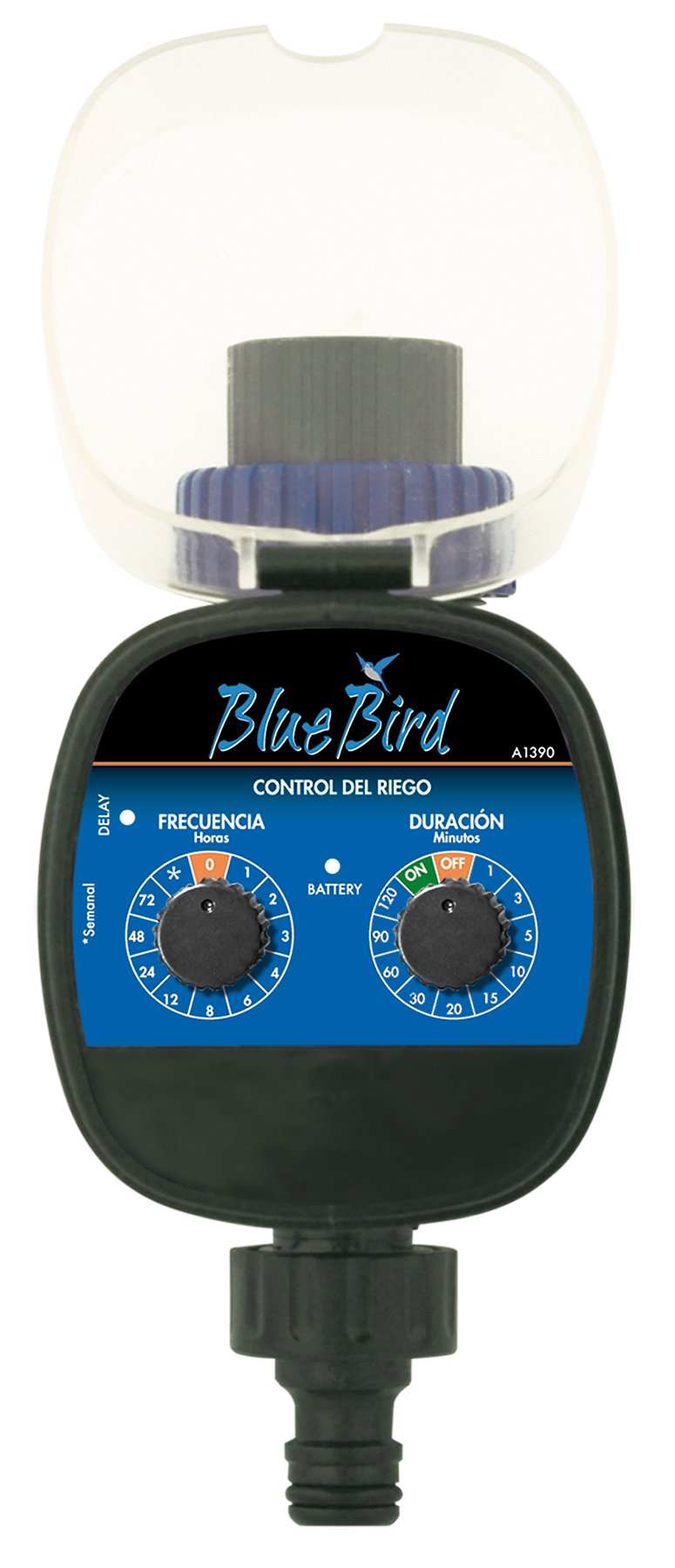
Figura 1: Faţă view of the BlueBird A1390 Irrigation Programmer. The left dial controls irrigation frequency, and the right dial controls irrigation duration. A battery indicator light is located between the dials.
Componente:
- Frequency Dial (Frecuencia): Sets how often the irrigation occurs. Options include 0 (off), 1, 2, 3, 4, 6, 8, 12, 24, 48, 72 hours, and a '*' setting for manual or weekly operation.
- Duration Dial (Duración): Sets how long each irrigation cycle lasts. Options include 0 (off), 1, 3, 5, 10, 15, 20, 30, 60, 90, 120 minutes.
- Comutator PORNIT / OPRIT: Located on the Duration Dial, allows for manual override or turning the unit off.
- Indicator baterie: A light that indicates battery status.
- Compartiment baterie: Located at the rear of the unit (not visible in Figure 1).
- Intrare/Ieșire apă: Standard tap and hose connections.
5. Configurare
5.1 Instalarea bateriei
- Localizați capacul compartimentului bateriilor din spatele unității.
- Remove the cover by twisting or sliding it open.
- Insert two (2) new 1.5V AA alkaline batteries, ensuring correct polarity (+/-).
- Puneți la loc capacul compartimentului bateriei în siguranță pentru a menține rezistența la apă.
5.2 Connecting to the Tap
- Ensure your outdoor tap is turned off.
- Screw the BlueBird A1390 programmer onto your tap. Hand-tighten only to prevent damage.
- Connect your garden hose or irrigation system to the outlet of the programmer. Ensure a tight connection to prevent leaks.
- Slowly turn on your outdoor tap. Check for any leaks at the connections.
6. Instrucțiuni de utilizare
The BlueBird A1390 is designed for simple, intuitive programming using its two rotary dials.
6.1 Setting Irrigation Frequency
- Rotiți Apelare frecvență (left dial) to your desired irrigation interval.
- Setările disponibile sunt:
- 0: No irrigation (off).
- 1, 2, 3, 4, 6, 8, 12, 24, 48, 72: Irrigation every X hours.
- *: This setting typically indicates a manual mode or a weekly cycle, depending on the specific model's internal logic. Refer to the example below for common usage.
6.2 Setarea duratei de udare
- Rotiți Duration Dial (right dial) to your desired watering time per cycle.
- Setările disponibile sunt:
- OPRIT: No irrigation.
- PE: Continuous irrigation (use with caution).
- 1, 3, 5, 10, 15, 20, 30, 60, 90, 120: Irrigation for X minutes.
6.3 Example Programare
To water every 6 hours for 10 minutes:
- Setați Apelare frecvență la 6 (ore).
- Setați Duration Dial la 10 (minute).
The programmer will automatically begin the cycle based on these settings. The first cycle will typically start shortly after programming, or after a short delay.
6.4 Manual ON/OFF
To manually turn on the water, rotate the Duration Dial to the ON position. To stop manual watering, rotate the dial back to OFF or a timed setting.
7. Întreținere
7.1 Înlocuirea bateriei
When the battery indicator light dims or the unit stops functioning, it's time to replace the batteries. Follow the steps in Section 5.1 for battery installation.
7.2 Curățare
Clean the exterior of the programmer with a damp cloth. Do not use abrasive cleaners or solvents. Ensure no water enters the battery compartment or internal electronics.
7.3 Depozitarea de iarnă
Before the first frost, disconnect the programmer from the tap and hose. Remove the batteries. Store the unit indoors in a dry, frost-free location to prevent damage from freezing water.
8. Depanare
| Problemă | Cauza posibila | Soluţie |
|---|---|---|
| Unit does not turn on/display. | Baterii descărcate sau instalate incorect. | Înlocuiți bateriile, asigurându-vă de polaritatea corectă. |
| Apa nu curge. | Tap is off; programmer set to '0' or 'OFF'; low water pressure; clogged filter. | Ensure tap is fully open. Check frequency/duration settings. Verify water pressure. Clean any filters. |
| Unit leaks at connections. | Conexiuni slăbite; șaibă lipsă sau deteriorată. | Tighten connections. Check and replace washers if necessary. |
| Irrigation schedule is incorrect. | Incorrect frequency or duration settings. | Re-check and adjust the Frequency and Duration Dials according to your desired schedule. |
9. Specificații
- Model: A1390
- Marca: Pasare albastra
- Producător: Altadex
- Sursa de alimentare: 2 baterii alcaline AA de 1.5 V (nu sunt incluse)
- Frecvența irigațiilor: 0, 1, 2, 3, 4, 6, 8, 12, 24, 48, 72 hours, or '*' (manual/weekly)
- Durata irigației: OFF, ON, 1, 3, 5, 10, 15, 20, 30, 60, 90, 120 minutes
- Dimensiuni produs: Aproximativ 19.4 x 10.6 x 10 cm
- Greutate produs: Aproximativ 280 g
- GTIN (UPC): 8426375113909
10. Garanție și asistență
This product is covered by a standard manufacturer's warranty. For specific warranty details, please refer to the documentation provided at the time of purchase or contact your retailer. For technical support or inquiries, please contact the seller or manufacturer directly.


