1. Introducere
This manual provides essential instructions for the safe and efficient operation of your QFX PBX-412200BTD Battery Powered Bluetooth Karaoke PA Speaker. This speaker system is designed to deliver powerful sound with wireless Bluetooth streaming, featuring dual 12-inch woofers, two 1-inch tweeters, and a 9-inch LCD screen. It includes a microphone for karaoke functions and is equipped with a built-in 12V 12Ah rechargeable battery for portable use. Please read this manual thoroughly before using the product and retain it for future reference.
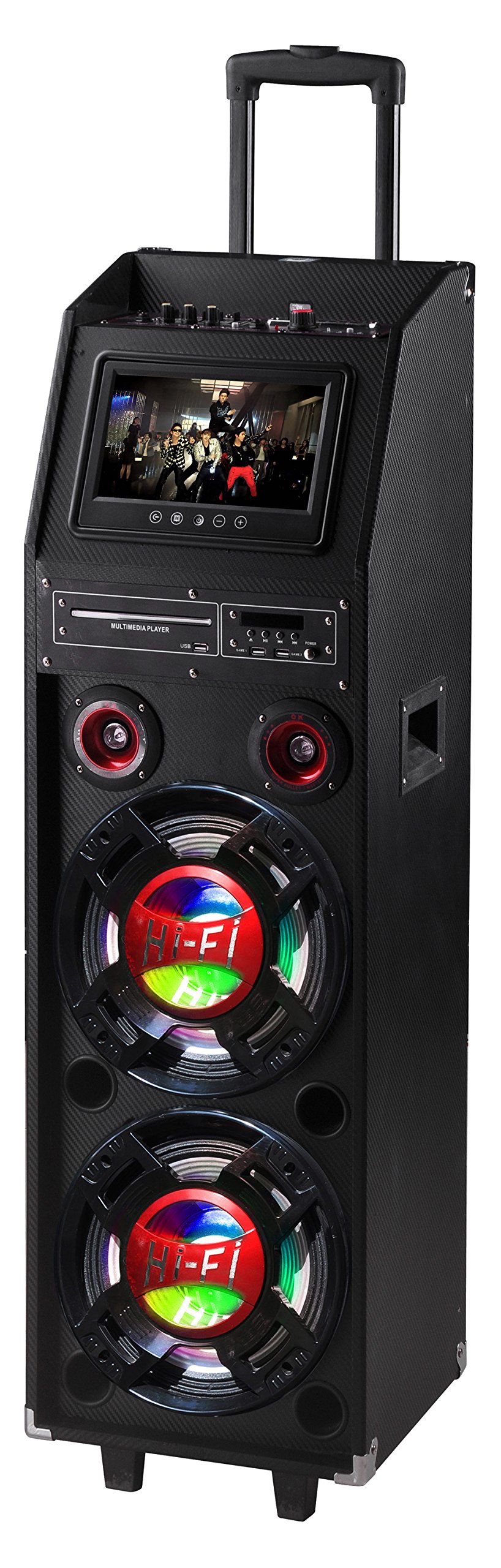
Figure 1: QFX PBX-412200BTD-R Speaker (Red model shown)
2. Informații de siguranță
Please observe the following safety precautions to prevent electric shock, fire, or injury.
- Nu expuneți acest aparat la ploaie sau umezeală.
- Do not remove the cover or back of the unit. There are no user-serviceable parts inside. Refer all servicing to qualified service personnel.
- Asigurați o ventilație adecvată în jurul unității. Nu blocați orificiile de ventilație.
- Protejați cablul de alimentare pentru a nu fi călcat sau ciupit, în special la prize, prize și la punctul în care acestea ies din aparat.
- Deconectați acest aparat din priză în timpul furtunilor cu fulgere sau când nu este utilizat pentru perioade lungi de timp.
- Curățați numai cu o cârpă uscată.
- AVERTIZARE: Cancer și vătămare a reproducerii - www.P65Warnings.ca.gov. This warning is provided in compliance with California Proposition 65.
3. Conținutul pachetului
Carefully unpack your QFX PBX-412200BTD speaker and ensure all items listed below are present and in good condition.
- QFX PBX-412200BTD Speaker with Built-In Handle and Wheels
- Game Joysticks (2)
- Microfon
- Telecomanda
- Rechargeable Battery (pre-installed)
4. Caracteristicile produsului
The QFX PBX-412200BTD offers a range of features for an enhanced audio experience:
- Integrated Disco Lights for party ambiance.
- Built-in FM Radio tuner.
- USB and SD card player for direct media playback.
- Dual 12-inch Woofers and two 1-inch Tweeters for powerful sound output.
- RCA input/output and Video output for versatile connectivity.
- Convenient Handle and Caster Wheels for easy transport.
- Includes Microphone, 2 Game Joysticks, and Remote Control.
- Ecran LCD de 9 inchi.
- Built-in 12V 12Ah rechargeable battery providing 2-3 hours playing time at 50% volume.
5. Controale și conexiuni
Familiarize yourself with the control panel and connection ports of your speaker.
5.1. Top Panel Controls (ExampLe)
(Image of top panel controls would be placed here, showing volume knobs, mode buttons, etc.)
Description: This image would display the main control panel located on the top of the speaker, highlighting buttons for Power, Mode selection (Bluetooth, FM, USB/SD, AUX), Play/Pause, Track Skip, Master Volume, Microphone Volume, Echo, and Bass/Treble controls.
- Buton de alimentare: Pornește / oprește unitatea.
- Butonul de mod: Switches between Bluetooth, FM Radio, USB/SD, and AUX input modes.
- Buton Redare/Pauză: Starts or pauses playback in Bluetooth, USB, or SD modes.
- Butoane Anterior/Următor: Sare la piesa/postul anterior sau următor.
- Butonul de volum principal: Ajustează nivelul general al sunetului de ieșire.
- Buton de volum microfon: Reglează volumul de intrare al microfonului.
- Butonul pentru eco: Controlează efectul de ecou pentru microfon.
- Butoane bas/înalte: Ajustează răspunsul la frecvența joasă și înaltă.
5.2. Rear Panel Connections (ExampLe)
(Image of rear panel connections would be placed here, showing input/output ports.)
Description: This image would illustrate the rear panel of the speaker, indicating ports such as USB, SD card slot, Microphone Input (6.3mm), AUX Input (RCA), RCA Audio Output, Video Output, and DC Power Input.
- Port USB: Pentru conectarea unităților flash USB.
- Slot pentru card SD: Pentru introducerea cardurilor de memorie SD.
- Intrare MIC: Mufă de 6.3 mm pentru conectarea microfonului inclus.
- Intrare AUX (RCA): Pentru conectarea dispozitivelor audio externe prin cabluri RCA.
- Ieșire audio RCA: For connecting to another audio system.
- Ieșire video: For connecting to an external display to show video content from USB/SD or karaoke lyrics.
- Intrare curent continuu: For connecting the power adapter to charge the battery or operate the unit.
6. Configurare
6.1. Încărcarea inițială
Before first use, fully charge the speaker's built-in battery.
- Connect the provided power adapter to the DC Power Input port on the rear panel of the speaker.
- Plug the adapter into a standard AC power outlet.
- The charging indicator light (if present) will illuminate. Allow several hours for a full charge.
- Once fully charged, the indicator light may change color or turn off. Disconnect the power adapter.
6.2. Poziționarea difuzorului
Place the speaker on a stable, flat surface. Utilize the built-in handle and caster wheels for easy relocation. Ensure adequate space around the speaker for ventilation.
7. Instrucțiuni de utilizare
7.1. Pornire/Oprire
Țineți apăsat butonul Buton de alimentare on the top panel to turn the speaker ON or OFF.
7.2. Mod Bluetooth
- Turn on the speaker. The default mode is usually Bluetooth. If not, press the Butonul de mod until "Bluetooth" appears on the LCD screen.
- Pe dispozitivul mobil (smartphone, tabletă etc.), activați Bluetooth și căutați dispozitivele disponibile.
- Select "QFX PBX-412200BTD" (or similar name) from the list of devices.
- Once paired, the speaker will emit an audible confirmation. You can now stream audio from your device.
- Utilizați Redare/Pauză şi Anterior/Următorul butoanele de pe difuzor sau de pe dispozitiv pentru a controla redarea.
7.3. Modul radio FM
- Apăsați tasta Butonul de mod until "FM" appears on the LCD screen.
- Apăsați tasta Buton Redare/Pauză once to initiate an automatic scan for FM stations. The speaker will save all found stations.
- Utilizați Butoane Anterior/Următor to navigate through the saved stations.
7.4. Redare de pe USB/card SD
- Introduceți o unitate flash USB în Port USB sau un card SD în Slot pentru card SD.
- The speaker should automatically switch to USB or SD mode and begin playing compatible audio files. Dacă nu, apăsați butonul Butonul de mod pentru a selecta sursa corectă.
- Utilizați Redare/Pauză şi Anterior/Următorul butoane pentru a controla redarea.
- For video playback from USB/SD, connect the Ieșire video către un afișaj extern.
7.5. Intrare AUX
- Conectați un dispozitiv audio extern (de exemplu, un player MP3, un laptop) la Intrare RCA AUX using appropriate RCA cables.
- Apăsați tasta Butonul de mod until "AUX" appears on the LCD screen.
- Controlează redarea și volumul de pe dispozitivul extern.
7.6. Funcția Karaoke
- Connect the included microphone to the Intrare MIC jack.
- Play your desired karaoke track via Bluetooth, USB/SD, or AUX input.
- Reglați volumul microfonului folosind butonul Butonul de volum al microfonului.
- Ajustați efectul de ecou folosind Butonul pentru eco for desired vocal enhancement.
- For displaying lyrics, connect the Ieșire video to a compatible external display.
8. Întreținere
8.1. Curatenie
- Deconectați întotdeauna difuzorul de la priză înainte de curățare.
- Folosiți o lavetă moale și uscată pentru a șterge suprafețele exterioare ale difuzorului.
- Do not use liquid cleaners, aerosol sprays, or abrasive chemicals, as these may damage the finish or internal components.
8.2. Îngrijirea bateriei
- Pentru a prelungi durata de viață a bateriei, evitați descărcarea completă frecventă a acesteia.
- Recharge the battery regularly, even if the speaker is not in use for extended periods (e.g., once every 3 months).
- Păstrați difuzorul într-un loc răcoros și uscat atunci când nu este utilizat.
9. Depanare
| Problemă | Cauza posibila | Soluţie |
|---|---|---|
| Fără putere | Battery discharged; Power cable not connected. | Încărcați bateria; Asigurați-vă că este conectat corect cablul de alimentare. |
| Nici un sunet | Volum prea mic; Mod selectat incorect; Dispozitiv neîmperecheat (Bluetooth). | Măriți volumul principal; Apăsați butonul Mod pentru a selecta intrarea corectă; Reconectați dispozitivul Bluetooth. |
| Bluetooth nu se conectează | Speaker not in Bluetooth mode; Device too far; Interference. | Ensure speaker is in Bluetooth mode; Move device closer; Turn off other Bluetooth devices. |
| Microfonul nu funcționează | Microphone not connected; Mic volume too low. | Ensure microphone is securely plugged in; Increase Mic Volume knob. |
| Probleme de redare pe USB/SD | Incompatibil file format; Corrupted media; Incorrect mode. | Asigura files are in supported format (e.g., MP3); Try a different USB/SD card; Select correct mode. |
10. Specificații
- Model: PBX-412200BTD
- Dimensiuni produs: 16.5 x 14.75 x 49.6 inchi (41.9 x 37.5 x 126 cm)
- Greutatea articolului: 69 lire (31.3 kg)
- Configurație difuzor: Două woofere de 12 inch, două tweetere de 1 inch
- Sursa de alimentare: Battery Powered (Built-in 12V 12Ah rechargeable battery)
- Durata de viață a bateriei: Aproximativ 2-3 ore la 50% volum
- Conectivitate: Bluetooth, USB, SD, FM Radio, RCA AUX Input, RCA Audio Output, Video Output, Microphone Input
- Componente incluse: Speaker, 2 Game Joysticks, Microphone, Remote Control, Rechargeable Battery
- Producător: QFX USA
- Data primului disponibil: 29 iulie 2016
11. Garanție și asistență
For warranty information and technical support, please refer to the warranty card included with your product or visit the official QFX webPăstrați bonul fiscal ca dovadă a achiziției pentru orice reclamații în garanție.
QFX Official Website: While a direct link is not provided in this manual, you can typically find support information by searching for "QFX Electronics" online.


