1. Introducere
This manual provides essential instructions for the safe operation and maintenance of your QFX PBX-410204BTD PA Speaker. Please read this manual thoroughly before using the device and retain it for future reference.
1.1. Produs terminatview
The QFX PBX-410204BTD is a versatile battery-powered PA speaker system featuring dual 10-inch woofers and dual 1-inch tweeters. It includes multiple audio input options such as Bluetooth, USB, SD card, FM radio, and DVD playback. Additional features include a disco light and karaoke functionality, making it suitable for various entertainment and public address applications. The unit operates on a 12V 12AH rechargeable battery and supports AC 100-240V input.
1.2. Instrucțiuni de siguranță
- Sursa de alimentare: Asigurați-vă că sursa de alimentare corespunde volumuluitage requirements (AC 100-240V or DC 12V).
- Ventilare: Nu blocați orificiile de ventilație. Mențineți suficient spațiu în jurul unității pentru o circulație corectă a aerului.
- Apă și umiditate: Nu expuneți unitatea la ploaie, umezeală sau lichide.
- Surse de caldura: Țineți unitatea departe de surse de căldură, cum ar fi calorifere, registre de căldură, sobe sau alte aparate producătoare de căldură.
- curatenie: Disconnect the power before cleaning. Use a dry cloth.
- Service: Nu încercați să reparați singur acest produs. Consultați toate lucrările de service către personalul calificat de service.
- Baterie: The unit contains a rechargeable battery. Follow proper disposal guidelines for batteries. Do not expose to excessive heat.
2. Conținutul pachetului
Vă rugăm să verificați pachetul pentru următoarele articole:
- QFX PBX-410204BTD PA Speaker Unit
- Adaptor/cablu de alimentare
- Telecomanda (daca este inclusa)
- Microfon (dacă este inclus)
- Manual de utilizare (acest document)
3. Comenzi și funcții
Familiarize yourself with the various controls and connection ports on your PA speaker.
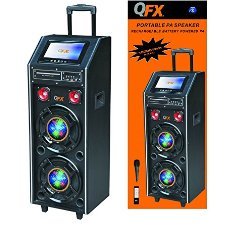
Figura 1: Față view of the QFX PBX-410204BTD PA Speaker. This image displays the speaker's front panel, including the dual 10-inch woofers, the central control panel with various buttons and knobs, and the integrated disco light.
3.1. Panoul de control pesteview
- Întrerupător: Pornește / oprește unitatea.
- Controlul volumului: Reglează volumul principal.
- Intrare microfon: Connects a wired microphone.
- Echo/Mic Volume: Adjusts microphone volume and echo effect.
- Port USB: Pentru redarea de pe o unitate flash USB.
- Slot pentru card SD: Pentru redarea de pe card SD.
- Butonul de mod: Switches between input modes (Bluetooth, USB, SD, FM, DVD).
- Buton Redare/Pauză: Controlează redarea media.
- Butoane de urmărire anterioară/următoare: Navigates media tracks or FM stations.
- Antena FM: Pentru o recepție radio FM îmbunătățită.
- Disco Light Switch: Turns the disco light ON/OFF.
- DVD player: Integrated DVD disc slot and controls.
- Intrare AC: Connects the power adapter for charging and AC operation.
- DC 12V Input/Output: For external 12V power source or output.
4. Configurare
4.1. Încărcarea inițială
Before first use, fully charge the internal battery. Connect the power adapter to the AC input on the speaker and plug it into a standard wall outlet. The charging indicator will illuminate. Charging typically takes several hours. The indicator will change or turn off once fully charged.
4.2. Plasare
Place the speaker on a stable, flat surface. Ensure there is adequate space around the unit for ventilation. Avoid placing it near direct sunlight, heat sources, or areas with high humidity.
5. Instrucțiuni de utilizare
5.1. Pornire/Oprire
To power on the unit, toggle the Power Switch to the "ON" position. To power off, toggle it to "OFF".
5.2. Conexiune Bluetooth
- Turn on the speaker and press the "Mode" button until "Bluetooth" mode is selected.
- Enable Bluetooth on your mobile device or audio player.
- Caută "QFX PBX-410204BTD" (or similar name) in your device's Bluetooth settings.
- Selectați difuzorul pentru asociere. Se va auzi un ton de confirmare după conectarea reușită.
- Acum poți reda sunet de pe dispozitiv prin difuzor.
5.3. Redare de pe USB/card SD
- Introduceți o unitate flash USB sau un card SD în slotul corespunzător.
- Press the "Mode" button to select "USB" or "SD" mode. The unit will automatically begin playing compatible audio files.
- Folosește butoanele Redare/Pauză, Anterior și Următor pentru a controla redarea.
5.4. Radio FM
- Press the "Mode" button to select "FM" mode.
- Extindeți antena FM pentru o recepție mai bună.
- Apăsați și țineți apăsat butonul Redare/Pauză pentru a scana automat și a salva posturile FM disponibile.
- Folosiți butoanele Anterior/Următor pentru a naviga prin posturile salvate.
5.5. Redare DVD
- Insert a DVD disc into the DVD slot.
- Press the "Mode" button to select "DVD" mode.
- Use the integrated DVD controls or the remote control to manage playback.
5.6. Funcția Karaoke
- Connect a microphone to the Microphone Input jack.
- Adjust the Microphone Volume and Echo controls to your preference.
- Play music from any source (Bluetooth, USB, SD, DVD) and sing along.
5.7. Disco Light
Toggle the Disco Light Switch to activate or deactivate the integrated disco light feature.
6. Întreținere
6.1. Curatenie
Wipe the exterior of the unit with a soft, dry cloth. Do not use abrasive cleaners, waxes, or solvents. Ensure the unit is powered off and unplugged before cleaning.
6.2. Îngrijirea bateriei
To prolong battery life, fully charge the unit before storing it for extended periods. Recharge the battery at least once every 3 months if not in regular use. Avoid completely draining the battery frequently.
6.3. Depozitare
Depozitați difuzorul într-un loc răcoros și uscat, ferit de lumina directă a soarelui și de temperaturi extreme.
7. Depanare
| Problemă | Cauza posibila | Soluţie |
|---|---|---|
| Fără putere | Unit not plugged in; Power switch off; Battery drained. | Check power connection; Turn power switch ON; Charge the battery. |
| Nici un sunet | Volum prea mic; Mod de introducere incorect; Dispozitiv neîmperecheat (Bluetooth). | Măriți volumul; Selectați modul de intrare corect; Reconectați dispozitivul Bluetooth. |
| Bluetooth nu se conectează | Speaker not in Bluetooth mode; Device too far; Interference. | Ensure speaker is in Bluetooth mode; Move device closer; Avoid obstacles. |
| Nu se redă pe USB/SD | Incorect file formatare; card USB/SD corupt; mod incorect. | Asigura files are compatible (e.g., MP3); Try another USB/SD card; Select correct mode. |
| Recepție slabă a radioului FM | Antena nu este extinsă; Semnal slab. | Fully extend the FM antenna; Try repositioning the unit. |
8. Specificații
- Model: PBX-410204BTD
- Tip difuzor: Difuzor PA alimentat cu baterii
- Dimensiune woofer: 2 x 10 inci
- Dimensiune Tweeter: 2 x 1 inchi
- Conectivitate: Bluetooth, USB, SD, FM Radio, DVD
- Caracteristici speciale: Disco Light, Karaoke
- Baterie: Reîncărcabilă 12V 12AH
- Intrare AC: 100-240V
- Intrare/Ieșire CC: 12V
- Putere de ieșiretage: 346 wați
- Dimensiuni pachet: 100.33 x 43.18 x 43.18 cm (39.5 x 17 x 17 țoli)
- Greutatea articolului: 29.94 kg (66 livre)
9. Garanție și asistență
For warranty information and technical support, please refer to the warranty card included with your product or contact QFX customer service directly. Keep your purchase receipt as proof of purchase.
Notă: Termenii specifici ai garanției pot varia în funcție de regiune și de comerciant.


