Introducere
This manual provides comprehensive instructions for the installation, operation, and maintenance of your Sony XM-GTX6041 600W Amplifier. Designed for car audio systems, this 4-channel amplifier delivers clear, precise, and distortion-free sound. It features advanced thermal control and a high-capacity air cooling system to ensure stable performance even under demanding conditions. Please read this manual thoroughly before using the amplifier to ensure proper setup and to maximize its performance and longevity.
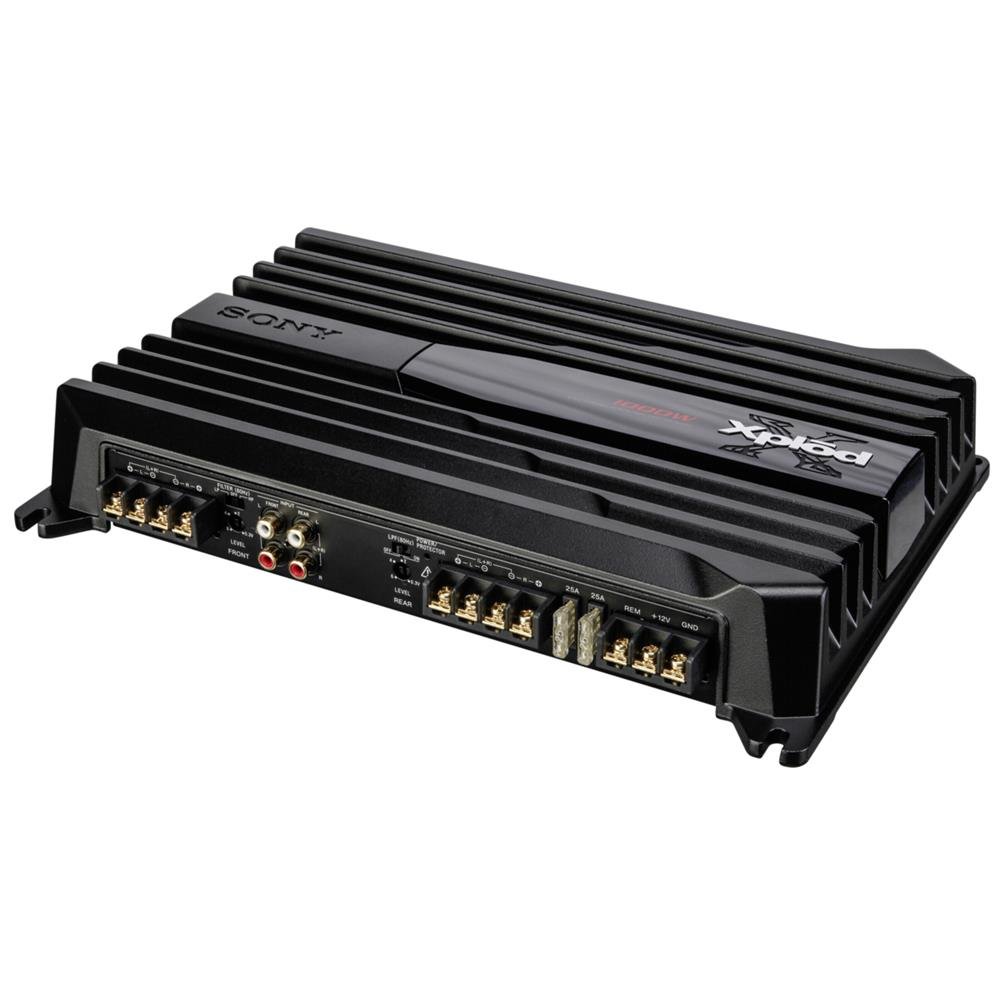
Image: Sony XM-GTX6041 600W AmpAceastă imagine arată partea de sus view al amplifier unit, highlighting its compact design and connection terminals.
Informații de siguranță
- Alimentare electrică: Conectați amplifier only to a 12V DC car battery with a negative ground.
- Cablaj: Ensure all wiring is correctly connected and insulated to prevent short circuits and electrical hazards. Use appropriate gauge wires for power and ground connections.
- Montare: Montați ampAșezați refrigeratorul în siguranță într-un loc care permite o ventilație adecvată și este protejat de umiditate și căldură excesivă.
- Niveluri de volum: Avoid prolonged listening at extremely high volume levels to prevent hearing damage.
- Instalare profesionala: If you are unsure about any installation steps, consult a qualified professional car audio installer.
Înființat
1. Despachetarea
Îndepărtați cu grijă amplifier and all accessories from the packaging. Verify that all components are present before proceeding with installation.
2. Locația de montare
Alegeți o locație de montare care să fie:
- Dry and protected from moisture.
- Well-ventilated to allow for proper heat dissipation.
- Secure and stable to prevent movement during vehicle operation.
- A se păstra departe de lumina directă a soarelui sau de surse de căldură.
Locațiile comune includ sub un scaun, în portbagaj sau în spatele unui panou.
3. Conexiuni de cablare
Follow these general guidelines for wiring your ampmai în viață:
- Putere (BATT+): Connect a heavy-gauge power cable directly from the positive terminal of your car battery to the BATT+ terminal on the amplifier. Install an in-line fuse (not supplied) as close to the battery as possible.
- Masa (GND): Conectați un cablu de împământare de grosime mare la terminalul GND de pe amplifier to a clean, unpainted metal surface of the vehicle chassis. Ensure a solid electrical connection.
- La distanță (REM): Conectați un fir de pornire de la distanță de la ieșirea de la distanță a unității principale la terminalul REM de pe amplifizer. Aceasta va transforma ampporniți și opriți activatorul cu unitatea principală.
- Intrare RCA: Connect RCA cables from your head unit's pre-out outputs to the RCA input jacks on the ampmai în viață.
- Ieșire difuzor: Connect your speakers to the speaker output terminals on the amplifier. Ensure correct polarity (+ to + and - to -) for each speaker. The XM-GTX6041 supports 4-channel speaker configurations.
Always double-check all connections before applying power to the ampmai în viață.
Instrucțiuni de operare
1. Pornire/Oprire
The amplifier will automatically power on when your head unit is turned on (via the remote wire connection) and power off when the head unit is turned off.
2. Reglarea controlului amplificării
The gain control (often labeled "LEVEL" or "GAIN") matches the ampsensibilitatea de intrare a amplificatorului la nivelul de ieșire al unității principale. Pentru a seta amplificarea:
- Rotiți ampcontrolul amplificării lifizerului la setarea minimă (complet în sens invers acelor de ceasornic).
- Turn your head unit volume up to about 75-80% of its maximum level.
- Creșteți încet ampcontrolul de amplificare al amplificatorului până când auziți distorsiuni, apoi reduceți-l ușor până când sunetul este clar.
The gain control is not a volume control; it is for matching signal levels.
3. Crossover Settings (High-Pass / Low-Pass Filters)
The XM-GTX6041 features built-in high-pass (HPF) and low-pass (LPF) filters to optimize sound output for different speakers:
- Filtru de trecere înaltă (HPF): Permite frecvențe mai sus the set point to pass through. Use for full-range speakers or tweeters to prevent them from playing low bass frequencies they cannot reproduce effectively.
- Filtru trece-jos (LPF): Permite frecvențe de mai jos the set point to pass through. Use for subwoofers to ensure they only reproduce bass frequencies.
Adjust these filters according to your speaker types and desired sound profile. Refer to your speaker's specifications for recommended crossover points.
Întreţinere
1. Curatenie
Curățați periodic exteriorul amplifier with a soft, dry cloth. Do not use harsh chemicals or abrasive cleaners. Ensure that the cooling fins and ventilation openings are free from dust and debris to maintain optimal airflow.
2. Managementul termic
The XM-GTX6041 features an advanced thermal control system and high-capacity air cooling to prevent overheating. Ensure that the amplifier is mounted in a location with sufficient air circulation. Avoid blocking any ventilation openings. If the amplifier enters thermal protection mode (indicated by a protection light, if present), reduce the volume or allow it to cool down before continued use.
Depanare
| Problemă | Cauza posibila | Soluţie |
|---|---|---|
| Fara putere / AmpLifierul nu se aprinde |
|
|
| Fără ieșire de sunet |
|
|
| Sunet distorsionat |
|
|
| Amplifier overheats / Enters protection mode |
|
|
Specificații
| Caracteristică | Detaliu |
|---|---|
| Marca | Sony |
| Numărul de model | XMGTX6041 |
| Numărul de canale | 4 |
| Putere maximă de ieșire | 600 wați |
| Voltage | 12 volți (DC) |
| Tip de montare | Montare la suprafață |
| Temperatura de operare | Până la 125 de grade Celsius |
| Dimensiuni (L x l x H) | 10 x 10 x 10 centimetri |
| Codul Internațional al Articolului (CPU) | 04905524761740 |
Garanție și suport
Informații despre garanție
Specific warranty details for the Sony XM-GTX6041 amplifier are typically provided with the product at the time of purchase or can be found on the official Sony website. Vă rugăm să păstrați dovada achiziției pentru reclamații în garanție.
Asistență pentru clienți
For further assistance, technical support, or service inquiries, please contact Sony customer support through their official website-ul sau informațiile de contact furnizate în documentația produsului.


