Introducere
This manual provides essential instructions for the safe and efficient operation of your Panasonic DVD-LS83 8.5-Inch Portable DVD Player. Please read this manual thoroughly before using the device and retain it for future reference. This player offers an 8.5-inch diagonal widescreen LCD display and supports multi-format playback including DVD, DivX, DVD-RAM, DVD-R, DVD-RW, CD, CD-R, CD-RW, JPEG, and MPEG4.
Informații de siguranță
Pentru a asigura o funcționare sigură și a preveni deteriorarea, respectați următoarele precauții:
- Nu expuneți unitatea la ploaie, umezeală sau temperaturi extreme.
- Avoid placing the unit near heat sources such as radiators or stoves.
- Use only the specified power adapters (AC adapter and Car DC adapter) provided with the unit.
- Nu încercați să dezasamblați sau să modificați unitatea. Apelați la personal calificat pentru orice service.
- Țineți unitatea departe de câmpuri magnetice puternice.
- Asigurați o ventilație corespunzătoare; nu blocați nicio deschidere de ventilație.
Conținutul pachetului
Vă rugăm să verificați dacă toate articolele sunt prezente în coletul dumneavoastră:
- Panasonic DVD-LS83 Portable DVD Player
- Baterie reîncărcabilă
- Adaptor AC
- Car DC Adapter
- Suport de montare pentru tetiera
- Manual de utilizare (acest document)
Produs terminatview
Familiarize yourself with the components of your portable DVD player.
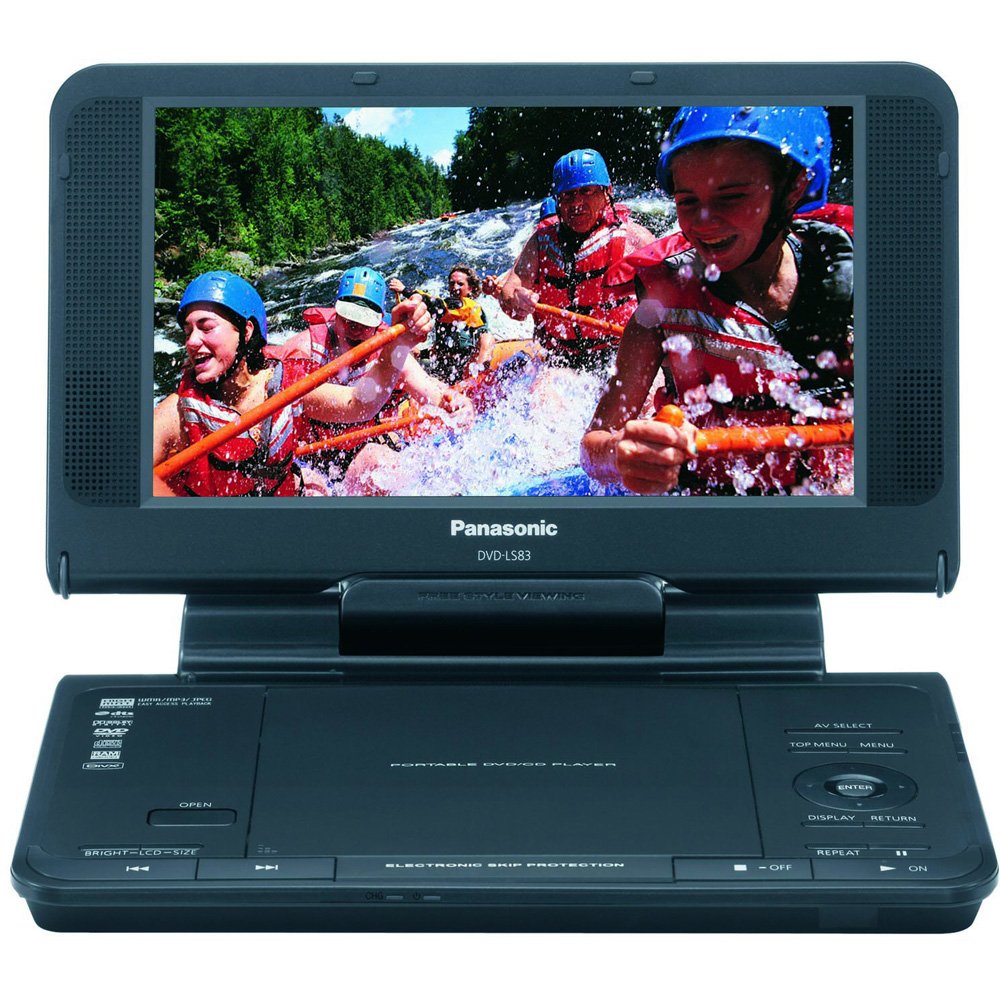
This image displays the Panasonic DVD-LS83 portable DVD player with its 8.5-inch screen open, revealing the disc compartment and control buttons on the main unit. The player features an integrated screen that can swivel for optimal viewing angles. Control buttons for playback, menu navigation, and volume are typically located on the front panel or along the sides of the main unit. Various ports for power, headphones, and AV output are usually found on the side panels.
Înființat
Încărcarea bateriei
Before initial use, fully charge the included rechargeable battery. Connect the AC adapter to the player's DC IN jack and then to a standard wall power outlet. The battery indicator light will illuminate to show charging status. A full charge provides up to 6 hours of playback time, depending on screen brightness and usage. Alternatively, use the included Car DC Adapter to power or charge the unit while in a vehicle.
Mounting in a Vehicle
The included headrest mounting bracket allows for secure attachment of the player to a vehicle's headrest. Follow the specific instructions provided with the bracket for proper installation. Ensure the player is securely fastened and does not obstruct the driver's view or interfere with vehicle safety features before driving.
Instrucțiuni de operare
Pornire/Oprire
To turn the player on, press and hold the PUTERE button until the screen illuminates. To turn it off, press and hold the PUTERE button again until the screen goes dark.
Inserting and Removing Discs
Open the disc compartment cover. Carefully place a compatible disc (DVD, CD, DivX) onto the spindle with the label side facing up. Gently press the disc until it clicks into place. Close the compartment cover firmly. To remove a disc, press the DESCHIDE button, gently lift the disc from its edges, and store it in its protective case.
Controale de bază de redare
- REDARE/PAUZĂ: Press to start playback or to pause/resume the current content.
- STOP: Press to stop disc playback.
- SARE (Forward/Backward): Press to skip to the next or previous track/chapter.
- FF / REW (Fast Forward/Rewind): Press and hold to fast forward or rewind through the content.
Reglarea volumului
Utilizați VOLUM +/- buttons or the dedicated volume dial, typically located on the side or front panel, to adjust the audio output level.
Setări ecran
The 8.5-inch widescreen LCD display features an LCD Selector cu NORMAL/FULL modes to adjust the aspect ratio of the displayed content. You can also adjust screen brightness and contrast via the on-screen menu or dedicated controls for optimal viewing. Be aware that higher brightness settings may reduce battery life.
Redare multiformat
The player supports a wide range of formats including DVD, DivX, DVD-RAM, DVD-R, DVD-RW, CD, CD-R, CD-RW, JPEG, and MPEG4. Ensure discs are clean and free from scratches or damage for optimal performance.
Utilizarea căștilor
Two headphone terminals are provided for private listening. Connect standard 3.5mm stereo headphones to either jack. Adjust the volume to a comfortable level to protect your hearing.
Întreţinere
Curățarea unității
Wipe the exterior of the player with a soft, dry cloth. For stubborn dirt, slightly dampen the cloth with water. Do not use abrasive cleaners, solvents, or alcohol, as these can damage the finish. Clean the disc lens periodically with a specialized DVD lens cleaner disc (not included) to maintain optimal playback quality.
Îngrijirea bateriei
To prolong battery life, fully charge the battery before first use and after long periods of inactivity. Avoid exposing the battery to extreme temperatures (hot or cold), as this can reduce its capacity and lifespan. If storing the unit for an extended period, charge the battery to approximately 50% capacity.
Depozitare
When not in use, store the player in a cool, dry place, away from direct sunlight, high humidity, and extreme temperatures. Keep the disc compartment closed to prevent dust accumulation.
Depanare
If you encounter problems with your player, refer to the following common issues and solutions:
Fără putere
- Ensure the AC adapter or car adapter is securely connected to both the player and the power source.
- Check if the rechargeable battery is sufficiently charged.
- Apăsați și țineți apăsat ferm butonul de pornire timp de câteva secunde.
Discul nu se redă
- Asigurați-vă că discul este introdus corect, cu eticheta în sus.
- Check if the disc is clean and free from scratches, smudges, or damage. Clean with a soft, lint-free cloth if necessary.
- Verify that the disc format is supported by the player (e.g., DVD, CD, DivX).
Fără sunet sau volum scăzut
- Adjust the volume control on the player.
- If using headphones, ensure they are fully plugged into one of the headphone terminals and are functional.
- Check the audio settings within the player's on-screen menu.
Calitate slabă a imaginii
- Curățați bine discul.
- Adjust screen brightness and contrast settings via the player's controls or menu.
- Ensure the LCD Selector is set appropriately (NORMAL/FULL) for the content being viewed.
Specificații
| Caracteristică | Detaliu |
|---|---|
| Marca | Panasonic |
| Numărul de model | DVD-LS83 |
| Dimensiunea ecranului | 8.5 inchi |
| Tip de afișare | LCD |
| Tipuri de suport acceptate | DVD, DivX, DVD-RAM, DVD-R, DVD-RW, CD, CD-R, CD-RW, JPEG, MPEG4 |
| Playback Time (Battery) | Up to 6 hours (with included rechargeable battery) |
| Dimensiunile produsului | 7.2 x 9.5 x 2.1 inci |
| Greutatea articolului | 2 lire sterline |
| Culoare | Negru |
| Data primului disponibil | 21 februarie 2008 |
Garanție și suport
For detailed warranty information, technical support, or service inquiries, please refer to the documentation included with your original purchase. You may also visit the official Panasonic website for the most current support resources and contact information.


