Introducere
This manual provides instructions for the setup, operation, and maintenance of your Logitech Wingman Force Joystick, model 963155-0403. This device is designed to enhance your PC gaming experience with force feedback technology and programmable controls.
Conținutul pachetului
Verificați dacă pachetul dvs. conține următoarele articole:
- Logitech Wingman Force Joystick
- Adaptor de alimentare
- USB Cable (integrated or separate)
- Software CD (if applicable, for WingMan Software)
- Manual de utilizare (acest document)
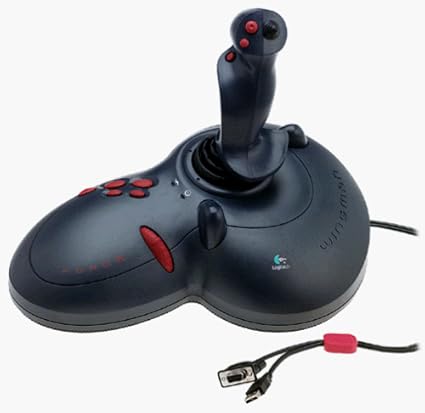
Figure 1: The Logitech Wingman Force Joystick packaging, showing the joystick and its features.
Înființat
- Conectare alimentare: Plug the power adapter into the joystick and then into a standard electrical outlet.
- Conectați-vă la PC: Connect the joystick's USB cable to an available USB port on your computer. The joystick also supports serial interfaces.
- Instalați software-ul: Insert the WingMan Software CD (if provided) into your computer's CD-ROM drive and follow the on-screen instructions to install the drivers and WingMan Software. If no CD is provided, drivers may be automatically installed by your operating system or available for download from the Logitech support website-ul.
- Cerințe de sistem: Ensure your computer runs a compatible Windows operating system.
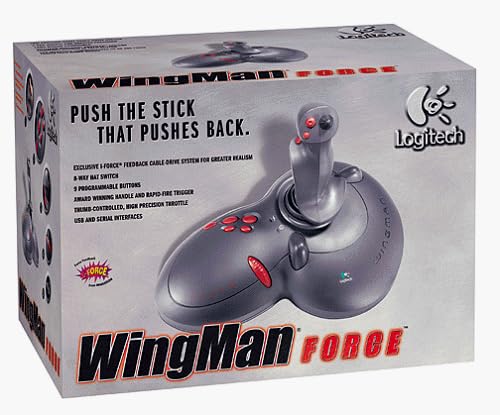
Figure 2: The Logitech Wingman Force Joystick, illustrating its ergonomic design and button layout.
Instrucțiuni de operare
Comenzi terminateview
- Joystick Handle: Provides precise control for in-game movement.
- 9 butoane programabile: Customize these buttons using the WingMan Software for various in-game actions.
- Comutator pălărie cu 8 poziții: Located on top of the joystick, this switch allows for quick camera views or directional commands.
- Thumb-Controlled Throttle: Adjust speed or thrust with the integrated throttle control.
Force Feedback Technology
The Wingman Force Joystick utilizes Logitech's exclusive I-Force force feedback technology with a cable-drive system. This system provides realistic tactile feedback, such as vibrations from impacts, recoil from weapons, and resistance during maneuvers, enhancing immersion in compatible games.
Using WingMan Software
The WingMan Software allows you to:
- Program the 9 buttons for specific game functions.
- Creați și salvați mai multe profesioniștifiles pentru diferite jocuri.
- Adjust force feedback intensity settings.
- Calibrate the joystick for optimal performance.
Refer to the WingMan Software's help documentation for detailed instructions on customization and profile management.
Întreţinere
To ensure the longevity and optimal performance of your joystick:
- curatenie: Use a soft, dry cloth to wipe the surface of the joystick. Avoid using abrasive cleaners or solvents.
- Depozitare: Store the joystick in a clean, dry environment away from extreme temperatures and direct sunlight.
- Îngrijirea cablului: Avoid bending or crimping the cables excessively.
Depanare
- Problem: Joystick not recognized by computer.
- Soluţie:
- Asigurați-vă că cablul USB este conectat corect atât la joystick, cât și la computer.
- Încercați să vă conectați la un alt port USB.
- Verify that the power adapter is properly connected and the joystick is receiving power.
- Reinstall the WingMan Software drivers.
- Problem: Inconsistent or absent force feedback.
- Soluţie:
- Check the force feedback settings within the WingMan Software and ensure they are set to an appropriate level.
- Ensure the game you are playing supports force feedback and that it is enabled in the game's settings.
- Restart your computer and the game.
- Verificați că toate conexiunile sunt securizate.
- Problem: Buttons or controls are unresponsive.
- Soluţie:
- Calibrate the joystick using the WingMan Software.
- Ensure the joystick drivers are up to date.
- Test the joystick in a different game or application to determine if the issue is game-specific.
Specificații
| Caracteristică | Detaliu |
|---|---|
| Numărul de model | 963155-0403 |
| Marca | Logitech |
| Tip controler | Joystick |
| Tehnologia de conectivitate | USB, serial |
| Dispozitive compatibile | PC-uri Windows |
| Dimensiunile produsului | 13.5 x 9.63 x 9.25 inci |
| Greutatea articolului | 4.14 lire sterline |
| Feedback de forță | I-Force feedback cable-drive system |
| Butoane | 9 butoane programabile |
| Comutator de pălărie | Comutator de pălărie cu 8 căi |
| Accelerație | Thumb-controlled, high precision throttle |
Garanție și suport
Pentru informații despre garanție și asistență tehnică, consultați documentația inclusă împreună cu produsul sau vizitați pagina oficială de asistență Logitech. website. De obicei, puteți găsi acolo drivere, întrebări frecvente și informații de contact pentru serviciul clienți.
Suport Logitech Website: www.logitech.com/support