


ReolinkTech RLA-JBLI Junction Box

Reolink Operational Instructions
Apply to: RLA-JBL1
Technical Support
If you need any technical help, please visit our official support site and contact our support team before returning the products: https://support.reolink.com.
Company Information
REOLINK INNOVATION LIMITED
FLAT/RM 705 7/F FA YUEN COMMERCIAL BUILDING 75-77 FA YUEN STREET MONG KOK KL HONG KONG
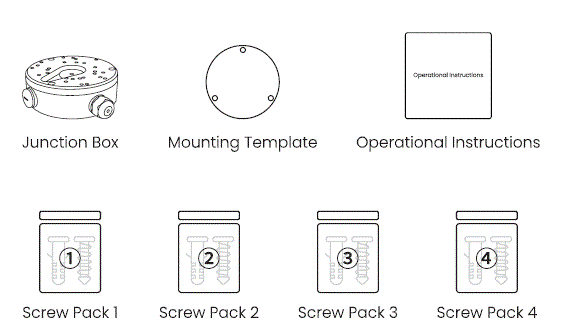
What’s in the Box
Product Overview

- Front Plate
- Rubber Grommet
- Camera Mounting Holes
- Base
- Snap Hook Chain
- Back Cable Entry
- Side Cable Entry
- Cable Gland
Compatibility
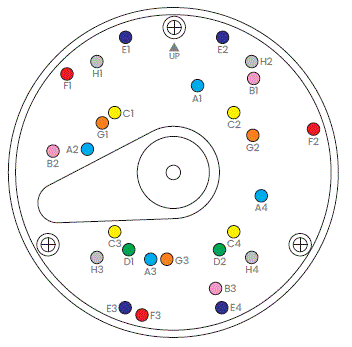
The pre-drilled screw patterns of RLA-JBL1 Junction Box support different Reolink cameras as shown below. For the latest compatibility list, please visit: Reolink Support.
- Pattern A: D500, D800, D1200, RLC-520A, RLC-820A, RLC-833A, RLC-1224A
- Pattern B: V500, V800, V1200, V800W, RLC-540A, RLC-840A, RLC-840WA, RLC-1240A
- Pattern C (for Wall Mount): E1 Outdoor, E1 Outdoor C, E1 Outdoor S, E1 Outdoor SE PoE, E1 Outdoor PoE
- Pattern D (for Ceiling Mount): E1 Outdoor, E1 Outdoor C, E1 Outdoor S, E1 Outdoor SE PoE, E1 Outdoor PoE
- Pattern E: RLC-823A 16X
- Pattern F: RLC-843A, RLC-843WA, Reolink Duo 2V PoE, Reolink Duo 3V PoE
- Pattern G: FE-P, FE-W
- Pattern H: RLC-823S1, RLC-823S2, RLC-823S1W
Installation Guide
Note: Installation steps may vary by camera model. The following instructions are for a vandal-proof camera. For other models, please refer to: Reolink Support.
- Route the Power/Network Cable into Box
 Unscrew the box.
- Feed the cable(s) through the entry point.

- Mount the Junction Box Base to the Wall

- Mount the Camera to the Junction Box
- Thread the camera’s tail cable(s) through the front plate.
- Connect & organize the cables.

- Secure the front plate to the box.
- Mount the camera to the junction box.

Note: Choose the correct screw pack for your camera model:
- For Pattern-E cameras, use Screw Pack 3.
- For Pattern-H cameras, use Screw Pack 4.
- For all other patterns, use Screw Pack 2.
Specifications
 Important Safety Instructions
Please read the instructions carefully before using the device.
- Replace only with the same or equivalent type of accessories recommended by Reolink.
- Do not use the device in an environment that exceeds the recommended temperature range.
- Do not use the device in an environment that exceeds the recommended humidity range.
- Do not attempt to disassemble, repair, or alter the device by yourself.
- Always follow the local safety laws and regulations when using the device.
- The device contains (or comes with) small components, small plastic elements, and other small parts that may cause choking hazards. Keep the device and its accessories out of reach of children. Consult a physician immediately if small parts are swallowed.
- The device contains (or comes with) cables or cords that may cause strangulation hazards. Keep the device and its accessories out of reach of children.
Legal Disclaimer
To the maximum extent permitted by applicable law, this document and the product described, with its hardware, software, firmware, and services, are delivered on an “as-is” and “as-available” basis, with all faults and without warranty of any kind. Reolink disclaims all warranties, express or implied, including but not limited to, warranties of merchantability, satisfactory quality, fitness for a particular purpose, accuracy, and non-infringement of third-party rights. In no event will Reolink, its directors, officers, employees, or agents be liable to you for any special, consequential, incidental, or indirect damages, including but not limited to damages for loss of business profits, business interruption, or loss of data or documentation, in connection with the use of this product, even if Reolink has been advised of the possibility of such damages.
Notification of Compliance
 Correct Disposal of This Product
This marking indicates that this product should not be disposed of with other household wastes throughout the EU. To prevent possible harm to the environment or human health from uncontrolled waste disposal, recycle it responsibly to promote the sustainable reuse of material resources. To return your used device, please use the return and collection systems or contact the retailer where the product was purchased. They can take this product for environmentally safe recycling.
Limited Warranty
This product comes with a 2-year limited warranty that is valid only if purchased from Reolink Official Store or a Reolink authorized reseller. Learn more: https://reolink.com/warranty-and-return/.
- Terms and Privacy
Use of the product is subject to your agreement to the Terms of Service and Privacy Policy at reolink.com. - Terms of Service
By using the Product Software that is embedded in the Reolink product, you agree to the terms and conditions between you and Reolink. Learn more: https://reolink.com/terms-conditions/ - Technical Support
If you need any technical help, please visit our official support site and contact our support team before returning the products, https://support.reolink.com. - Trademarks Acknowledgement
“Reolink” and other Reolink’s trademarks and logos are the properties of Reolink. Other trademarks and logos mentioned are the properties of their respective owners.
FAQ
-
What should I do if I need to return the product?
Contact the support team before returning any products.
What is included in the box?
The box includes a Junction Box, Mounting Template, Operational Instructions, and four Screw Packs.
What are the dimensions of the Junction Box?
The dimensions are 5.3
How do I ensure safe disposal of the product?
Use return and collection systems or contact the retailer for environmentally safe recycling.
Documents / Resources
 |
ReolinkTech RLA-JBLI Junction Box [pdf] Instruction Manual A1, A2, A3, A4, B1, B2, B3, C1, C2, C3, C4, D1, D2, E1, E2, E3, E4, F1, F2, F3, G1, G2, G3, H1, H3, H4, RLA-JBLI Junction Box, RLA-JBLI, Junction Box, Box |