1. Introdução
The CUBOT Kingkong 11 is a rugged 5G smartphone designed for durability and high performance. It features a powerful processor, extensive memory, a large battery, and an advanced camera system, all housed in a robust, water-resistant, and dustproof body.
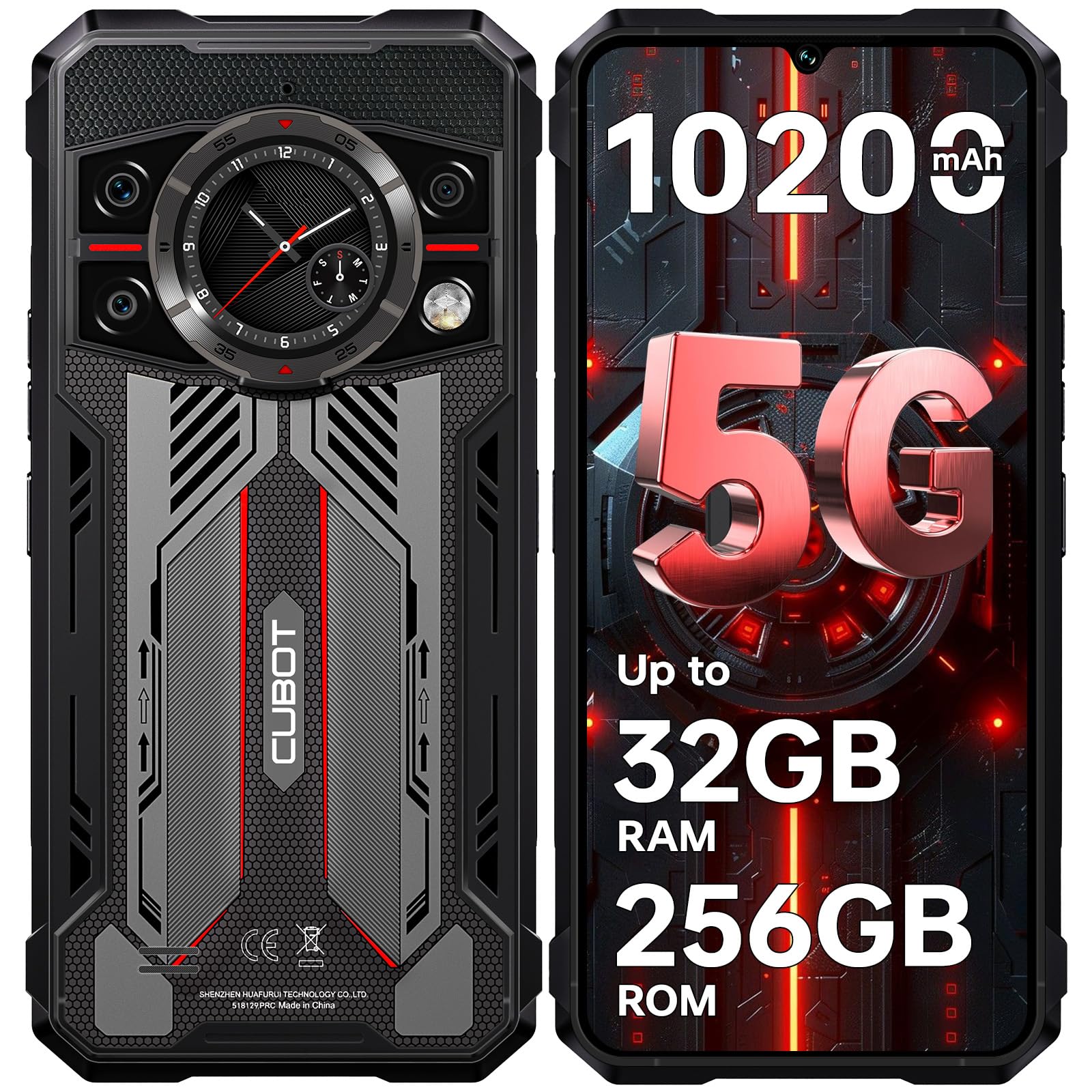
Imagem: Frente e verso view of the CUBOT Kingkong 11 5G smartphone, highlighting its rugged design.
2. Configuração inicial
2.1. Inserindo cartões SIM e cartão MicroSD
The CUBOT Kingkong 11 supports dual SIM cards and a MicroSD card for expanded storage.
- Localize a bandeja do cartão SIM na lateral do aparelho.
- Utilize a ferramenta de ejeção do SIM fornecida para abrir a bandeja.
- Insira cuidadosamente o cartão Nano-SIM e/ou o cartão MicroSD nos slots designados. Certifique-se de que esteja na orientação correta.
- Empurre cuidadosamente a bandeja de volta para dentro do dispositivo até que fique nivelada com a lateral.

Image: Close-up of the CUBOT Kingkong 11 showing the SIM card tray with waterproof seals.
2.2. Powering On and Initial Charge
- Press and hold the power button located on the side of the device until the CUBOT logo appears.
- For first-time use, it is recommended to fully charge the device. Connect the USB-C cable to the phone and the 33W fast charger to a power outlet.
- O indicador de bateria na tela mostrará o status do carregamento.

Image: Illustration of the 10200mAh battery capacity and 33W fast charging capability of the CUBOT Kingkong 11.
2.3. Configuração de software
Follow the on-screen prompts to complete the initial setup, including language selection, Wi-Fi connection, Google account login, and security settings (Face ID/Fingerprint).
3. Operação
3.1. Sistema Operacional Android 15
The CUBOT Kingkong 11 runs on Android 15, offering an intuitive user interface and enhanced features. Navigate through apps, customize settings, and utilize smart functions for an optimized experience.

Image: Screenshot of the Android 15 operating system interface on the CUBOT Kingkong 11.
3.2. Tela principal (6.72" FHD+ 120Hz)
The 6.72-inch FHD+ display provides vibrant visuals with a 120Hz refresh rate for smooth scrolling and gaming. The 1080x2400 resolution ensures clear and detailed content viewindo.

Image: Visual representation of the 6.72-inch FHD+ display with 120Hz refresh rate on the CUBOT Kingkong 11.
3.3. Rear Smart Display (1.46")
The 1.46-inch rear smart display provides quick access to essential information such as time, notifications, battery status, and compass without activating the main screen. This feature is useful for quick glances during activities.

Image: The 1.46-inch rear smart display of the CUBOT Kingkong 11, showing widgets for clock, camera, music, battery, calls, compass, and alarm.
3.4. Sistema de Câmeras
The device features a versatile quad-camera system:
- Câmera principal de 108 MP: Captures high-resolution photos with impressive detail.
- Câmera frontal de 32 MP: For high-definition selfies and video calls.
- Câmera de visão noturna de 24 MP: Equipped with infrared LEDs for clear imaging in complete darkness.
- Lente macro de 8 MP: Allows for close-up photography, capturing intricate details of small subjects.

Imagem: Acimaview of the CUBOT Kingkong 11's quad-camera system, including the 108MP main, 32MP front, 24MP night vision, and 8MP macro lenses, with exampas fotos.
3.5. Conectividade e Navegação
The Kingkong 11 supports 5G full-band connectivity for fast data speeds. It includes NFC for contactless payments and data transfer, and a quadruple positioning system (GPS+GLONASS+BeiDou+Galileo) for accurate navigation.

Image: Graphic illustrating the CUBOT Kingkong 11's 5G ultra-fast global coverage and connectivity features.
4. Manutenção
4.1. Durabilidade e Proteção
The CUBOT Kingkong 11 is certified with IP68/IP69K for dust and water resistance, and MIL-STD-810H for shock resistance. It can withstand submersion in water up to 5 meters for 30 minutes.
- Resistência à água: Ensure all ports (USB-C, SIM tray) are properly sealed before exposing the device to water. After exposure to water, dry the device thoroughly before charging.
- Resistência à poeira: The device is designed to prevent dust ingress. Clean any accumulated dust from ports and crevices using a soft, dry brush.
- Resistência ao choque: While rugged, avoid intentional drops or impacts from extreme heights to preserve the device's integrity.

Image: Visual representation of the CUBOT Kingkong 11's IP68, IP69K, and MIL-STD-810H certifications for water, dust, and shock resistance.
4.2. Limpeza
Use a soft, lint-free cloth to clean the screen and body of the phone. For stubborn smudges, a slightly damp Pode-se usar um pano e, em seguida, secá-lo imediatamente.
5. Solução De Problemas
5.1. O dispositivo não liga
- Certifique-se de que a bateria esteja carregada. Conecte o carregador e aguarde alguns minutos antes de tentar ligar novamente.
- Pressione e mantenha pressionado o botão liga/desliga por pelo menos 10 a 15 segundos para forçar a reinicialização.
5.2. Poor Performance/Lag
- Feche aplicativos desnecessários em segundo plano.
- Limpe os dados em cache dos aplicativos usados com frequência.
- Ensure sufficient storage space is available. Consider moving large files to the MicroSD card or cloud storage.
- Reinicie o dispositivo periodicamente.
5.3. Problemas de carregamento
- Verify that the charging cable and adapter are securely connected and undamaged.
- Try using a different compatible charger and cable.
- Check the USB-C port for any debris or obstruction.
5.4. Problemas de conectividade de rede
- Ensure SIM cards are correctly inserted and activated.
- Check network settings (e.g., APN settings) with your service provider.
- Ative e desative o Modo Avião.
- Reinicie o dispositivo.
6. Especificações
| Recurso | Detalhe |
|---|---|
| Marca | CUBOT |
| Modelo | CUBOT KINGKONG 11 |
| Sistema operacional | Androide 15 |
| Processador | 5G Dimensity 7025 Octa-Core |
| BATER | Up to 32 GB (16 GB physical + 16 GB extended) |
| Armazenamento interno | 256 GB |
| Armazenamento expansível | Até 1 TB via cartão microSD |
| Tela principal | 6.72 inches FHD+ (1080x2400), 120Hz refresh rate, 450 nits brightness |
| Visor traseiro | 1.46 inches Smart Display |
| Câmera principal | 108 MP |
| Câmera Frontal | 32 MP |
| Night Vision Camera | 24 MP with IR LED |
| Lente Macro | 8 MP |
| Capacidade da bateria | 10200 mAh |
| Carregando | Carregamento rápido de 33 W, carregamento reverso OTG. |
| Conectividade | 5G, NFC, Dual SIM |
| Navegação | GPS+GLONASS+BeiDou+Galileo |
| Durabilidade | IP68/IP69K, MIL-STD-810H (Water resistant up to 5m for 30 min) |
| Segurança | Face ID, Fingerprint Sensor |
| Dimensões | 22.4 x 17.3 x 4.2 cm (Pacote) |
| Peso | 700 g (Embalagem) |

Image: Energy label for the CUBOT Kingkong 11, showing battery life and durability ratings. View Ficha de informações do produto EPREL
7. Garantia e Suporte
CUBOT offers a comprehensive support package for the Kingkong 11:
- Retornos: Devoluções sem complicações em até 30 dias após a compra.
- Garantia: A two-year warranty covers manufacturing defects.
- Suporte técnico: Long-term technical assistance is available.
- Atendimento ao Cliente: 24/7 online customer service is provided for any inquiries during your ownership.
For assistance, please contact CUBOT customer service through their official channels.


