1. Introdução
Thank you for choosing the occiam AI Translation Earbuds. These innovative open-ear earbuds are designed to provide seamless real-time language translation and high-quality audio playback. Featuring Bluetooth 5.3 connectivity and a comfortable earhook design, they are ideal for travel, business, and daily communication across language barriers. This manual provides detailed instructions on how to set up, operate, and maintain your earbuds to ensure optimal performance.
2. Informações de segurança
- Não exponha os fones de ouvido ou o estojo de carregamento a temperaturas extremas, umidade ou líquidos.
- Evite deixar o dispositivo cair, sofrer impactos ou desmontá-lo.
- Utilize apenas o cabo de carregamento fornecido ou um equivalente certificado.
- Não utilize os fones de ouvido em volumes excessivamente altos por períodos prolongados para evitar danos à audição.
- Mantenha fora do alcance de crianças e animais de estimação.
3. Conteúdo da embalagem
Por favor, verifique se a embalagem contém os seguintes itens:
- occiam AI Translation Earbuds (Left and Right)
- Estojo de carregamento
- Cabo de carregamento USB
- Manual do usuário

Image: The occiam AI Translation Earbuds, featuring a black body with a yellow earhook, are shown alongside their sleek black charging case. The earbuds have small indicator lights, and the charging case displays four white LED indicators on its front.
4. Produto acabadoview
The occiam AI Translation Earbuds are designed for comfort and functionality. They feature an open-ear design with a flexible earhook for a secure fit, allowing you to stay aware of your surroundings while enjoying audio or translation.
Componentes dos fones de ouvido:
- Corpo principal: Abriga o alto-falante e os componentes eletrônicos internos.
- Gancho de orelha: Flexible component that secures the earbud over the ear.
- Luz indicadora: Displays status (pairing, charging, power).
- Microfone: For voice input during calls and translation.
- Área de controle de toque: For managing playback, calls, and translation functions.
Estojo de carregamento:
- Portas de carregamento: Internal contacts for charging earbuds.
- Porta USB-C: Para carregar o próprio estojo.
- Indicadores LED: Show the charging status of the case.

Image: A single occiam AI Translation Earbud is shown with a blue earhook, highlighting its comfortable fit design against a starry background with large blue spheres.
5. Configuração
5.1 Carregamento Inicial
- Coloque os dois fones de ouvido no estojo de carregamento. Certifique-se de que estejam encaixados corretamente.
- Conecte o cabo de carregamento USB à porta de carregamento do estojo e ligue a outra extremidade a um adaptador de energia USB (não incluído) ou à porta USB de um computador.
- The LED indicators on the charging case will illuminate to show charging status. A full charge typically takes 1-2 hours for the case and earbuds.

Image: The occiam AI Translation Earbuds are shown with their charging case, illustrating the impressive battery life of up to 80 hours with the charging case, and 10 hours of playback per earbud.
5.2 Emparelhamento Bluetooth
- Abra o estojo de carregamento. Os fones de ouvido entrarão automaticamente no modo de emparelhamento e suas luzes indicadoras piscarão.
- No seu smartphone ou dispositivo com Bluetooth, acesse as configurações de Bluetooth.
- Procurar new devices and select "occiam D72" (or similar name) from the list.
- Once connected, the earbud indicator lights will stop flashing or turn off, and you will hear a confirmation tone.
5.3 App Download for Translation
For real-time translation functionality, you need to download the dedicated occiam translation app.
- Scan the QR code provided in the physical user manual or search for the "occiam Translate" app (or similar name) on your device's app store (iOS/Android).
- Install the app and follow the on-screen instructions to connect your earbuds within the app.
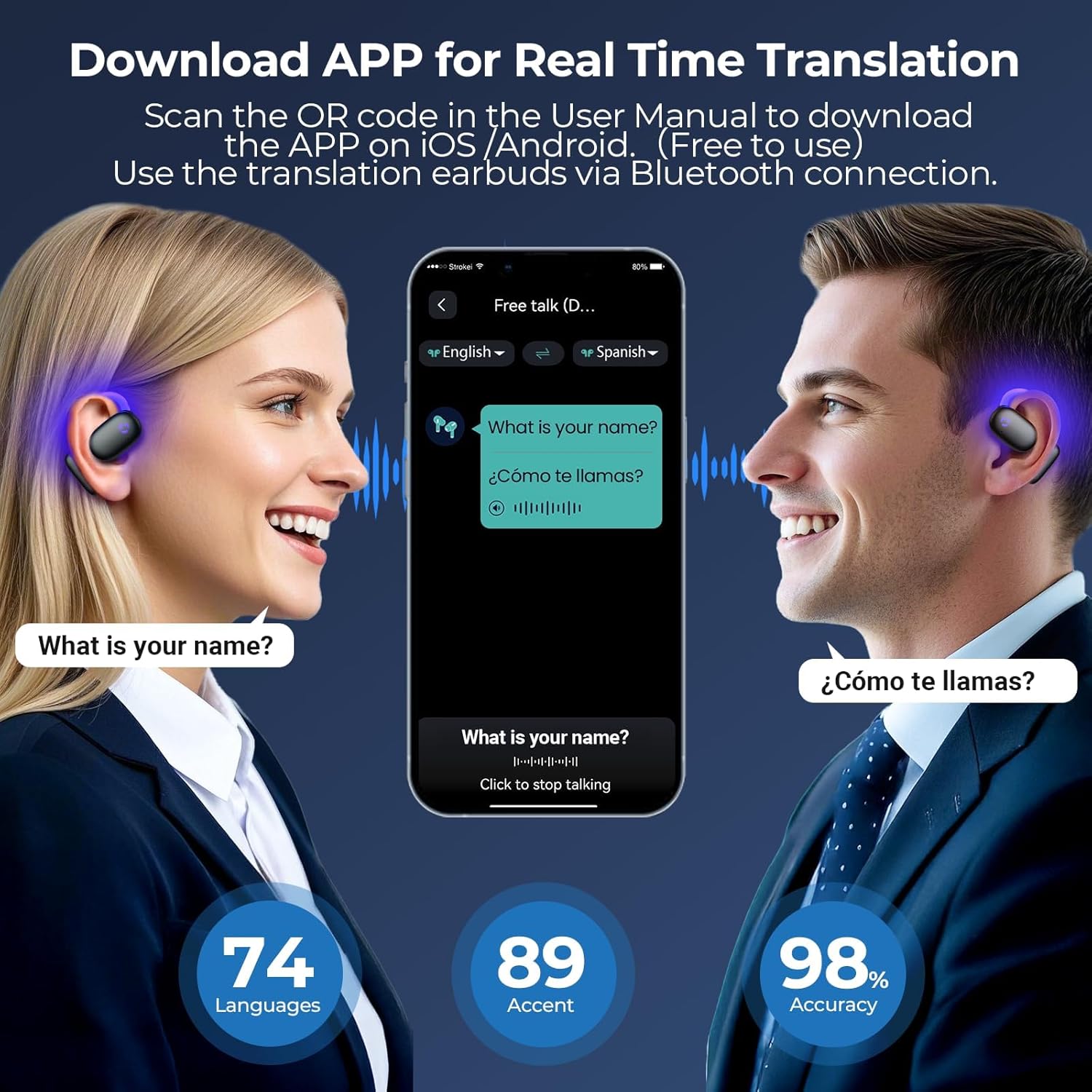
Image: Two individuals are shown using the occiam translation app on a smartphone, with speech bubbles indicating real-time translation between English and Spanish. The image highlights the app's ability to translate across 74 languages and 89 accents with 98% accuracy.
6. Instruções de operação
6.1 Ligar/Desligar
- Ligar: Abra o estojo de carregamento e os fones de ouvido ligarão automaticamente.
- Desligar: Coloque os fones de ouvido de volta no estojo de carregamento e feche a tampa. Eles desligarão automaticamente e começarão a carregar.
6.2 Reprodução de áudio
Once paired with your device, you can use the earbuds for music playback and calls.
- Reproduzir/Pausar: Single tap on either earbud's touch control area.
- Próxima faixa: Toque duas vezes no fone de ouvido direito.
- Faixa anterior: Toque duas vezes no fone de ouvido esquerdo.
- Atender/encerrar chamada: Um único toque em qualquer um dos fones de ouvido durante uma chamada recebida.
- Rejeitar chamada: Durante uma chamada recebida, mantenha pressionado qualquer um dos fones de ouvido por 2 segundos.

Image: Two occiam AI Translation Earbuds are depicted against a dark, textured background with glowing blue sound waves emanating from them, symbolizing a Hi-Fi Sound Experience.
6.3 Tradução em tempo real
The core feature of these earbuds is their AI-powered real-time translation. This functionality is managed through the dedicated occiam translation app.
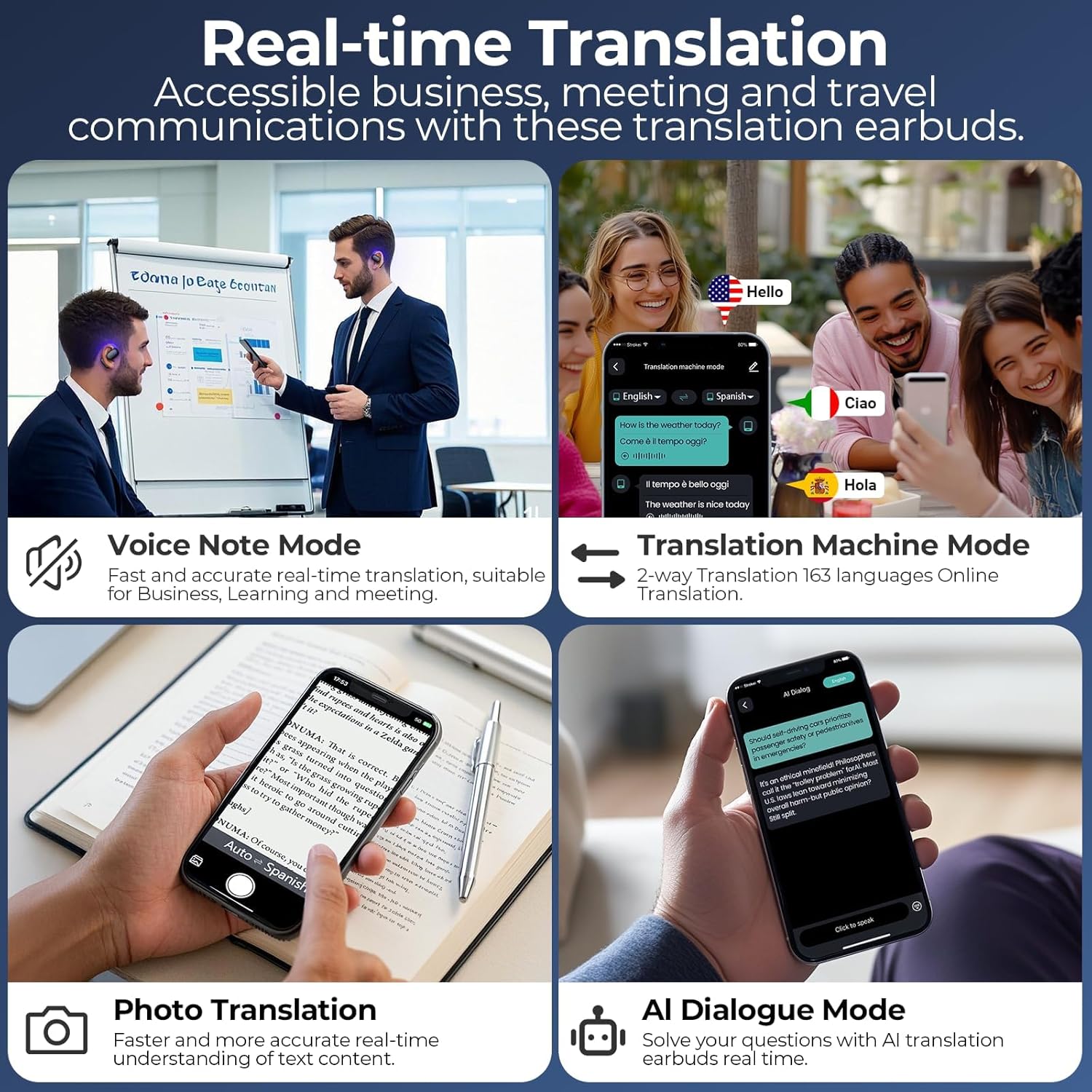
Imagem: Uma colagem mostrandoasing the real-time translation capabilities of the occiam earbuds, including Voice Note Mode for fast and accurate recording, Translation Machine Mode for 2-way translation in 163 languages, Photo Translation for text understanding, and AI Dialogue Mode for interactive conversations.
The app typically offers several translation modes:
- Translation Machine Mode (Two-Way Translation): Select the source and target languages in the app. Speak into your earbud's microphone, and the translation will be played through the other earbud or your phone's speaker, allowing for natural conversation. Supports 163 languages (74 languages, 89 accents).
- Modo de notas de voz: Record spoken notes, and the app will transcribe and translate them. Useful for business meetings or lectures.
- Tradução da foto: Use your phone's camera through the app to translate text from images.
- Modo de diálogo com IA: Engage in conversations with an AI, which can translate your speech and respond.
Refer to the in-app guide for detailed instructions on using each translation mode.
7. Manutenção
7.1 Limpeza
- Limpe os fones de ouvido e o estojo de carregamento com um pano macio, seco e sem fiapos.
- Não utilize produtos de limpeza abrasivos, álcool ou solventes químicos.
- Se necessário, limpe cuidadosamente os contatos de carregamento dos fones de ouvido e do estojo com um cotonete seco.
7.2 Armazenamento
- Guarde os fones de ouvido no estojo de carregamento quando não estiverem em uso para protegê-los e mantê-los carregados.
- Armazene em local fresco e seco, longe da luz solar direta e de temperaturas extremas.
7.3 Cuidados com a bateria
- Charge the earbuds and case regularly, even if not used frequently, to maintain battery health.
- Avoid fully discharging the batteries for extended periods.
8. Solução De Problemas
| Problema | Possível causa | Solução |
|---|---|---|
| Fones de ouvido não emparelham | Bateria fraca; Fora do alcance; Não está em modo de emparelhamento; Interferência de Bluetooth. | Charge earbuds and case; Move closer to device; Ensure earbuds are in pairing mode (open case); Turn off other Bluetooth devices. |
| Nenhum som dos fones de ouvido | Volume too low; Not connected; Incorrect audio output selected on device. | Increase volume on device; Reconnect earbuds; Select earbuds as audio output. |
| A tradução não está funcionando | No internet connection; App not connected to earbuds; Incorrect language settings; Microphone blocked. | Ensure stable internet connection; Check app connection status; Verify language settings in app; Ensure microphone is clear. |
| Fones de ouvido não carregam | Poor contact; Faulty cable/adapter; Case battery empty. | Ensure earbuds are properly seated; Clean charging contacts; Try different cable/adapter; Charge the case. |
9. Especificações
| Recurso | Detalhe |
|---|---|
| Marca | occiama |
| Modelo | D72 |
| Conectividade | Bluetooth 5.3 |
| Idiomas de tradução | 163 (74 idiomas, 89 sotaques) |
| Tempo de reprodução dos fones de ouvido | Até 10 horas (carga única) |
| Tempo total de reprodução (com estojo) | Até 80 horas |
| Tipo de Bateria | Polímero de lítio |
| Dimensões do produto | 6.6 x 2.2 x 8.5 cm |
| Peso do item | 76 g |
10. Informações de garantia
occiam products are manufactured to the highest quality standards. This product is covered by a limited warranty from the date of purchase. Please refer to the warranty card included in your product packaging or visit the official occiam website for detailed warranty terms and conditions. The warranty typically covers manufacturing defects but does not cover damage caused by misuse, accidents, unauthorized modifications, or normal wear and tear.
11. Suporte ao cliente
If you encounter any issues or have questions regarding your occiam AI Translation Earbuds, please do not hesitate to contact our customer support team. For the fastest service, please have your product model number (D72) and purchase details ready.
- E-mail: Refer to your product packaging or the official occiam website para o endereço de e-mail de suporte.
- Website: Visita www.occiam.com (placeholder, please check actual brand website) for FAQs, support resources, and contact forms.


