1. Introdução
1.1 Produto Acimaview
The Rraycom 5MP Wireless Security Camera is a battery-powered, outdoor-ready surveillance device designed for home security. It features 5MP ultra-HD video, a 130° wide field of view, and dual light source night vision for both full-color and infrared options. Equipped with AI motion detection, two-way audio, a siren alarm, and spotlight, it provides comprehensive monitoring and deterrence. The camera supports both cloud and local SD card storage and is compatible with Amazon Alexa.
1.2 Principais Características
- 2.5K (5MP) Ultra-HD Video: Provides clear and detailed surveillance footage.
- 130° Campo Amplo de View: Minimizes blind spots for broader coverage.
- Full-Color & Infrared Night Vision: Offers versatile night monitoring options.
- Bateria recarregável: Ensures wire-free operation and flexible placement.
- IP65 à prova d'água: Projetado para suportar diversas condições climáticas para uso externo.
- PIR Motion Detection with AI Analysis: Accurately detects human movement and sends real-time notifications.
- Áudio bidirecional: Allows for remote communication with visitors or intruders.
- Sirene de alarme e holofote: Deters unwanted visitors with audible and visual alerts.
- Cloud/SD Card Storage: Offers flexible options for video recording storage.
- Integração Alexa: Enables voice control for live view acesso.

Imagem: Acimaview of the Rraycom 5MP Wireless Security Camera and its main features.
1.3 O que vem na caixa?
Por favor, verifique o conteúdo da sua encomenda. Se algum item estiver faltando ou danificado, entre em contato com o suporte ao cliente.
- Rraycom 5MP Wireless Security Camera (x1)
- Suporte de montagem (x1)
- Mounting Screws and Wall Anchors (x1 set)
- Cabo de carregamento USB (x1)
- Manual do usuário (x1)
2. Primeiros passos: Configuração
2.1 Carregando a câmera
Before initial use, fully charge the camera battery. Connect the provided USB charging cable to the camera's charging port and to a standard 5V USB power adapter (not included). The indicator light will show charging status and turn solid when fully charged.
2.2 Instalação do aplicativo
Download the companion app, VistaFlow, from your mobile device's app store.
- Para dispositivos iOS: Procurar "VistaFlow" in the Apple App Store.
- Para dispositivos Android: Procurar "VistaFlow" in the Google Play Store.
Siga as instruções na tela para criar uma conta e fazer login.
2.3 Device Pairing (Wi-Fi Connection)
- Certifique-se de que seu dispositivo móvel esteja conectado a uma rede Wi-Fi. Rede Wi-Fi de 2.4 GHz. The camera does not support 5GHz Wi-Fi.
- Open the VistaFlow app and tap the "Add Device" or "+" icon.
- Selecione o modelo da sua câmera na lista.
- Follow the in-app instructions to power on the camera and put it into pairing mode (usually indicated by a flashing LED).
- Scan the QR code displayed on your phone screen with the camera lens, or follow alternative pairing methods if prompted.
- Após conectar a câmera, dê um nome a ela e conclua o processo de configuração.
2.4 Montagem da câmera
Choose a suitable location for your camera, considering Wi-Fi signal strength, desired viewing angle, and power access for occasional recharging. The camera is IP65 waterproof, making it suitable for outdoor installation.
- Marque os furos usando o suporte de montagem como gabarito.
- Faça furos e insira buchas se for instalar em alvenaria ou drywall.
- Secure the mounting bracket to the wall or ceiling with screws.
- Fixe a câmera ao suporte de montagem e ajuste o ângulo para obter a cobertura ideal.
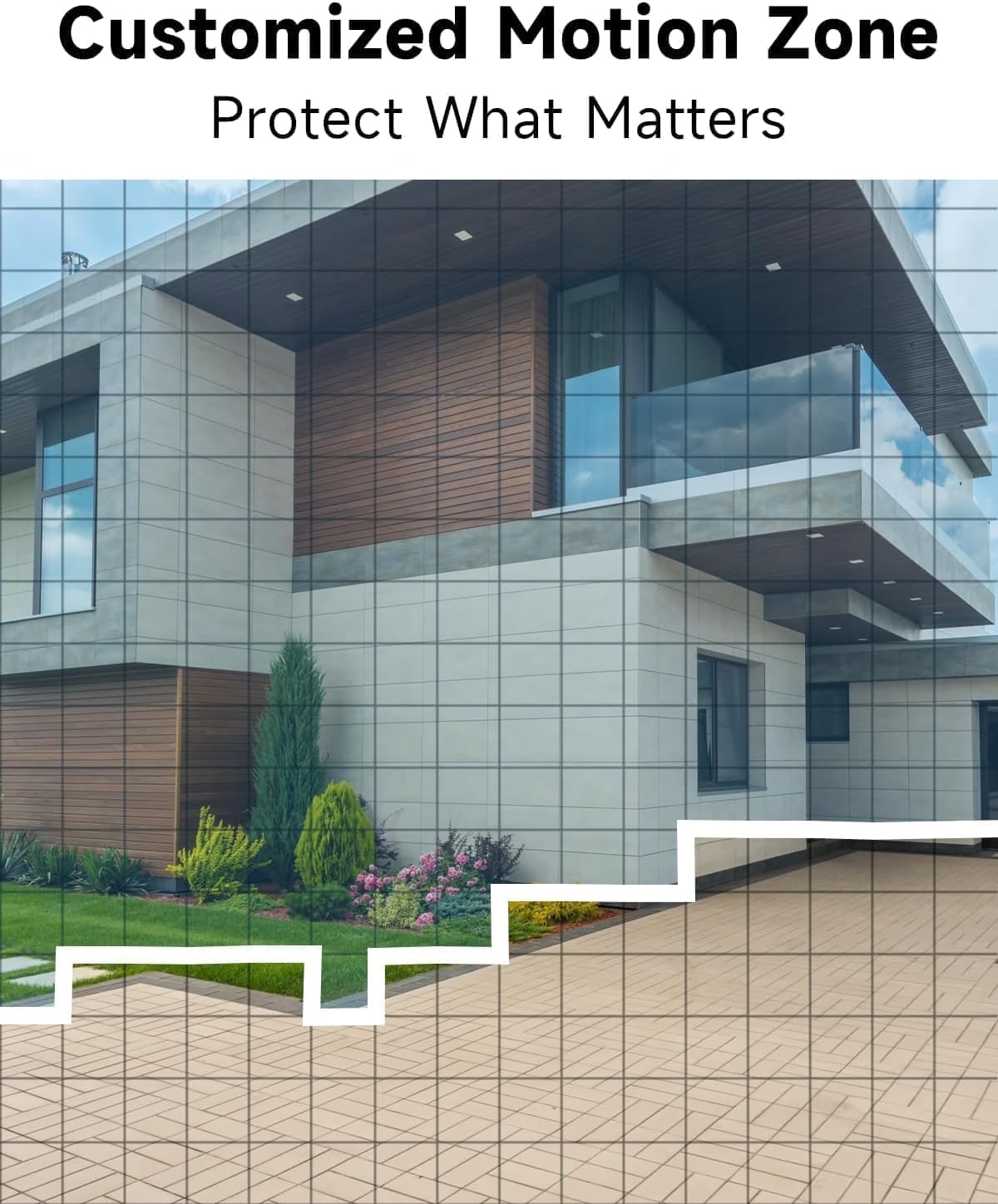
Imagem: Example of camera placement and customized motion zone setup.
3. Instruções de operação
3.1 Ao vivo View
Access the VistaFlow app and select your camera to view the live feed. You can pinch to zoom and pan across the 130° wide-angle view. The 5MP resolution provides clear details.

Image: Visual comparison of 5MP versus 1080P video resolution.
3.2 Motion Detection & AI Analysis
The camera uses a PIR sensor and AI analysis to detect motion, specifically identifying persons to reduce false alarms. When motion is detected, you will receive a notification on your phone.
- Customized Activity Zones: In the app settings, you can define specific areas within the camera's view onde a detecção de movimento deve estar ativa, ignorando outras áreas.
- Ajuste de Sensibilidade: Adjust the motion detection sensitivity to suit your environment and reduce unwanted alerts.

Image: AI Motion Detection in action, highlighting alert options.
Áudio bidirecional 3.3
The built-in microphone and speaker allow for real-time two-way communication. Tap the microphone icon in the live view Falar através da câmera e ouvir o áudio proveniente da localização da câmera.

Imagem: Demonstração de comunicação de áudio bidirecional.
3.4 Visão noturna
A câmera oferece dois modos de visão noturna:
- Visão noturna em cores: Utilizes the built-in spotlight to provide color images in low-light conditions.
- Visão Noturna Infravermelha: Utiliza LEDs infravermelhos para imagens em preto e branco na escuridão total.
Você pode alternar entre esses modos ou configurá-los para automático nas configurações do aplicativo.

Image: Comparison of color and infrared night vision modes.
3.5 Siren Alarm & Spotlight
In response to motion detection, or manually activated via the app, the camera can trigger a siren alarm and turn on its spotlight to deter intruders. You can customize the siren sound with pre-recorded messages.
3.6 Opções de armazenamento
A câmera suporta dois métodos de armazenamento para vídeos gravados:
- Armazenamento em nuvem: A free rolling 3-day cycled cloud storage service is provided. Optional subscription plans may be available for extended cloud storage.
- Cartão Micro SD: Insira um cartão micro SD (até 256 GB, não incluído) no slot para cartão SD da câmera para armazenamento local.
3.7 Integração com Alexa
The Rraycom camera is compatible with Amazon Alexa. To enable this feature:
- Abra o aplicativo Alexa no seu dispositivo móvel.
- Go to "Skills & Games" and search for "VistaFlow".
- Enable the skill and link your VistaFlow account.
- Descubra dispositivos.
You can then use voice commands such as: "Alexa, show me the [camera name]" to view the live feed on compatible Alexa devices (e.g., Echo Show).
4. Manutenção
4.1 Gerenciamento de bateria
The camera is powered by a rechargeable battery. Battery life varies based on usage, motion detection frequency, and environmental factors.
- Recarregando: When the battery level is low, you will receive a notification via the app. Disconnect the camera from its mount and charge it using the provided USB cable.
- Otimizando a vida útil da bateria: Reduce motion detection sensitivity, shorten recording duration, and minimize live view access to extend battery life.
4.2 Limpeza
Periodically clean the camera lens and body to ensure optimal performance.
- Use a soft, dry, lint-free cloth to wipe the lens. For stubborn smudges, a slightly damp Pode-se usar um pano, seguido de um seco.
- Limpe o corpo da câmera com o produto.amp pano. Evite usar produtos químicos agressivos ou produtos de limpeza abrasivos.
5. Solução De Problemas
5.1 Problemas e soluções comuns
| Emitir | Solução possível |
|---|---|
| Câmera não conecta ao Wi-Fi | Ensure your Wi-Fi is 2.4GHz. Check Wi-Fi signal strength at the camera's location. Restart your router and the camera. Re-attempt pairing in the app. |
| A detecção de movimento não está funcionando ou há muitos alarmes falsos. | Check motion detection settings in the app. Adjust sensitivity. Define activity zones to exclude irrelevant areas. Ensure camera lens is clean. |
| Baixa qualidade de imagem | Ensure the camera lens is clean. Check Wi-Fi signal strength. Ensure the camera is set to 5MP resolution in app settings if available. |
| Bateria não carrega | Ensure the USB cable is securely connected. Try a different USB power adapter. Check if the charging port is clean and free of debris. |
| Cannot hear or speak through two-way audio | Verifique as configurações de volume no seu telefone e no aplicativo. Certifique-se de que as permissões de microfone e alto-falante estejam concedidas ao aplicativo. |
6. Especificações técnicas
| Recurso | Especificação |
|---|---|
| Resolução | 5MP (2.5K QHD) |
| Campo de View | 130° |
| Conectividade | Wi-Fi (somente 2.4 GHz) |
| Fonte de energia | Alimentado por bateria |
| Resistência às intempéries | IP65 à prova d'água |
| Visão noturna | Full-Color, Infrared |
| Áudio | Áudio bidirecional |
| Detecção de movimento | PIR with AI Analysis (Person Detection) |
| Opções de armazenamento | Cloud (3-day free rolling), Micro SD Card (up to 256GB) |
| Integração de casa inteligente | Amazon Alexa |
| Dispositivos compatíveis | iOS, Android |
| Uso interno/externo | Ar livre |
7. Garantia e Suporte ao Cliente
7.1 Informações de garantia
Rraycom products come with a limited warranty. Please refer to the warranty card included in your package or visit the official Rraycom website para obter termos e condições detalhados da garantia.
7.2 Suporte ao cliente
If you encounter any issues or have questions regarding your Rraycom 5MP Wireless Security Camera, please contact our customer support team. Contact information can be found on the Rraycom website ou na embalagem do produto.


