Introdução
Thank you for choosing the OHOVIV N10 Portable Charger Power Bank. This high-capacity 50000mAh power bank is designed to provide reliable and fast charging for your electronic devices on the go. Please read this manual carefully before use to ensure optimal performance and safety.
O que está na caixa
- 1 x OHOVIV 50000mAh Portable Charger for Cell Phone
- 1 x cabo USB-C
- 1 x Manual do Usuário
- 1 x 12 Months Guarantee Card
Produto acimaview
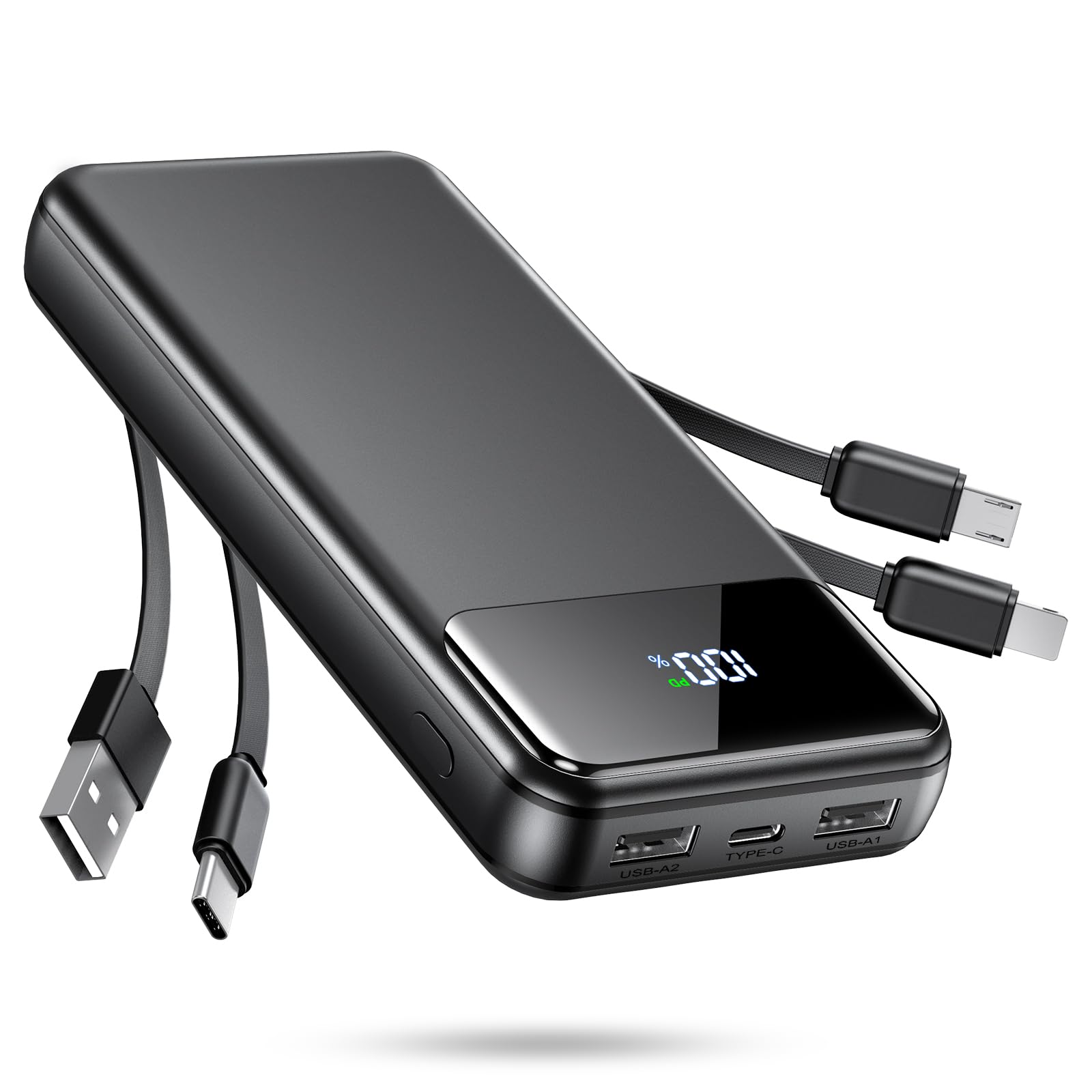
Image: The OHOVIV N10 Portable Charger, a black rectangular device with a digital LED display showing "100%" charge. It features two integrated short cables (one with a standard USB-A connector and another with a common mobile charging connector, such as Micro-USB or Lightning compatible) and three external ports (USB-A1, Type-C, USB-A2) on one end. The overall design is sleek and compact.
The OHOVIV N10 Portable Charger features a robust design with multiple charging options. Key components include:
- Visor LED digital: Mostra a porcentagem restante da bateriatage.
- USB-A Output Ports (USB-A1, USB-A2): Para carregar dispositivos externos.
- Porta Type-C: Functions as both input (for charging the power bank) and output (for charging devices).
- Cabos Integrados: Includes built-in USB-A and a common mobile charging cable (e.g., Micro-USB or Lightning compatible) for direct device connection.
Configurar
Carregamento inicial do Power Bank
- Upon first use, it is recommended to fully charge your OHOVIV N10 Power Bank.
- Connect the provided USB-C cable to the Type-C input port on the power bank.
- Conecte a outra extremidade do cabo USB-C a um adaptador de parede USB compatível (não incluído) ou à porta USB de um computador.
- O visor digital LED mostrará o progresso do carregamento, indicando a porcentagem da bateria.tage. The power bank is fully charged when the display shows "100%".
A full charge may take several hours due to the large 50000mAh capacity.
Instruções de operação
Carregando seus dispositivos
The OHOVIV N10 Power Bank can charge multiple devices simultaneously, supporting up to three devices at once for optimal performance.
- Identify the correct charging cable for your device. You can use the integrated USB-A or common mobile charging cable, or connect your device's charging cable to one of the USB-A output ports (USB-A1, USB-A2) or the Type-C port.
- Connect your device to the power bank. Charging will typically begin automatically.
- The LED display on the power bank will illuminate to show the remaining battery level.
- Desconecte o dispositivo quando ele estiver totalmente carregado ou quando não precisar mais carregá-lo.
Observação: The Type-C port supports 22.5W output for fast charging compatible devices. The USB-A ports also support 22.5W output. Ensure your device supports fast charging protocols for optimal speed.
Verificando o nível da bateria
The digital LED display provides an accurate percentage of the remaining battery capacity. Simply press the power button (if available, not explicitly mentioned but common) or connect a device to activate the display.
Especificações
| Número do modelo | N10 |
| Capacidade da bateria | 50000 Miliamp Horas (mAh) |
| Entrada (Tipo C) | 18W (máx.) |
| Output (USB-A1, USB-A2) | 22.5W (máx.) |
| Saída (Tipo-C) | 22.5W (máx.) |
| Dimensões do produto | 5.25 x 3.7 x 1 polegadas (13.4 x 7 x 3.4 cm) |
| Peso do item | 1.36 libras (613g) |
| Tipo de Bateria | Polímero de lítio |
| Cor | Preto |
| Características especiais | 50000mAh Capacity, Fast Charging, LED Indicator Lights, Over Charging Protection |
Nota importante: Due to its high capacity (50000mAh), this portable charger is NOT ALLOWED ON AIRPLANE for carry-on or checked baggage according to current aviation regulations.
Manutenção
- Mantenha o carregador portátil longe de temperaturas extremas (quentes ou frias), luz solar direta e ambientes úmidos.
- Não deixe o aparelho cair, não o desmonte e não tente repará-lo por conta própria.
- Limpe a superfície com um pano macio e seco. Não utilize produtos químicos agressivos ou materiais abrasivos.
- For long-term storage, charge the power bank to approximately 50-75% every 3 months to preserve battery health.
Solução de problemas
| Problema | Possível causa/solução |
|---|---|
| Banco de potência não carrega |
|
| Dispositivo não carrega do banco de potência |
|
| Carregamento lento |
|
Garantia e Suporte
Your OHOVIV N10 Portable Charger comes with a Garantia de 12 meses from the date of purchase. This warranty covers manufacturing defects and ensures product quality.
For any questions, technical support, or warranty claims, please do not hesitate to contact OHOVIV customer service. We provide 7/24hrs online pleasant customer service.
Please refer to the contact information provided on the guarantee card included in your package or visit the official OHOVIV website para detalhes de suporte.


