Introdução
The FMART T10PRO Window Cleaning Robot is designed to provide efficient and safe cleaning for both interior and exterior windows. Featuring dual-spray technology, AI intelligent path planning, and robust safety mechanisms, this robot simplifies window maintenance, saving you time and effort. This manual provides detailed instructions for setup, operation, and maintenance to ensure optimal performance and longevity of your device.
Informações de segurança
Please read all safety instructions carefully before operating the FMART T10PRO. Failure to follow these instructions may result in injury or damage to the device.
- The T10PRO includes a built-in Uninterruptible Power Supply (UPS) system, providing up to 30 minutes of operation during power outages to prevent falls.
- Always attach the high-strength 5m safety rope with 1393N pulling force to a secure anchor point before operation, especially for high-altitude cleaning.
- Ensure the cleaning pads are properly installed and secure before starting the robot.
- Use only recommended cleaning solutions, such as glass cleaner or purified water, in the water tank.
- Durante o funcionamento, mantenha as mãos e roupas soltas longe das partes móveis.
- Do not operate the robot on cracked or damaged glass surfaces.
- Supervise the robot during its first few uses to ensure proper adherence and operation.

Figure 1: Safety Protection Features of the T10PRO.
Produto acimaview
The FMART T10PRO is an ultra-thin window cleaning robot designed for comprehensive window cleaning. It features a powerful suction motor, dual-spray nozzles, and intelligent navigation.
Componentes
| Componente | Descrição |
|---|---|
| Unidade principal | The robot itself, housing the motor, water tank, and controls. |
| Tomada | For connecting to a power outlet. |
| Adaptador | Converts power for the robot. |
| Replacement Wipes | Microfiber cleaning cloths. |
| Arnês de segurança | 5-meter safety rope with carabiner. |
| Frasco de spray | For filling the water tank. |
| Controle remoto | For manual control of the robot. |
| Manual do usuário | Este guia de instruções. |

Figure 2: What is included in the package.
Configurar
Follow these steps to prepare your FMART T10PRO for its first use.
- Attach the Cleaning Cloths: Ensure the cloth is installed smoothly and that the cloth holder is secure and not loose.
- Conecte o adaptador: Connect the adapter to the robot, rotating 90 degrees to secure.
- Connect the Power Plug: Connect the power plug to the adapter.
- Connect the Safety Rope: Securely connect the safety rope to the designated attachment point on the robot.
- Encha o tanque de água: Open the water tank cap and fill with glass cleaner or purified water using the provided spray bottle. It is recommended to use glass cleaner for best results.
- Secure the Safety Rope: Attach the other end of the safety rope to a sturdy anchor point, such as a window frame or a heavy piece of furniture, to prevent accidental falls.
- Conecte a fonte de alimentação: Insira o plugue de alimentação em uma tomada elétrica adequada.

Figure 3: Installation and Setup Steps.
Instruções de operação
Ligar/desligar
- Para Ativar: Long press the power button on the device until the indicator light turns green.
- Desligar: Long press the power button on the device.
Iniciar/Parar a limpeza
- Para iniciar: Short press the power button on the device.
- To Stop/Pause: Short press the power button on the device again.
Métodos de controle
The FMART T10PRO can be controlled via the included remote control or through the dedicated mobile application.
Controle remoto
The 2.4G remote control offers a 10m range with wall-penetrating capability.

Figure 4: Control via Remote and App.
Funções do botão de controle remoto:
- Seta para cima: Clean upward
- Seta esquerda: Clean to the left
- Seta direita: Clean to the right
- Seta para baixo: Clean downwards
- Botão Reproduzir/Pausar: Iniciar/pausar limpeza
- Sprinkler Icon: Turn on/off the sprinkler
- Target Icon: Limpeza de ponto fixo
- Ícone de gota d'água: Pulverização manual de água
- Left Arrow with 'A': Automatic cleaning to the left
- Right Arrow with 'A': Automatic cleaning to the right
- 'A' Button: Limpeza profunda
Mobile Application (FMART Smart App)
The FMART Smart App provides advanced control and monitoring features. Ensure your phone is connected to Wi-Fi before setup.
- Conectar ao Wi-Fi: Certifique-se de que seu dispositivo móvel esteja conectado a uma rede Wi-Fi estável.
- Baixar aplicativo: Open your device's app store (e.g., Apple App Store) and search for "fmart smart". Download and install the application.
- Registrar/Login: Open the app, agree to all user agreements and privacy policies, then register for a new account or log in if you already have one.
- Modo de emparelhamento: On the robot, short press the power button three times continuously to enter network matching mode (blue light will be on).
- Adicionar dispositivo no aplicativo: In the app, click the "Add Device" button or the '+' icon in the top right corner. Allow location and Bluetooth permissions when prompted.
- Conectar: The app will search for nearby devices. Once the "Window cleaning robot" is found, click "Connect" or "Add".
- Digite a senha do Wi-Fi: Digite a senha da sua rede Wi-Fi quando solicitado.
- Conexão completa: Wait for the connection to complete. Once successful, click "Done" and the app interface for controlling the robot will load.
Video 1: T10PRO User Guide App Connection Guide. This video demonstrates the step-by-step process of connecting the FMART T10PRO window cleaning robot to the mobile application, including initial setup and pairing.
Modos de limpeza
The T10PRO offers multiple cleaning modes to suit various needs:
- Limpeza automática: One-touch start for a full auto-clean cycle.
- Limpeza profunda: Cleans the surface twice for a more thorough result.
- 360-degree Cleaning: Allows for clean maneuvering and timely obstacle avoidance for more comprehensive coverage.
- Limpeza de manchas: Targets tough stains and cleans deeply in a specific area.

Figure 5: Multiple Cleaning Modes.
Intelligent Path Planning & Edge Detection
The robot utilizes FMART SLAM 4.0 AI Path Planning for efficient cleaning, covering up to 37.17 sq ft/min. It includes:
- Detecção de borda: Built-in AI detects window frames and adjusts the robot’s direction, ensuring a thorough clean even without a frame, while avoiding obstacles.
- Memory Start Point & Auto Return: The robot automatically returns to its starting point after completing a cleaning cycle, making it easy to retrieve.
- Wet and Dry Wiping Combined: For a cleaner finish, the robot performs wet wiping on one side and dry wiping on the other.

Figure 6: AI Path Planning and Edge Detection.

Figure 7: Intelligent Path Planning for increased efficiency.

Figure 8: Advanced Intelligent Detection System.
Dual-Spray Technology
The cross-spray system with dual nozzles ensures both cleaning pads are evenly moist, effectively dissolving stubborn stains and maintaining consistent moisture throughout the cleaning process. The 120ml large water tank can clean up to 60 square meters on a single fill.
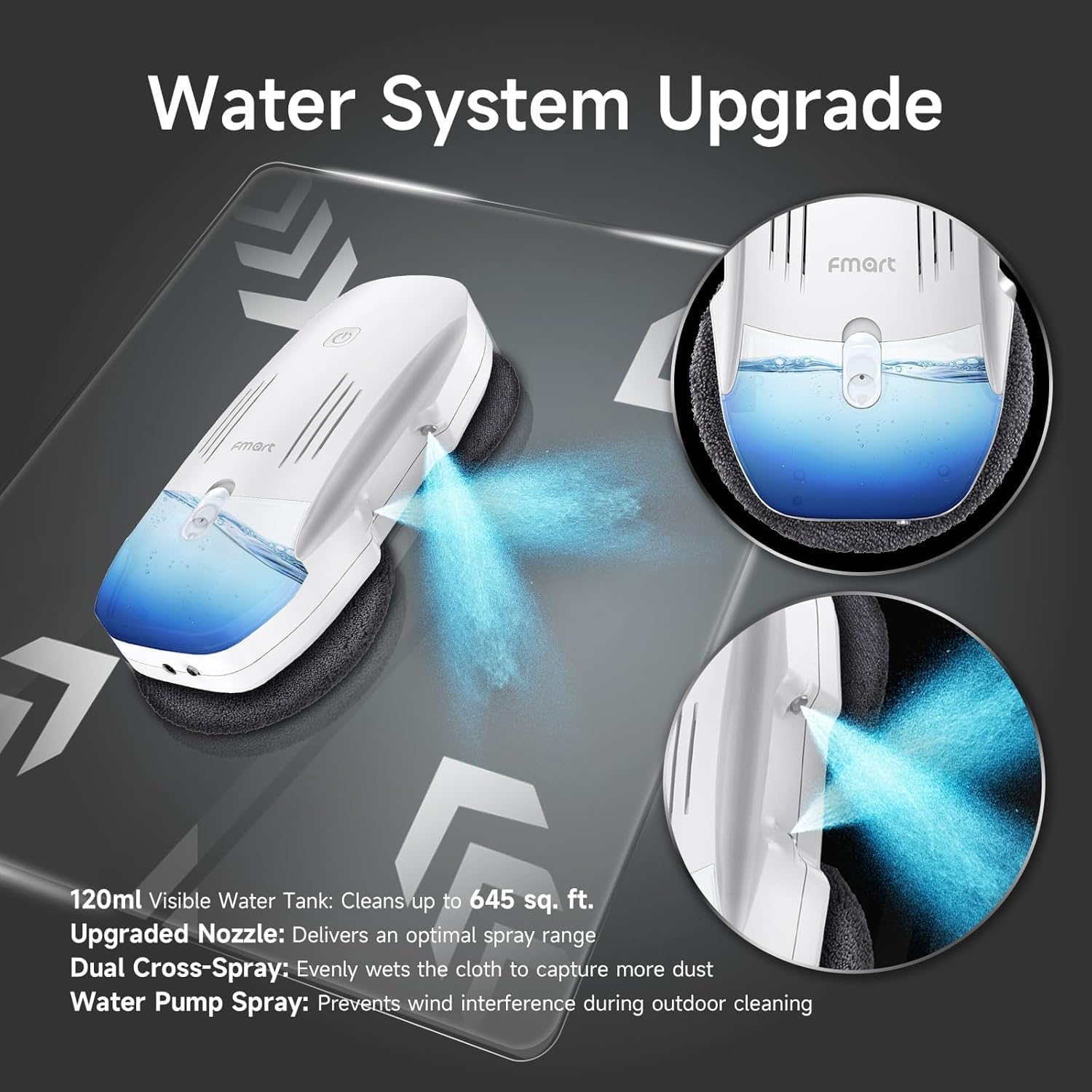
Figure 9: Water System Upgrade with Dual-Spray.
Manutenção
Almofadas de limpeza
The microfiber cleaning cloths are professional customization, reusable, and machine washable. For optimal cleaning performance, clean the pads after each use.

Figure 10: Microfiber Cleaning Cloths.
Tanque de água
Regularly empty and rinse the 120ml water tank to prevent residue buildup. Use only glass cleaner or purified water to avoid clogging the nozzles.
Cuidados Gerais
Wipe down the exterior of the robot with a soft, dry cloth. Store the robot in a cool, dry place when not in use.
Solução de problemas
This section provides guidance on common issues and their solutions based on the robot's indicator lights.
| Status da luz indicadora | Significado | Ação |
|---|---|---|
| Luz verde sempre acesa | Carregamento concluído | O dispositivo está totalmente carregado. |
| Luz verde piscando | Carregando | Device is currently charging. |
| Luz azul sempre acesa | Trabalhando | O dispositivo está operando normalmente. |
| Luz vermelha sempre acesa | Bateria fraca | Please connect the adapter for charging before use. |
| Luz vermelha piscando | Abnormal in the machine | Please check the machine or restart it. |
| luz amarela piscando | Bateria fraca | The machine can be normally turned on only after its indicator light turns green by charging. |

Figure 11: Description of Power and Flashing Lights.
Especificações
| Recurso | Detalhe |
|---|---|
| Marca | FMART |
| Nome do modelo | T10PRO |
| Características especiais | 120ml Water Tank, 2.4G remote control & APP control &10 Language Translation, Anti-Fall, Dual-side Spray Cleaning, Edge Cleaning |
| Cor | T10pro |
| Dimensões do produto | 11.5"C x 5.69"L x 2.96"A |
| Componentes incluídos | Pano |
| Tipo de filtro | Pano |
| Duração da bateria | 5 anos |
| Fonte de energia | Alimentado por bateria |
| Fator de forma | Plano |
| Peso do item | 5.58 libras |
| Fabricante | FMART |
Garantia e Suporte
FMART is committed to providing high-quality products and excellent customer service.
- Garantia: Our products provide 365 days warranty.
- Suporte ao cliente: If you encounter any problems during use, please feel free to contact us via email. We will solve the problem for you as soon as possible within 24 hours.

Figure 12: FMART Customer Service.


