1. Introdução
Welcome to the CUBOT GT1 Smartwatch user manual. This guide provides essential information for setting up, operating, maintaining, and troubleshooting your new smartwatch. The CUBOT GT1 is designed for outdoor enthusiasts, featuring a durable zinc alloy casing, high-precision dual-frequency GPS, a 1.43-inch HD AMOLED display, and comprehensive health monitoring capabilities.
2. Configuração
2.1 Conteúdo da embalagem
- CUBOT GT1 Smartwatch
- Cabo de carregamento
- Manual do usuário (este documento)
2.2 Carregamento Inicial
Before first use, fully charge your CUBOT GT1 Smartwatch. Connect the provided charging cable to the charging port on the back of the watch and to a standard USB power adapter (not included). The watch will display a charging indicator. A full charge can take approximately 2-3 hours.
Note: The watch features a 480 mAh high-voltage polymer battery. A single charge can last up to 90 days in standby mode, 20-30 days with normal daily use, and up to 22 hours with continuous GPS activation.
2.3 Emparelhamento com seu smartphone
- Download the official CUBOT smartwatch application from your smartphone's app store (compatible with Android 9.0+ and iOS 9.0+).
- Certifique-se de que o Bluetooth esteja ativado em seu smartphone.
- Open the CUBOT app and follow the on-screen instructions to create an account or log in.
- Selecione 'Adicionar dispositivo' ou 'Emparelhar novo dispositivo' no aplicativo.
- The app will search for your CUBOT GT1. Select it from the list of available devices.
- Confirme o pedido de emparelhamento tanto no seu smartphone quanto no smartwatch.
Once paired, the watch will synchronize data and notifications with your smartphone.
3. Instruções de operação
3.1 Controles Básicos
The CUBOT GT1 features a 1.43-inch HD AMOLED touchscreen and two physical buttons:
- Tela sensível ao toque: Swipe to navigate menus, tap to select, swipe down for quick settings, swipe up for notifications.
- Botão de energia: Press to wake the screen, return to the main watch face, or access the main menu.
- Botão PERSONALIZADO: Configurable for quick access to a specific function (e.g., sport mode). Long press for stopwatch.
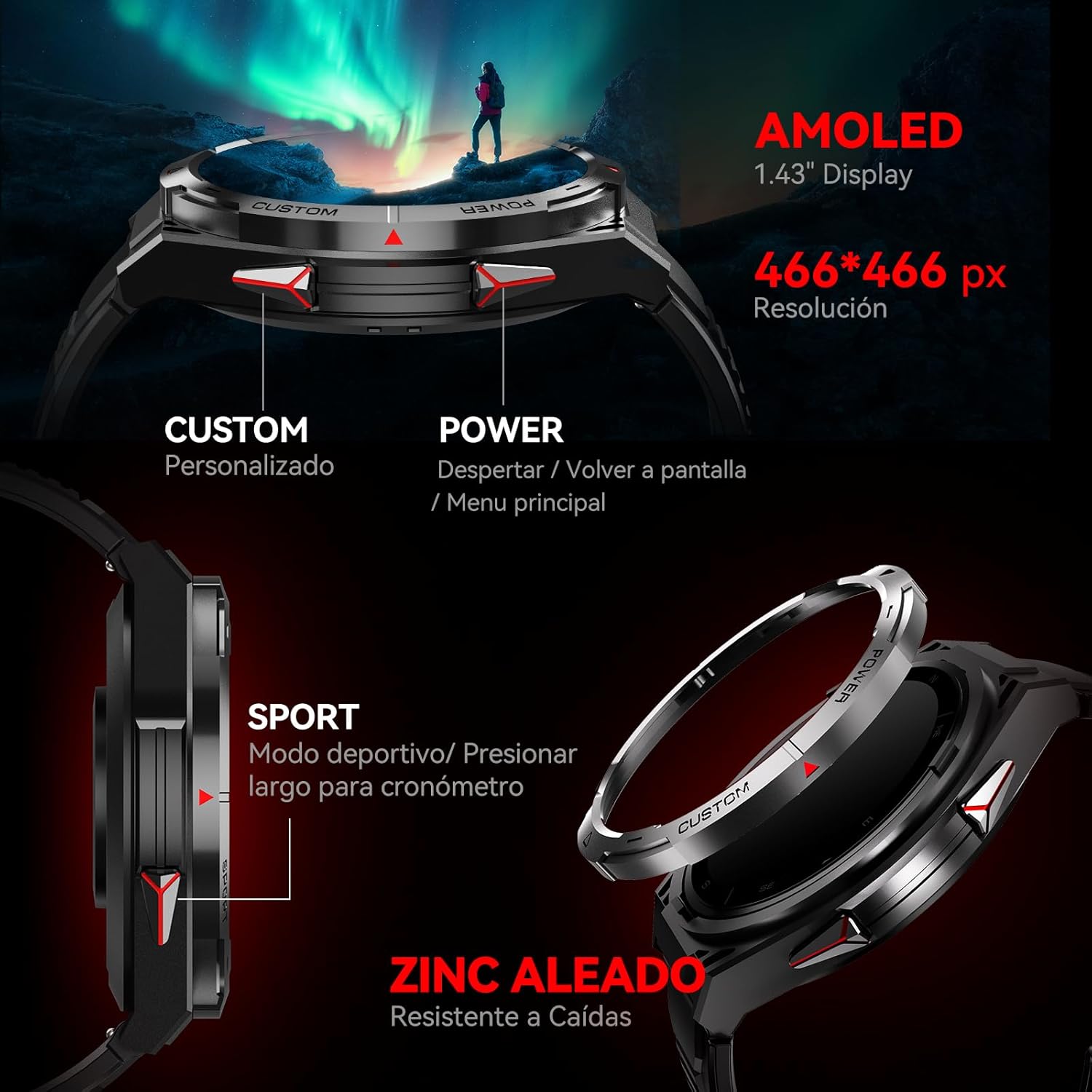
Imagem: Lado view of the CUBOT GT1 Smartwatch, highlighting the 'CUSTOM' and 'POWER' buttons and indicating the 1.43-inch AMOLED display with 466x466 pixel resolution.
3.2 Funcionalidade GPS
The smartwatch integrates a dual-frequency L1+L5 GPS system for high-precision positioning. This system supports features such as:
- Rastreamento em tempo real: Calibrates exercise routes and distances.
- Return-to-Start: Guides you back to your starting point via the same path or a straight line.
- Resiliência ambiental: Provides reliable positioning in various environments.

Image: The CUBOT GT1 Smartwatch displaying a GPS tracking map on its screen, with satellites in the background, illustrating its dual-frequency GPS precision for navigation.
3.3 Modos esportivos
The GT1 offers over 150 built-in sport modes. It utilizes the professional Savy sports algorithm and can automatically recognize 6 common sport modes. Each mode provides detailed exercise data to help users train scientifically.
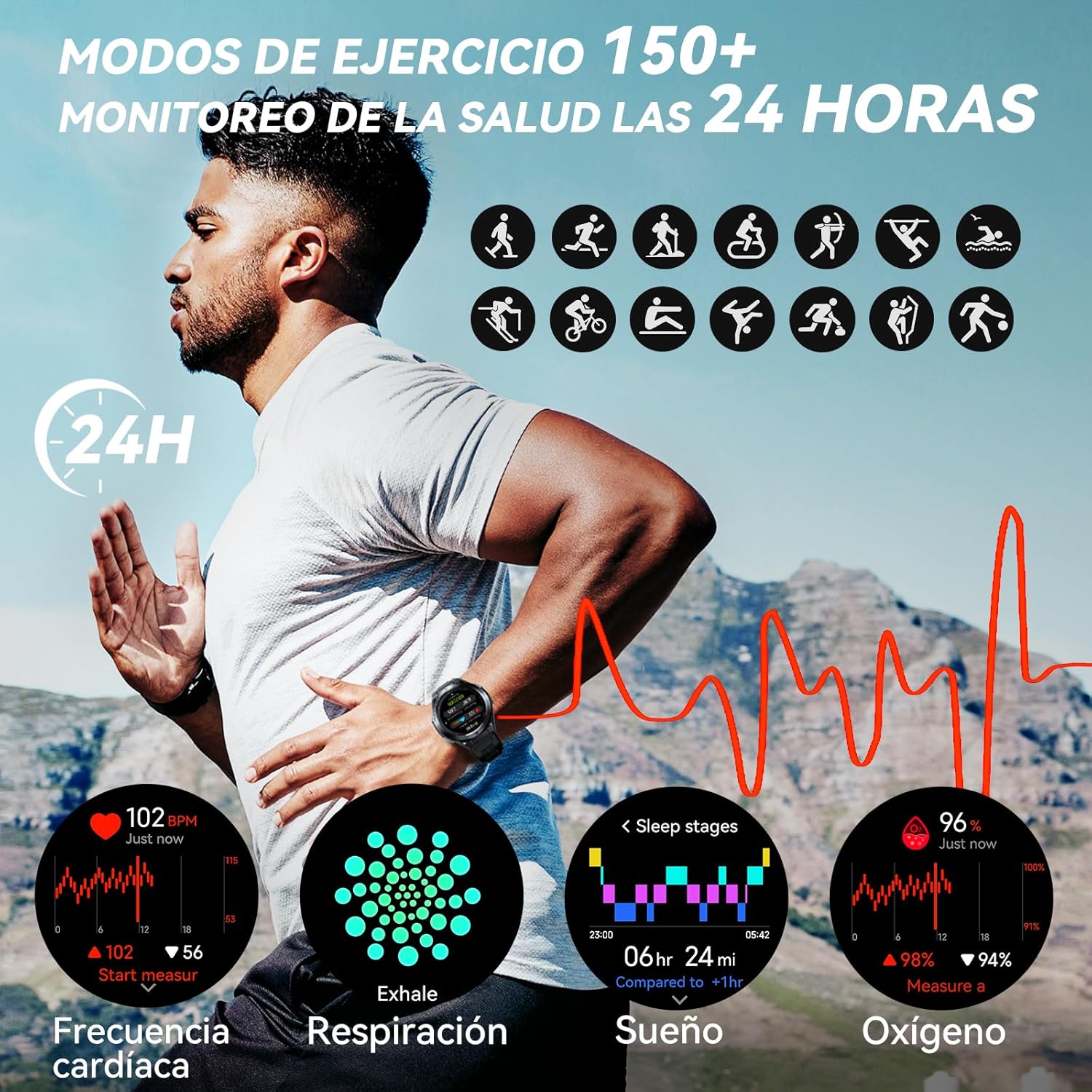
Image: A visual representation of various sport modes icons and health monitoring graphs for heart rate, respiration, sleep, and blood oxygen, indicating 24-hour tracking.
3.4 Monitoramento de Saúde
The smartwatch provides comprehensive 24-hour health monitoring through scientific algorithms, including:
- Monitoramento de freqüência cardíaca
- Blood Oxygen Saturation (SpO2) tracking
- Sleep Data analysis
- Real-time Pressure detection
3.5 Notificações e Chamadas
Connect your smartwatch to your smartphone via the app to receive real-time notifications for incoming calls, text messages, and social media alerts (e.g., Facebook, Instagram, Twitter). You can answer or reject calls directly from the watch.

Image: The CUBOT GT1 Smartwatch displaying various communication features, including WhatsApp notifications, AI assistant interaction, Bluetooth call handling, and an SOS call screen.
3.6 Recursos Adicionais
The CUBOT GT1 offers several other convenient functions:
- Controle de música: Controle a reprodução de música no seu smartphone.
- Câmera remota: Acione remotamente a câmera do seu smartphone.
- Previsão do tempo: View Condições meteorológicas atuais.
- Alerta Sedentário: Lembra você de se movimentar após períodos de inatividade.
- Botão SOS: For emergency situations (refer to app settings for configuration).
- Sensores Ambientais: Includes atmospheric pressure, altitude, and compass.

Image: A collage of various smartwatch functions, including an 'All In One Smartwatch' screen showing app icons, music control, sedentary alert, camera control, and weather display.
4. Manutenção
4.1 Resistência à água
The CUBOT GT1 is water-resistant up to 5 ATM (50 meters), making it suitable for swimming. However, it is crucial to follow these guidelines:
- After exposure to water, especially deep water or corrosive liquids like seawater, activate the drainage function on the watch. This function vibrates the watch to expel water from the speaker and microphone holes.
- Always drain and dry the device thoroughly after use in water.
- Store the watch in a dry place to prolong its lifespan.
- Evite expor o relógio à água quente, vapor ou jatos de água de alta pressão.

Image: The CUBOT GT1 Smartwatch submerged in water, illustrating its 5 ATM water resistance. Additional icons show IP69K dustproof rating and resistance to drops, along with atmospheric pressure, altitude, and compass features.
4.2 Limpeza
Regularly clean your smartwatch and strap to prevent skin irritation and maintain functionality:
- Limpe o relógio e a pulseira com um pano macio e seco.amp, pano sem fiapos.
- Não utilize produtos químicos agressivos, produtos de limpeza abrasivos ou solventes.
- Certifique-se de que os contatos de carregamento estejam limpos e secos antes de carregar.
4.3 Cuidados com a bateria
- Evite temperaturas extremas, que podem reduzir a vida útil da bateria.
- Não deixe o relógio completamente descarregado por períodos prolongados.
- Se o relógio não for usado por um longo período, carregue-o até cerca de 50% antes de guardá-lo.

Image: The back of the CUBOT GT1 Smartwatch showing the heart rate sensor and charging contacts, with text detailing battery life: 90 days standby, 25 days daily, 22 hours continuous GPS, and 10 days frequent use, powered by a 480mAh battery.
5. Solução De Problemas
- Relógio que não liga: Certifique-se de que o relógio esteja totalmente carregado. Conecte-o ao cabo de carregamento e a uma fonte de energia.
- Não foi possível emparelhar com o smartphone:
- Certifique-se de que o Bluetooth esteja ativado no seu telefone e no relógio.
- Make sure the CUBOT app is installed and running.
- Reinicie o relógio e o smartphone.
- Verifique se o relógio já está emparelhado com outro dispositivo.
- Dados de saúde imprecisos: Certifique-se de que o relógio esteja ajustado ao seu pulso, nem muito apertado nem muito folgado. Limpe o sensor na parte traseira do relógio.
- Problemas com o sinal de GPS: Certifique-se de estar em uma área aberta e desobstruída. view of the sky. GPS performance can be affected by buildings, dense foliage, or adverse weather.
- Tela não responde: Tente reiniciar o relógio pressionando e segurando o botão liga/desliga. Se não responder, deixe a bateria descarregar completamente e depois recarregue-a.
- Water damage after swimming: Although the watch is water-resistant, improper drainage or exposure to corrosive liquids can cause issues. Always activate the drainage function and dry thoroughly after water exposure. If issues persist, contact support.
6. Especificações
| Recurso | Especificação |
|---|---|
| Marca | CUBOT |
| Modelo | GT1 |
| Tamanho da tela | 1.43 polegadas |
| Tipo de exibição | AMOLED |
| BATER | 256 MB |
| Capacidade da bateria | 480 Miliamp Horas |
| Duração média da bateria | 7 days (normal use), up to 90 days (standby), 22 hours (continuous GPS) |
| Conectividade | Bluetooth |
| GPS | Integrated GPS (Dual-frequency L1+L5) |
| Resistência à água | 5 ATM (50 metros) |
| Características especiais | SOS Button, GPS, Phone Calls, Notifications, Music Player, Touchscreen |
| Dispositivos compatíveis | Smartphone (Android 9.0+, iOS 9.0+) |
| Acessórios de montagem | Cabo de carregamento |
7. Garantia e Suporte
7.1 Informações de garantia
For detailed warranty information, please refer to the warranty card included with your product packaging or the purchase documentation provided by your retailer. Keep your proof of purchase for any warranty claims.
7.2 Suporte ao cliente
If you encounter any issues or have questions not covered in this manual, please visit the official CUBOT website or contact their customer support through the contact information provided on their website ou sua plataforma de compra.


