1. Introdução
This manual provides essential information for setting up, operating, and maintaining your HUAWEI Watch FIT Special Edition. Please read this manual thoroughly to ensure proper use and to maximize the device's features. Keep this manual for future reference.
2. O que está na caixa
- HUAWEI Watch FIT Special Edition (with strap)
- Base de carregamento
- Cabo de carregamento
- Guia de início rápido
- Informações de segurança
3. Configuração inicial
3.1 Carregando o dispositivo
Before first use, fully charge your HUAWEI Watch FIT Special Edition. Connect the charging cradle to a power adapter using the provided charging cable, then place the watch onto the cradle, ensuring the charging contacts align. The watch screen will indicate charging status.

Imagem: Frente view of the HUAWEI Watch FIT Special Edition, showing the display and strap. This image represents the device during initial setup or general use.
3.2 Baixando e instalando o aplicativo HUAWEI Health
The HUAWEI Health app is required to manage your watch and access all its features. Scan the QR code provided in the Quick Start Guide or search for "HUAWEI Health" in your smartphone's app store (compatible with Android and iOS). Download and install the application.
3.3 Emparelhamento com seu smartphone
Open the HUAWEI Health app on your smartphone. Navigate to 'Devices' > 'Add' > 'Smartwatch' and select your HUAWEI Watch FIT Special Edition from the list of available devices. Follow the on-screen instructions to complete the pairing process.

Image: Visual guide for setting up the HUAWEI Health App, showing steps for downloading, pairing, and updating the device.
3.4 Atualizando Firmware
After pairing, it is recommended to check for and install any available firmware updates. In the HUAWEI Health app, go to 'Personal' > 'Check for updates'. This ensures your watch has the latest features and performance improvements.
4. Instruções de operação
4.1 Navegação básica
- Tela sensível ao toque: Deslize para cima, para baixo, para a esquerda ou para a direita para navegar pelos menus e notificações. Toque para selecionar os itens.
- Botão lateral: Press to wake the screen, return to the home screen, or open the app list. Press and hold to power on/off or restart the device.
4.2 Alterar mostradores de relógio
You can customize your watch face directly on the device or through the HUAWEI Health app. On the watch, press and hold the current watch face, then swipe left or right to browse available options. Tap to select a new watch face.

Image: A HUAWEI Watch FIT Special Edition on a wrist, showcasing a unique watch face design.
5. Recursos de monitoramento de saúde
The HUAWEI Watch FIT Special Edition offers comprehensive health tracking capabilities:
- Monitorização da frequência cardíaca: Utilizes HUAWEI TruSeen™ 5.0 technology for continuous and accurate heart rate tracking.
- Monitoramento de SpO2: Mede os níveis de saturação de oxigênio no sangue.
- Monitoramento do sono: HUAWEI TruSleep™ provides detailed analysis of sleep stage qualidade.
- Monitoramento de Estresse: Tracks stress levels and offers breathing exercises to help manage stress.
- Rastreamento de atividades: Records steps, distance, calories burned, and supports multiple sports modes.

Image: The watch display showing various personal health metrics, including SpO2, heart rate, and stress levels.
6. Funcionalidade GPS
The integrated GPS allows for precise tracking of your outdoor activities, such as running or cycling, without needing to carry your smartphone. The watch records your route, speed, and distance, which can be viewed in detail on the HUAWEI Health app.
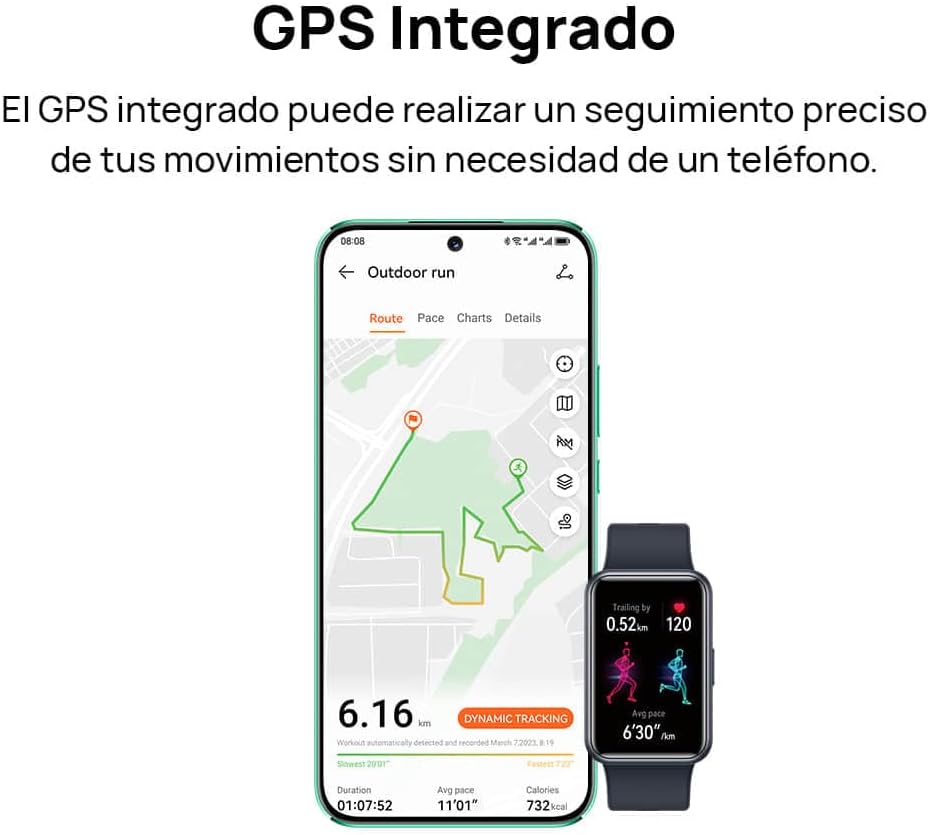
Image: A smartphone screen displaying a tracked outdoor run route, alongside the HUAWEI Watch FIT Special Edition showing activity data.
7. Notifications and Connectivity
Stay connected with your HUAWEI Watch FIT Special Edition. It supports incoming call notifications and quick message replies directly from your wrist. The watch connects to your smartphone via Bluetooth and is compatible with both Android and iOS devices.

Image: Two HUAWEI Watch FIT Special Edition devices showing an incoming call notification and a quick message reply interface.

Image: A smartphone displaying the HUAWEI Health app interface, illustrating the watch's compatibility with both Android and iOS operating systems.
8. Duração da bateria e carregamento
The HUAWEI Watch FIT Special Edition is designed for extended battery life. Actual battery performance may vary based on usage patterns and settings. To charge, use the provided charging cradle and cable. Ensure the watch is placed correctly on the cradle for optimal charging.
9. Manutenção
9.1 Limpeza do Relógio
Limpe regularmente o seu relógio e a pulseira para evitar irritações na pele e manter a funcionalidade. Use um pano macio e seco.amp cloth to wipe the watch body and strap. Avoid using harsh chemicals or abrasive materials. Ensure the charging contacts are clean and dry before charging.
9.2 Resistência à água
The HUAWEI Watch FIT Special Edition has a water resistance rating. Refer to the product specifications for details on its water resistance capabilities. Avoid using the watch in hot water, saunas, or steam rooms, as this may compromise its water resistance.

Image: The back of the HUAWEI Watch FIT Special Edition, showing the optical heart rate sensors and regulatory markings.
10. Solução De Problemas
If you encounter issues with your HUAWEI Watch FIT Special Edition, try the following steps:
- Relógio que não liga: Certifique-se de que o relógio esteja totalmente carregado. Conecte-o ao carregador por pelo menos 10 minutos.
- Não foi possível emparelhar com o telefone: Ensure Bluetooth is enabled on your phone and the watch. Restart both devices and try pairing again. Check if the HUAWEI Health app is updated to the latest version.
- Dados de saúde imprecisos: Certifique-se de que o relógio esteja ajustado ao seu pulso, nem muito apertado nem muito folgado. Limpe os sensores na parte traseira do relógio.
- Notificações não recebidas: Check notification settings in the HUAWEI Health app and your phone's system settings to ensure permissions are granted.
- Tela não responde: Restart the watch by pressing and holding the side button until the restart option appears, then confirm. If unresponsive, force restart by holding the button for a longer duration (e.g., 10-15 seconds).
11. Especificações
| Recurso | Especificação |
|---|---|
| Marca | HUAWEI |
| Número do modelo | 55020BEE-ES |
| Sistema operacional | HUAWEI LiteOS |
| Tamanho da tela | 1.64 polegadas |
| Conectividade | Bluetooth |
| Características especiais | Professional health management, multiple sports modes |
| Dispositivos compatíveis | Smartphone (Android e iOS) |
| Composição da Bateria | Íon de lítio |
| Bateria recarregável | Sim |
| GPS | GPS integrado |
| Forma | Retangular |
| Capacidade de armazenamento de memória | 4 GB |
| Capacidade da bateria | 900 Miliampere-hora (mAh) |
12. Garantia e Suporte
Para informações sobre a garantia, consulte o cartão de garantia incluído com o seu produto ou visite o site oficial da HUAWEI. website. For technical support, troubleshooting assistance, or service inquiries, please contact HUAWEI customer support through their official channels.


