1. Produto acabadoview
The Panasonic KX-HN4101W is a long-range video baby monitor designed to provide secure and reliable monitoring of your child. It features a 3.5-inch color LCD display, remote pan, tilt, and zoom capabilities, two-way talk, night vision, and smart alerts for motion, sound, and temperature changes. The system utilizes DECT technology for an interference-free and private connection, eliminating the need for Wi-Fi.

Image: The Panasonic KX-HN4101W baby monitor unit and camera.
Os principais recursos incluem:
- Longo alcance: Monitor children from up to 1500 feet away (line-of-sight). Actual distance may vary based on environmental factors.
- Conexão segura: Utilizes DECT technology for a private, interference-free connection, not reliant on Wi-Fi.
- Remote Pan, Tilt, Zoom: Ajuste a câmera view remotely from the monitor unit.
- Visão noturna nítida: Provides a clear monochrome view in low-light or dark conditions.
- Conversa bidirecional: Communicate with your baby through the monitor and camera.
- Sons calmantes: Play lullabies, white noise, ocean sounds, rain, vacuum, or heartbeat sounds to comfort your baby.
- Alertas inteligentes: Receive notifications for sound, motion, and room temperature changes.
- Bateria de longa duração: The monitor's built-in rechargeable battery offers up to 13 hours of standby time or 5 hours of continuous use.
- Expansível: The system can be expanded with up to four cameras (sold separately).
Vídeo: Acimaview of Panasonic Baby Monitor features including extended battery life, customizable alerts, extra long range, and smart sensors.
2. O que está na caixa
The Panasonic KX-HN4101W baby monitor system includes the following components:
- Baby Monitor Unit (Parent Unit)
- Baby Camera Unit (Baby Unit)
- AC Adapter for Camera
- AC Adapter for Monitor
- Adaptador de montagem em parede
- Rechargeable Battery (pre-installed in monitor)

Image: All components included in the Panasonic KX-HN4101W baby monitor package.
3. Guia de configuração
3.1 Carregando a unidade de monitoramento
- Connect the monitor AC adapter to the monitor unit and a power outlet.
- Charge the monitor unit for at least 6 hours before initial use. The battery indicator will show full when charging is complete.
3.2 Posicionamento da Unidade de Câmera
- Place the camera unit on a flat surface or mount it to a wall using the provided wall mounting adaptor.
- Ensure the camera is positioned to provide a clear view of your baby, away from direct sunlight or strong light sources.
- Connect the camera AC adapter to the camera unit and a power outlet. The camera unit must remain plugged in for continuous operation.

Image: The baby camera unit mounted on a wall, providing a view do berço.
3.3 Pairing (if necessary)
The monitor and camera units are pre-paired at the factory. If they lose connection or you are adding an additional camera, follow these steps:
- On the monitor unit, press the MENU botão.
- Navigate to the 'Camera Settings' or 'Add Camera' option.
- Siga as instruções na tela para iniciar o emparelhamento.
- On the camera unit, press and hold the pairing button (usually located on the back or bottom) until the indicator light flashes.
- The units will connect automatically.
4. Instruções de operação
4.1 Monitor Unit Controls
The monitor unit features a 3.5-inch LCD screen and several control buttons:
- Botão MENU: Acessa o menu principal de configurações e funcionalidades.
- Botão OK: Confirma seleções.
- Teclado direcional: Navigates through menus and controls camera pan/tilt/zoom.
- Botão do microfone: Activates two-way talk.
- Botão do alto-falante: Adjusts monitor volume.
- Botão de energia: Liga/desliga o monitor.
4.2 Panorâmica, inclinação e zoom remotos
To adjust the camera's view:
- Enquanto viewing the live feed, use the directional pad on the monitor unit to pan (left/right) and tilt (up/down) the camera.
- To zoom in or out, press the appropriate zoom button (often integrated into the directional pad or a separate button).

Image: Visual representation of the remote pan, tilt, and zoom functions controlled from the monitor unit.
4.3 Comunicação Bidirecional
Para falar com seu bebê:
- Press and hold the microphone button on the monitor unit.
- Speak clearly into the monitor's microphone. Your voice will be transmitted through the camera's speaker.
- Release the button to stop talking and resume listening.
4.4 Sons Relaxantes e Canções de Ninar
To play sounds to your baby:
- Pressione o MENU button on the monitor unit.
- Navigate to the 'Lullaby' or 'Soothing Sounds' option.
- Select from the available sounds (e.g., lullabies, white noise, ocean/wave, rain, vacuum, heartbeat).
- Ajuste o volume conforme necessário.

Image: The baby camera unit emitting musical notes, indicating the soothing sounds feature.
5. Principais características
5.1 Visão noturna
The camera unit automatically switches to monochrome night vision in low-light conditions, allowing you to see your baby clearly even in a dark room. The night vision feature ensures continuous monitoring without disturbing your baby with bright lights.

Image: The monitor screen showing a clear, monochrome night vision view de um bebê dormindo em um berço.
5.2 Smart Alerts (Motion, Sound, Temperature)
The monitor system provides customizable alerts to keep you informed:
- Sensor de movimento: Notifies you when movement is detected in the camera's view. You can define specific detection areas to avoid false alarms.
- Sensor de som: Alerts you when sounds above a set threshold are detected, such as your baby crying.
- Sensor de temperatura: Monitors the room temperature and alerts you if it goes above or below a pre-set range.

Image: Icons illustrating the monitor's features: long battery life, temperature alerts, sound alerts, and motion alerts.
5.3 Extra Long Range
The Panasonic KX-HN4101W offers an extra-long range of up to 1500 feet in a straight line-of-sight, thanks to its DECT technology. This allows you to move freely around your home or even outdoors while maintaining a secure connection to your baby's room. Actual range may vary depending on obstacles and interference.

Image: An illustration depicting the monitor's extra-long range capability, extending up to 1500 feet.
6. Manutenção
6.1 Limpeza
To clean the monitor and camera units:
- Desligue ambas as unidades da tomada antes de limpar.
- Limpe as superfícies com um pano macio e seco.
- Para manchas persistentes, use um produto ligeiramente damp Passe um pano com sabão neutro e seque imediatamente.
- Não utilize produtos de limpeza abrasivos, solventes ou produtos químicos agressivos.
6.2 Cuidados com a bateria
- To maximize battery life, avoid fully discharging the monitor unit frequently.
- If the monitor will not be used for an extended period, fully charge it and then store it in a cool, dry place.
7. Solução De Problemas
7.1 Sem vídeo/áudio no monitor
- Ensure both the monitor and camera units are powered on and connected to their respective AC adapters.
- Check if the monitor unit's battery is charged.
- Verify that the units are within range of each other. Move them closer if necessary.
- Re-pair the camera and monitor units if the connection is lost (refer to Section 3.3).
7.2 Qualidade de sinal ruim
- Reduce the distance between the camera and monitor units.
- Avoid placing units near large metal objects, thick walls, or other electronic devices that may cause interference.
- Ensure the camera's antenna is fully extended.
7.3 Alerts Not Functioning
- Check the settings in the monitor's menu to ensure motion, sound, and temperature alerts are enabled and configured correctly.
- Adjust the sensitivity levels for motion and sound detection as needed.
8. Especificações técnicas
| Recurso | Especificação |
|---|---|
| Número do modelo | KX-HN4101W |
| Tamanho da tela | 3.5 polegadas |
| Tecnologia de Conectividade | DECT sem fio |
| Gama Máxima | Até 1500 pés (em linha reta) |
| Visão noturna | Monocromático |
| Conversa bidirecional | Sim |
| Alertas inteligentes | Motion, Sound, Temperature |
| Lullabies/Sounds | Yes (Lullabies, White Noise, Ocean/Wave, Rain, Vacuum, Heartbeat) |
| Monitore a vida útil da bateria | Up to 13 hours standby / 5 hours continuous use |
| Expansibilidade | Até 4 câmeras |
| Fonte de energia | Battery Powered (Monitor), AC Powered (Camera) |
| Dimensões do item (C x L x A) | 15.5 x 6.5 x 7.5 polegadas |
| Peso do item | 8 onças |
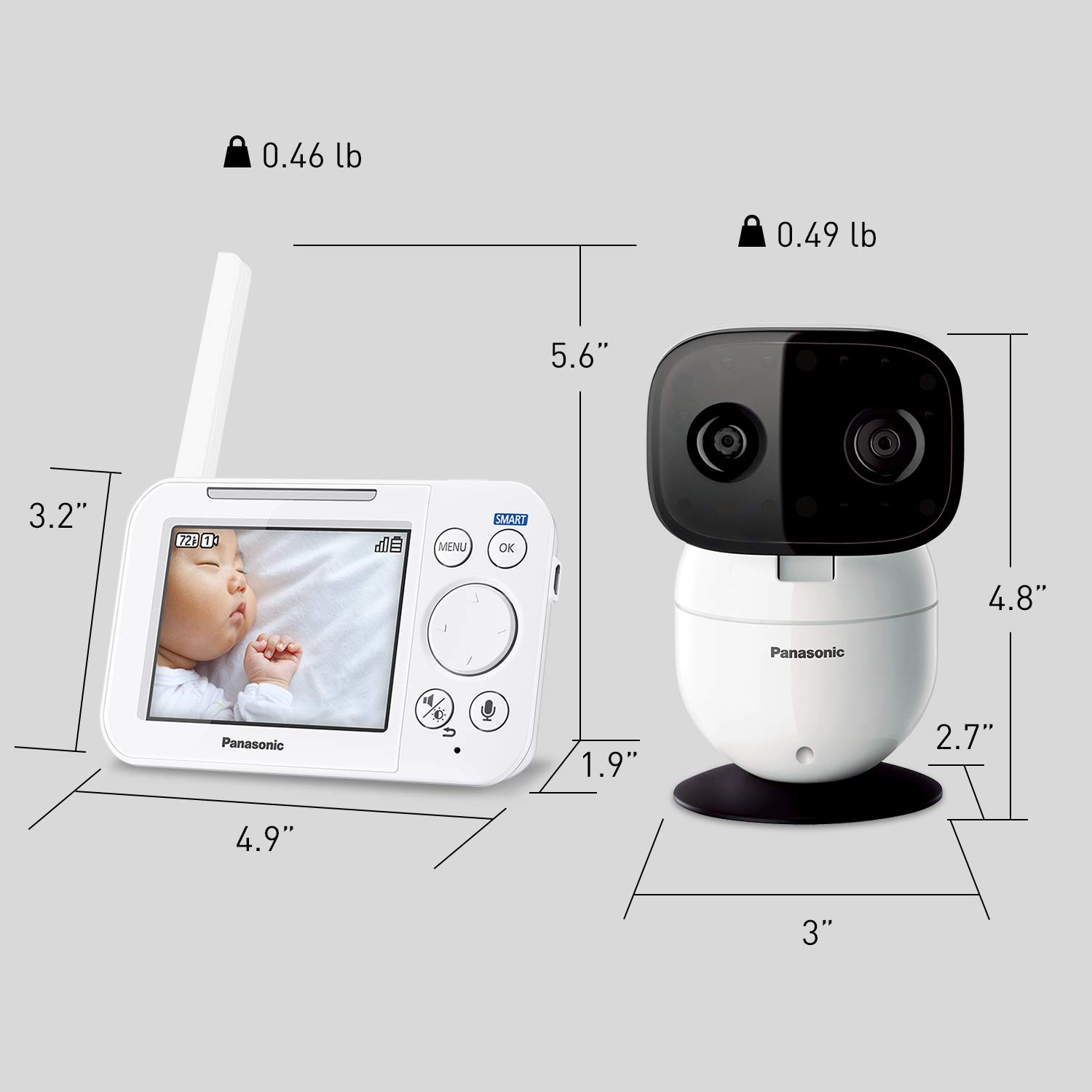
Image: Detailed dimensions of both the monitor and camera units.
9. Garantia e Suporte
9.1 Informações de garantia
This product comes with a manufacturer's warranty. Please refer to the warranty card included in your product packaging or visit the official Panasonic website para obter termos e condições detalhados da garantia.
9.2 Suporte ao cliente
For technical assistance, troubleshooting, or service inquiries, please contact Panasonic customer support. Contact information can typically be found in your product manual, on the product packaging, or on the official Panasonic support website.


