Introdução
This manual provides detailed instructions for the installation, setup, and operation of your JVC KD-X260BT Digital Media Receiver. This unit is designed to provide high-quality audio playback and hands-free communication in your vehicle, featuring Bluetooth connectivity, USB input, and a 13-band equalizer. Please note, this unit does not play CDs. Read this manual thoroughly before use to ensure proper operation and to prevent damage.

Imagem: Frente view of the JVC KD-X260BT Digital Media Receiver, showing the display and control buttons.
Informações de segurança
- Do not operate the unit in a way that distracts you from driving. Always keep your attention on the road.
- Ensure proper wiring connections to prevent short circuits or damage to the vehicle's electrical system.
- Evite expor o aparelho à umidade ou a temperaturas extremas.
- Não tente desmontar ou modificar a unidade. Encaminhe todos os serviços de manutenção para pessoal qualificado.
- Use only accessories specified by JVC.
Conteúdo da embalagem
Verifique se todos os itens estão presentes na embalagem:
- Receptor de mídia digital JVC KD-X260BT
- Chicote de Fiação
- Microfone externo com fio
- Hardware de montagem
- Manual de Instruções (este documento)
Instalação
Professional installation is recommended for this product. Incorrect installation can lead to damage to the unit or vehicle. The KD-X260BT features a short body design, which facilitates easier installation in various vehicle dashboards.
Conexões de fiação:
- Connect the wiring harness according to your vehicle's wiring diagram.
- Certifique-se de que todas as conexões estejam seguras e isoladas para evitar curtos-circuitos.
- Connect the external microphone to the designated input for hands-free calling. Position the microphone in a location that provides clear voice pickup.
- Conecte o cabo da antena.
- Se usar externo amplifiers, connect the 2.5V preamp outputs (rear/subwoofer selectable).
Montagem:
- Instale a manga de montagem na abertura do painel.
- Slide the receiver into the mounting sleeve until it locks into place.
- Fixe o anel de acabamento.
Configurar
Inicialização:
After installation, turn on your vehicle's ignition. The unit should power on. Follow any on-screen prompts for initial setup, such as language selection.
Emparelhamento Bluetooth:
The KD-X260BT supports Bluetooth 3.0+EDR and allows for two phones to be connected full-time. This enables receiving calls from either phone with a push of a key.
- No receptor, acesse o menu Bluetooth.
- Select "Pairing" or "Device Search".
- No seu smartphone, ative o Bluetooth e procure por dispositivos disponíveis.
- Select "KD-X260BT" from the list on your phone.
- Confirme o código de emparelhamento em ambos os dispositivos, se solicitado.
- Após o emparelhamento, a unidade exibirá uma confirmação.
The unit supports Bluetooth profiles HFP (Hands-Free Profile 1.6 for wideband speech), HSP (Headset Profile), PBAP (Phone Book Access Profile), A2DP (Advanced Audio Distribution Profile) e AVRCP (Controle Remoto de Áudio/Vídeo Profile 1.5).
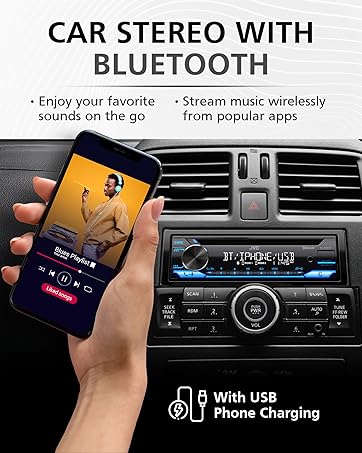
Image: JVC KD-X260BT display indicating Bluetooth connection, with a smartphone showing music playback, illustrating wireless audio streaming.
JVC Remote App:
Download the "JVC Remote" app (available for iOS and Android) to control the receiver's source directly from your smartphone using simple finger gestures.
Instruções de operação
Controles básicos:
- Botão de energia: Pressione para ligar/desligar a unidade.
- Botão de volume: Gire para ajustar o nível de volume. Pressione para acessar as opções do menu.
- Botão de fonte: Press to cycle through available audio sources (Tuner, USB, Bluetooth Audio, AUX).
- Botão de exibição: Changes display information (e.g., clock, track title).
Sintonizador de rádio:
- Press the Source button to select "Tuner" (AM/FM).
- Use os botões de busca para encontrar estações de rádio.
- Press and hold a preset button (1-6) to store a station.
Reprodução USB:
Connect a USB device to the front USB port. The unit supports MP3/WMA/WAV/FLAC playback. The USB port also provides high current 1.5A charging for smartphones.
- Insert the USB device. The unit will automatically switch to USB source and begin playback.
- Use the track buttons to skip tracks.
- Use the folder buttons to navigate through folders.
- MP3ID3 Tag Display (title/artist/album) is supported.
- Android music playback (AOA 2.0) is supported for Android phones (version 4.1 or later).
Transmissão de áudio via Bluetooth:
Once a Bluetooth device is paired, select "Bluetooth Audio" as the source to stream music wirelessly. Use the receiver's controls or the paired device to manage playback (play, pause, skip, search via AVRCP 1.5).
Chamadas com viva-voz:
When a call comes in on a paired phone, the unit will display the caller ID. Press the call button to answer, and the end call button to hang up. The external microphone ensures clear communication.
Audio Settings (Equalizer):
The unit features a 13-Band Graphic Equalizer with 10 preset EQ settings and 1 user-customizable setting. Access the audio menu to adjust:
- Equalizer: Select from preset curves or customize your own.
- Reforço de graves: Enhances low frequencies.
- Loudness: Compensates for perceived loss of bass and treble at low volumes.
- Equilíbrio/Fader: Adjusts sound distribution between left/right and front/rear speakers.
- Controle do subwoofer: Adjust subwoofer output level and frequency if connected.
Internet Radio/Digital Radio Control:
Control Pandora, iHeartRadio, and Spotify directly from the receiver when connected to a compatible Android device via Bluetooth.
Steering Wheel Remote Control:
Factory steering wheel control functions can be retained with a third-party adapter (sold separately).
Manutenção
- Limpeza da unidade: Use um pano macio e seco para limpar o painel frontal. Não use produtos de limpeza abrasivos ou solventes.
- Porta USB: Mantenha a porta USB livre de poeira e detritos.
- Atualizações de firmware: Check the JVC website periodically for any available firmware updates for improved performance and features.
Solução de problemas
| Problema | Solução |
|---|---|
| Sem energia | Check vehicle's fuse. Ensure wiring harness is correctly connected. |
| Sem som | Check speaker connections. Verify volume level. Ensure correct source is selected. |
| Bluetooth não conecta | Ensure Bluetooth is enabled on both devices. Delete previous pairing and re-pair. Move devices closer. |
| Dispositivo USB não reconhecido | Ensure USB device is formatted correctly (FAT16/32). Check for compatible file tipos. Tente um dispositivo USB diferente. |
| Má recepção de rádio | Check antenna connection. Ensure antenna is fully extended (if applicable). |
Especificações
| Recurso | Detalhe |
|---|---|
| Número do modelo | KD-X260BT |
| Potência de saída (pico) | 50 Watts x 4 Canais |
| Saída de energia (RMS) | 22 Watts x 4 Canais |
| Mostrar | VA LCD Display, Spanish Text Display |
| Entrada USB | Front USB, 1.5A Charging, MP3/WMA/WAV/FLAC Playback, Android AOA 2.0 |
| Entrada auxiliar | 3.5mm Front Audio Auxiliary Input |
| Versão Bluetooth | 3.0+EDR Certified |
| Bluetooth Profissionalfiles | HFP 1.6, HSP, PBAP, A2DP, AVRCP 1.5 |
| Equalizador | 13-Band Graphic Equalizer (10 Preset x 1 User) |
| Préamp Saídas | 1 Set of 2.5V (Rear/Subwoofer Selectable) |
| Internet Radio Control | Pandora, Spotify, iHeartRadio (for Android) |
| Dimensões (produto) | 4 x 9 x 8 polegadas |
| Peso do item | 1.79 libras |
Garantia e Suporte
This JVC KD-X260BT Digital Media Receiver comes with a 1-Year Manufacturer's Warranty. For warranty claims, technical support, or service inquiries, please contact JVC customer support or visit the official JVC webGuarde seu comprovante de compra para validação da garantia.
Suporte ao cliente da JVC: Refer to the contact information provided with your product packaging or on the official JVC website.


