Introdução
Obrigado pela compra.asing the Max Power MPD125L Karaoke DJ Speaker System. This portable 12-inch speaker system is designed to deliver powerful sound and vibrant LED lighting for your entertainment needs. It features a built-in rechargeable battery, multiple connectivity options including USB, SD, AM/FM radio, and Bluetooth, along with a strong amplifier para uma experiência de áudio envolvente.
Please read this manual thoroughly before operating the device to ensure proper use, optimal performance, and to prevent damage.
Informações de segurança
- Não exponha o aparelho à chuva ou umidade para evitar incêndio ou choque elétrico.
- Não abra o casing. Não existem peças que possam ser reparadas pelo usuário no interior. Encaminhe todos os serviços de manutenção para pessoal qualificado.
- Coloque a unidade em uma superfície estável e plana para evitar que ela caia.
- Mantenha o aparelho longe da luz solar direta, fontes de calor e acúmulo excessivo de poeira.
- Garanta uma ventilação adequada. Não obstrua as aberturas de ventilação.
- Use apenas o adaptador de energia fornecido com a unidade.
- Desligue a unidade durante tempestades com raios ou quando não for utilizada por longos períodos.
- Evite colocar objetos pesados sobre o cabo de alimentação.
- Não insira nenhum objeto nas aberturas da unidade.
Conteúdo da embalagem
Por favor, verifique se todos os itens estão presentes e em boas condições:
- Max Power MPD125L Karaoke DJ Speaker System
- Microfone sem fio
- Controle remoto sem fio
- Adaptador de energia/cabo de carregamento
- Manual do usuário (este documento)
Características do produto
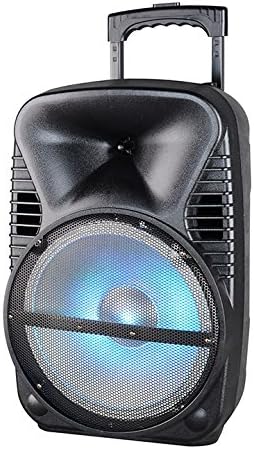
Imagem: Frente view of the Max Power MPD125L Karaoke DJ Speaker System. It is a black, portable speaker with a retractable handle on top and wheels at the bottom. The front features a large speaker grille with blue LED lights illuminating the woofer, indicating its active state.
- Design portátil: 12-inch speaker with built-in retractable handle and wheels for easy transport.
- Áudio poderoso: 4000W peak power output for loud and clear sound with good bass.
- Bateria recarregável integrada: Provides up to 4 hours of continuous playback. (Battery size: 12V/2.6A)
- LED Dance Lights: Integrated LED lights that flash, transforming any room into a disco club.
- Múltiplas opções de conectividade:
- Bluetooth: Wireless streaming from compatible devices (laptops, smartphones).
- Entrada USB: Para reproduzir áudio files de unidades USB.
- Slot SD: Para reproduzir áudio files from SD cards.
- Rádio AM/FM: Built-in tuner for radio broadcasts.
- Funcionalidade de karaokê: Includes a wireless microphone for karaoke sessions.
- Full-Function Wireless Remote Control: Para operação conveniente à distância.
- Impedância: 4 Ohms.
- Resposta de frequência: 40 Hz - 20 kHz.
Configurar
1. Carregando o alto-falante
- Locate the DC input port on the speaker (usually on the rear panel).
- Connect the supplied power adapter to the DC input port.
- Conecte o adaptador de alimentação a uma tomada elétrica padrão.
- A luz indicadora de carregamento (se presente) acenderá, normalmente em vermelho, durante o carregamento e ficará verde quando a carga estiver completa.
- Allow approximately 4-6 hours for a full charge before first use. The speaker can be used while charging.
2. Wireless Microphone Setup
- Insert appropriate batteries (not included, usually AA) into the wireless microphone.
- Turn on the microphone. It should automatically pair with the speaker.
- Adjust the microphone volume knob on the speaker's control panel to your desired level.
3. Configuração do controle remoto
- Insert appropriate batteries (not included, usually AAA) into the wireless remote control.
- Point the remote control towards the speaker's IR receiver (usually on the front panel or near the controls) to operate.
Instruções de operação
1. Ligar/desligar
Locate the Power switch (usually a rocker switch) on the speaker's control panel. Flip it to the "ON" position to power on the speaker. Flip it to "OFF" to power off.
2. Seleção de modo
Press the "MODE" button on the control panel or remote control to cycle through available input modes: Bluetooth, USB, SD, FM Radio, AM Radio, AUX (if available).
3. Emparelhamento Bluetooth
- Turn on the speaker and select Bluetooth mode. The speaker will typically announce "Bluetooth Mode" or display "BT" and enter pairing mode (indicated by a flashing Bluetooth indicator).
- On your smartphone, tablet, or laptop, enable Bluetooth and search for new devices.
- Select "MPD125L" (or similar name) from the list of available devices.
- Once paired, the speaker will confirm with an audible tone or a solid Bluetooth indicator light. You can now play audio wirelessly.
4. Reprodução via USB/SD
- Insert a USB flash drive or SD card (pre-loaded with MP3 or compatible audio files) into the respective slot.
- The speaker should automatically switch to USB/SD mode and begin playing the first track. If not, press the "MODE" button to select USB or SD mode.
- Use the Play/Pause, Next Track, and Previous Track buttons on the control panel or remote to navigate.
5. Operação do rádio AM/FM
- Select FM or AM radio mode using the "MODE" button.
- Press and hold the Play/Pause button (often labeled "SCAN") to automatically scan and save available radio stations.
- Use the Next Track and Previous Track buttons to switch between saved stations.
- Extend the telescopic antenna (if present) for better reception.
6. Função Karaokê
Ensure the wireless microphone is powered on and paired. Play your desired music through any input mode (Bluetooth, USB, etc.). Speak or sing into the microphone. Adjust the microphone volume and echo effects (if available) using the dedicated knobs on the control panel.
7. LED Dance Lights
The LED lights typically activate automatically when the speaker is powered on. There may be a dedicated button (e.g., "LIGHT" or "LED") on the control panel or remote to toggle them on/off or change patterns.
8. Controle de volume
Adjust the master volume using the main volume knob on the speaker's control panel or the volume buttons on the remote control.
Manutenção
- Limpeza: Use a soft, dry cloth to wipe the exterior of the speaker. Do not use liquid cleaners or abrasive chemicals.
- Armazenar: Quando não estiver em uso por longos períodos, guarde a caixa de som em local fresco e seco, longe da luz solar direta e de temperaturas extremas.
- Cuidados com a bateria: To prolong battery life, avoid fully discharging the battery frequently. Recharge the battery at least once every 3 months if not in regular use.
- Ventilação: Certifique-se de que as aberturas de ventilação da caixa de som estejam livres de poeira e detritos para evitar superaquecimento.
Solução de problemas
| Problema | Possível causa | Solução |
|---|---|---|
| A caixa de som não liga. | A bateria está esgotada. Cabo de alimentação não está conectado corretamente. | Connect the speaker to a power outlet and allow it to charge. Ensure the power cable is securely plugged into both the speaker and the outlet. |
| Nenhum som sai do alto-falante. | O volume está muito baixo. Modo de entrada incorreto selecionado. Device not properly connected (Bluetooth/USB/SD). | Aumente o volume principal. Press the "MODE" button to select the correct input. Re-pair Bluetooth device, re-insert USB/SD, or check AUX cable connection. |
| O dispositivo Bluetooth não emparelha. | O alto-falante não está em modo de emparelhamento. O dispositivo está muito longe da caixa de som. O Bluetooth do dispositivo está desligado. | Ensure speaker is in Bluetooth mode and indicator is flashing. Move device closer to the speaker (within 10 meters). Ative o Bluetooth no seu dispositivo. |
| O microfone não está funcionando. | Microphone is off or batteries are dead. O volume do microfone está muito baixo. | Turn on the microphone and replace batteries if necessary. Increase the microphone volume knob on the speaker. |
| A recepção de rádio é fraca. | Sinal fraco. Antena não estendida. | Mude a caixa de som para uma área com melhor sinal. Estenda totalmente a antena telescópica. |
Especificações
| Número do modelo | MPD125L |
| Marca | POTÊNCIA MÁXIMA |
| Potência de pico de saída | 4000 Watts |
| Impedância | 4 Ohms |
| Resposta de frequência | 40 Hz - 20 kHz |
| Tamanho da bateria | 12V / 2.6A |
| Duração da bateria | Até 4 horas |
| Dimensões do produto (C x L x A) | 33.02 x 38.1 x 58.42 cm (13 x 15 x 23 polegadas) |
| Peso do produto | 15.88 kg (35 libras) |
| Dispositivos compatíveis | Notebooks, Smartphones |
| Tipo de conector | USB |
| UPC | 703510623201 |
Garantia e Suporte
Para informações sobre garantia e suporte técnico, consulte a documentação fornecida no momento da compra ou entre em contato com o revendedor. Guarde o comprovante de compra para eventuais solicitações de garantia.
For further assistance or inquiries, please visit the official MAX POWER website ou entre em contato com o departamento de atendimento ao cliente.


