1. Introdução
This manual provides essential instructions for the safe operation and maintenance of your QFX PBX-410204BTD PA Speaker. Please read this manual thoroughly before using the device and retain it for future reference.
1.1. Produto acabadoview
The QFX PBX-410204BTD is a versatile battery-powered PA speaker system featuring dual 10-inch woofers and dual 1-inch tweeters. It includes multiple audio input options such as Bluetooth, USB, SD card, FM radio, and DVD playback. Additional features include a disco light and karaoke functionality, making it suitable for various entertainment and public address applications. The unit operates on a 12V 12AH rechargeable battery and supports AC 100-240V input.
1.2. Instruções de segurança
- Fonte de energia: Certifique-se de que a fonte de alimentação corresponda ao voltage requirements (AC 100-240V or DC 12V).
- Ventilação: Não obstrua as aberturas de ventilação. Mantenha espaço suficiente ao redor do aparelho para garantir a circulação adequada do ar.
- Água e Umidade: Não exponha o aparelho à chuva, umidade ou líquidos.
- Fontes de calor: Mantenha o aparelho afastado de fontes de calor, como radiadores, aquecedores, fogões ou outros aparelhos que produzam calor.
- Limpeza: Disconnect the power before cleaning. Use a dry cloth.
- Manutenção: Não tente consertar este produto sozinho. Encaminhe todos os serviços de manutenção para pessoal de serviço qualificado.
- Bateria: The unit contains a rechargeable battery. Follow proper disposal guidelines for batteries. Do not expose to excessive heat.
2. Conteúdo da embalagem
Por favor, verifique se a embalagem contém os seguintes itens:
- QFX PBX-410204BTD PA Speaker Unit
- Adaptador/Cabo de alimentação
- Controle remoto (se incluído)
- Microfone (se incluído)
- Manual do usuário (este documento)
3. Controles e recursos
Familiarize yourself with the various controls and connection ports on your PA speaker.
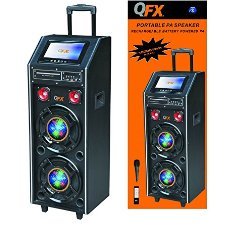
Figura 1: Frente view of the QFX PBX-410204BTD PA Speaker. This image displays the speaker's front panel, including the dual 10-inch woofers, the central control panel with various buttons and knobs, and the integrated disco light.
3.1. Painel de controle finalizadoview
- Interruptor de alimentação: Liga / desliga a unidade.
- Controle de volume: Ajusta o volume principal.
- Entrada de microfone: Connects a wired microphone.
- Echo/Mic Volume: Adjusts microphone volume and echo effect.
- Porta USB: Para reprodução a partir de pen drives USB.
- Slot para cartão SD: Para reprodução em cartão SD.
- Botão de modo: Switches between input modes (Bluetooth, USB, SD, FM, DVD).
- Botão Reproduzir/Pausar: Controla a reprodução de mídia.
- Botões de faixa anterior/próxima: Navigates media tracks or FM stations.
- Antena FM: Para melhor recepção de rádio FM.
- Disco Light Switch: Turns the disco light ON/OFF.
- Leitor de DVD: Integrated DVD disc slot and controls.
- Entrada CA: Connects the power adapter for charging and AC operation.
- DC 12V Input/Output: For external 12V power source or output.
4. Configuração
4.1. Carregamento inicial
Before first use, fully charge the internal battery. Connect the power adapter to the AC input on the speaker and plug it into a standard wall outlet. The charging indicator will illuminate. Charging typically takes several hours. The indicator will change or turn off once fully charged.
4.2. Localização
Place the speaker on a stable, flat surface. Ensure there is adequate space around the unit for ventilation. Avoid placing it near direct sunlight, heat sources, or areas with high humidity.
5. Instruções de operação
5.1. Ligar/desligar
To power on the unit, toggle the Power Switch to the "ON" position. To power off, toggle it to "OFF".
5.2. Conexão Bluetooth
- Turn on the speaker and press the "Mode" button until "Bluetooth" mode is selected.
- Enable Bluetooth on your mobile device or audio player.
- Procurar "QFX PBX-410204BTD" (or similar name) in your device's Bluetooth settings.
- Select the speaker to pair. A confirmation tone will sound upon successful connection.
- Agora você pode reproduzir áudio do seu dispositivo através do alto-falante.
5.3. Reprodução via USB/Cartão SD
- Insert a USB flash drive or SD card into the respective slot.
- Press the "Mode" button to select "USB" or "SD" mode. The unit will automatically begin playing compatible audio files.
- Utilize os botões Reproduzir/Pausar, Anterior e Próximo para controlar a reprodução.
5.4. Rádio FM
- Press the "Mode" button to select "FM" mode.
- Estenda a antena de FM para melhor recepção.
- Press and hold the Play/Pause button to auto-scan and save available FM stations.
- Use the Previous/Next buttons to navigate through saved stations.
5.5. Reprodução de DVD
- Insert a DVD disc into the DVD slot.
- Press the "Mode" button to select "DVD" mode.
- Use the integrated DVD controls or the remote control to manage playback.
5.6. Função Karaokê
- Connect a microphone to the Microphone Input jack.
- Adjust the Microphone Volume and Echo controls to your preference.
- Play music from any source (Bluetooth, USB, SD, DVD) and sing along.
5.7. Disco Light
Toggle the Disco Light Switch to activate or deactivate the integrated disco light feature.
6. Manutenção
6.1. Limpeza
Wipe the exterior of the unit with a soft, dry cloth. Do not use abrasive cleaners, waxes, or solvents. Ensure the unit is powered off and unplugged before cleaning.
6.2. Cuidados com a bateria
To prolong battery life, fully charge the unit before storing it for extended periods. Recharge the battery at least once every 3 months if not in regular use. Avoid completely draining the battery frequently.
6.3. Armazenamento
Guarde a caixa de som em local fresco e seco, longe da luz solar direta e de temperaturas extremas.
7. Solução De Problemas
| Problema | Possível causa | Solução |
|---|---|---|
| Sem energia | Unit not plugged in; Power switch off; Battery drained. | Check power connection; Turn power switch ON; Charge the battery. |
| Sem som | Volume too low; Incorrect input mode; Device not paired (Bluetooth). | Aumentar o volume; Selecionar o modo de entrada correto; Emparelhar novamente o dispositivo Bluetooth. |
| Bluetooth não conecta | Alto-falante não está no modo Bluetooth; Dispositivo muito distante; Interferência. | Ensure speaker is in Bluetooth mode; Move device closer; Avoid obstacles. |
| USB/SD não reproduz | Incorreto file format; USB/SD card corrupted; Incorrect mode. | Garantir files are compatible (e.g., MP3); Try another USB/SD card; Select correct mode. |
| Rádio FM com recepção ruim. | Antena não estendida; sinal fraco. | Fully extend the FM antenna; Try repositioning the unit. |
8. Especificações
- Modelo: PBX-410204BTD
- Tipo de alto-falante: Alto-falante PA alimentado por bateria
- Tamanho do Woofer: 2 x 10 polegadas
- Tamanho do Tweeter: 2 x 1 polegadas
- Conectividade: Bluetooth, USB, SD, FM Radio, DVD
- Características especiais: Disco Light, Karaoke
- Bateria: Bateria recarregável de 12V 12AH
- Entrada CA: 100-240V
- DC Input/Output: 12V
- Potência de saídatage: 346 Watts
- Dimensões do pacote: 100.33 x 43.18 x 43.18 cm (39.5 x 17 x 17 polegadas)
- Peso do item: 29.94 kg (66 libras)
9. Garantia e Suporte
For warranty information and technical support, please refer to the warranty card included with your product or contact QFX customer service directly. Keep your purchase receipt as proof of purchase.
Observação: Os termos específicos da garantia podem variar conforme a região e o revendedor.


