1. Introdução
The Lorex LW2731AC1 is an add-on wireless camera designed to expand your existing Lorex 7-Inch LCD Wireless Home Monitoring System. This camera provides additional surveillance capabilities, allowing you to monitor more areas of your home or property. It features day and night viewing, two-way audio communication, and a secure digital wireless signal for reliable performance.
This manual provides essential information for the proper installation, operation, and maintenance of your LW2731AC1 add-on camera.
2. Conteúdo da embalagem
Verifique se todos os componentes estão presentes na embalagem:
- 1 x Indoor/Outdoor Wireless Camera (LW2731AC1)
- 1 x Power Adapter for Camera
3. Recursos do Produto
The LW2731AC1 camera is equipped with several features to enhance your monitoring experience:
- VGA (640 x 480) Resolution Sensor: Fornece vídeo nítido footage.
- 52 graus Viewângulo de entrada: Offers a focused field of view for specific areas.
- Visão noturna infravermelha de 30 metros (40 pés): Enables monitoring in low-light or complete darkness, with black and white video.
- Filtro de corte IR: Ensures accurate color reproduction during daylight conditions.
- Advanced Day/Night Mode: Automatically switches between color (day) and black and white (night) modes for optimal clarity.
- Passive Infrared (PIR) Motion Detection: Detects movement to trigger recording or alerts.
- Áudio bidirecional: Built-in microphone and speaker allow for listening and speaking through the camera.
- Secure Digital Wireless Signal: Utilizes Frequency Hopping Spread Spectrum (FHSS) technology for private and secure video and audio transmission.
- Design resistente às intempéries: Suitable for both indoor and outdoor installation. For outdoor use, install under shelter to protect from direct exposure to rain or snow.

Figura 3.1: Frente angulada view of the Lorex LW2731AC1 Add-on Camera, showing the lens, IR LEDs, and antenna.

Figura 3.2: Detalhe da vista frontal view of the camera, highlighting the lens, infrared LEDs, and the motion sensor below.
4. Configuração
4.1 Instalação Física
- Escolha um local: Select a suitable location for your camera. Consider the desired viewing area, proximity to a power outlet, and wireless signal strength to your Lorex 7-Inch LCD monitor. For outdoor use, ensure the camera is installed under shelter to protect it from direct weather exposure.
- Monte a câmera: Use the provided mounting hardware to securely attach the camera to a wall or ceiling. Adjust the camera's angle to cover the desired area.
- Conecte a energia: Plug the camera's power adapter into the camera and then into a standard electrical outlet. The camera requires a local power outlet for operation.
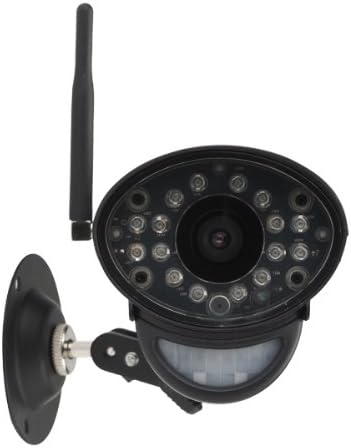
Figura 4.1: Frente view of the camera with its adjustable mounting bracket, ready for installation.
4.2 Pairing with Your Monitoring System
To integrate the LW2731AC1 add-on camera with your Lorex 7-Inch LCD monitoring system, follow the pairing instructions provided with your main monitoring system. Typically, this involves:
- Access the menu on your Lorex 7-Inch LCD monitor.
- Navigate to the 'Camera Pairing' or 'Add Camera' section.
- Select an unused channel for the new camera.
- Follow the on-screen prompts, which usually instruct you to press a 'Pair' or 'Sync' button on the back of the camera within a specified timeframe (e.g., 30 seconds).
- Once successfully paired, the camera's video feed will appear on the selected channel of your monitor.
Note: Refer to your Lorex 7-Inch LCD monitoring system's manual for specific pairing instructions, as steps may vary slightly by model.
5. Operação
Once paired, the LW2731AC1 camera operates in conjunction with your Lorex 7-Inch LCD monitoring system. Refer to your main system's manual for detailed instructions on:
- ViewModos de ing: How to switch between single camera view, scan mode (automatic switching), and quad split-screen mode (if supported by your monitor).
- Configurações de detecção de movimento: Adjusting sensitivity and recording triggers for the camera's passive infrared motion sensor.
- Áudio bidirecional: Using the talk-back function to communicate through the camera.
- Gravação e reprodução: Managing video recordings stored on your monitoring system's SD card.
The camera's digital wireless signal ensures a private and secure connection, minimizing interference and unauthorized access to your video feed.
6. Manutenção
6.1 Limpeza da Câmera
To maintain optimal image quality, periodically clean the camera lens and housing:
- Certifique-se de que a câmera esteja desligada antes de limpá-la.
- Use a soft, lint-free cloth to gently wipe the lens. If necessary, dampumedeça levemente o pano com água ou uma solução suave para limpeza de lentes.
- Wipe the camera housing with a soft, damp pano. Evite produtos químicos agressivos ou produtos de limpeza abrasivos.
6.2 Considerações Ambientais
While the camera is weather-resistant, extreme conditions can affect its performance and lifespan:
- Avoid installing the camera in direct sunlight for prolonged periods, as this can cause overheating.
- Protect the camera from direct exposure to heavy rain, snow, or hail. Install under an overhang or eave when used outdoors.
- Certifique-se de que o adaptador de energia esteja protegido contra umidade.
7. Solução De Problemas
If you encounter issues with your LW2731AC1 add-on camera, consider the following common solutions:
- Sem sinal de vídeo:
- Ensure the camera is powered on and its power adapter is securely connected to a working outlet.
- Verify the camera is within range of your Lorex 7-Inch LCD monitor. Obstructions like thick walls or multiple floors can reduce wireless range.
- Attempt to re-pair the camera with your monitoring system (refer to Section 4.2).
- Check for sources of interference (e.g., other wireless devices, microwaves) near the camera or monitor.
- Má qualidade de imagem:
- Clean the camera lens (refer to Section 6.1).
- Garanta iluminação adequada na área monitorada durante o dia.
- For night vision, ensure there are no obstructions directly in front of the camera's IR LEDs.
- A detecção de movimento não funciona:
- Check the motion detection settings on your Lorex 7-Inch LCD monitor to ensure it is enabled and sensitivity is appropriately set.
- Ensure the camera's motion sensor is not obstructed.
- Problemas de áudio bidirecional:
- Verify the volume settings on your Lorex 7-Inch LCD monitor.
- Certifique-se de que não haja obstruções físicas bloqueando o microfone ou o alto-falante da câmera.
If problems persist, consult the support section of the Lorex website or contact Lorex customer support for further assistance.
8. Especificações
| Recurso | Especificação |
|---|---|
| Número do modelo | LW2731AC1 |
| Resolução de captura de vídeo | 640x480 (VGA) |
| Campo de View | 52 graus |
| Alcance de visão noturna | Até 40 pés (12 m) |
| Tecnologia de Conectividade | Sem fio (FHSS) |
| Fonte de energia | Elétrico com fio |
| Áudio | Áudio bidirecional (microfone e alto-falante integrados) |
| Detecção de movimento | Infravermelho passivo (PIR) |
| Uso interno/externo | Indoor, Outdoor (Weather-Resistant) |
| Dimensões (C x L x A) | 9.6 x 3.6 x 3.4 polegadas (24.4 x 9.1 x 8.6 cm) |
| Peso do item | 1.05 libras (0.48 kg) |
| Cor | Preto |
| Avaliação de proteção internacional | IP67 |
9. Garantia e Suporte
For information regarding product warranty, technical support, and additional resources, please visit the official Lorex website. You can typically find FAQs, software downloads, and contact information for customer service there.
Website: www.lorex.com


