1. پیژندنه
Thank you for choosing the GOBOULT Z40 V2.0 True Wireless Earbuds. These earbuds are designed to provide a high-quality audio experience with features such as extended playtime, clear call quality, and low-latency gaming. This manual provides instructions for setup, operation, maintenance, and troubleshooting to ensure optimal use of your device.

Image 1.1: GOBOULT Z40 V2.0 True Wireless Earbuds and Charging Case.
2. محصول ختم شوview
۲.۲ شاملې برخې
په بسته کې لاندې توکي شامل دي:
- GOBOULT Z40 V2.0 Earbuds
- د چارج کولو قضیه
- د USB چارج کیبل
- د غوږونو ټپونه (مختلف اندازې)
- د کارن لارښود
- د تضمین کارت
2.2 کلیدي ځانګړتیاوې
- تر 70 ساعتونو پورې د لوبو ټول وخت
- Quad Mic Environmental Noise Cancellation (ENC) for clear calls
- 13mm Bass Drivers for enhanced audio
- 45ms Low Latency Gaming Mode
- Bluetooth v5.4 for stable connectivity
- IPX5 د اوبو مقاومت
- Smart Touch Controls with Voice Assistant support
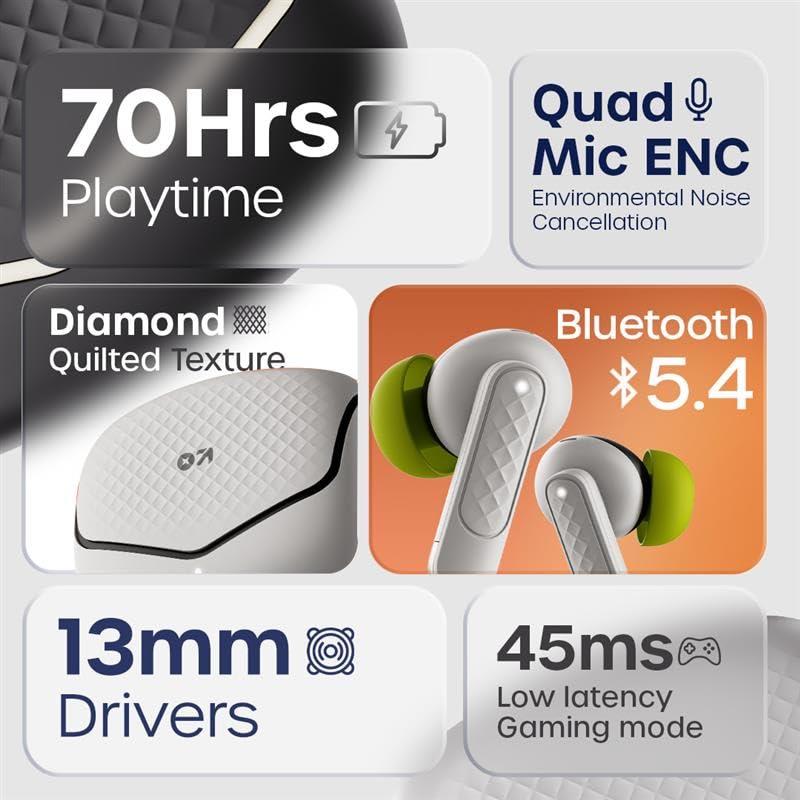
انځور 2.1: اوورview of GOBOULT Z40 V2.0 key features.
۴. د تنظیم لارښوونې
۴.۱ د ایربډز او کیس چارج کول
د لومړي ځل کارولو دمخه، د غوږ بډونه او د چارج کولو قضیه په بشپړه توګه چارج کړئ.
- غوږوالۍ د چارج کولو په قضیه کې ځای په ځای کړئ.
- د USB چارج کولو کیبل د قضیې د چارج کولو پورټ او د بریښنا سرچینې سره وصل کړئ.
- د قضیې په شاخص رڼا به د چارج کولو حالت وښيي.
- A 10-minute charge provides approximately 120 minutes of playtime. The case offers up to 70 hours of total battery life for the earbuds.

Image 3.1: Charging and battery life details.
3.2 د بلوتوټ جوړه کول
The GOBOULT Z40 V2.0 earbuds utilize Bluetooth v5.4 for quick and reliable pairing.
- Open the charging case. The earbuds will automatically enter pairing mode (Blink&Pair™ Tech).
- په خپل وسیله (سمارټ فون، ټابلیټ، لپ ټاپ) کې، بلوتوث فعال کړئ.
- لټون available Bluetooth devices and select "GOBOULT Z40 V2.0" from the list.
- یوځل چې وصل شي، د غوږ بډونه به د بریالي جوړې نښه وي.
- The earbuds will automatically reconnect to the last paired device when removed from the case.

Image 3.2: Bluetooth 5.4 and Blink&Pair™ technology.
4. عملیاتي لارښوونې
4.1 ټچ کنټرولونه
The earbuds feature intuitive touch controls for managing various functions:
- پلی کول / ودرول: په دواړو غوږونو کې یو ځل کلیک وکړئ.
- بله لار: په ښي غوږۍ کې دوه ځله ټایپ کړئ.
- مخکینی لار په چپ غوږۍ کې دوه ځله ټایپ کړئ.
- ځواب / پای کال: په دواړو غوږونو کې یو ځل کلیک وکړئ.
- زنګ رد کړئ: د 2 ثانیو لپاره هر یو ایربډ فشار ورکړئ او ونیسئ.
- د غږ همکار فعاله کړئ: په دواړو غوږونو درې ځله ټایپ کړئ.
- د لوبو حالت بدل کړئ: Press and hold the right earbud for 2 seconds (specific gesture may vary, refer to quick start guide).

Image 4.1: Hands-free control and voice assistant activation.
4.2 تلیفونونه کول او ترلاسه کول
The Quad Mic ENC system ensures clear voice transmission during calls by reducing environmental noise.
- Ensure earbuds are connected to your device.
- Use the touch controls to answer, end, or reject calls.

Image 4.2: Quad Mic ENC for clear calls.
۴.۳ د لوبو حالت
Activate Combat™ Gaming Mode for a low-latency audio experience, ideal for gaming and video playback.
- Refer to the touch control section for activating Gaming Mode (typically a press and hold gesture).
- This mode reduces audio latency to 45ms, providing synchronized sound with on-screen action.

Image 4.3: Low Latency Gaming Mode.
5. ساتنه
5.1 پاکول
منظم پاکول ستاسو د غوږونو فعالیت او اوږد عمر ساتلو کې مرسته کوي.
- د غوږ بډونو او چارج کولو کیس پاکولو لپاره نرم، وچ، له لینټ څخه پاک ټوکر وکاروئ.
- Gently remove any earwax or debris from the eartips and speaker mesh using a small brush or cotton swab.
- د کثافاتو موادو، الکولو، یا کیمیاوي پاکوونکو کارولو څخه ډډه وکړئ.
۵.۲ د اوبو مقاومت (IPX5)
The earbuds are rated IPX5 water-resistant, meaning they can withstand sweat and light splashes.
- د غوږونو غوږوالۍ په اوبو کې مه ډوبوئ.
- Avoid exposing them to heavy rain or strong water jets.
- ډاډ ترلاسه کړئ چې د غوږ بډونه وچ دي مخکې له دې چې بیرته چارج کولو کیس کې ځای په ځای کړئ ترڅو د زیان مخه ونیول شي.
Image 5.1: IPX5 Water Resistance.
6. ستونزه حل کول
If you encounter any issues with your GOBOULT Z40 V2.0 earbuds, please refer to the following common solutions:
- غږ نشته: Ensure the earbuds are charged and properly paired with your device. Check the volume level on both the earbuds and your device.
- د جوړه کولو مسلې: ډاډ ترلاسه کړئ چې ستاسو په وسیله کې بلوتوث فعال شوی او د غوږ بډونه د جوړې کولو حالت کې دي. د غوږ بډونه د جلا کولو او بیا جوړې کولو هڅه وکړئ.
- موقتي اړیکه: Ensure you are within the 10-meter Bluetooth range. Avoid obstacles between the earbuds and your device.
- د چارج کولو ستونزې: Verify the charging cable is securely connected and the power source is active. Clean the charging contacts on both the earbuds and the case.
- مایکروفون کار نه کوي: Ensure the earbuds are properly seated in your ears. Check if any debris is blocking the microphone ports.
If the problem persists, please contact GOBOULT customer support for further assistance.
7. مشخصات
Detailed technical specifications for the GOBOULT Z40 V2.0 True Wireless Earbuds:
| فیچر | مشخصات |
|---|---|
| د ماډل نوم | Z40 V2.0 (Airbass Earbuds) |
| د ارتباط ټیکنالوژي | بې سیم (بلوتوث) |
| بلوتوث نسخه | 5.4 |
| د بلوتوټ رینج | 10 متره |
| د آډیو ډرایور اندازه | 13 ملی میتر |
| د آډیو ډرایور ډول | متحرک چلوونکی |
| د تعدد ځواب | 20 Hz |
| حساسیت | 115 dB |
| د بیټرۍ ژوند (ایربډونه) | تر ۴۸ ساعتونو پورې (د چارج کولو کیس سره) |
| د چارج کولو وخت | 10 Minutes for 120 minutes playtime |
| مایکروفون | کواډ مایک د ENC سره |
| آډیو ځنډ | ۴۵ ملی ثانیې (د لوبو حالت) |
| د اوبو مقاومت | IPX5 |
| د کنټرولر ډول | لمس |
| هډوتري برسیر | د USB ډول C |
| د غوږ ځای پرځای کول | په غوږ کې |
| د محصول ابعاد | 5.8 x 4 x 4.9 سانتي متره |
| د توکي وزن | ۱۲۰ ګرامه (د ټول پیکج وزن) |

Image 7.1: 13mm Bass Drivers for enhanced audio.
8. تضمین او ملاتړ
۸.۱ د جوړونکي تضمین
The GOBOULT Z40 V2.0 True Wireless Earbuds come with a 1-year manufacturer’s warranty. This warranty covers manufacturing defects and ensures product quality and durability.
8.2 د پیرودونکي ملاتړ
For any product-related queries, technical assistance, or warranty claims, please contact GOBOULT customer support. Refer to the warranty card included in your package for contact details or visit the official GOBOULT webسایټ


