1. محصول ختم شوview
The YESIDO KM27 is a 2.4G wireless video intercom doorbell system designed for enhanced home security and convenient communication. It features a 4.3-inch indoor display screen, infrared night vision capabilities, two-way audio communication, and supports video recording to a TF card for monitoring purposes.
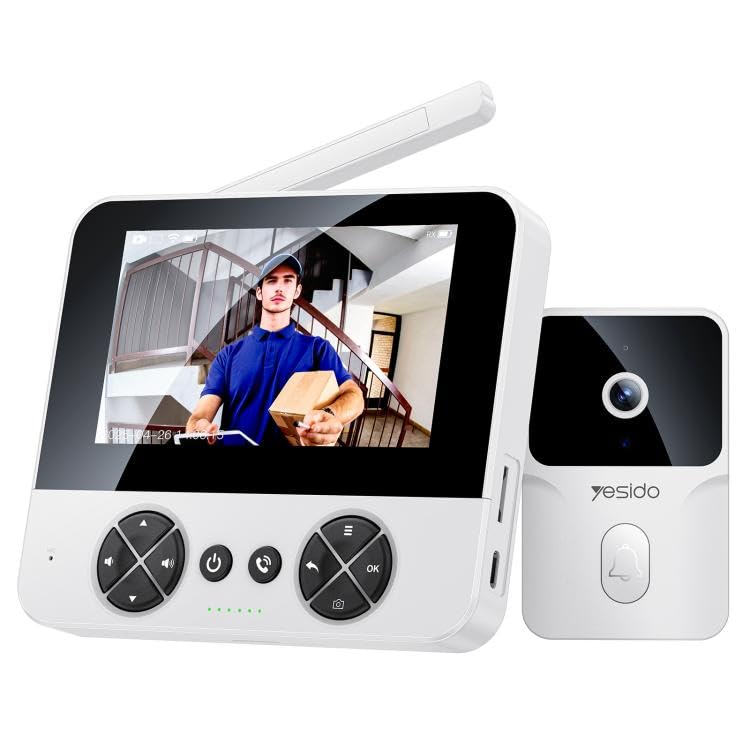
Image 1.1: The YESIDO KM27 wireless video intercom doorbell system, showing both the outdoor doorbell unit and the indoor display unit.
2. د بسته محتويات
ډاډ ترلاسه کړئ چې ټول توکي په کڅوړه کې شتون لري:
- Outdoor Doorbell Unit
- Indoor Display Unit (4.3-inch screen)
- د ډول - سي چارج کیبل
- د نصبولو هارډویر (سکرو، دیوال لنگرونه)
- د کارن لارښود
۴. د تنظیم لارښوونې
۵.۱ د واحدونو چارج کول
Before initial use, fully charge both the outdoor doorbell unit and the indoor display unit using the provided Type-C charging cable and a DC5V/1A power adapter (not included). The outdoor unit's 1000mAh lithium battery provides approximately 6 months of standby time on a single charge.
3.2 Installing a TF Card (Optional)
To enable photo and video recording, insert a TF card (up to 256GB, not included) into the designated slot on the indoor display unit. Ensure the card is inserted correctly.
3.3 Mounting the Outdoor Doorbell Unit
- Choose a suitable location near your door, ensuring clear visibility and within the wireless range of the indoor unit (up to 50 meters indoors, 300 meters in open air).
- د نصب کولو بریکٹ په کارولو سره د نمونې په توګه د برمه کولو نقطې په نښه کړئ.
- سوري وکړئ او که اړتیا وي نو دیوال لنگرونه دننه کړئ.
- د نصب کولو بریکٹ د پیچونو سره دیوال ته خوندي کړئ.
- Attach the outdoor doorbell unit to the mounting bracket. The unit is IP65 waterproof, suitable for outdoor conditions.
3.4 Placing the Indoor Display Unit
Place the indoor display unit in a convenient location within your home where you can easily view the screen and hear notifications. Ensure it is within the effective wireless transmission range of the outdoor unit.
4. عملیاتي لارښوونې
4.1 بریښنا کول / بندول
Press and hold the power button on both units to power them on or off.
4.2 Answering a Doorbell Call
When a visitor presses the doorbell button on the outdoor unit, the indoor display unit will ring and show a real-time video feed. Press the 'Answer' button on the indoor unit to initiate two-way voice intercom with the visitor.

Image 4.1: The indoor display unit showing a visitor and enabling two-way communication.
4.3 دوه لارې انټرکام
After answering, you can speak to the visitor through the indoor unit's microphone and speaker, and hear their response through the outdoor unit's speaker and microphone. This allows for clear communication with low latency.
4.4 انفراریډ د شپې لید
The outdoor unit is equipped with infrared night vision, allowing for clear visibility of visitors at the door both day and night. This feature automatically activates in low-light conditions.

Image 4.2: The outdoor unit utilizing intelligent infrared night vision for clear visibility in darkness.

Image 4.3: Comparison demonstrating clear night vision capability of the YESIDO KM27.
4.5 Photo/Video Recording
د زنګ وهلو یا ژوندۍ خپرونې په جریان کې view, press the 'Record' button on the indoor unit to take a photo or start video recording. This function helps maintain a record of door activity.

Image 4.4: The outdoor unit automatically capturing photos or recording videos when the doorbell is pressed.
4.6 د ترتیباتو تنظیم کول
The indoor unit features shortcut keys for adjusting volume and screen brightness. There are four selectable ringtones with adjustable volume levels.
5. ساتنه
5.1 چارج کول
Regularly charge both units. The outdoor unit's battery life is approximately 6 months on standby. The indoor unit should be charged as needed.
5.2 پاکول
Wipe the units with a soft, dry cloth. Avoid using abrasive cleaners or solvents that could damage the surfaces.
۷.۲ د TF کارت مدیریت
په دوره توګه بیاview او ثبت شوي foo اداره کړئtage on the TF card. Format the card if necessary to free up space or resolve recording issues.
6. ستونزه حل کول
- ویډیو/آډیو نشته: Ensure both units are powered on and fully charged. Check that they are within wireless range. Restart both units.
- Poor Wireless Range: Reduce obstacles between the outdoor and indoor units. Ensure the indoor unit is not placed near sources of interference (e.g., microwaves, large metal objects). The external industrial-grade antenna provides a range of 300 meters in open air and 50 meters indoors (through walls).
- بیټرۍ په چټکۍ سره له مینځه ځي: Ensure units are fully charged. Excessive use of live view or recording can reduce battery life.
- د ثبت کولو مسلې: Check if a TF card is properly inserted and has sufficient free space. Format the TF card if necessary.
- سکرین ځواب نه ورکوي: Try restarting the indoor display unit. If the issue persists, ensure it is charged.
7. مشخصات
| مواد | PC+ABS+TPU |
| اصلي کنټرولر | V821 |
| د سپیکر ځواک | 1W |
| د انځور سینسر | GC0328C5 |
| د لیږد حالت | 2.4G بې سیم |
| د ویډیو کمپریشن | MJPEG, H.265 |
| د بریښنا رسول | ډول-C، DC5V/1A |
| IPC Battery | ۶۰۰۰mAh (لیتیم بیټرۍ) |
| LCD سکرین | 4.3-inch TFT, 480x272 pixels |
| د کیمرې ریزولوشن | 1MP |
| د ویډیو نیول حل | 1080p |
| د پنروک درجه | IP65 |
| د لیږد حد | 300m (open air), 50m (indoors) |
| د TF کارت ملاتړ | تر ۳۲ جي بي پورې (شامل نه دی) |
| Outdoor Unit Standby Time | نږدې 6 میاشتې |
| ځانګړي ځانګړتیاوې | 2-Way Audio, Infrared Night Vision |
| د محصول ابعاد | 20 x 10 x 8 سانتي متره |
8. د تضمین معلومات
Specific warranty details for the YESIDO KM27 are not provided in the product information. Please refer to the retailer or manufacturer's official website for warranty terms and conditions, or contact their customer service directly.
9. د پیرودونکي ملاتړ
For technical assistance, troubleshooting, or further inquiries regarding your YESIDO KM27 Wireless Video Intercom Doorbell, please contact the retailer where you purchased the product or visit the official YESIDO support channels.


