د خوندیتوب مهم معلومات
Please read all safety instructions carefully before using your new television. Keep this manual for future reference. Always follow basic safety precautions to reduce the risk of fire, electric shock, and injury.
- تلویزیون باران یا رطوبت ته مه ښکاره کوئ.
- تلویزیون مه خلاصوه casinز؛ ټولې خدمتونه وړ پرسونل ته راجع کړئ.
- ډاډ ترلاسه کړئ چې د تلویزیون شاوخوا مناسب هوا ورکول.
- د بریښنا تار د چلولو یا پنچ کیدو څخه خوندي کړئ.
- د برېښنا د طوفانونو پر مهال یا کله چې د اوږدې مودې لپاره نه کارول کیږي، تلویزیون خلاص کړئ.
1. ترتیب کول
۲.۱ د بسته بندۍ خلاصول او لومړنۍ تفتیش
Carefully remove the television and all accessories from the packaging. Check for any damage. The package should include:
- THOMSON 24HT2S15 Smart TV
- ریموټ کنټرول
- د بریښنا اډاپټر
- د کارونکي لارښود (دا لاسوند)
- د تضمین کارت
- TV Stands (2 pieces) and screws
۴.۱ د تلویزیون سټینډونو نصب کول
Place the TV face down on a soft, flat surface to prevent screen damage. Attach the two stand feet to the designated slots on the bottom of the TV using the provided screws. Ensure they are securely fastened. The adjustable feet allow for two positions (60 cm or 30 cm apart) to fit your furniture.


۲.۳ د بهرنیو وسایلو نښلول
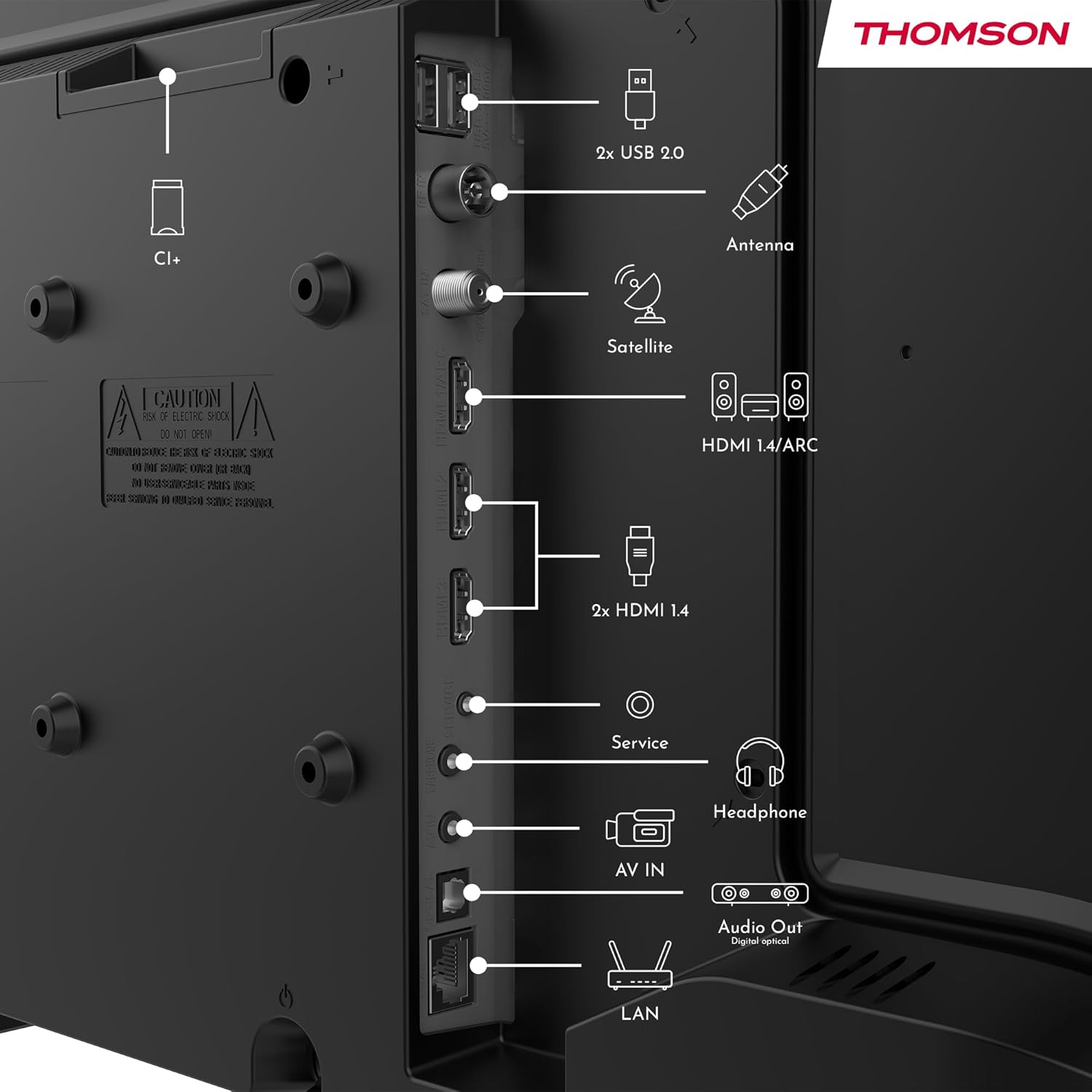
Refer to the diagram below for available ports and connect your devices accordingly.
- ځواک: Connect the power adapter to the TV and then to a power outlet.
- انتن/سپوږمکۍ: Connect your terrestrial antenna or satellite dish cable to the respective inputs.
- HDMI: د بلو رې پلیرونو، د لوبې کنسولونو، یا سیټ ټاپ بکسونو په څیر وسیلو سره د نښلولو لپاره د HDMI کیبلونو څخه کار واخلئ. HDMI 1.4/ARC د آډیو بیرته راستنیدو چینل ملاتړ کوي.
- USB: د میډیا پلې بیک یا سافټویر تازه معلوماتو لپاره USB ډرایوونه دننه کړئ.
- لین (ایترنیټ): د تار لرونکي انټرنیټ اتصال لپاره د ایترنیټ کیبل وصل کړئ.
- هیډفون: د شخصي اوریدلو لپاره هیډفونونه وصل کړئ.
- ډیجیټل آپټیکل آډیو آوټ: Connect to an external sound system for high-quality audio.
- AV IN: د زړو وسیلو لپاره چې د جامع ویډیو او سټیریو آډیو کیبلونه کاروي.
- CI+ سلاټ: Insert a Conditional Access Module (CAM) for encrypted digital channels.
2. عملیاتي لارښوونې
2.1 First-Time Setup and TiVo System
Upon first power-on, the TV will guide you through the initial setup process. This includes language selection, network connection (Wi-Fi or Ethernet), and channel scanning. The integrated TiVo system provides a user-friendly interface that combines live TV and streaming applications, offering personalized recommendations.

2.2 د ریموټ کنټرول فعالیتونه
The included remote control is backlit for easy use in low light and features direct access buttons for popular streaming services.

- د بریښنا تڼۍ: تلویزیون چالان یا بند کړئ.
- د غږ کنټرول تڼۍ: Activates the voice assistant for commands like searching for content or adjusting settings.
- د نیویګیشن پیډ (پورته/ښکته/کیڼ/ښي/ښه): مینو ته ځي او انتخابونه غوره کوي.
- حجم پورته / ښکته: د غږ کچه تنظیموي.
- چینل پورته / ښکته: د تلویزیون چینلونه بدلوي.
- د مستقیم لاسرسي تڼۍ: One-touch access to Netflix, YouTube, Prime Video, Disney+, and Canal+.
- شاته / وتل: پخوانۍ سکرین ته راستنیږي یا له اوسني مینو څخه وځي.

۴.۴ بې سیم ښودنه (د سکرین عکس العمل)
The Wireless Display function allows you to project the screen of your smartphone, tablet, or computer onto the TV. This feature is convenient for sharing photos, videos, or presentations.

2.4 Audio and Picture Settings
Your TV supports Dolby Audio for rich and precise sound, enhancing dialogues and immersion. HDR10 technology provides more natural images with balanced contrast and faithful colors for a realistic viewتجربه


Access the TV's settings menu to adjust picture modes (e.g., Standard, Dynamic, Movie), sound modes (e.g., Standard, Music, Movie), and other advanced options to customize your viewتجربه
3. ساتنه
۶.۱ د تلویزیون سکرین پاکول
په نرمۍ سره سکرین د نرم، لینټ نه پاک ټوکر سره پاک کړئ. د سختو نښو لپاره، یو څه لږampټوکر د اوبو یا ځانګړي سکرین پاکونکي سره ومینځئ. هیڅکله مایع مستقیم په سکرین مه سپری کوئ.
۳.۲ د تلویزیون پاکول جasing
د تلویزیون د پاکولو لپاره نرم، وچ ټوکر وکاروئasing. Avoid using abrasive cleaners, waxes, or solvents as they can damage the finish.
۵.۳ د ریموټ کنټرول پاملرنه
Keep the remote control dry and clean. Replace batteries when necessary, ensuring correct polarity. If the remote will not be used for an extended period, remove the batteries to prevent leakage.
4. ستونزه حل کول
که تاسو د خپل تلویزیون سره ستونزې سره مخ شئ، د ملاتړ سره د تماس نیولو دمخه لاندې عام ستونزو او حلونو ته مراجعه وکړئ.
۱ برېښنا نشته
- ډاډ ترلاسه کړئ چې د بریښنا تار په خوندي ډول د تلویزیون او بریښنا رسونې دواړو سره وصل دی.
- وګورئ چې ایا د بریښنا آوټ لیټ د بل وسیلې په پلګ کولو سره کار کوي.
- په تلویزیون کې د بریښنا تڼۍ فشار ورکړئ، نه یوازې ریموټ.
۶.۲ انځور نشته، خو غږ شته
- Check the input source. Press the "Source" button on your remote and select the correct input (e.g., HDMI 1, Antenna).
- ډاډ ترلاسه کړئ چې ټول کیبلونه (HDMI، انټینا) په خوندي ډول وصل دي.
- هڅه وکړئ چې تلویزیون او هر وصل شوي وسایل بیا پیل کړئ.
۶.۳ غږ نشته، خو انځور شته
- د غږ کچه وګورئ او ډاډ ترلاسه کړئ چې تلویزیون خاموش نه دی.
- د تلویزیون مینو کې د آډیو ترتیبات تایید کړئ.
- که بهرني سپیکرونه کاروئ، ډاډ ترلاسه کړئ چې دوی په سمه توګه وصل شوي او فعال دي.
۵.۴ ریموټ کنټرول کار نه کوي
- بیټرۍ د نویو سره بدل کړئ، د درست قطبیت ډاډ ترلاسه کړئ.
- ډاډ ترلاسه کړئ چې د ریموټ او د تلویزیون د IR سینسر ترمنځ هیڅ خنډ شتون نلري.
- ریموټ مستقیم تلویزیون ته وښایاست.
۷.۳ د وای فای اتصال ستونزې
- ډاډ ترلاسه کړئ چې ستاسو وای فای روټر فعال دی او په سمه توګه کار کوي.
- خپل روټر او تلویزیون بیا پیل کړئ.
- Check the Wi-Fi password in the TV's network settings.
- Move the TV closer to the router or use a wired Ethernet connection if possible.
5. مشخصات
| د ماډل شمیره | د 24HT2S15 معرفي کول |
| د سکرین اندازه | 24 انچه (60 سانتي متره) |
| ټیکنالوژي ښکاره کول | LED |
| قرارداد | ۷۲۰p (HD) |
| د تازه کولو نرخ | 60 Hz |
| د اړخ نسبت | 16:9 |
| ځانګړي ځانګړتیاوې | TiVo System with Voice Control, Dolby Audio, HDR10, Wireless Display, Backlit Remote with Direct Access Buttons |
| ارتباط | Wi-Fi, Ethernet, HDMI (x3, one with ARC), USB (x2), Antenna, Satellite, AV In, Digital Optical Audio Out, Headphone Out, CI+ |
| ابعاد (W x H x D) | ۲۴.۱۵ x ۱.۸۶ x ۱۴.۰۴ سانتي متره (پرته له ولاړې) |
| وزن | 3.33 کیلو ګرامه |
| شاملې برخې | Power Adapter, Remote Control, User Manual, Warranty Card |
| جوړونکی | جریانview GmbH |
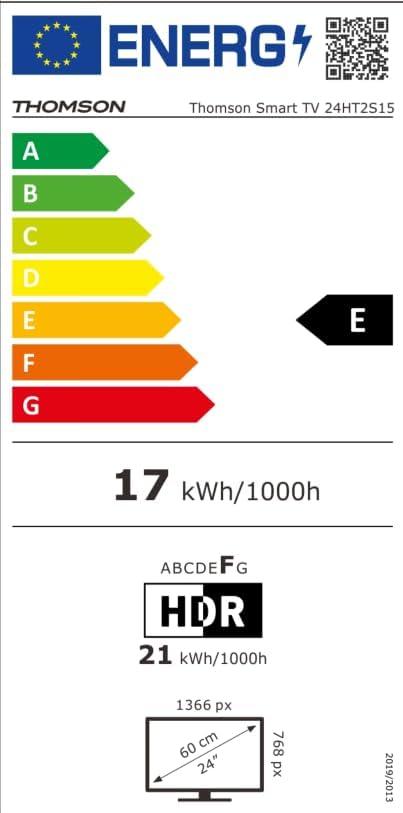
| د انرژي موثریت ټولګي | E |

6. تضمین او ملاتړ
Your THOMSON 24HT2S15 Smart TV comes with a warranty card included in the box. Please refer to this card for specific warranty terms and conditions applicable in your region.
For technical support, service, or warranty claims, please contact the manufacturer, Streamview GmbH, or your local authorized service center. Contact information can typically be found on the warranty card or the manufacturer's official webسایټ
جوړونکی: سټریمview GmbH
Webسایټ: www.streamview.com


