1. پیژندنه
The BLUETTI Elite 10 Mini Portable Power Station is a compact and versatile power solution designed for various applications, including camping, travel, and emergency backup. Featuring a 128Wh LiFePO4 battery and a 200W AC outlet, it provides reliable power for small electronic devices. Its lightweight and airline-friendly design makes it an ideal companion for on-the-go power needs.

Figure 1: BLUETTI Elite 10 Mini Portable Power Station, showcasing its compact design and front panel.
2. د خوندیتوب لارښوونې
Please read and understand all safety instructions before operating the BLUETTI Elite 10. Failure to follow these instructions may result in electric shock, fire, or serious injury.
- یونټ له مینځه وړل ، ترمیم او ترمیم مه کوئ.
- واحد د اور، اوبو او سختې تودوخې څخه لرې وساتئ.
- د واحد د غورځولو یا قوي اغیزو سره مخ کیدو څخه ډډه وکړئ.
- یوازې منظور شوي لوازم او چارج کولو کیبلونه وکاروئ.
- د کارولو او چارج کولو پرمهال مناسب هوا ورکول ډاډمن کړئ.
- د ماشومانو د لاسرسي څخه لرې وساتئ.
3. د محصول ب Featuresې
- د څو اړخیزه بریښنا تولید: Equipped with a 200W AC outlet, 100W USB-C fast charging, and multiple DC ports to power various devices.
- کمپیکٹ او پورټ ایبل: Weighs approximately 4.0 lbs (1.8 kg) with an ergonomic handle, making it easy to carry.
- Airline-Friendly Capacity: 128Wh battery capacity falls within the 100–160Wh range, allowing it to be carried on most major airlines with prior approval (limit 2 per passenger).
- د نه وقفې وړ بریښنا رسول (UPS): Features a built-in 10ms UPS and 350W bypass output for seamless power during outages.
- د څو چارج کولو اختیارونه: Supports 150W AC charging (full in 70 mins), 100W solar charging, and 100W car charging.
- د سمارټ ایپ کنټرول: Connect via Bluetooth to customize charging modes, adjust lighting, and monitor power status in real time.
- مدغم LED رڼا: Offers 3 lighting modes (warm/cool light, SOS) for up to 50 hours of illumination.
۲. پیل کول او تنظیم کول
۱. د بکس خلاصول او د بسته بندۍ محتويات
د بسته بندۍ پرانستلو سره، ډاډ ترلاسه کړئ چې ټولې برخې شتون لري:
- BLUETTI Elite 10 Mini Power Station
- د AC چارج کولو کیبل
- د موټر چارج کیبل
- د کارن لارښود

Figure 2: Contents of the BLUETTI Elite 10 package.
۱. ابتدايي چارج کول
Before first use, fully charge the BLUETTI Elite 10. Connect the AC charging cable to the AC input port on the unit and then to a wall outlet. The display will indicate charging status. A full charge via AC takes approximately 70 minutes.
5. محصول ختم شوview
5.1. د مخ پینل
The front panel features the main display, control buttons, and various output ports:
- DC Output (12V/5A): For compatible DC devices.
- د ښودلو سکرین: د ننوتلو/آؤټ پټ واټ ښیېtage، د بیټرۍ فیصدهtage، او پاتې وخت.
- د DC تڼۍ: Activates DC output ports.
- د بریښنا تڼۍ: واحد فعال/بندوي.
- د AC تڼۍ: Activates the AC output outlet.
- USB-C 100W Output: د چټک چارج کولو سره مطابقت لرونکي USB-C وسیلو لپاره.
- USB-A 15W Outputs (x2): Standard USB-A ports for charging.
- USB-C 15W Output: Additional USB-C port.
Figure 3: Front panel layout of the BLUETTI Elite 10.
5.2. Side and Rear Panels
The side and rear panels house additional input/output ports and the LED light:
- DC/PV Input (12-28V/8A, 100W Max): For solar or car charging.
- AC Output (120V/200W): Standard wall outlet for AC-powered devices.
- د AC داخلول: For charging the unit via wall outlet.
- LED څراغ: Multi-mode light for illumination.

Figure 4: Rear panel showing AC output and LED light.
5.3. ابعاد او وزن
The Elite 10 is designed for portability:
- ابعاد: Approximately 7.8"L x 5.7"W x 4.3"H (19.8cm x 14.5cm x 11cm)
- وزن: نږدې 4.0 پونډه (1.8 کیلو ګرامه)

Figure 5: Visual representation of the Elite 10's compact size.
6. عملیاتي لارښوونې
6.1. بریښنا کول/بندول
Press and hold the main power button on the front panel to turn the unit on or off. The display will illuminate upon activation.
۶.۲. د AC ساکټونو کارول
To use the AC outlet, press the 'AC' button on the front panel. The AC icon on the display will light up. Plug your AC-powered device into the AC output port on the rear panel. Ensure your device's power consumption does not exceed 200W.
۶.۳. د ډي سي محصولاتو کارول
To use the DC output ports (USB-C, USB-A, 12V/5A), press the 'DC' button on the front panel. The DC icon on the display will light up. Connect your devices to the appropriate USB or 12V DC output ports.
6.4. Charging the Elite 10
The Elite 10 supports three charging methods:
- د AC چارج کول: Connect the AC charging cable to the AC input port and a wall outlet. Max 150W, full charge in approximately 70 minutes.
- د سولر چارج کول: Connect a compatible solar panel (e.g., BLUETTI PV60L/PV60F/PV100) to the DC/PV input port. Max 100W.
- د موټر چارج کول: Connect the car charging cable to the DC/PV input port and your vehicle's cigarette lighter socket. Max 100W.

Figure 6: Various charging methods for the Elite 10.
6.5. Uninterruptible Power Supply (UPS) Function
When the Elite 10 is connected to an AC wall outlet and has devices plugged into its AC output, it can function as a UPS. In case of a power outage, the unit will automatically switch to battery power within 10 milliseconds, providing continuous power to connected devices up to 350W bypass output.
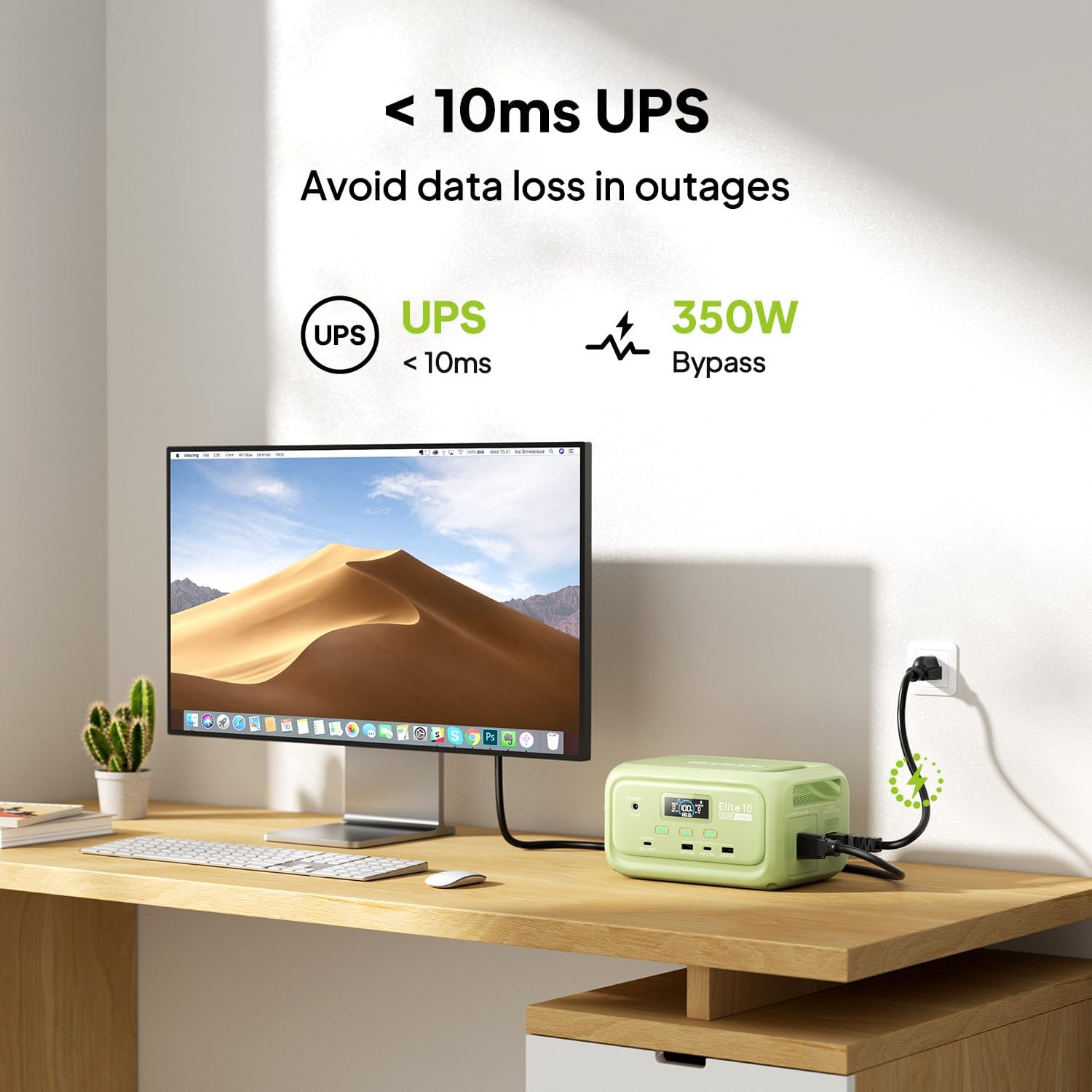
Figure 7: Illustration of the Elite 10's UPS capability.
6.6. د LED رڼا
The LED light on the rear panel offers three modes: warm light, cool light, and SOS. Press the dedicated light button to cycle through modes or turn it off. The light can provide up to 50 hours of illumination.
۳.۴. د سمارټ اپلیکیشن کنټرول
Download the BLUETTI app and connect to your Elite 10 via Bluetooth. The app allows you to monitor power status, customize charging modes, and adjust lighting settings remotely.

Figure 8: Managing the Elite 10 via the BLUETTI mobile application.
7. ساتنه او ذخیره کول
- پاکول: د واحد پاکولو لپاره وچ، نرم ټوکر وکاروئ. د کثافاتو پاکوونکي یا محلول مه کاروئ.
- دحرارت درجه: Store and operate the unit within the recommended temperature range (typically 0°C to 40°C or 32°F to 104°F).
- د اوږدې مودې ذخیره کول: If storing for extended periods, charge the unit to 50-80% every 3-6 months to prolong battery life. Store in a cool, dry place.
8. ستونزه حل کول
If you encounter issues with your BLUETTI Elite 10, refer to the following common solutions:
- واحد نه فعالیږي: ډاډ ترلاسه کړئ چې بیټرۍ چارج شوې ده. که نه، د چارج کولو لپاره د AC ساکټ سره وصل شئ.
- له بندرونو څخه هیڅ محصول نشته: Verify that the respective DC or AC output buttons are pressed and their indicators are lit. Check if the device connected requires more power than the unit can provide.
- ورو چارج کول: Ensure you are using the original BLUETTI charging cables. Check the power source for adequate output.
- د اوورلوډ محافظت: که چیرې واحد بند شي، نو دا ممکن د ډیر بار له امله وي. ځینې وسایل منقطع کړئ او واحد بیا پیل کړئ.
For persistent issues, contact BLUETTI customer support.
9. مشخصات
| فیچر | تفصیل |
|---|---|
| ماډل | ایلیټ ۴ |
| د بیټرۍ ظرفیت | 128Wh LiFePO4 |
| د AC محصول | 120V/200W (Pure Sine Wave) |
| د USB-C محصول | ۱ x ۱۸ واټ، ۱ x ۴ واټ |
| د USB-A وتنه | 2 x 15W |
| د DC وت | 12V/5A |
| DC/PV داخلول | 12-28V/8A، 100W Max |
| د AC چارج کولو وخت | Approx. 70 minutes (150W Max) |
| د UPS فعالیت | 10ms switchover, 350W bypass |
| ابعاد (L x W x H) | ۴.۲۵" x ۱.۸۹" x ۱.۳۸" (۱۰.۸ سانتي متره x ۴.۸ سانتي متره x ۳.۵ سانتي متره) |
| وزن | ۱۱.۵۷ پونډه (۵.۲۵ کیلو ګرامه) |
10. تضمین او ملاتړ
The BLUETTI Elite 10 Mini Portable Power Station comes with a standard manufacturer's warranty. Please refer to the warranty card included in your package or visit the official BLUETTI webد تضمین د تفصيلي شرایطو او مقرراتو لپاره سایټ.
For technical support, troubleshooting assistance, or any product-related inquiries, please contact BLUETTI customer service through their official channels.


