پیژندنه
This manual provides detailed instructions for the OUKITEL C2 Android 14 smartphone. Please read this guide thoroughly to ensure proper usage and to maximize your device's capabilities. Keep this manual for future reference.
د بسته محتويات
ډاډ ترلاسه کړئ چې ټول توکي ستاسو د محصول په کڅوړه کې شتون لري:
- OUKITEL C2 سمارټ فون
- 10W چټک چارجر
- د USB ډول-C ډیټا کیبل
- SIM Card Ejector Tool (SIM pin)
- د سکرین محافظ (مخکې له مخکې کارول شوی یا شامل شوی)
- د سمارټ فون قضیه
- د کارن لارښود

Image: Contents of the OUKITEL C2 retail package.
وسیله ختمه شوهview
The OUKITEL C2 features a lightweight and slim design, weighing approximately 198g and measuring 9.3mm in thickness. It is equipped with a 6.52-inch HD+ display and a triple camera system on the rear.
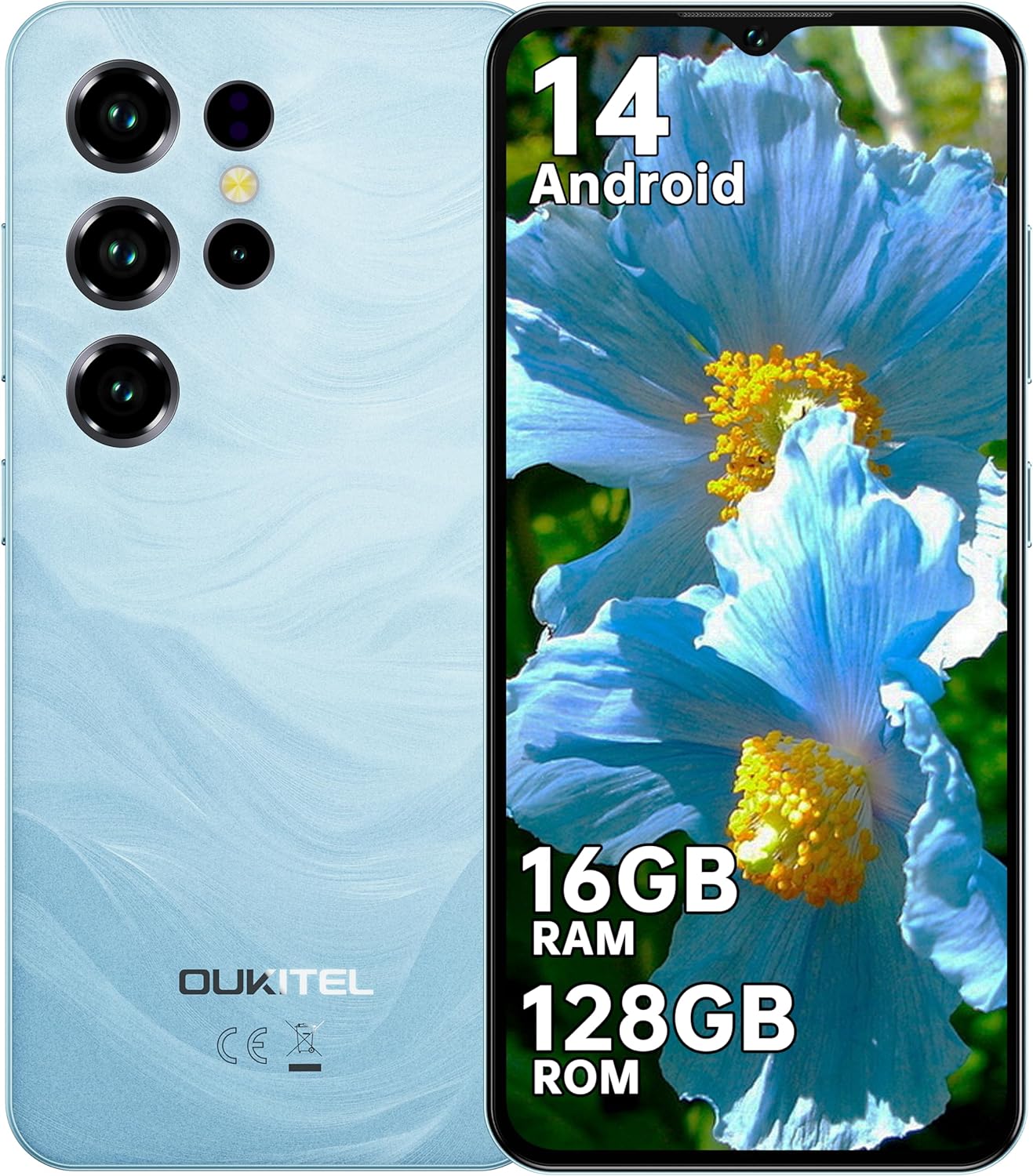
انځور: مخ او شا view of the OUKITEL C2 smartphone.
فزیکي ځانګړتیاوې:
- ښکاره کول: 6.52-inch HD+ Waterdrop Notch Display (540x1200 resolution, 209 PPI, 450 nits brightness, 20:9 aspect ratio, 93% screen-to-body ratio).
- شاته کیمره: 13MP Main Camera.
- مخکینۍ کیمره: 5MP Front Camera.
- بندرونه: USB Type-C for charging and data transfer, 3.5mm Headphone Jack.
- د سیم سلاټ: Supports Dual Nano SIM or Nano SIM + TF card for expandable storage up to 1TB.
- سینسرونه: Face Unlock, GPS, GLONASS, Beidou, Galileo.

Image: Key features and ports of the OUKITEL C2 smartphone.
چمتو کول
1. Inserting SIM Card and TF Card:
- د وسیلې په اړخ کې د سیم کارت ټری ومومئ.
- د سیم ایجیکټر وسیله د ټرې تر څنګ په کوچني سوري کې دننه کړئ او په نرمۍ سره فشار ورکړئ تر هغه چې ټرې بهر راشي.
- Place your Nano SIM card(s) and/or TF card into the designated slots on the tray. Ensure the gold contacts face downwards.
- ټری په احتیاط سره بیرته وسیله ته فشار ورکړئ تر هغه چې دا د اړخ سره فلش شي.

Image: SIM and TF card installation guide.
۲. د بریښنا لومړنی فعالول او تنظیم کول:
- د بریښنا تڼۍ فشار ورکړئ او ونیسئ تر هغه چې د OUKITEL لوګو څرګند شي.
- د خپلې ژبې د غوره کولو، د وای فای شبکې سره د وصل کیدو او د خپل ګوګل حساب د تنظیمولو لپاره په سکرین کې موجود لارښوونې تعقیب کړئ.
- Configure security settings such as Face Unlock or a PIN/pattern/password.

Image: Wi-Fi connectivity and Face Unlock features.
عملیاتي لارښوونې
اساسي نیویګیشن:
- د بریښنا تڼۍ: Press to turn the screen on/off. Press and hold to power off or restart the device.
- د حجم تڼۍ: د رسنیو حجم، د زنګ وهلو حجم، او د خبرتیا حجم تنظیم کړئ.
- د ټچ سکرین اشارې: د انتخاب لپاره ټایپ کړئ، د سکرول کولو لپاره سوائپ کړئ، د زوم کولو لپاره پنچ کړئ.
Android 14 Features:
The OUKITEL C2 runs on Android 14, offering enhanced performance, intuitive operation, and robust privacy protection. Key features include:
- Improved system performance and application launch speeds.
- Customizable user interface, lock screen, and application icons.
- Advanced security features with real-time threat detection and encrypted data.
- Seamless device connectivity and file شریکول

Image: Android 14 operating system interface.
د کیمرې کارول:
The OUKITEL C2 is equipped with a 13MP main camera and a 5MP front camera, suitable for daily photography and video calls. It supports various shooting modes:
- پانوراما
- پورټریټ
- د ښکلا حالت
- HDR
- مسلکي حالت
To take a photo or record a video, open the Camera app and select your desired mode. Tap the shutter button to capture an image or start/stop video recording.

انځور: Examples of photos taken with the OUKITEL C2's main and front cameras.
د بیټرۍ مدیریت
The OUKITEL C2 features a 5000mAh large-capacity battery, providing extended usage times. It supports 10W fast charging.
- چارج کول: Connect the USB Type-C cable to the phone and the 10W fast charger to a power outlet. The device can charge up to 80% in approximately 2.5 hours.
- د OTG ریورس چارج کول: The OUKITEL C2 supports OTG (On-The-Go) reverse charging, allowing it to act as a temporary power bank for other electronic devices.
- Battery Life Estimates:
- Continuous Talk Time: Up to 35 hours
- د موسیقۍ غږول: تر ۳۱ ساعتونو پورې
- د ویډیو پلې بیک: تر لسو ساعتونو پورې
- سټینډ بای وخت: تر 18 ورځو پورې

Image: Battery capacity and charging features of the OUKITEL C2.

Image: OTG reverse charging capability.
ارتباط
- ۵ جي دوه سیم: The device supports 4G dual SIM cards, allowing you to use two different network providers simultaneously.
- وای فای: Supports Wi-Fi 5 (2.4GHz/5GHz) for high-speed internet access.
- GPS: Integrated satellite navigation system (GPS+GLONASS+Beidou+Galileo) for accurate positioning, ideal for outdoor activities and navigation.
- 3.5mm آډیو جیک: Allows direct connection to FM radio and wired headphones.
ساتنه
- پاکول: د تلیفون سکرین او بدن پاکولو لپاره د نرم، لینټ نه پاک ټوکر څخه کار واخلئ. د سخت کیمیاوي موادو یا خړوبونکي موادو کارولو څخه ډډه وکړئ.
- د سافټویر تازه معلومات: د غوره فعالیت او امنیت ډاډمن کولو لپاره په منظم ډول د سیسټم تازه معلومات وګورئ او نصب کړئ. ترتیبات> سیسټم> سیسټم تازه معلومات ته لاړ شئ.
- د ذخیرې مدیریت: په دوره یي ډول غیر ضروري پاک کړئ files and applications to maintain sufficient storage space. The device supports up to 1TB expandable storage via TF card.
- د بیټرۍ پاملرنه: د لوړې تودوخې څخه ډډه وکړئ. بیټرۍ په مکرر ډول په بشپړه توګه مه چارجوئ.
د ستونزو حل کول
| ستونزه | د حل لاره |
|---|---|
| وسیله فعاله نه ده. | ډاډ ترلاسه کړئ چې بیټرۍ چارج شوې ده. چارجر وصل کړئ او د بیا چالانولو هڅه کولو دمخه څو دقیقې انتظار وکړئ. که ځواب ورنکړل شي، د بریښنا تڼۍ د 10-15 ثانیو لپاره فشار ورکړئ او ونیسئ ترڅو بیا چالان کړئ. |
| د شبکې سیګنال کمزوری یا هیڅ خدمت نشته. | Check if the SIM card is correctly inserted. Ensure you are within network coverage. Try restarting the device. Verify network settings in Settings > Network & internet > SIMs. |
| غوښتنلیکونه ورو یا خراب دي. | Close background applications. Clear app cache (Settings > Apps > [App Name] > Storage & cache > Clear cache). Ensure sufficient free storage space. Restart the device. |
| بیټرۍ په چټکۍ سره وچیږي. | Reduce screen brightness. Close unused apps running in the background. Disable Wi-Fi, Bluetooth, or GPS when not in use. Check battery usage in Settings > Battery to identify power-hungry apps. |
| د مخ خلاصول کار نه کوي. | Ensure your face is well-lit and clearly visible to the front camera. Re-register your face data in Settings > Security > Face unlock. |
مشخصات
| فیچر | تفصیل |
|---|---|
| برانډ | OUKITEL |
| د ماډل نوم | اوکیټل سي ۶۹ |
| عملیاتي سیسټم | Android 14 |
| RAM | ۲۴ جي بي (۸ جي بي فزیکي + ۱۶ جي بي مجازي) |
| داخلي ذخیره | 128GB |
| د پراخیدو وړ ذخیره | د TF کارت له لارې تر ۱TB پورې |
| د ښودلو اندازه | 6.52 انچه |
| د ښودلو ریزولوشن | ۱۶۰۰ x ۷۲۰ (HD+) |
| اصلي کیمره | 13MP |
| مخکینۍ کیمره | 5MP |
| د بیټرۍ ظرفیت | 5000mAh |
| چارج کول | 10W چټک چارج کول |
| ارتباط | 4G Dual SIM, Wi-Fi 5 (2.4GHz/5GHz), Bluetooth, GPS (GPS+GLONASS+Beidou+Galileo) |
| بندرونه | د USB ډول-سي، ۳.۵ ملي میتر هیډفون جیک |
| ابعاد | 20.9 x 12.3 x 7 سانتي متره |
| وزن | 198g (device only), 430g (package) |
تضمین او ملاتړ
OUKITEL provides the following support for the C2 smartphone:
- د راستنیدو پالیسي: د ۳۰ ورځو غیر مشروط بیرته ستنیدو پالیسي.
- تضمین: 2 کلن تضمین.
- تخنیکي ملاتړ: اوږدمهاله تخنیکي ملاتړ.
- د پیرودونکو خدمت: 24/7 آنلاین پیرودونکي خدمت.
For further assistance, please contact OUKITEL customer service through their official channels or the retailer where the product was purchased.


