1. پیژندنه
The OMIZN-M6 is a global Push-to-Talk over Cellular (PoC) two-way radio designed for nationwide communication. It features a pre-installed SIM card for instant service, a high-capacity 6000mAh battery, AES256 encryption for secure communication, and intelligent noise cancellation for clear audio in various environments. This manual provides essential information for setting up, operating, and maintaining your OMIZN-M6 device.

Figure 1: OMIZN-M6 Global PoC Walkie Talkie overview.
2. د تنظیم کولو لارښود
۱.۱ د بکس خلاصول او د اجزاو چک کول
Carefully unbox your OMIZN-M6 walkie talkie and verify that all components are present. The standard package includes the walkie talkie unit, battery, antenna, Type-C charging cable, back clip, and charging adapter.

Figure 2: All accessories included with the OMIZN-M6 walkie talkie.
2.2 Battery and Antenna Installation
- بیټرۍ نصب کړئ: Align the battery with the compartment on the back of the walkie talkie and gently push until it clicks into place. Ensure it is securely fastened.
- انتن وصل کړئ: Screw the antenna clockwise onto the connector at the top of the walkie talkie until it is finger-tight. Do not overtighten.
- Install FM Antenna (Optional): If using the FM antenna, insert it into the designated port.
Video 1: Demonstrates battery and antenna assembly for the walkie talkie.
2.3 SIM Card Installation and Device Registration
The OMIZN-M6 comes with a pre-installed SIM card. To register your device and activate the communication service:
- Locate the QR Code: The device's QR code for registration is typically found on the packaging or displayed on the device screen after initial power-on.
- د QR کوډ سکین کړئ: Use your smartphone to scan the QR code. This will direct you to a registration interface.
- Enter Group Name and IMEI: On the registration interface, enter a user group name and the device's IMEI (International Mobile Equipment Identity). The IMEI can be scanned directly from the walkie talkie's display.
- Submit and Restart: After submitting the information, turn off and restart the walkie talkie to activate the call service.
Video 2: Guide on SIM card installation and device registration via QR code scanning.
Note: For international roaming, contact OMIZN support in advance.
3. عملیاتي لارښوونې
3.1 وسیله ختمه شوهview
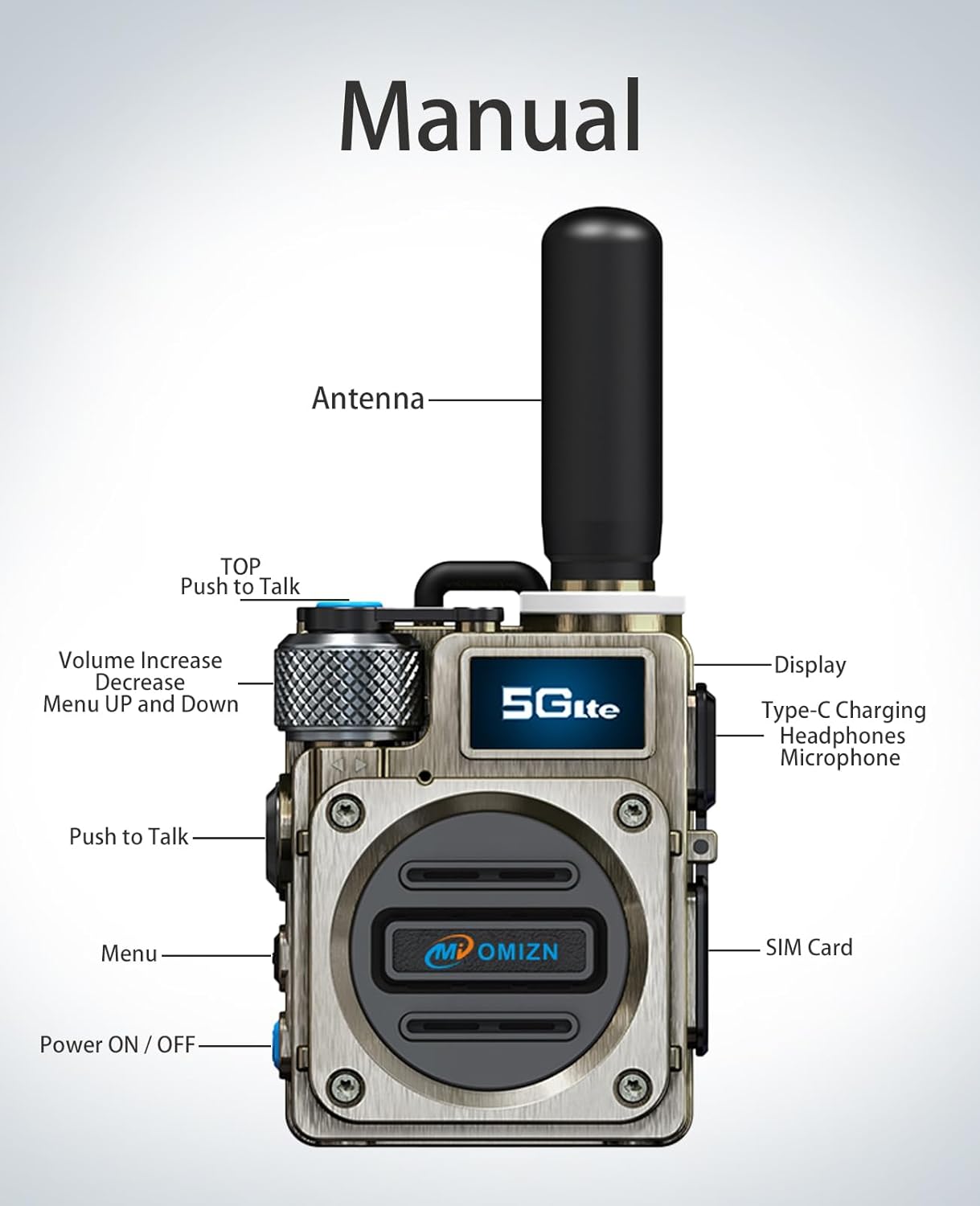
Figure 3: Key components and controls of the OMIZN-M6 walkie talkie.
- د بریښنا آن/آف بټن: Located on the side, press and hold to power on or off.
- د خبرو اترو لپاره د فشار (PTT) تڼۍ: Large button on the side for initiating and ending transmissions.
- د حجم کنټرول نوب: Top-mounted knob to adjust speaker volume.
- د مینو تڼۍ: For navigating device settings and options.
- د ښودلو سکرین: Shows status, group information, and other relevant data.
- د ډول-C چارج کولو بندر: د وسیله چارج کولو لپاره.
- هیډفون/مایکروفون جیک: د بهرني آډیو لوازمو لپاره.
3.2 بنسټیز عملیات
- پاور آن: Press and hold the Power ON/OFF button until the device powers on and displays the welcome screen.
- حجم تنظیم کړئ: Rotate the volume control knob to increase or decrease the audio output.
- Initiate a Call (PTT): Press and hold the PTT button to transmit your voice. Release the button to listen.
- د سیګنال رڼا: The signal light indicates device status (e.g., transmitting, receiving, idle).
- رڼا: Press the designated button to turn the flashlight on or off.
Video 3: Demonstrates basic operations including power on, PTT, volume control, and flashlight.
3.3 پرمختللی ځانګړتیاوې
- ډله ییزه اړیکه: The OMIZN-M6 supports group calls. Ensure your device is registered to the correct user group for seamless communication with other members.
- د AES256 کوډ کول: All communications are secured with 256-bit AES encryption, providing privacy and protection against unauthorized listening.
- د شور لغوه کول: The device features intelligent noise cancellation for clear audio, even in loud environments.
4. ساتنه
- پاکول: د وسیلې د پاکولو لپاره نرم، وچ ټوکر وکاروئ. سخت کیمیاوي توکي یا د کثافاتو پاکوونکي مه کاروئ.
- د بیټرۍ پاملرنه:
- Charge the 6000mAh battery using the provided Type-C cable and adapter.
- د بیټرۍ د عمر د اوږدولو لپاره د هغې د بار بار بشپړ چارج کولو څخه ډډه وکړئ.
- کله چې د اوږدې مودې لپاره نه کارول کیږي، وسیله په یخ او وچ ځای کې وساتئ.
- ذخیره کول: Keep the walkie talkie away from extreme temperatures, direct sunlight, and moisture.
- د شاک مقاومت: The zinc alloy body is designed to be shockproof and crushproof, but avoid unnecessary impacts to maintain optimal performance.
5. ستونزه حل کول
| ستونزه | احتمالي لامل | د حل لاره |
|---|---|---|
| هیڅ ځواک نشته | Low battery; Device not turned on. | Charge the battery; Press and hold the power button. |
| نشي لیږدول کیدی یا ترلاسه کیدی نشي | Out of service area; SIM card not activated; Incorrect group settings. | Move to an area with network coverage; Ensure SIM card is activated and device registered; Verify group settings. |
| ضعیف غږ کیفیت | Weak signal; Obstructions; Volume too low/high. | Move to an open area; Adjust volume; Check for obstructions. |
| بیټرۍ په چټکۍ سره وچیږي | Frequent use; High volume; Old battery. | Reduce usage; Lower volume; Consider replacing battery if old. |
6. مشخصات
| فیچر | تفصیل |
|---|---|
| د ماډل شمیره | OMIZN-HJ-M6-1Set |
| برانډ | OMIZN |
| د اړیکې ډول | Push-to-Talk over Cellular (PoC) |
| د شبکې ملاتړ | 4G LTE Bands (FDD): B1, B2, B3, B4, B5, B7, B8, B20, B28, B34, B38, B39, B40, B41 (Compatible with all 4G bands of AT&T, T-Mobile, and Verizon carriers) |
| د فریکونسۍ لړۍ (MHz) | 824 - 849MHz, 1710 - 1755MHz, 1850 - 1910MHz, 2496 - 2690MHz, 2500 - 2570MHz, 2570 - 2620MHz |
| د بیټرۍ ظرفیت | 6000mAh |
| د بیټرۍ ژوند | Up to 48 hours continuous use, 168 hours standby |
| چارج کول | د USB-C چټک چارج کول |
| کوډ کول | AES256 |
| د شور کمول | Intelligent Noise Cancellation |
| ابعاد | ۱۶"د x ۲۶"وچ x ۴۷"ح |
| د FCC ID | 2BK6D-G6S |
7. تضمین او ملاتړ
7.1 د تضمین معلومات
OMIZN products are covered by a limited warranty against defects in materials and workmanship. Please refer to the product packaging or the official OMIZN website for specific warranty terms and duration. Keep your proof of purchase for warranty claims.
7.2 د پیرودونکي ملاتړ
For technical assistance, troubleshooting, or any questions regarding your OMIZN-M6 walkie talkie, please contact OMIZN customer support. You can find contact details on the official OMIZN webسایټ یا ستاسو د پرچون پلورونکي له لارې.
- آنلاین ملاتړ: لیدنه وکړئ OMIZN Store on Amazon د محصول معلوماتو او ملاتړ سرچینو لپاره.
- د سیم کارت نوي کول: After the first year, renew your data service for $30/year. Contact support for international roaming activation.


