usmile Y20PRO AI-Powered Smart Electric Toothbrush User Manual
Model: Y20PRO
پیژندنه
Welcome to the usmile Y20PRO AI-Powered Smart Electric Toothbrush. This manual provides essential information for setting up, operating, and maintaining your new toothbrush to ensure optimal oral hygiene.
په بکس کې څه دي
The usmile Y20PRO package includes the following components:
د usmile Y20 Pro غاښونو برش × ۱
د برش سرونه × 2
د USB-C چارج کیبل × 1
د غاښونو برش لرونکی (دیوال ته ایښودل شوی) ×1
د کارن لارښود × 1
Image: The usmile Y20PRO package contents, including the toothbrush handle, two brush heads, a USB-C charging cable, a wall-mounted toothbrush holder, and the user manual.
چمتو کول
لومړنی لګښت: Before first use, fully charge your usmile Y20PRO toothbrush using the provided USB-C charging cable. The toothbrush features a 90-day battery life on a full charge.
د برش سر ضمیمه کړئ: Align the brush head with the metal shaft on the toothbrush handle and push it down until it clicks into place.
App Download (Optional but Recommended): Download the usmile App from your device's app store (App Store for iOS, Google Play for Android). This app provides real-time feedback, brushing reports, custom mode adjustments, and more.
د اپلیکیشن سره جوړه کړئ: Follow the in-app instructions to pair your usmile Y20PRO toothbrush with your smartphone via Bluetooth.
Image: The usmile Y20PRO toothbrush alongside a smartphone showing the usmile app interface, illustrating the app connectivity.
عملیاتي لارښوونې
پاور آن/بند او د موډ انتخاب
Press the power button to turn the toothbrush on or off. The Y20PRO features an intuitive screen that displays the current mode and brushing information.
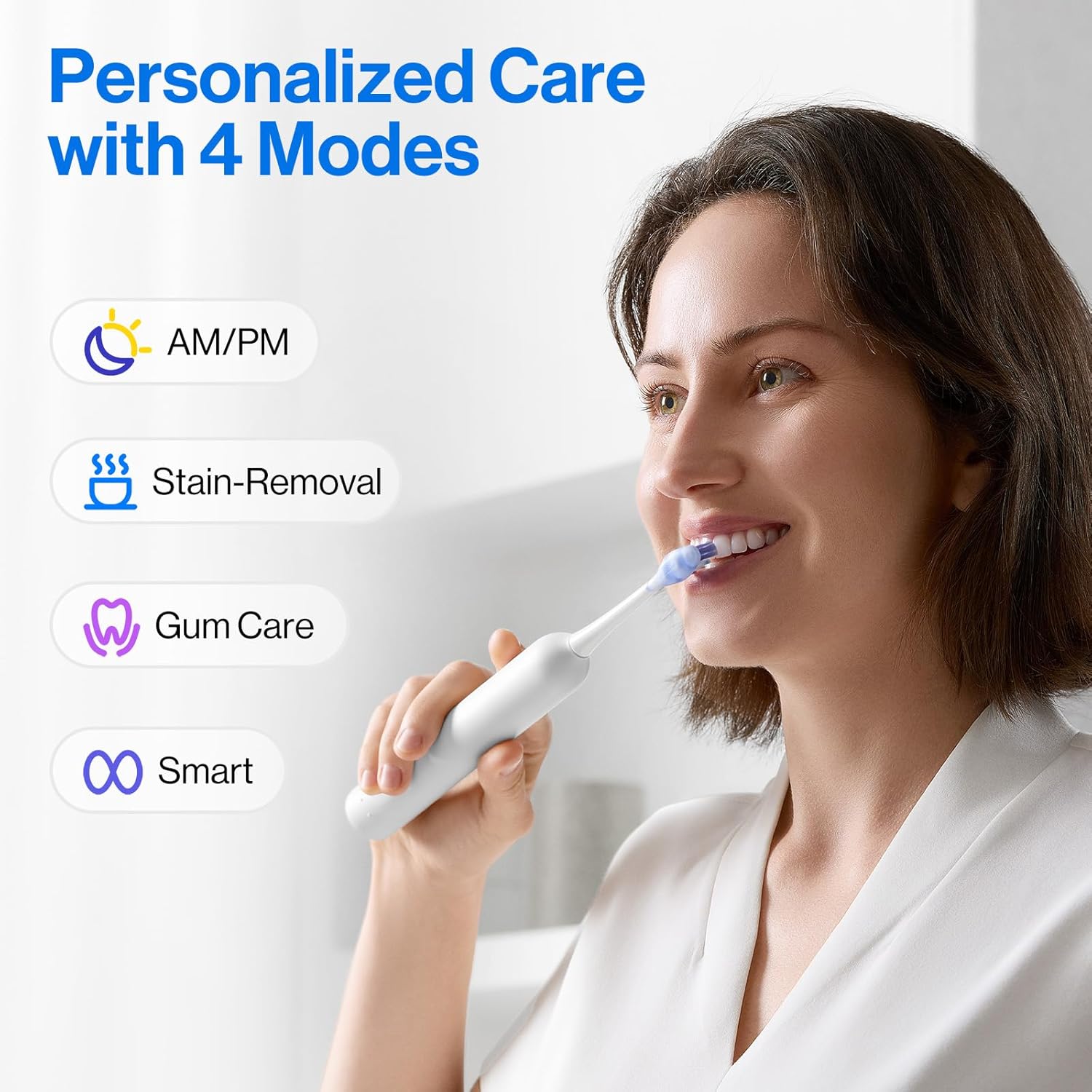
The toothbrush offers 4 personalized brushing modes, including a custom mode, and an AM/PM Auto-Switch Mode:
د سهار/ماښام د اتوماتیک سویچ حالت: Intelligently switches between morning and evening modes, tailoring vibrations to your daily routine for round-the-clock care.
Anti-cavity Mode: Optimized for molar cleaning, removing up to 98.7% plaque.
د داغ لرې کولو طریقه: Utilizes 45° oscillation to polish incisors and remove stains.
حساس حالت: Provides gentle oscillation for thorough cleaning without irritation, protecting delicate gums.
دودیز حالت: Accessible via the usmile App, this mode allows you to tailor cleaning intensity based on your dental status.
Image: The usmile Y20PRO toothbrush highlighting its various brushing modes, including Morning, Evening, Stain Removal, and Gum Care.
سمارټ ځانګړتیاوې او د اپلیکیشن ادغام
The usmile Y20PRO integrates with the usmile App to provide an intelligent brushing experience:
Live 3D Oral Map: Displays your brushing progress in real-time, highlighting missed areas for complete care.
Real-time Voice Reminder: Advanced bone conduction technology delivers voice reminders to guide you through brushing zones.
Brushing Reports: Get detailed feedback on brushing duration, coverage, and overall performance.
Custom Mode Adjustments: Personalize your brushing routine through the app.
Image: The usmile Y20PRO toothbrush with a smartphone displaying the usmile app's live 3D oral map, providing real-time brushing feedback.
د برش کولو تخنیک
For optimal cleaning, hold the brush at a slight angle against your gumline. Move the brush slowly across each tooth, allowing the bristles to clean the surface. The real-time guidance from the toothbrush and app will help ensure full coverage.
ساتنه
د غاښونو برش پاکول
After each use, rinse the brush head thoroughly under running water. Wipe the handle with a damp cloth. The usmile Y20PRO is IPX8 waterproof, allowing for easy cleaning.
د برش سرونو بدلول
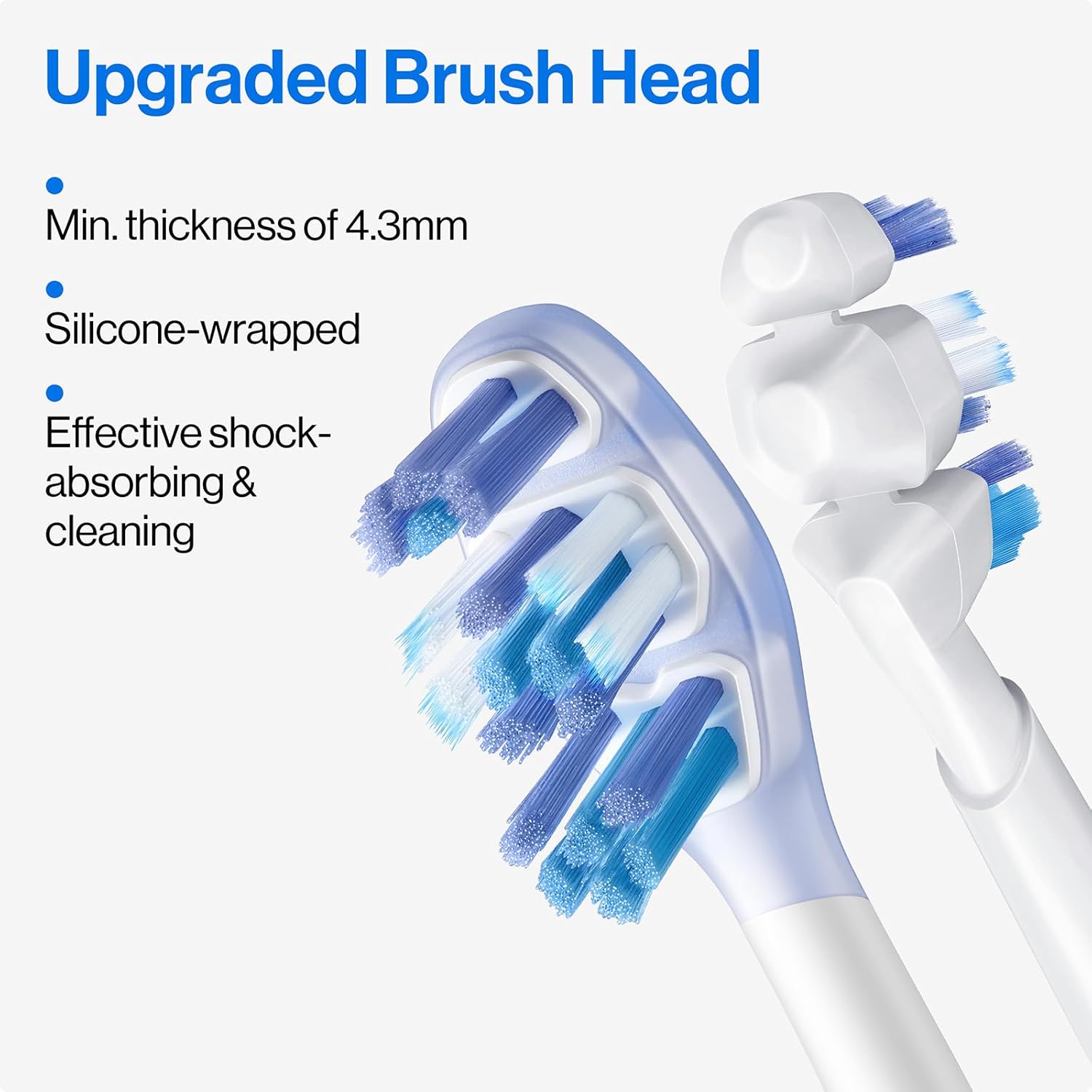
It is recommended to replace your brush head every 3 months, or sooner if the bristles become frayed. The upgraded brush heads feature biomimetic fins and an ultra-slim profile د مؤثره پاکولو لپاره.
انځور: یو مفصل view of the usmile Y20PRO's upgraded brush head, highlighting its minimum thickness of 4.3mm, silicone-wrapped design, and biomimetic fins for effective shock absorption and cleaning.
د ستونزو حل کول
ستونزه
احتمالي لامل
د حل لاره
Toothbrush not turning on.
ټیټ بیټرۍ.
Charge the toothbrush using the USB-C cable.
اپلیکیشن د غاښونو برش سره نه وصل کیږي.
Bluetooth is off; App not updated; Toothbrush not in pairing mode.
Ensure Bluetooth is enabled on your phone. Update the usmile App to the latest version. Restart the toothbrush and app.
Bristles not moving effectively.
Brush head worn out; Incorrect mode selected.
Replace the brush head. Select an appropriate brushing mode for your needs.
Unhappy face icon on display.
Brushing session stopped too early.
Continue brushing for the recommended 2 minutes for optimal results.
مشخصات
ماډل: Y20PRO
د محصول ابعاد: 1 x 1 x 9 انچه
وزن: 1.01 پونډه
بیټرۍ: 1 x 12V battery (included), up to 90-day battery life
Image: A comparison table highlighting the features of the usmile Y20PRO versus the Y10PRO, detailing differences in cleaning effectiveness, auto-switch mode, voice reminders, app features, and brush heads.
تضمین او ملاتړ
For warranty information and customer support, please refer to the official usmile website or contact usmile customer service directly. Keep your purchase receipt as proof of purchase.
You can visit the official usmile store on Amazon for more products and information: usmile Official Store.