پیژندنه
This manual provides essential instructions for the safe and efficient use of your ACwO Dwots 313 Wireless In-Ear Earbuds. Please read this manual thoroughly before using the product and retain it for future reference.
د بسته محتويات
ډاډ ترلاسه کړئ چې ټول توکي په کڅوړه کې شتون لري:
- ACwO Dwots 313 Wireless Earbuds
- د چارج کولو قضیه
- د USB چارج کیبل
- د غوږونو ټپونه (مختلف اندازې)
- د کارونکي لارښود (دا لاسوند)
- د تضمین کارت
- زما کارت سکین کړئ

Image: The ACwO Dwots 313 Wireless Earbuds in their open charging case, showcasing the cool blue color variant.
محصول پای ته ورسیدview
The ACwO Dwots 313 earbuds feature a compact design with intuitive touch controls and advanced audio technology.

انځور: یو بصري کتنهview highlighting key features such as Dual Device Connectivity, Bluetooth V5.4, SBC & AAC Codec support, 13mm BassBoomX™ drivers, HyperBoost™ Charging, 50ms Low Latency, Intuitive Touch Control, and Instant Auto Connect.
اجزا
- ایربودز: Left and Right, with integrated microphones and touch sensors.
- د چارج کولو قضیه: Stores and charges the earbuds, with an LED indicator for battery status.
- غوږونه: د خوندي او آرامۍ فټ لپاره ډیزاین شوی، په ډیری اندازو کې شتون لري.
ټچ کنټرولونه
The earbuds are equipped with touch-sensitive areas for controlling playback, calls, and other functions. Specific gestures will be detailed in the Operating section.
د غږ کیفیت
The ACwO Dwots 313 earbuds support AAC and SBC audio codecs, delivering detailed audio with seamless transmission. This ensures clear sound reproduction with low latency.

Image: A graphic illustrating sound waves, representing the lossless sound quality and authentic audio experience provided by the earbuds.
ارګونومیک ډیزاین
The earbuds feature a rubberized comfort seal and a lightweight design for a secure, pressure-free fit, engineered for effortless wear.
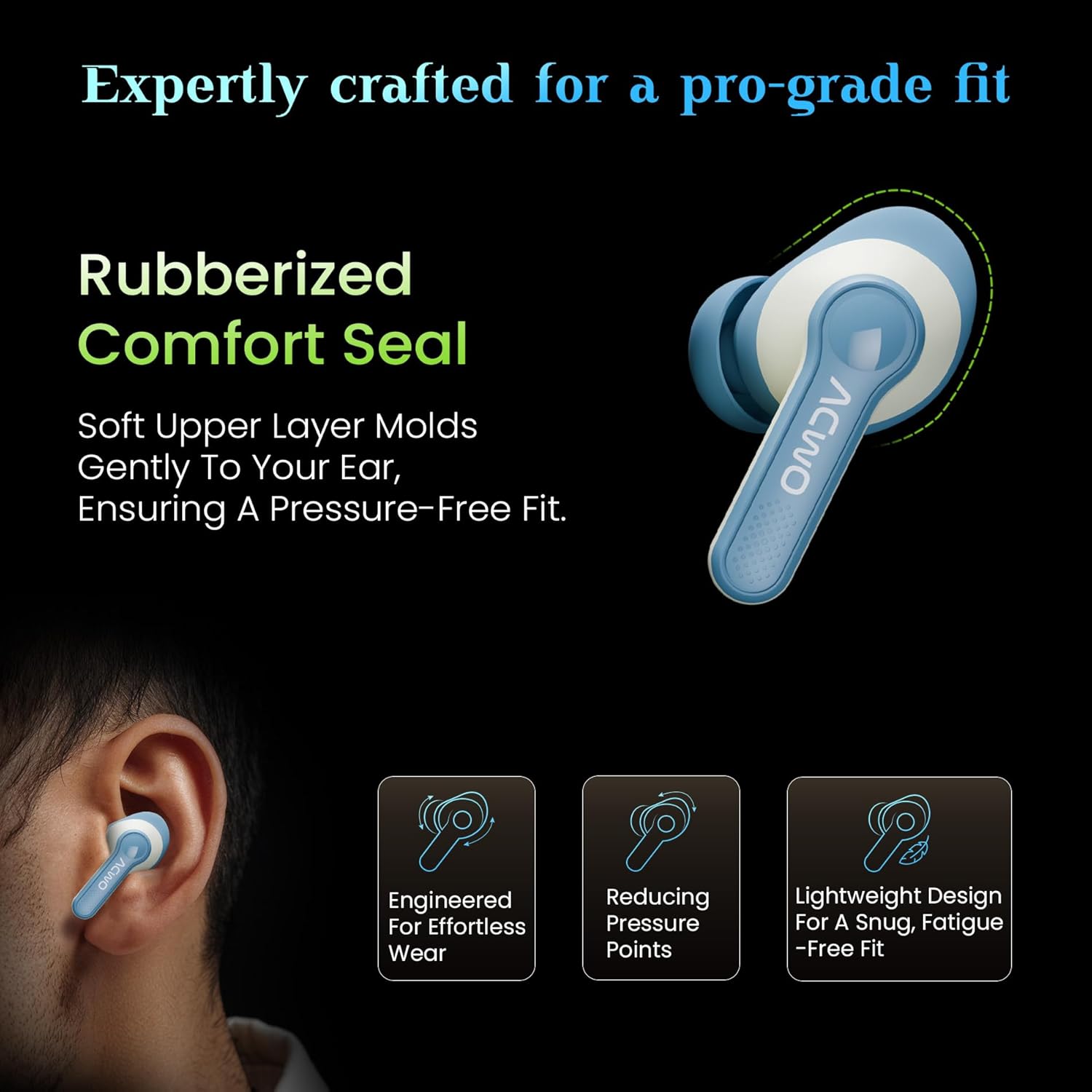
Image: An illustration showing the ACwO Dwots 313 earbud in an ear, highlighting the rubberized comfort seal and lightweight design for a snug, fatigue-free fit.
چمتو کول
۴.۱. د غوږۍ او کیس چارج کول
د لومړي ځل کارولو دمخه، د غوږ بډونه او د چارج کولو قضیه په بشپړه توګه چارج کړئ.
- د غوږ بډونه د چارج کولو په بکس کې واچوئ. ډاډ ترلاسه کړئ چې په سمه توګه ځای پر ځای شوي دي.
- د USB چارج کولو کیبل د قضیې د چارج کولو پورټ او د بریښنا سرچینې سره وصل کړئ.
- د قضیې په سر د LED شاخص به د چارج کولو حالت وښيي. بشپړ چارج تقریبا یو ساعت وخت نیسي.
- The HyperBoost™ Charging feature allows for 120 minutes of playtime from just 10 minutes of charging.

Image: The ACwO Dwots 313 earbuds in their charging case, illustrating the 65-hour total playtime and the HyperBoost™ charging capability.
۹. لومړنۍ جوړه کول
To pair the earbuds with your device for the first time:
- د چارج کولو قضیه پرانیزئ. د غوږ بډونه به په اتوماتيک ډول د جوړې کولو حالت ته ننوځي.
- په خپل وسیله (سمارټ فون، ټابلیټ، لپ ټاپ) کې، بلوتوث فعال کړئ.
- لټون available Bluetooth devices and select "ACwO Dwots 313" from the list.
- یوځل چې وصل شي، د تایید غږ به غږ شي، او د غوږ بډونه به د کارونې لپاره چمتو وي.
3. Dual Device Connectivity
The ACwO Dwots 313 supports simultaneous connection to two devices, allowing seamless switching between them.

Image: An illustration demonstrating the dual device connectivity feature, showing the earbuds wirelessly linked to both a smartphone and a laptop.
- لکه څنګه چې پورته تشریح شوي، د لومړي وسیلې سره د غوږ بډونه جوړه کړئ.
- Disconnect the earbuds from the first device (or put them back in the case and close/open to re-enter pairing mode if needed).
- د غوږ بډونه د دوهم وسیلې سره یوځای کړئ.
- The earbuds will now remember both devices and can switch between them automatically when both are in range and Bluetooth is enabled.
عملیاتي لارښوونې
د لمس اساسي کنټرولونه
| فعالیت | عمل |
|---|---|
| پلی/ودرول | په هر غوږ کې یو نل |
| بله لار | په ښي غوږۍ کې دوه ځله ټایپ کړئ |
| مخکینی ټریک | په چپ غوږۍ کې دوه ځله ټایپ کړئ |
| ځواب / پای کال | په هر غوږ کې یو نل |
| زنګ رد کړئ | په دواړو غوږونو کې اوږد فشار ورکړئ |
| د غږ معاون فعال کړئ | په دواړو غوږونو درې ځله ټایپ کړئ |
د EQ حالتونه
The earbuds feature three preset EQ modes to optimize your listening experience:
- د باس حالت: Provides deep, powerful bass for music genres that benefit from enhanced low frequencies.
- Cinematic Mode: Offers an immersive, surround sound experience suitable for movies and videos.
- نورمال حالت: یو متوازن آډیو پرو وړاندې کويfile د عمومي اورېدو لپاره.

Image: A visual representation of the two distinct audio modes: Bass Mode, depicted with a background of speaker cones, and Cinematic Mode, shown with a cinema hall background.
To switch between EQ modes, refer to the specific touch control gesture provided in the product's quick start guide or "Scan Me" card, as this functionality is often customized.
د ټیټ ځنډ حالت
The 50ms low latency mode is designed for gaming and streaming, ensuring audio synchronization with on-screen action. This mode is typically activated automatically when a gaming application is detected or can be manually toggled via a specific touch control (refer to the quick start guide for details).
ساتنه
پاکول
- په منظم ډول د غوږ بډونه او د چارج کولو کیس د نرم، وچ، لینټ نه پاک ټوکر سره پاک کړئ.
- د غوږونو سرونه لرې کړئ او په نرم صابون او اوبو سره یې پاک کړئ، بیا یې د بیا نښلولو دمخه په ښه توګه وچ کړئ.
- د کثافاتو پاکوونکي، الکول، یا کیمیاوي محلولونه مه کاروئ.
- ډاډ ترلاسه کړئ چې د غوږونو او کیس دواړو چارج کولو تماسونه پاک او له کثافاتو څخه پاک دي.
ذخیره کول
- کله چې په کارولو کې نه وي، د غوږ بډونه د چارج کولو په قضیه کې وساتئ ترڅو دوی خوندي شي او چارج یې وساتي.
- په یخ او وچ ځای کې د سختې تودوخې او مستقیم لمر وړانګو څخه لرې وساتئ.
د اوبو مقاومت (IPX5)
The earbuds are IPX5 water resistant, meaning they can withstand splashes and light rain. They are not designed for submersion in water. Ensure the earbuds are dry before placing them back into the charging case to prevent damage.
د ستونزو حل کول
| ستونزه | د حل لاره |
|---|---|
| Earbuds نه جوړیږي | Ensure earbuds are charged. Place them back in the case, close, then open to re-enter pairing mode. Check your device's Bluetooth settings and try reconnecting. |
| یوازې یو غوږ بډ کار کوي | Place both earbuds back in the charging case, close the lid for 5 seconds, then open. This often re-syncs them. Check battery levels for both earbuds. |
| ټیټ حجم یا د غږ خراب کیفیت | Adjust volume on both your device and the earbuds. Ensure eartips are properly sealed in your ear. Clean any debris from the earbud speakers. |
| ایربډونه چارج نه کوي | Ensure the charging cable is securely connected. Check the charging contacts on both earbuds and case for obstructions. Verify the power source is functional. |
| د زنګ وهلو کیفیت ستونزې | Ensure microphones are not obstructed. Move to an area with less background noise. Check device's call settings. |

Image: A diagram illustrating the placement of the four microphones on the ACwO Dwots 313 earbuds, designed for clear call quality with Environmental Noise Cancellation (ENC).
مشخصات
| فیچر | تفصیل |
|---|---|
| د ماډل نوم | DwOTS 313 |
| ارتباط | بېسیم (بلوتوث ۵.۳) |
| د بلوتوټ رینج | 10 متره |
| د لوبې وخت | تر ۴۸ ساعتونو پورې (د چارج کولو کیس سره) |
| د چارج کولو وخت | Approx. 1 Hour (earbuds and case) |
| چټک چارج کول | 10 Mins Charge = 120 Mins Playtime (HyperBoost™) |
| ټیټ ځنډ | 50ms |
| مایکروفون | Quad Mics with Environmental Noise Cancellation (ENC) |
| د اوبو مقاومت | IPX5 (د اوبو مقاومت) |
| د آډیو ډرایور اندازه | ۱۰ ملي متره متحرک ډرایور |
| د تعدد ځواب | 20000 Hz |
| د شور کنټرول | غیر فعاله شور لغوه کول |
| د کنټرول طریقه | لمس |
| وزن | 43 ګرامه |
| ابعاد | 4.5 x 6 x 2 سانتي متره |
| مواد | پلاستیک |
تضمین او ملاتړ
Your ACwO Dwots 313 Wireless Earbuds come with a warranty. Please refer to the included Warranty Card for detailed terms and conditions, including the warranty period and coverage.
For technical support, service, or further inquiries, please contact ACwO customer service. Contact information can typically be found on the Warranty Card or the official ACwO webسایټ
Manufacturer: ACwO Lifestyle Pvt Ltd, Plot No. 58-60, 1st Floor, Apple Industrial Hub, Pelhar, Dist. Palghar, Maharashtra - 401208, India.


