1. محصول ختم شوview
The Nokia G310 5G Smartphone (Model TA-1573) offers lightning-fast 5G connectivity and modern mobile technology. It features a vibrant display for various tasks, a powerful processor for smooth performance, and an advanced camera system for detailed photos. Designed for daily use, it provides a comfortable grip and durable build quality. Enjoy extensive network compatibility, ample storage, a long-lasting battery with quick charging, and a user-friendly interface with regular software updates.
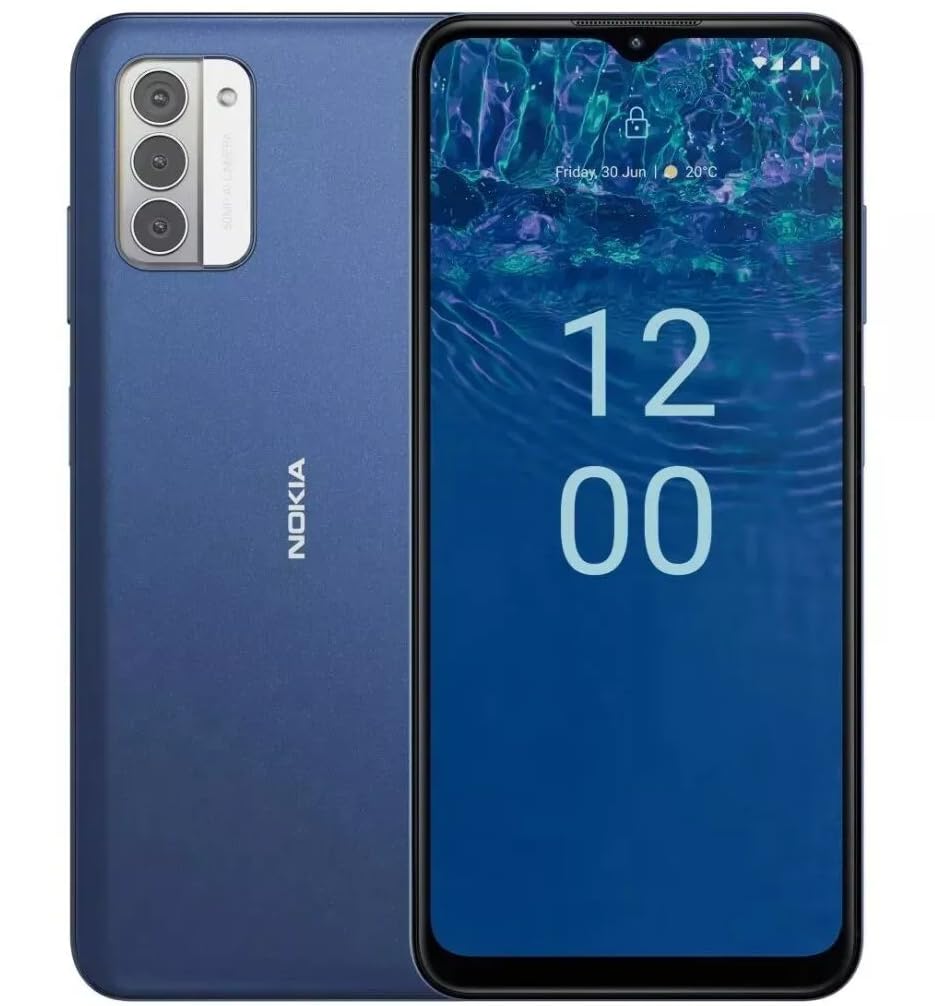
انځور: شاته view of the Nokia G310 5G Smartphone, showcasing the triple camera module and Nokia branding.
کلیدي ځانګړتیاوې
- 5G ارتباط: Experience ultra-fast mobile data speeds and low latency.
- متحرک نندارتون: Large touchscreen display delivers vibrant colors and sharp visuals.
- اغیزمن فعالیت: Processor handles everyday tasks smoothly, from browsing to gaming.
- دوامدار ډیزاین: Sleek and modern smartphone design with durable construction.
2. پیل کول
په بکس کې څه دي
- د نوکیا G310 5G سمارټ فون
- چارجر
SIM and MicroSD Card Installation
Locate the SIM/MicroSD card tray on the side of your device. Use the provided SIM ejector tool to open the tray. Insert your Nano-SIM card(s) and/or MicroSD card into the designated slots. Ensure the cards are correctly oriented. Gently push the tray back into the device until it clicks into place.
بریښنا کول / بند کول
To power on your Nokia G310, press and hold the Power/Fingerprint Sensor button located on the right side of the device until the Nokia logo appears. To power off, press and hold the Power/Fingerprint Sensor button, then select 'Power off' from the options that appear on the screen.
3. د وسیلې ترتیب
Physical Buttons and Ports
- د حجم تڼۍ: Located on the right side, above the Power/Fingerprint Sensor button, for adjusting media and call volume.
- Power/Fingerprint Sensor Button: Located on the right side, used for powering the device on/off, locking/unlocking the screen, and fingerprint authentication.
- د USB-C پورټ: په ښکته برخه کې موقعیت لري، د چارج کولو او معلوماتو لیږد لپاره کارول کیږي.
- ۳.۵ ملي میتره آډیو جیک: د تار لرونکي هیډفونونو د نښلولو لپاره په ښکته برخه کې موقعیت لري.
- سپیکر: د آډیو آوټ پټ لپاره په ښکته کې موقعیت لري.
- مایکروفون: د زنګونو او غږیزو امرونو لپاره مدغم شوی.
د کیمرې ماډل
The rear of the device features a multi-lens camera module, including a main camera, along with a flash for low-light photography. The front-facing camera is discreetly placed within a notch at the top of the display.
4. عملیاتي لارښوونې
بنسټیز نیویګیشن
The Nokia G310 operates on the Android operating system, offering an intuitive touchscreen interface. Swipe up from the bottom of the screen to access the app drawer, swipe down from the top for notifications and quick settings, and use gestures or navigation buttons (configurable in settings) to move between apps and screens.
ارتباط
- 5G Cellular Data: The device supports 5G connectivity for ultra-fast mobile data speeds. Ensure your SIM card and plan support 5G.
- وای فای: د انټرنیټ لاسرسي لپاره بېسیم شبکو سره وصل شئ. د اړیکو اداره کولو لپاره ترتیبات > شبکه او انټرنیټ > وای فای ته لاړ شئ.
- بلوتوث: Pair with other Bluetooth-enabled devices like headphones or speakers. Go to Settings > Connected devices > Bluetooth.
- GPS: Utilize built-in GPS for location services and navigation.
5. د کیمرې کارول
The Nokia G310 features an advanced camera system designed to capture memorable moments. Access the camera app from your home screen or app drawer.
عکسونه اخیستل
Open the Camera app, frame your shot, and tap the shutter button on the screen to take a picture. The advanced AI camera assists in optimizing settings for various scenes.
د ویډیوګانو ثبتول
In the Camera app, switch to video mode, then tap the record button to start and stop recording. The phone supports various video resolutions.
د کیمرې طریقې
Explore different camera modes available in the camera app, such as Portrait, Panorama, and Night mode, to enhance your photography experience.
6. د بیټرۍ مدیریت
ستاسو وسیله چارج کول
The Nokia G310 is equipped with a 5000 Milliamp Hours (5000.0 Battery Power Rating) battery. Connect the provided USB-C charger to the port at the bottom of the device. The phone supports quick charging for reduced downtime.
د بیټرۍ ژوند اصلاح کول
- د سکرین روښانتیا آرامۍ کچې ته تنظیم کړئ.
- کله چې بیټرۍ ټیټه وي د بیټرۍ سیور حالت فعال کړئ.
- په شاليد کې روان نه کارول شوي ایپسونه بند کړئ.
- کله چې نه کارول کېږي، وای فای، بلوتوث یا جي پي ایس غیر فعال کړئ.
7. تخنیکي مشخصات
| د ماډل شمیره | TA-1573 |
| عملیاتي سیسټم | Android |
| د CPU ماډل | میډیا ټیک هیلیو P60T |
| سیلولر ټیکنالوژي | 5G |
| بې سیم کیریر | خلاص شوی |
| د حافظې د ذخیره کولو ظرفیت | 4 جي بي |
| قرارداد | 1080 x 2340 |
| د انسان انٹرفیس ننوت | ټچ سکرین |
| د بیټرۍ ظرفیت | 5000 ملیونهamp ساعتونه |
| آډیو جیک | 3.5 ملي متره |
| رنګ | آبي |
| جوړونکی | نوکیا |
| نیټه لومړی شتون لري | د ۲۰۲۴ کال د جنورۍ ۲۸ مه |
8. ستونزه حل کول
If you encounter issues with your Nokia G310, try the following common troubleshooting steps:
- وسیله ځواب نه ورکوي: د بریښنا تڼۍ د شاوخوا ۱۰-۱۵ ثانیو لپاره فشار ورکړئ او ونیسئ ترڅو بیا پیل کړئ.
- د اتصال مسلې: Toggle Wi-Fi or Bluetooth off and on. Restart your device. Check network settings.
- App not working: د اپلیکیشن کیش او ډیټا په ترتیباتو > ایپسونو کې پاک کړئ. که ستونزه دوام ومومي، اپلیکیشن غیر نصب او بیا نصب کړئ.
- بیټرۍ په چټکۍ سره له مینځه وړل: Review battery usage in Settings > Battery to identify power-hungry apps. Adjust screen brightness and enable Battery Saver.
- ډک ذخیره: غیر ضروري حذف کړئ files, photos, or apps. Transfer media to a computer or cloud storage. Consider using a MicroSD card for additional storage.
9. ساتنه او پالنه
- پاکول: د خپل وسیله پاکولو لپاره له نرم، لینټ څخه پاک ټوکر څخه کار واخلئ. د سختو کیمیاوي موادو یا کثافاتو موادو څخه ډډه وکړئ.
- د سافټویر تازه معلومات: Regularly check for and install software updates to ensure your device runs optimally and has the latest security features. Go to Settings > System > System update.
- د ذخیرې مدیریت: په دوره توګه بیاview your device's storage to free up space and maintain performance.
- د چاپیریال شرایط: Avoid exposing your device to extreme temperatures, direct sunlight, or excessive moisture.
10. تضمین او ملاتړ
For warranty information, please refer to the warranty card included in your product packaging or visit the official Nokia support website. For further assistance, contact Nokia customer support.


