
Introduction
This manual provides essential information for the safe and efficient operation of your Philips HD4934/00 1300W Induction Cooktop. Please read these instructions carefully before first use and retain them for future reference.
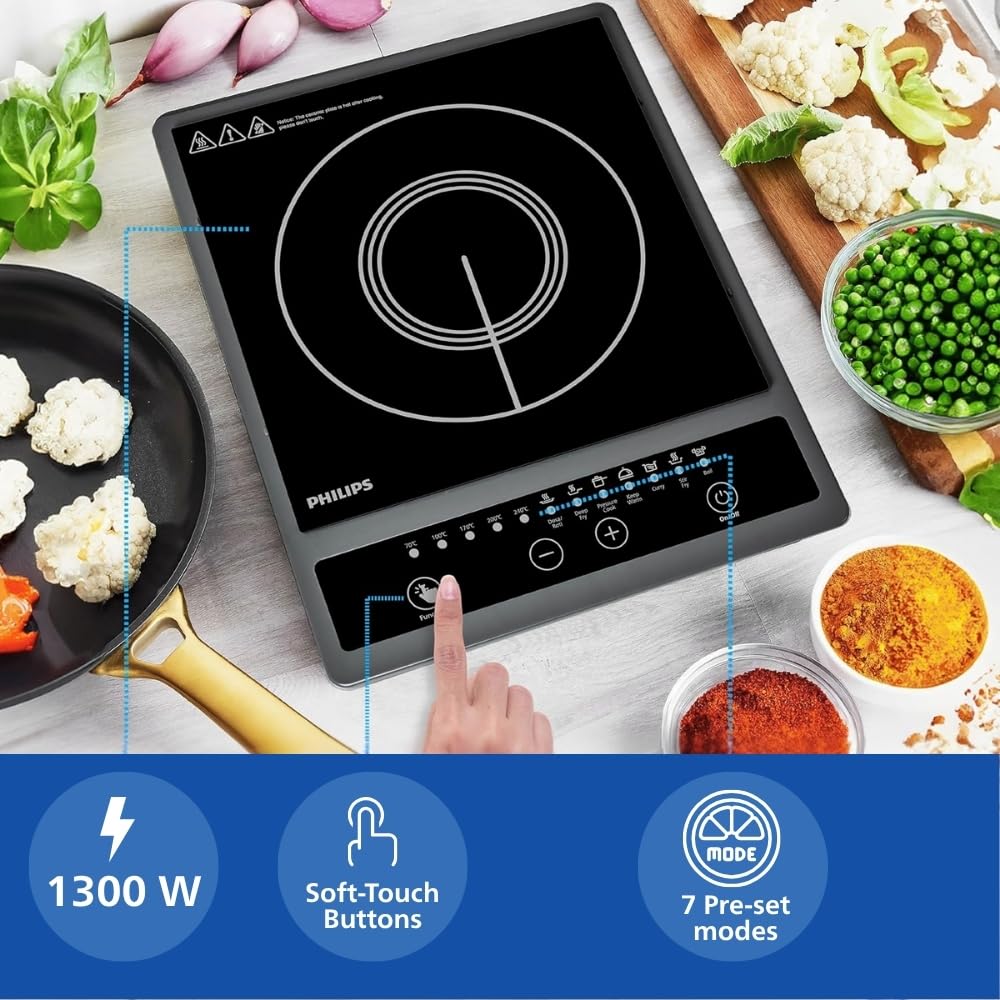
Image: The Philips HD4934/00 1300W Induction Cooktop, showcasing its sleek design and control panel.
Important Safety Information
General Safety Precautions
- Ensure the appliance is placed on a stable, flat, and heat-resistant surface.
- Do not immerse the cooktop in water or any other liquid.
- Keep out of reach of children.
- Do not touch the hot surface immediately after cooking. The ceramic plate will retain residual heat.
- Use only induction-compatible cookware.
- Do not block the ventilation openings of the cooktop.
- Unplug the appliance when not in use and before cleaning.
- If the power cord is damaged, it must be replaced by the manufacturer, its service agent, or similarly qualified persons to avoid a hazard.
Electrical Safety
- This induction cooktop features Triple MOV (Metal Oxide Varistor) technology for up to 4kW surge protection, designed to handle voltage fluctuations and reduce PCB damage.
- Connect the appliance to a grounded power outlet with the correct voltage (240 Volts).
- Do not use extension cords unless absolutely necessary and ensure they are rated for the appliance's wattage (1300 Watts).

Image: The Philips HD4934/00 Induction Cooktop highlighting its 4KV surge protection with Triple MOV (Metal Oxide Varistor) technology, designed to reduce PCB damage.
Product Overview
Components
The Philips HD4934/00 Induction Cooktop is designed for efficient and convenient cooking. Key components include:
- Induction Plate: The cooking surface where induction-compatible cookware is placed.
- Control Panel: Features soft-touch buttons for power, preset menus, and temperature/power adjustments.
- Ventilation Openings: Located on the sides and bottom to ensure proper airflow and prevent overheating.

Image: Close-up view of the Philips HD4934/00 Induction Cooktop control panel, showing soft-touch buttons for various functions and preset menus.

Image: Overview of the Philips HD4934/00 Induction Cooktop highlighting key features such as 1300W fast heating, Triple MOV 4kW surge protection, 7 preset menus, soft-touch buttons, compact design, and 1000 hours life testing.
Setup
- Unpacking: Carefully remove the induction cooktop from its packaging. Retain the packaging for future storage or transport.
- Placement: Place the cooktop on a dry, stable, and level surface. Ensure there is adequate ventilation around the appliance (at least 10 cm clearance from walls or other objects). Do not place it near heat sources or on metallic surfaces that could interfere with induction.
- Power Connection: Plug the power cord into a standard 240 Volt grounded electrical outlet. Ensure the outlet is easily accessible.
- Initial Cleaning: Before first use, wipe the induction plate with a soft, damp cloth. Ensure it is completely dry before plugging in.
Operating Instructions
Compatible Cookware
The Philips HD4934/00 Induction Cooktop requires induction-compatible cookware. This includes:
- Pots and pans made of cast iron, enameled iron, or stainless steel with a magnetic bottom.
- Cookware with a flat bottom diameter between 12 cm and 26 cm.
- To test compatibility, hold a magnet to the bottom of your cookware. If it sticks, the cookware is suitable for induction.
Basic Operation
- Power On: Place induction-compatible cookware with food on the center of the induction plate. Press the Power button to turn on the cooktop. The display will illuminate.
- Select Mode: Choose a cooking mode using the soft-touch buttons. You can select from 7 preset menus or adjust power/temperature manually.
- Adjust Settings: Use the + and - buttons to increase or decrease the power level or temperature as needed.
- Cooking: The cooktop will begin heating. Monitor your food as it cooks.
- Power Off: After cooking, press the Power button to turn off the cooktop. The fan may continue to run for a short period to cool down the internal components.
Preset Menus
The cooktop features 7 preset menus for common Indian cooking tasks:
- Dosa/Roti
- Deep Fry
- Pressure Cook
- Keep Warm
- Curry
- Stir Fry
- Boil
Select the desired preset menu by pressing the corresponding button on the control panel. The cooktop will automatically adjust to optimal power and temperature settings for that dish. You can further customize these settings using the + and - buttons.

Image: Visual representation of the 7 preset menus available on the Philips HD4934/00 Induction Cooktop, including Dosa/Roti, Deep Fry, Pressure Cook, Keep Warm, Curry, Stir Fry, and Boil.
Maintenance and Cleaning
Regular cleaning and maintenance will ensure the longevity and optimal performance of your induction cooktop.
- Disconnect Power: Always unplug the cooktop from the power outlet before cleaning.
- Cool Down: Allow the cooktop to cool completely before cleaning. The ceramic plate retains heat after use.
- Cleaning the Surface: Wipe the induction plate with a soft, damp cloth and a mild detergent. For stubborn stains, use a non-abrasive cleaner specifically designed for ceramic or glass cooktops. Avoid abrasive pads or harsh chemicals.
- Cleaning the Housing: Wipe the exterior housing with a soft, damp cloth. Do not allow water to enter the ventilation openings.
- Ventilation Openings: Periodically check and clean the ventilation openings to ensure they are free from dust and debris. Use a soft brush or vacuum cleaner if necessary.
- Storage: When not in use for extended periods, store the cooktop in a dry place, preferably in its original packaging.
Troubleshooting
If you encounter issues with your Philips HD4934/00 Induction Cooktop, refer to the following common problems and solutions:
| Problem | Possible Cause | Solution |
|---|---|---|
| Cooktop does not turn on. | No power supply; Power cord not properly plugged in; Main power switch off. | Check if the power cord is securely plugged into a working outlet. Ensure the main power switch is on. |
| Cooktop beeps and turns off automatically. | Incompatible cookware; No cookware on the plate; Overheating. | Ensure you are using induction-compatible cookware. Place cookware on the plate. Allow the unit to cool down if it has overheated. |
| Food is not heating or heating slowly. | Cookware not centered; Incorrect power setting; Cookware not induction-compatible. | Center the cookware on the induction plate. Increase the power setting. Verify cookware compatibility. |
| Display shows an error code. | Specific internal fault or sensor issue. | Refer to the specific error code in the full manual (if available) or contact customer support. Try unplugging and re-plugging the unit after a few minutes. |
If the problem persists after attempting these solutions, please contact Philips customer support.
Specifications
| Feature | Detail |
|---|---|
| Brand | PHILIPS |
| Model Number | HD4934/00 |
| Wattage | 1300 Watts |
| Voltage | 240 Volts |
| Heating Elements | 1 |
| Control Type | Push Button (Soft-touch) |
| Burner Type | Induction |
| Special Features | Triple MOV for 4kW surge protection, 7 Preset Menus, Soft-touch control |
| Material Type | ABS (Body), Mirco crystal plate (Heater Surface) |
| Item Dimensions (D x W x H) | 40D x 33W x 10H Centimeters |
| Item Weight | 1.7 Kilograms |
| Included Components | Induction Cooktop & User Manual |
| Country Of Origin | India |
Warranty and Support
Warranty Information
The Philips HD4934/00 Induction Cooktop comes with a 1-year warranty on the product and a 3-year warranty on the coil from the date of purchase. This warranty covers manufacturing defects under normal use.
For extended warranty options, please refer to the details provided at the time of purchase or contact your retailer.
Customer Support
For any queries, service requests, or technical assistance, please contact Philips customer support.
Manufacturer Contact Information: Philips, Versuni India Home Solutions Ltd. (3rd Floor, Tower A, DLF IT Park, 08 Block AF Major Arterial Road, New Town (Rajarhat) Kolkata WB 700156 IN)
Please have your model number (HD4934/00) and purchase details ready when contacting support.
Product Videos
No official product videos from the seller with verified creator type were available in the provided data to embed in this manual.


