پیژندنه
This user manual provides comprehensive instructions for the setup, operation, and maintenance of your Kogan 55" QLED 4K 144Hz Smart AI Google TV (Model: KAQL55XQ98GSTA). Please read this manual thoroughly before using your TV to ensure proper functionality and to maximize your viewتجربه دا لارښود د راتلونکي حوالې لپاره وساتئ.

Figure 1: Kogan 55" QLED 4K 144Hz Smart AI Google TV
This image shows the Kogan 55-inch QLED 4K 144Hz Smart AI Google TV from the front, highlighting its slim bezels and the vibrant display. The Kogan logo is visible on the bottom left, and the screen displays a colorful abstract pattern, emphasizing its QLED technology.
چمتو کول
د بسته بندۍ او ابتدايي تفتیش
Carefully remove the TV from its packaging. Inspect the TV and all accessories for any signs of damage. If any damage is found, do not proceed with setup and contact Kogan customer support immediately.
Attaching the Stand or Wall Mounting
Your TV comes with a stand for tabletop placement. For wall mounting, a VESA-compatible wall mount (not included) is required. Refer to the wall mount's instructions for proper installation.
- د سټینډ نصب کول:
- د سکرین د زیان مخنیوي لپاره د تلویزیون مخ په نرم او پاک سطح کې کیږدئ.
- د تلویزیون په ښکته برخه کې د سکرو سوري سره د سټینډ بریکٹونه سم کړئ.
- د ورکړل شویو پیچونو په کارولو سره سټینډ خوندي کړئ. ډاډ ترلاسه کړئ چې سټینډ په کلکه سره وصل دی.
- دیوال نصبول:
This TV supports wall mounting. Ensure you use a compatible wall mount and follow the manufacturer's instructions for safe and secure installation. Professional installation is recommended for wall mounting.
د پردیو سره نښلول
Connect your external devices such as set-top boxes, gaming consoles, or sound systems to the TV's input ports (HDMI, USB, etc.).
- د HDMI اړیکې: Use HDMI cables for high-definition video and audio. This TV features multiple HDMI inputs.
- د USB اتصال: د میډیا پلې بیک لپاره USB وسایل وصل کړئ.
- د بریښنا پیوستون: د برېښنا تار د تلویزیون د برېښنا ان پټ سره ولګوئ، بیا د دیوال په یوه ساکټ کې.
عملیاتي لارښوونې
د لومړي ځل لپاره تنظیم او ګوګل تلویزیون
Upon first power-on, the TV will guide you through the initial setup process, including network connection, Google account login, and channel scanning. Google TV integrates your favorite streaming services and content into one personalized hub.

Figure 2: Google TV Interface in Use
This image depicts two individuals comfortably seated in a living room, viewing the Kogan Google TV. The TV screen displays the Google TV interface with various streaming app icons and content recommendations, illustrating the user-friendly nature of the smart TV system.

Figure 3: Detailed Google TV Home Screen
This image provides a closer look at the Google TV home screen, showcasing content recommendations like "Nine Perfect Strangers" and various app icons such as Netflix, YouTube, and Prime Video. The interface is clean and organized, making content discovery intuitive.

Figure 4: All Your Favorite Apps
This image highlights the extensive selection of streaming applications available on the Kogan Google TV. It displays numerous popular app logos, including Netflix, Prime Video, Disney+, YouTube, and Stan, emphasizing the TV's capability to serve as a comprehensive entertainment hub.
کلیدي ځانګړتیاوې او دندې
- QLED ټیکنالوژي: Experience mesmerizing color reproduction and vibrant visuals thanks to Quantum Dot Technology.
- 4K UHD ریزولوشن: Enjoy stunning clarity and detail with 3840 x 2160 pixel resolution.

Figure 5: Ultra HD (4K) Visual Comparison
This image visually compares Full HD and Ultra HD (4K) resolutions using a scenic view of boats on clear water. The 4K side demonstrates significantly clearer picture quality and sharper colors, illustrating the enhanced immersive viewing experience provided by 4K resolution.
- ۱۴۴ هرټز متغیر تازه کولو کچه (VRR): Achieve smoother and tear-free visuals, especially beneficial for fast-paced scenes and gaming.

Figure 6: 144Hz Variable Refresh Rate in Action
This image illustrates the benefit of a 144Hz Variable Refresh Rate (VRR) for gaming. It shows a split screen with a racing game, comparing the visual quality "Without 144Hz VRR" (blurry) and "With 144Hz VRR" (sharp and smooth), highlighting the enhanced gaming experience.
- ډولبي ویژن™: Enjoy cinematic immersion with lifelike and vibrant visuals.
- High-Dynamic Range (HDR): Delivers brighter highlights, better contrast, and more realistic colors.
- جوړ شوی ګوګل کروم کاسټ: Stream content directly from your smartphone, laptop, or tablet to your TV.
- د ګوګل پلی پلورنځي: Access over 400,000 movies, TV episodes, live TV, and a wide range of applications.
- د حرکت اټکل او د حرکت جبران (MEMC): Improves clarity and reduces blur in fast-moving scenes for smoother visuals.
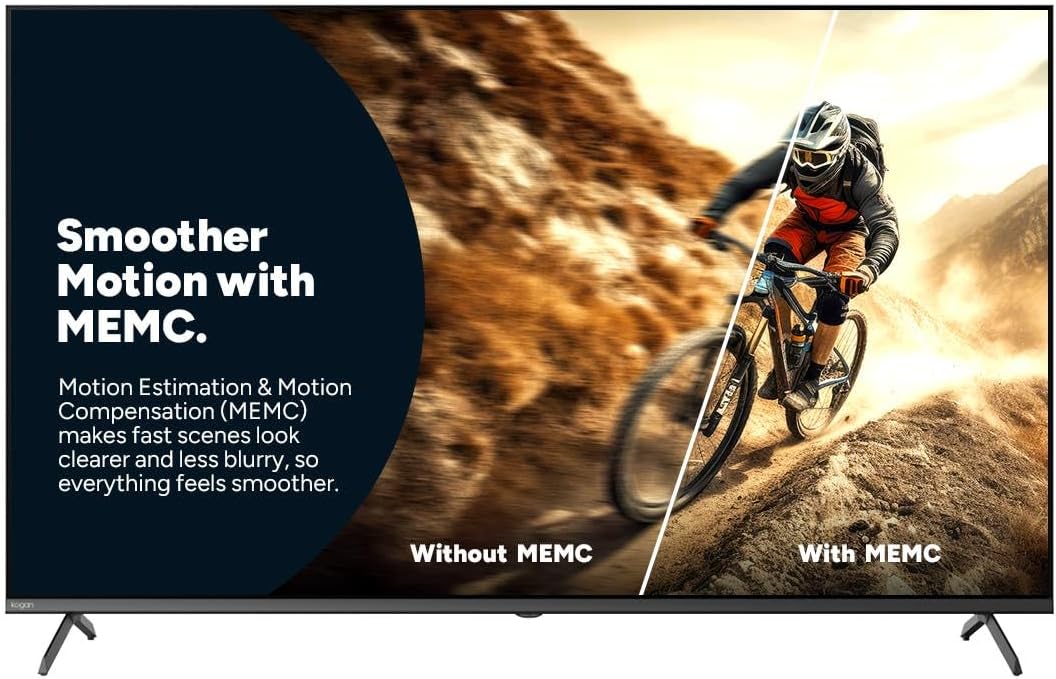
Figure 7: Smoother Motion with MEMC
This image demonstrates the effect of Motion Estimation & Motion Compensation (MEMC). It shows a split view of a cyclist in motion, comparing the visual "Without MEMC" (blurry) and "With MEMC" (clearer and smoother), illustrating how MEMC enhances the clarity of fast-paced scenes.
- د اتومات ټیټ ځنډ حالت (ALLM): Automatically reduces response time for an ultra-smooth and lag-free gaming experience.
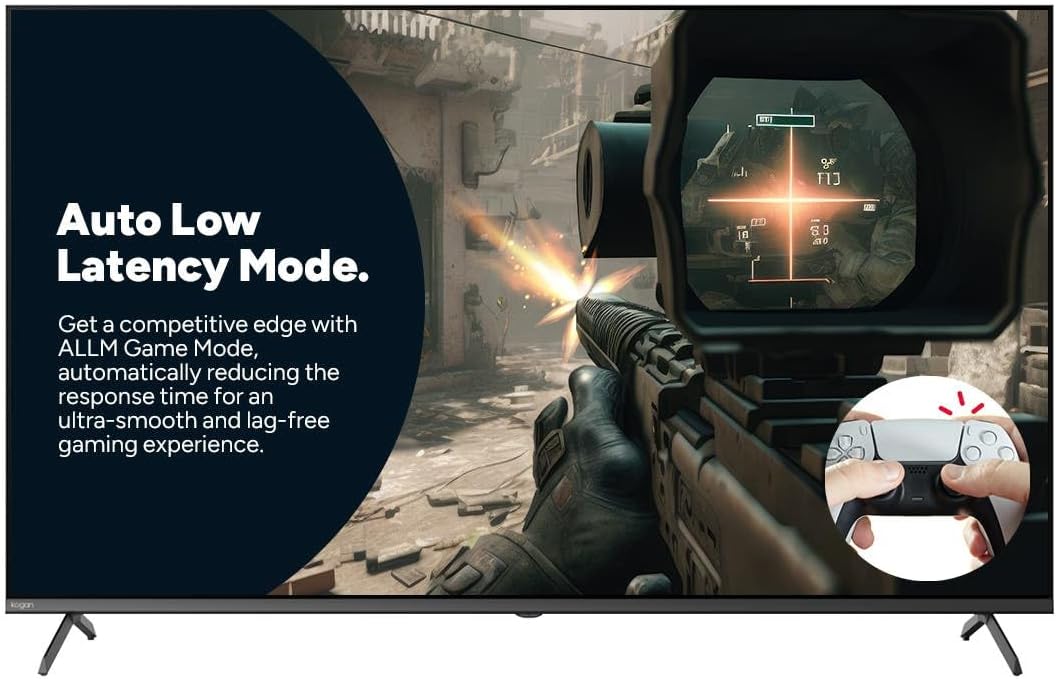
Figure 8: Auto Low Latency Mode for Gaming
This image highlights the benefits of Auto Low Latency Mode (ALLM) for gaming. It features a first-person shooter game scene, emphasizing how ALLM automatically reduces response time, providing a competitive edge with ultra-smooth and lag-free gameplay.
د ریموټ کنټرول کارول
The included remote control allows you to navigate the Google TV interface, adjust settings, change channels, and control connected devices. Familiarize yourself with the button layout for optimal use.
ساتنه
د تلویزیون پاکول
- سکرین: سکرین په نرمۍ سره د نرم، لینټ نه پاک ټوکر سره پاک کړئ. د سختو نښو لپاره، د سکرین پاکوونکي څخه کار واخلئ چې په ځانګړي ډول د تلویزیونونو لپاره ډیزاین شوی وي، په ټوکر باندې تطبیق شي، نه په مستقیم ډول په سکرین باندې.
- چوکاټ: د تلویزیون چوکاټ پاک کړئ او د نرم، وچ ټوکر سره یې ودریږئ.
- مه کاروئ: د خړوبولو پاکوونکو، مومونو یا محلولونو کارولو څخه ډډه وکړئ ځکه چې دوی کولی شي د تلویزیون پای ته زیان ورسوي.
عمومي پاملرنه
- د تلویزیون شاوخوا مناسب هوا ورکول ډاډمن کړئ ترڅو د ډیر تودوخې مخه ونیسئ.
- تلویزیون د مستقیم لمر وړانګو، تودوخې سرچینو او ډیرې دوړو څخه لرې وساتئ.
- د برېښنا د طوفانونو پر مهال یا کله چې د اوږدې مودې لپاره بې پامه پاتې شي، تلویزیون د بریښنا له شبکې څخه خلاص کړئ.
د ستونزو حل کول
If you encounter issues with your Kogan TV, refer to the following common problems and solutions. If the problem persists, contact Kogan customer support.
| ستونزه | احتمالي لامل / حل |
|---|---|
| هیڅ ځواک نشته | Check if the power cord is securely plugged into the TV and the wall outlet. Ensure the wall outlet has power. Try a different outlet. |
| انځور / غږ نشته | Verify the correct input source is selected (e.g., HDMI 1, TV). Check cable connections to external devices. Ensure volume is not muted or too low. |
| ریموټ کنټرول کار نه کوي | بیټرۍ وګورئ او بدل کړئ. ډاډ ترلاسه کړئ چې د ریموټ او د تلویزیون د IR سینسر ترمنځ هیڅ خنډ شتون نلري. |
| د عکس ضعیف کیفیت | د انتن/کیبل اتصال وګورئ. د انځور ترتیبات تنظیم کړئ (روښانتیا، برعکس، تیزوالی). ډاډ ترلاسه کړئ چې د سرچینې مینځپانګه لوړ کیفیت لري. |
| د انټرنیټ اتصال نشته | Check Wi-Fi router and modem. Reconnect to the Wi-Fi network in TV settings. Try restarting the TV and router. |
مشخصات
| فیچر | تفصیل |
|---|---|
| برانډ | کوګان |
| د ماډل نوم | کوګان 55" QLED 4K 144Hz سمارټ AI ګوګل تلویزیون |
| د ماډل شمیره | KAQL55XQ98GSTA |
| د سکرین اندازه | ۷۸۷ انچه |
| ټیکنالوژي ښکاره کول | QLED |
| قرارداد | 4K (3840 x 2160) |
| د تازه کولو نرخ | 144 Hz |
| عملیاتي سیسټم | ګوګل تلویزیون |
| د RAM اندازه | 3 جي بي |
| ځانګړي ځانګړتیاوې | Chromecast, Dolby Vision, HDR, MEMC, ALLM |
| د ارتباط ټیکنالوژي | USB، HDMI |
| د آډیو ان پټ مطابقت لري | USB، HDMI |
| والیtage | 240 ولټه |
| د توکي وزن | 18.2 کیلو ګرامه |
| د کڅوړې ابعاد | 134 x 85 x 14 سانتي متره |
تضمین او ملاتړ
For warranty information and technical support, please refer to the warranty card included with your product or visit the official Kogan website. You can also contact Kogan customer service directly for assistance with product issues or inquiries.
Kogan Support: https://www.kogan.com/au/help/


