1. پیژندنه
Welcome to the ACwO DwOTS Fire user manual. These innovative earbuds offer a unique dual-style design, providing both in-ear and half-in-ear options within a single charging case. Designed for versatility and high-quality audio, the DwOTS Fire earbuds feature advanced connectivity, extended battery life, and intuitive controls to enhance your listening experience.

Image: ACwO DwOTS Fire earbuds showcasing both half-in-ear and in-ear styles from a single case.
۲. په بکس کې څه دي؟
مهرباني وکړئ تصدیق کړئ چې ټول توکي ستاسو په کڅوړه کې شتون لري:
- 2 x Set of Wireless Earbuds (one in-ear, one half-in-ear)
- ۱ x ډول-سي چټک چارج کیبل
- 4 x Extra Earmuffs (for in-ear style)
- 1 x تضمین کارت
- 1 x Scan Me Card

Image: The ACwO DwOTS Fire earbuds and charging case.
۵. تنظیم او جوړه کول
۴.۲ لومړنۍ جوړه کول
- ډاډ ترلاسه کړئ چې د غوږ بډونه چارج شوي دي.
- د چارج کولو قضیه پرانیزئ. د غوږ بډونه به په اتوماتيک ډول د جوړې کولو حالت ته ننوځي.
- په خپل وسیله (سمارټ فون، ټابلیټ، او نور) کې، بلوتوث فعال کړئ.
- لټون available devices and select "ACwO Fire" or "ACwO DwOTS Fire" to connect.
- یوځل چې وصل شو، تاسو به د آډیو غږ واورئ، او د غوږونو د شاخص رڼا به بدله شي.
3.2 دوه ګونی ارتباط
The ACwO DwOTS Fire earbuds offer unique dual connectivity options:
- Connect Each Pair to Two Different Devices: Ideal for sharing your listening experience.
- Connect Both Pairs to a Single Device: Perfect for watching movies or listening to music together with a loved one. This feature is available only for devices with dual audio connectivity (e.g., certain Android devices).

Image: Illustration of the dual connectivity feature, showing two pairs of earbuds.
Steps for Dual Sharing (Connecting Both Pairs to a Single Device):
- Connect both 'ACwO DwOTS Fire' and 'ACwO Fire +' with your device's Bluetooth.
- Once both pairs are connected, scroll down your device's notification panel and click on 'Media Output'.
- One pair will already be selected. Select the other pair to enable dual audio.
- You can now listen on both pairs of your earbuds simultaneously.

Image: Visual guide for setting up dual sharing on a compatible device.
4. عملیاتي لارښوونې
4.1 Intuitive Touch Controls
The earbuds feature intuitive touch controls for easy management of music, calls, and voice assistants. Refer to the included 'Scan Me Card' for a detailed diagram of touch functions.
- پلی کول / ودرول: په دواړو غوږونو کې یو ځل کلیک وکړئ.
- بله لار: په ښي غوږۍ کې دوه ځله ټایپ کړئ.
- مخکینی لار په چپ غوږۍ کې دوه ځله ټایپ کړئ.
- ځواب / پای کال: په دواړو غوږونو کې یو ځل کلیک وکړئ.
- زنګ رد کړئ: په دواړو غوږونو اوږد فشار ورکړئ.
- د غږ همکار فعاله کړئ: په دواړو غوږونو درې ځله ټایپ کړئ.
4.2 EQ موډونه
Customize your audio experience with 3 preset EQ modes, offering a total of 3+3 EQ options across the two earbud styles. Switch between modes to suit your preference for deep bass, balanced sound, or enhanced treble.
- د لوبو حالت: Optimized for immersive gaming audio with low latency.
- د تیاتر حالت: Enhanced soundstage for movies and videos.
- متوازن حالت: Provides a neutral and clear audio profile د عمومي اورېدو لپاره.

Image: ACwO DwOTS Fire earbuds with a visual representation of available EQ modes.
4.3 د غږ مرسته
Easily access your device's voice assistant by triple-tapping either earbud. Compatible with "Ok Google" and "Hey Siri" for hands-free control.
5. چارج کول
5.1 Earbuds and Case Charging
The ACwO DwOTS Fire earbuds provide up to 52 hours of music playtime with the charging case. The case supports both wired and wireless charging.
- د تار چارج کول: Connect the provided Type-C fast charging cable to the charging port on the case and a power source.
- بې سیم چارج کول: Place the charging case on a compatible wireless charging pad (wireless charger not included). The indicator light on the case will show charging status.

Image: ACwO DwOTS Fire charging case highlighting 52 hours of playtime.

Image: 'One On, One Charging' feature for extended use.
6. ساتنه
۳.۳ د اوبو او خولې مقاومت
The earbuds are IPX5 water and sweat resistant, making them suitable for workouts and outdoor activities. This rating protects against low-pressure water jets from any direction. Do not submerge the earbuds in water.

Image: ACwO DwOTS Fire earbuds demonstrating IPX5 water and sweat resistance.
6.2 پاکول
Regularly clean your earbuds and charging case with a soft, dry, lint-free cloth. Avoid using abrasive materials or harsh chemicals. For the in-ear style, gently remove and clean the earmuffs with water and mild soap, ensuring they are completely dry before reattaching.
7. مشخصات
| فیچر | تفصیل |
|---|---|
| د ماډل نوم | د DwOTS اور |
| د ارتباط ټیکنالوژي | بېسیم (بلوتوث V5.3) |
| د آډیو ډرایور ډول | 13mm Real Drivers |
| د شور کنټرول | AI-ENC with Quad Mics, Passive Noise Cancellation |
| د لوبې وخت | تر ۴۸ ساعتونو پورې (د چارج کولو کیس سره) |
| ځنډ | Up to 45ms (Ultra-low) |
| د اوبو د مقاومت کچه | IPX5 (Water Repellent) |
| چارج کول | Type-C Fast Charging, Wireless Charging Capability |
| د کنټرول طریقه | Touch Controls, Voice Assistant (Ok Google, Hey Siri) |
| د غوږ شکل | In-Ear, Half-in-Ear |
| د توکي وزن | 43 ګرامه |
| د محصول ابعاد | 5.6 x 5.6 x 1.8 سانتي متره |
| مواد | پلاستیک |
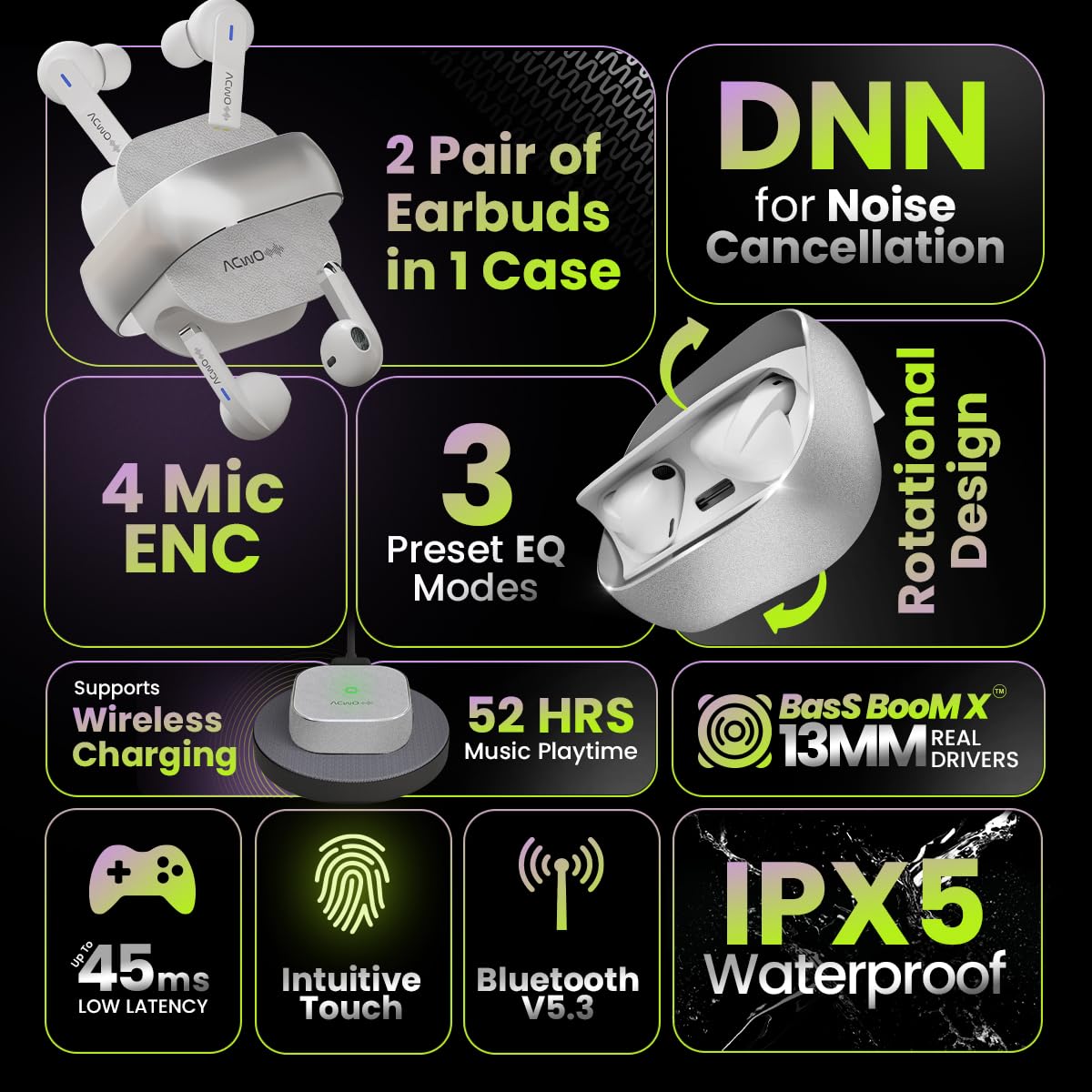
Image: Summary of ACwO DwOTS Fire key features.
8. ستونزه حل کول
۵.۱ د غوږونو نه جوړېدل
- Ensure earbuds are charged and the case lid is open.
- د خپل وسیله بلوتوث بند او فعال کړئ.
- د خپل بلوتوث لیست څخه وسیله هیر کړئ او بیا جوړه کولو هڅه وکړئ.
- Reset the earbuds (refer to the 'Scan Me Card' for specific reset instructions).
۵.۲ غږ نشته یا ټیټ غږ
- په خپل وسیله او ایربډ دواړو کې د غږ کچه وګورئ.
- ډاډ ترلاسه کړئ چې اییربډونه ستاسو په غوږونو کې په سمه توګه ځای پر ځای شوي دي.
- د اییربډ سپیکرو او چارج کولو اړیکو څخه هر ډول پاتې شوني پاک کړئ.
- غوږوالۍ خپل وسیله سره وصل کړئ.
8.3 د چارج کولو مسلې
- ډاډ ترلاسه کړئ چې د چارج کولو کیبل په خوندي ډول د قضیې او بریښنا سرچینې دواړو سره وصل دی.
- که تاسو د بې سیم چارج کولو څخه کار اخلئ، ډاډ ترلاسه کړئ چې قضیه په سمه توګه د یو مناسب بې سیم چارج کولو پیډ کې ځای په ځای شوې ده.
- Check for any obstructions on the charging contacts of the earbuds and inside the case.
- د چارج کولو بل کیبل یا د بریښنا اډاپټر هڅه وکړئ.
9. تضمین او ملاتړ
The ACwO DwOTS Fire earbuds come with a standard brand warranty. Please refer to the included Warranty Card for specific terms and conditions.
د پیرودونکي ملاتړ:
For any queries, technical assistance, or warranty claims, please contact ACwO customer support:
- بریښنالیک: help@acwo.com
- تلیفون: +۴۵۷۴۸۸
- جوړونکی: ACWO LIFESTYLE PRIVATE LIMITED, Borivali, Mumbai, Maharashtra - 400092, India


