1. پیژندنه
Thank you for choosing the Cherry KW 7100 Mini Multi-Device Compact Keyboard. This manual provides essential information for setting up, operating, and maintaining your new keyboard. Designed for versatility and portability, this keyboard offers seamless connectivity across multiple devices.
۲. په بکس کې څه دي؟
- Cherry KW 7100 Mini Multi-Device Compact Keyboard
- USB-C to USB-A Charging/Connection Cable
- 2x AAA بیټرۍ
- 2.4 GHz Wireless Nano Receiver (stored magnetically in the keyboard)
- د لیږد قضیه
- د لارښوونې لارښود

شکل ۱: پورته څخه ښکته view of the Cherry KW 7100 Mini Keyboard.
3. ترتیب کول
3.1. د بیټرۍ نصب کول
- د کیبورډ په لاندې برخه کې د بیټرۍ کڅوړه ومومئ.
- سلایډ د بیټرۍ خونې پوښ خلاص کړئ.
- دوه AAA بیټرۍ دننه کړئ، د سم قطبیت ډاډ ترلاسه کړئ (+/-).
- د بیټرۍ کمپارټ پوښ په خوندي ډول وتړئ.
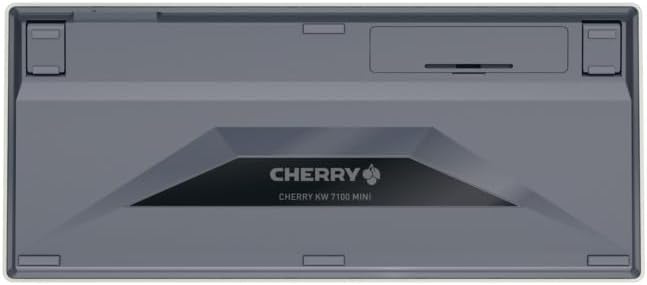
Figure 2: Underside of the keyboard with the battery compartment.
3.2. د کیبورډ سره نښلول
The Cherry KW 7100 Mini supports three connection methods: Bluetooth, 2.4 GHz Wireless, and Wired USB-C.
3.2.1. Bluetooth Connection (Up to 3 Devices)
- په اړخ کې د بریښنا سویچ په کارولو سره کیبورډ چالان کړئ.
- Press and hold one of the Bluetooth channel keys (F1, F2, or F3) for 3-5 seconds until the corresponding LED indicator blinks rapidly. This indicates pairing mode.
- On your device (laptop, smartphone, tablet), navigate to Bluetooth settings and search for available devices.
- Select "Cherry KW 7100" from the list to pair. The LED will stop blinking and remain solid for a few seconds upon successful connection.
- Repeat for up to two additional devices using the other Bluetooth channel keys (F1, F2, or F3).
۲.۱. ۲.۴ GHz بېسیم اتصال
- Locate the 2.4 GHz wireless nano receiver, typically stored magnetically in a slot on the underside of the keyboard.
- Insert the nano receiver into an available USB-A port on your computer.
- Turn on the keyboard using the power switch. The keyboard should automatically connect to the receiver.
۴. د وایرډ USB-C اتصال
- Connect one end of the provided USB-C cable to the USB-C port on the keyboard.
- Connect the other end of the USB-C cable to an available USB-A port on your computer.
- The keyboard will function as a wired keyboard.
Video 1: Demonstrating the setup and typing experience of the Cherry KW 7100 Mini Keyboard.
۴. د کیبورډ چلول
۱. د وصل شویو وسیلو ترمنځ بدلول
To switch between paired Bluetooth devices, simply press the corresponding Bluetooth channel key (F1, F2, or F3) that your device is paired to. The keyboard will automatically connect to the selected device.
۴.۲. د فعالیت کیلي (FN)
The keyboard features a dedicated FN key, typically located near the right Shift key. This key, in combination with other keys, activates secondary functions such as media controls, screen brightness, and other system commands. Refer to the keycap legends for specific FN key combinations.
4.3. د LED شاخصونه
LED indicators on the keyboard provide information about its status:
- Bluetooth Channel LEDs (F1, F2, F3): Indicate the currently active Bluetooth connection or pairing mode.
- د کیپس لاک LED: کله چې کیپس لاک فعال وي نو روښانه کیږي.
- د بیټرۍ حالت LED: د بیټرۍ ټیټه کچه په ګوته کوي.
4.4. د تنظیم وړ پښې
The keyboard is equipped with stable, fold-out feet on the underside. These allow you to adjust the typing angle for improved ergonomics and comfort.
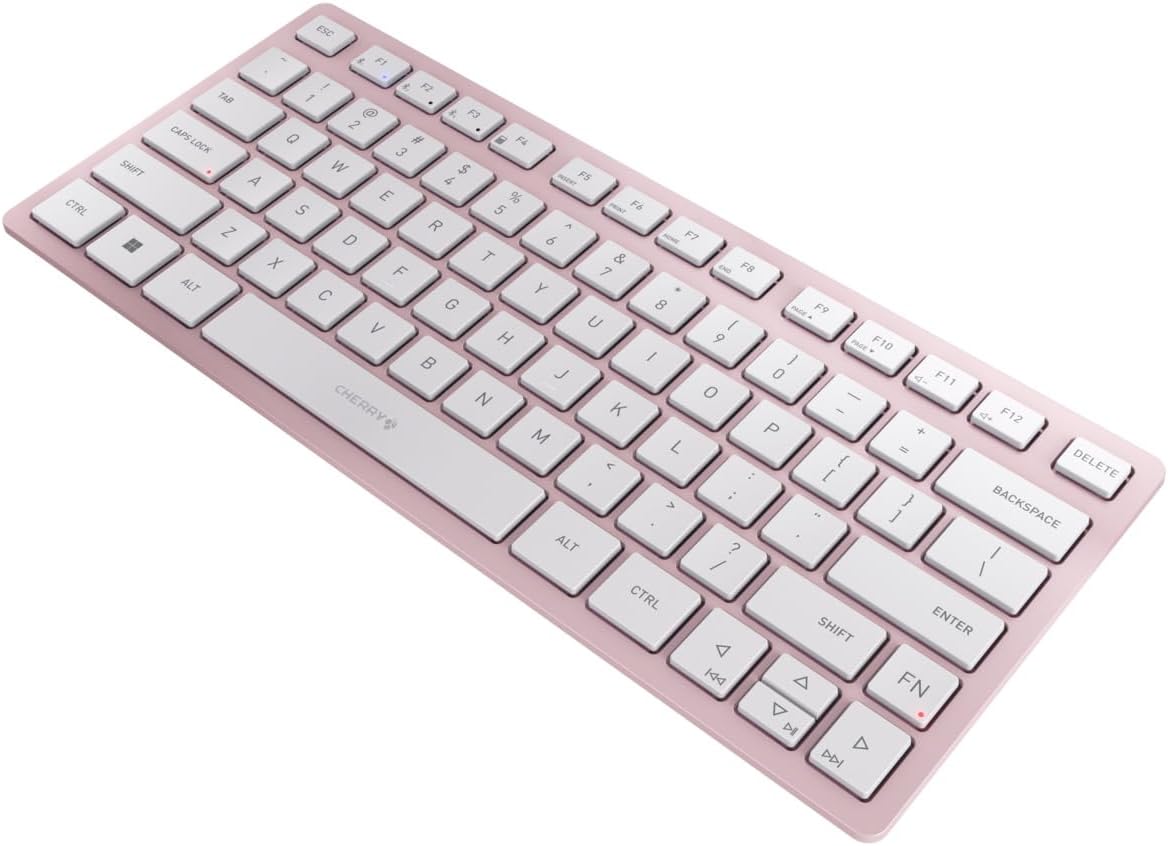
شکل ۳: زاویه لرونکی view of the keyboard, highlighting its slim profile.

شکل 4: اړخ view showing the adjustable feet extended for an ergonomic typing angle.
5. ساتنه
5.1. پاکول
To clean your keyboard, gently wipe the keycaps and surface with a soft, lint-free cloth. For stubborn dirt, slightly dampټوکر د اوبو یا یو نرم، غیر خارښونکي پاکولو محلول سره ومینځئ. د ډیر رطوبت څخه مخنیوی وکړئ او په مستقیم ډول په کیبورډ باندې کلینر مه سپری کوئ.
5.2. ذخیره کول
When not in use, especially during travel, store the keyboard in its included carrying case to protect it from dust, scratches, and minor impacts.

Figure 5: The keyboard stored in its protective carrying case.
6. ستونزه حل کول
۷.۱. کیبورډ نه نښلي
- ډاډ ترلاسه کړئ چې کیبورډ فعال دی.
- بیټرۍ چیک کړئ او د اړتیا په صورت کې یې بدل کړئ.
- For Bluetooth, ensure the correct channel (F1, F2, or F3) is selected and the keyboard is in pairing mode (blinking LED).
- For 2.4 GHz wireless, ensure the nano receiver is securely plugged into a USB-A port.
- د بېسیم ستونزو د له منځه وړلو لپاره د USB-C کیبل له لارې د نښلولو هڅه وکړئ.
- خپل وسیله بیا پیل کړئ او بیا جوړه کولو هڅه وکړئ.
۷.۲. هغه کیلي چې ځواب نه ورکوي
- Check the connection as described above.
- ډاډ ترلاسه کړئ چې د کیلي ګانو لاندې هیڅ کثافات نه وي.
- که چیرې د تار لرونکی اتصال کاروئ، نو یو بل USB پورټ یا کیبل هڅه وکړئ.
۳. د بیټرۍ لنډ ژوند
- ډاډ ترلاسه کړئ چې تاسو تازه، لوړ کیفیت لرونکي AAA بیټرۍ کاروئ.
- کله چې د بیټرۍ بریښنا خوندي کولو لپاره کار نه کوئ نو کیبورډ بند کړئ.
7. مشخصات
| فیچر | مشخصات |
|---|---|
| د ماډل نوم | KW7100 |
| د توکي ماډل شمیره | JK-7100US-19 |
| برانډ | چیری |
| د ارتباط ټیکنالوژي | Bluetooth 5.1 (3 channels), 2.4 GHz Wireless, USB-C Wired |
| مطابقت لرونکې وسیلې | لپ ټاپ، سمارټ فون، ټابلیټ |
| د کیبورډ توضیحات | Compact, Multi-Device |
| کلیدي میکانیزم | CHERRY SX Scissor Mechanism |
| د بریښنا سرچینه | 2x AAA بیټرۍ |
| کوډ کول | AES-128 |
| د محصول ابعاد | 11.6 x 5.1 x 0.6 انچه |
| د توکي وزن | ۲.۴۵ پونډه |
| مواد | فلزي، پلاستيک |
| رنګ | چیری بلاسم |
8. تضمین او ملاتړ
This product is covered by Cherry's standard manufacturer warranty. For detailed warranty information, technical support, or service inquiries, please visit the official Cherry webسایټ ته مراجعه وکړئ یا مستقیم د دوی د پیرودونکو ملاتړ سره اړیکه ونیسئ.
جوړونکی: چیری
Webسایټ: www.cherry.de