1. پیژندنه
The COMFAST CF-726B is a versatile 2-in-1 USB adapter designed to provide both Bluetooth 4.2 and dual-band Wi-Fi connectivity to your computer. This device allows you to connect to wireless networks at speeds up to 650Mbps and pair with various Bluetooth peripherals, enhancing your system's wireless capabilities.
This manual provides essential information for the proper setup, operation, and maintenance of your CF-726B adapter.
2. د محصول ب Featuresې
- 2-in-1 فعالیت: Combines Wi-Fi and Bluetooth capabilities in a single USB device.
- دوه ګونی بانډ وای فای: Supports 2.4GHz and 5.8GHz frequencies for flexible network connections.
- High Speed Data Transfer: Achieves Wi-Fi speeds up to 650Mbps.
- بلوتوث 4.2: Enables stable and efficient connection with Bluetooth devices.
- تړون ډیزاین: د لیږد وړتیا او محتاط کارونې لپاره کوچنی فارم فاکتور.
- پراخه مطابقت: Supports Windows, macOS, and Linux operating systems.
3. ترتیب او نصب کول
Before using your COMFAST CF-726B adapter, driver installation is required. The product is supplied with documentation and an installation CD. It is recommended to use the provided CD for driver installation or download the latest drivers from the official COMFAST webسایټ
3.1 د سیسټم اړتیاوې
- عملیاتي سیسټمونه: Windows 7/8/8.1/10 (32 or 64-bit), MacOS 10.6~10.11, Linux Kernel 2.6.18~3.10.
- یادونه: The Bluetooth driver is نه compatible with Windows XP/Vista.
- انٹرفیس: د USB 2.0 پورټ شتون لري.
3.2 Driver Installation Steps
- Insert the COMFAST CF-726B adapter into an available USB port on your computer.
- Insert the provided installation CD into your computer's CD/DVD drive.
- Follow the on-screen instructions to install the Wi-Fi and Bluetooth drivers. If an auto-run feature does not start, navigate to the CD drive in 'My Computer' or 'This PC' and run the setup executable (e.g., 'setup.exe' or 'install.exe').
- Alternatively, download the latest drivers from the official COMFAST support website. Ensure you select the correct model (CF-726B) and operating system.
- د نصبولو وروسته، که غوښتنه وشي، خپل کمپیوټر بیا پیل کړئ.

Figure 1: COMFAST CF-726B USB adapter. This image shows the compact blue casing of the adapter with its USB connector, ready for insertion into a computer's USB port.
4. عملیاتي لارښوونې
4.1 د وای فای شبکې سره وصل کول
- Ensure the CF-726B adapter is securely plugged into a USB port.
- On Windows, click the Wi-Fi icon in the system tray (usually bottom-right corner). On macOS, click the Wi-Fi icon in the menu bar (top-right corner). For Linux, consult your distribution's network manager.
- د شته شبکو له لیست څخه خپل مطلوب وای فای شبکه غوره کړئ.
- که غوښتنه وشي، د شبکې امنیتي کیلي (پاسورډ) دننه کړئ.
- Click 'Connect'. The adapter will establish a connection to the Wi-Fi network.
۳.۴ د بلوتوث وسیلو سره نښلول
- Ensure the CF-726B adapter is securely plugged into a USB port.
- On Windows, go to 'Settings' > 'Devices' > 'Bluetooth & other devices'. On macOS, go to 'System Preferences' > 'Bluetooth'. For Linux, use your desktop environment's Bluetooth settings.
- په خپل کمپیوټر کې بلوتوث فعال کړئ.
- خپل بلوتوث وسیله (د مثال په توګه، هیډفونونه، موږک، کیبورډ) د جوړه کولو حالت ته واچوئ. د ځانګړو لارښوونو لپاره د خپل وسیله لارښود ته مراجعه وکړئ.
- On your computer, click 'Add Bluetooth or other device' (Windows) or wait for the device to appear in the Bluetooth settings (macOS/Linux).
- له لیست څخه خپل وسیله غوره کړئ او د جوړې پروسې بشپړولو لپاره په سکرین کې هر ډول لارښوونې تعقیب کړئ.
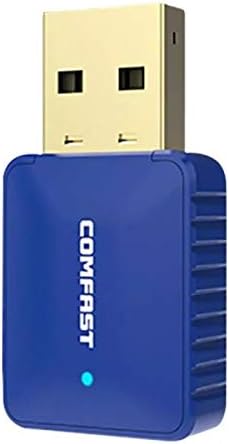
شکل 2: اړخ view of the COMFAST CF-726B adapter. This image highlights the compact profile of the device, making it suitable for various USB ports.
5. ساتنه
The COMFAST CF-726B adapter is designed for durability. To ensure its longevity and optimal performance, consider the following maintenance tips:
- پاک ساتل: Periodically clean the USB connector with a dry, lint-free cloth to remove dust or debris.
- د فزیکي زیان څخه مخنیوی وکړئ: Do not bend, drop, or expose the adapter to excessive force. Avoid pulling the adapter out by its casing; always grasp the USB connector firmly.
- د مایعاتو څخه ساتنه: Keep the adapter away from water and other liquids.
- ذخیره کول: کله چې په کارولو کې نه وي، اډاپټر په یخ، وچ ځای کې وساتئ، د مستقیم لمر وړانګو او سختې تودوخې څخه لرې.

شکل ۱: مخ او اړخ view of the COMFAST CF-726B adapter. This perspective shows the overall dimensions and the blue LED indicator light.
6. ستونزه حل کول
If you encounter issues with your COMFAST CF-726B adapter, refer to the following common troubleshooting steps:
- اډاپټر ونه موندل شو:
- هڅه وکړئ چې اډاپټر په بل USB پورټ کې ولګوئ.
- خپل کمپیوټر بیا پیل کړئ.
- Ensure drivers are correctly installed. Reinstall drivers if necessary.
- د وای فای اتصال نشته:
- تایید کړئ چې ستاسو د وای فای شبکه فعاله ده او خپریږي.
- وګورئ چې ایا تاسو د وای فای سم رمز داخل کړی دی.
- Ensure the Wi-Fi function is enabled on your computer.
- هڅه وکړئ خپل روټر/موډیم بیا پیل کړئ.
- بلوتوث کار نه کوي:
- Ensure Bluetooth is enabled in your computer's settings.
- Confirm your Bluetooth device is in pairing mode.
- Remember that the Bluetooth driver is نه compatible with Windows XP/Vista.
- د بلوتوث وسیله لرې کړئ او بیا جوړه کړئ.
- د وای فای ورو سرعت:
- Ensure you are connected to the optimal frequency band (5.8GHz generally offers faster speeds if your router supports it).
- Reduce interference by moving closer to your Wi-Fi router or away from other electronic devices.
- Check for updated drivers.

4 شکل: چاودلی view of the COMFAST CF-726B adapter. This image illustrates the internal chip (RTL8821CU) responsible for its dual Wi-Fi and Bluetooth functionalities.
7. مشخصات
| برانډ | کامفا |
| ماډل | CF-726B |
| اصلي برخه | RTL8821CU |
| بې سیم معیارونه | IEEE802.11a/b/g/n/ac |
| بلوتوث نسخه | 4.2 |
| انٹرفیس | USB 2.0 |
| د فریکونسی بندونه | 2.4GHz / 5.8GHz (Dual Frequency) |
| د اعظمي ډیټا نرخ | 650 Mbps |
| د معلوماتو امنیت | WPA-PSK/WPA2-PSK, WPA/WPA2, WEP |
| ابعاد | 36mm x 19mm x 9mm |
| رنګ | آبي |
| ملاتړ شوی OS | Windows 7/8/8.1/10 (32/64-bit), MacOS 10.6~10.11, Linux Kernel 2.6.18~3.10 |
| مطابقت لرونکې وسیلې | ډیسټاپ کمپیوټر |
8. تضمین او ملاتړ
8.1 د تضمین معلومات
The COMFAST CF-726B adapter comes with a د 12 میاشتو تضمین from the date of purchase. This warranty covers manufacturing defects and ensures the product functions as described under normal use. Please retain your proof of purchase for warranty claims.
8.2 د پیرودونکي ملاتړ
For technical assistance, driver updates, or further inquiries, please refer to the official COMFAST website or contact their customer support channels. The product is supplied with additional documentation that may contain specific support contact details.


