پیژندنه
The Logitech POP Mouse is a compact, wireless mouse designed for enhanced productivity and personal expression. Featuring SilentTouch Technology for quiet clicks, a customizable top button for emojis or shortcuts, and a SmartWheel that shifts between precision and speed scrolling, it offers a versatile user experience. This mouse supports multi-device connectivity via Bluetooth, allowing seamless switching between up to three devices. It is built with durability in mind, offering up to 24 months of battery life and auto-sleep power-saving features.
په بکس کې څه دي
- د لوجیټیک پاپ موږک
- 1 x AA Battery (pre-installed)
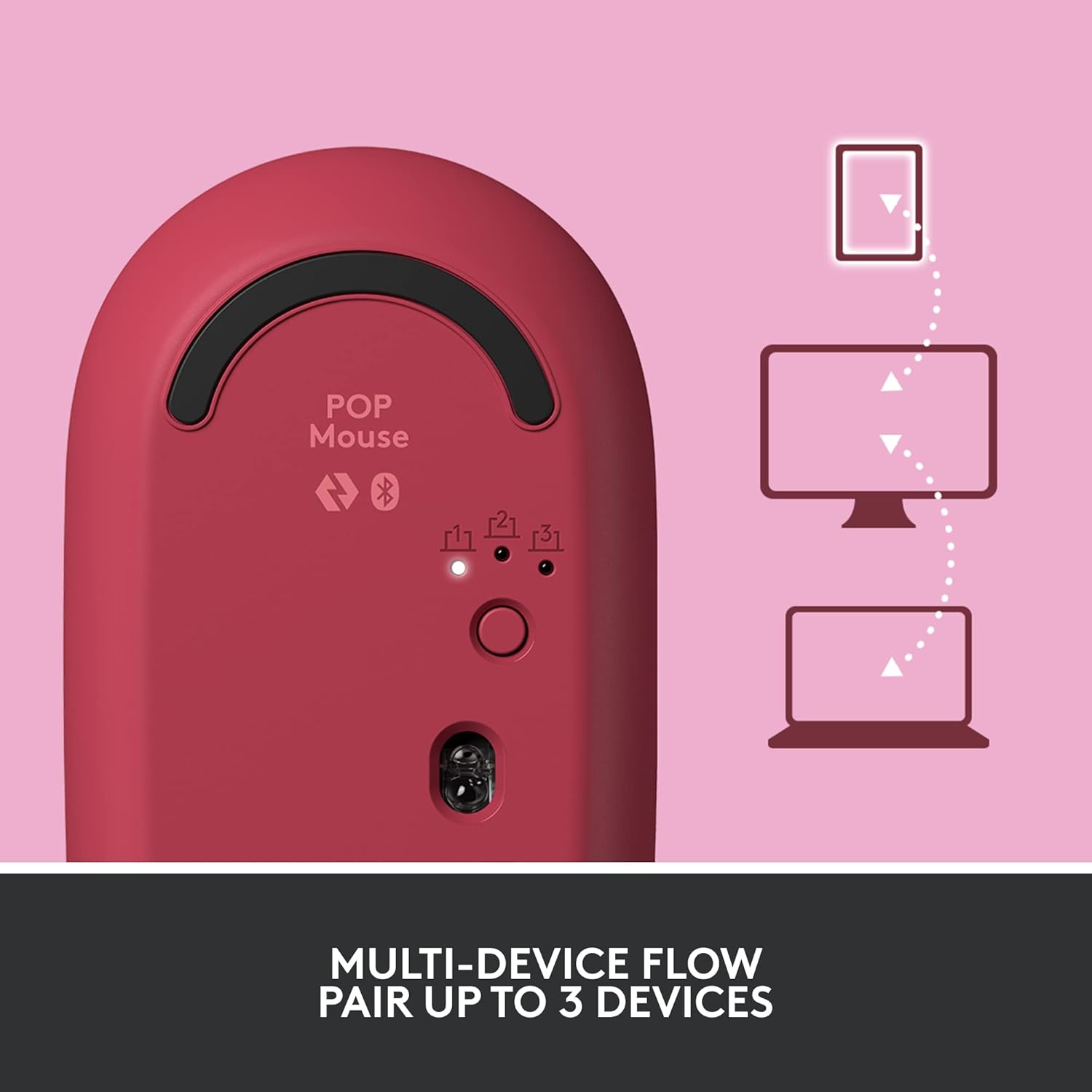
Image: The Logitech POP Mouse and an included AA battery, as typically found in the product packaging.
چمتو کول
1. د بیټرۍ نصب کول
- د موږک لاندې برخه کې د بیټرۍ کڅوړه ومومئ.
- Gently slide the top cover of the mouse backward to remove it.
- شامل شوي AA بیټرۍ دننه کړئ، د سم قطبیت ډاډ ترلاسه کړئ (+/-).
- Replace the top cover by aligning it and sliding it forward until it clicks into place.
2. بریښنا فعاله کړئ
- Flip the mouse over. Locate the On/Off switch on the bottom of the mouse.
- Slide the switch to the 'On' position (usually indicated by green color).
3. Device Pairing (Bluetooth)
- On the bottom of the mouse, press and hold the Easy-Switch button (labeled with 1, 2, or 3) for 3 seconds until the LED light starts blinking rapidly. This indicates pairing mode.
- On your computer, tablet, or phone, open your Bluetooth settings.
- Select "Logitech POP Mouse" from the list of available devices.
- د جوړې کولو پروسې بشپړولو لپاره د سکرین پر هر ډول لارښوونو تعقیب کړئ. د موږک LED څراغ به د 5 ثانیو لپاره جامد شي کله چې وصل شي.
۱. د څو وسیلو بدلول
- The POP Mouse can be paired with up to three devices. To switch between paired devices, simply press the Easy-Switch button on the bottom of the mouse. The corresponding LED (1, 2, or 3) will light up to indicate the active device.
Image: The Logitech POP Mouse can seamlessly connect and switch between up to three different devices, such as a tablet, desktop computer, and laptop.
د موږک چلول
1. بنسټیز کارونه
- کیڼ کلیک: لومړني انتخاب او تعامل.
- ښي کلیک: د شرایطو مینو ته لاسرسی لري.
- سکرول ویل: په عمودي ډول د اسنادو له لارې سکرول کوي او web پاڼې
۵.۲. د سمارټ ویل ټیکنالوژي
- The SmartWheel automatically shifts between high-precision scrolling for detailed work and super-fast scrolling for quickly navigating long documents or web پاڼې

Image: The SmartWheel on the Logitech POP Mouse dynamically adjusts its scrolling mode for precision or speed.
۴.۲. سایلنټ ټچ ټیکنالوژي
- Enjoy a quiet working environment with SilentTouch Technology, which significantly reduces click noise without compromising tactile feedback.

Image: SilentTouch Technology ensures a quiet and comfortable user experience.
اصلاح کول
1. Customizable Top Button
- The top button, located below the scroll wheel, is customizable. By default, it opens an emoji menu for quick access to your favorite emojis.

Image: The customizable top button allows for quick access to an emoji menu on your screen.
2. Logi Options+ App
- ډاونلوډ کړئ د لوګي اختیارونه+ اپلیکیشن (Windows and macOS only) to personalize your POP Mouse.
- You can reassign the top button to perform various shortcuts, such as Snip Screen, Mic Mute, Voice-to-Text, or any other function you desire.
- The app also allows you to adjust pointer speed, scroll speed, and enable Flow for cross-computer control.
ساتنه
- پاکول: یو نرم استعمال کړئ، دamp cloth to clean the exterior of the mouse. Avoid harsh chemicals or abrasive materials.
- د بیټرۍ بدلول: Replace the AA battery when the low battery indicator light appears.
- ذخیره کول: When not in use for extended periods, turn off the mouse using the On/Off switch to conserve battery life.
د ستونزو حل کول
- موږک نه نښلي: Ensure the mouse is powered on and within range of your device. Check your device's Bluetooth settings to confirm it's enabled and the mouse is paired. Try re-pairing the mouse.
- ځنډ یا بې نظمه حرکت: Replace the battery if it's low. Ensure there are no obstructions between the mouse and your device. Avoid using the mouse on highly reflective or uneven surfaces.
- Custom button not working: Verify that the Logi Options+ App is installed and running on your computer. Check the button assignments within the app.
مشخصات
| برانډ | Logitech |
| د ماډل شمیره | 910-006545 |
| د ارتباط ټیکنالوژي | بلوتوث 5.1 |
| د بیسیم رینج | 32.81 فوټ (10 متر) |
| د سینسر ټیکنالوژي | د لوجیټیک لوړ دقیق نظری تعقیب |
| د تڼیو شمیر | 4 (Left/Right click, Scroll wheel click, Top button) |
| د اصلاح وړ تڼۍ | Yes (Top button, via Logi Options+ App) |
| د بیټرۍ ډول | د 1 x AA بیټرۍ |
| د بیټرۍ ژوند | تر ۱۸ میاشتو پورې (ممکن د استعمال پر بنسټ توپیر ولري) |
| د عملیاتي سیسټم مطابقت | وینډوز ۱۰ یا وروسته، میکوس ۱۰.۱۵ یا وروسته، iPadOS، کروم OS، انډرایډ |
| د توکي وزن | 2.89 اونس |
| د محصول ابعاد (LxWxH) | 4.3 x 2.6 x 1.7 انچه |
| مواد | Plastic parts include certified post-consumer recycled plastic (Heartbreaker Rose: 29%) |
تضمین او ملاتړ
د تضمین معلوماتو او تخنیکي ملاتړ لپاره، مهرباني وکړئ د لوجیټیک رسمي ملاتړ ته مراجعه وکړئ. website or refer to the warranty card included with your product. You can find detailed FAQs, troubleshooting guides, and contact options for customer service.
- آنلاین ملاتړ: لیدنه support.logi.com
- د محصول ثبتول: د تازه معلوماتو او ملاتړ ترلاسه کولو لپاره خپل محصول راجستر کړئ.


