1. پیژندنه
This manual provides detailed instructions for the installation, operation, and maintenance of your CPVAN BC01-Pro Outdoor Security Camera. Please read this manual thoroughly before using the product to ensure proper functionality and safety. Keep this manual for future reference.
۲. په بکس کې څه دي؟
ډاډ ترلاسه کړئ چې ټولې برخې ستاسو په کڅوړه کې شتون لري:
- CPVAN BC01-Pro Outdoor Security Camera
- Solar Panel (3.3W with 3-meter charging cable)
- Adjustable Wall Mount (for camera)
- Mounting Bracket (for solar panel)
- د نصبولو پیچونه او دیوال لنگرونه
- د USB چارج کیبل
- د کارونکي لارښود (دا لاسوند)
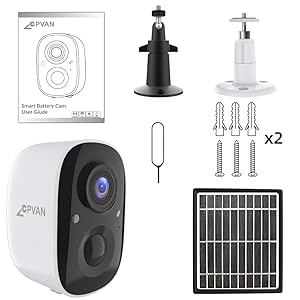
Figure 2.1: All components included in the CPVAN BC01-Pro package.
3. ترتیب کول
3.1 ابتدايي چارج کول
Before first use, fully charge the camera's built-in 5200mAh rechargeable battery using the provided USB cable. The charging indicator light will change to indicate a full charge.
۳.۴ د کیمرې او سولر پینل نصب کول
د لمریزې تختې لپاره د لمر وړانګو سره مناسب بهرنی ځای غوره کړئ او روښانه view for the camera. The camera features a 360° adjustable wall mount for flexible positioning.
- Secure the camera's wall mount to a desired surface using the provided screws and anchors.
- کیمره د نصب شوي بریکٹ سره وصل کړئ.
- Mount the solar panel in a location that receives maximum direct sunlight throughout the day.
- Connect the solar panel's charging cable to the camera's charging port. Ensure the port cover is securely closed after connection to maintain weather resistance.

شکل 3.1: مثالample installation of the camera and solar panel on an exterior wall.
۳.۳ د وای فای او اپلیکیشن سره وصل کیدل
Download the VicoHome APP from your smartphone's app store. Follow the in-app instructions to connect your camera to your Wi-Fi network and complete the setup process. This typically involves scanning a QR code displayed on your phone with the camera.
۳. د کیمرې چلول
4.1 ژوندی View او دوه طرفه آډیو
Access the live video feed through the VicoHome APP. The camera supports two-way audio, allowing you to listen and speak through the camera's built-in speaker and microphone.

Figure 4.1: VicoHome App interface for live view and two-way audio communication.
۵.۳ د حرکت کشف او د فعالیت زونونه
The camera features AI PIR motion detection to reduce false alarms. You can define specific activity zones within the camera's view via the VicoHome APP. Smart AI recognition (subscription required) can differentiate between people, cars, pets, and packages, sending real-time alerts to your device.
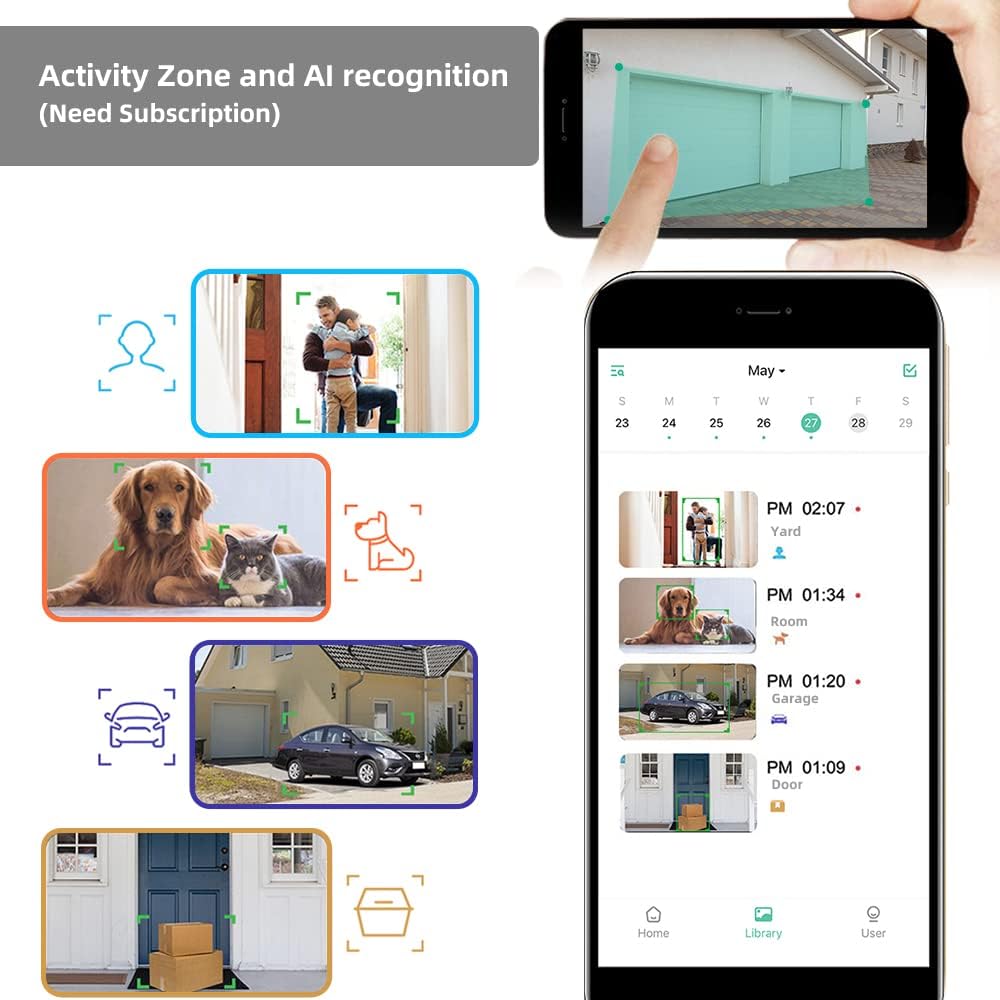
Figure 4.2: Configuring activity zones and viewing AI-detected events in the app.

Figure 4.3: Camera's field of view and motion detection capabilities.
4.3 د شپې لید
The camera offers 1080P HD video quality day and night. It automatically activates night vision mode using 8 IR LEDs in low light conditions. A powerful spotlight can be manually activated to provide full-color night vision.

Figure 4.4: Visual comparison of night vision modes.
4.4 ثبتول او ذخیره کول
The camera supports event recording. A 7-day rolling cloud storage is permanently free, with a 30-day trial of advanced cloud features available (subscription required). Local storage via Micro SD card is also supported.

Figure 4.5: Cloud service and local storage options.
5. ساتنه
5.1 د بیټرۍ مدیریت
The solar panel continuously recharges the camera's battery, minimizing the need for manual recharging. Ensure the solar panel is clean and positioned for maximum sun exposure.


Figure 5.1: Solar power ensures continuous battery charge.
۴.۲ پاکول او د چاپیریال ساتنه
The camera has an IP65 waterproof rating, protecting it from dust and water splashes. Periodically clean the camera lens and solar panel surface with a soft, damp cloth to ensure clear images and efficient charging. Avoid using harsh chemicals.

Figure 5.2: The camera's IP65 rating ensures durability in various weather conditions.
5.3 د فرم ویئر تازه معلومات
Regularly check the VicoHome APP for available firmware updates. Keeping your camera's firmware updated ensures optimal performance, security, and access to new features.
6. ستونزه حل کول
- کیمره له وای فای سره نه نښلي: Ensure your Wi-Fi network is 2.4GHz (5GHz is not supported). Check Wi-Fi signal strength at the camera's location. Restart your router and camera.
- د انځور کمزوری کیفیت: د کیمرې لینز پاک کړئ. ډاډ ترلاسه کړئ چې د کیمرې په ساحه کې هیڅ خنډ شتون نلري viewد خپل انټرنیټ اتصال سرعت وګورئ.
- بیټرۍ چارج نه کوي: Verify the solar panel is receiving direct sunlight and is clean. Check the connection between the solar panel and the camera. Ensure the camera is within the recommended operating temperature range (-4°F to 122°F).
- د غلط حرکت خبرتیاوې: Adjust motion detection sensitivity in the app. Define specific activity zones to exclude irrelevant areas.
- هیڅ غږ نشته یا ضعیف دوه اړخیز غږ: Check microphone and speaker settings in the app. Ensure your smartphone's volume is up.
7. مشخصات
| فیچر | تفصیل |
|---|---|
| ماډل | BC01-Pro |
| د ویډیو حل | 1080p HD (1920x1080 pixels) |
| اغیزمن لاهم حل | 2 MP |
| د ډګر View | 110 درجې پراخه زاویه |
| د شپې لید | 8 IR LEDs, Color Night Vision (with spotlight) |
| د حرکت کشف | AI PIR Motion Detection, Activity Zone support |
| د بریښنا سرچینه | Rechargeable Battery (5200mAh), Solar Panel (3.3W) |
| ارتباط | وای فای (2.4GHz) |
| ذخیره کول | Cloud Storage (7-day free rolling, subscription for advanced features), Micro SD Card |
| آډیو | Two-Way Audio, Built-in Siren |
| د هوا مقاومت | IP65 پنروک |
| د عملیاتي حرارت درجه | -4 °F څخه تر 122 °F (-20 ° C څخه تر 50 ° C) |
| ابعاد | 2.64 x 2.28 x 3.5 انچه |
| وزن | 400 ګرامه (14.1 اونس) |
| د کنټرول طریقه | د VicoHome اپلیکیشن |
8. تضمین او ملاتړ
For warranty information and technical assistance, please refer to the official CPVAN website or contact customer support. We are committed to providing the best possible experience with our products and typically respond to inquiries within 24 hours.


