پیژندنه
د پیرودلو لپاره مننهasing the Marvo Scorpion HG9055 USB Gaming Headset. This manual provides detailed instructions for setup, operation, maintenance, and troubleshooting to ensure optimal performance and longevity of your device. Please read this manual thoroughly before using the headset.
د خوندیتوب معلومات
- Avoid exposing the headset to extreme temperatures, humidity, or dust.
- هیډسیټ مه جلا کوئ یا پخپله د ترمیم هڅه مه کوئ. دا ممکن تضمین باطل کړي او زیان ورسوي.
- Clean the headset with a soft, dry cloth. Do not use liquid cleaners.
- د لوړ غږ په کچه د اوږدې مودې لپاره اوریدل ممکن د اوریدلو زیان لامل شي. غږ آرامۍ کچې ته تنظیم کړئ.
- هیډسیټ د ماشومانو او څارویو څخه لرې وساتئ.
د بسته محتويات
مهرباني وکړئ د بکس خلاصولو پر مهال د کڅوړې محتويات وګورئ. که کوم توکي ورک یا خراب وي، نو خپل پرچون پلورونکي سره اړیکه ونیسئ.
- Marvo Scorpion HG9055 USB Gaming Headset
- د کارونکي لارښود (دا لاسوند)
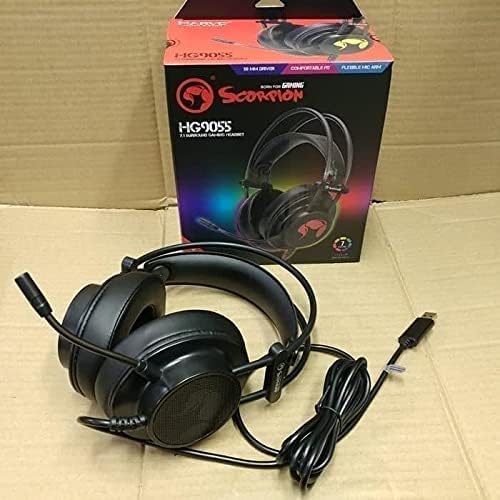
Image: The Marvo Scorpion HG9055 headset displayed next to its retail packaging, showing the product and its box.
محصول پای ته ورسیدview
The Marvo Scorpion HG9055 is a USB gaming headset designed for PC and laptop use, featuring 7.1 virtual surround sound, 50mm drivers, and a noise-cancelling microphone.

Image: A promotional view of the Marvo Scorpion HG9055 headset, detailing its 7.1 surround sound, USB connection, and customizable 7-color lighting features.
مهمې برخې:
- د تنظیم وړ سربند: د آرامۍ فټ لپاره.
- د غوږ څخه پورته د غوږونو کپونه: د اوږدې مودې کارونې پرمهال د آرامۍ لپاره پیډ شوی.
- انعطاف وړ مایکروفون: Noise-cancelling for clear communication.
- د USB نښلونکی: For digital audio and power.
د تنظیم کولو لارښوونې
- هیډسیټ وصل کړئ: Plug the USB connector of the HG9055 headset into an available USB port on your PC or laptop.
- د ډرایور نصب کول: The operating system (Windows/macOS) should automatically detect and install the necessary drivers. Allow a few moments for this process to complete.
- Verify Audio Output:
- وینډوز: Right-click the speaker icon in the system tray, select "Sound Settings" or "Playback devices." Ensure "Marvo Scorpion HG9055" or a similar device name is selected as the default playback device.
- macOS: Go to "System Preferences" > "Sound" > "Output." Select "Marvo Scorpion HG9055" as the output device.
- Verify Microphone Input:
- وینډوز: In "Sound Settings" or "Recording devices," ensure "Marvo Scorpion HG9055" is selected as the default recording device.
- macOS: In "System Preferences" > "Sound" > "Input," select "Marvo Scorpion HG9055" as the input device.
- فټ تنظیم کړئ: Adjust the headband and earcups for a comfortable and secure fit. Position the microphone approximately 2-3 cm from your mouth for optimal voice clarity.

Image: The Marvo Scorpion HG9055 headset resting on a stand, demonstrating its over-ear design and flexible microphone, ready for use.
عملیاتي لارښوونې
د آډیو پلې بیک:
Once connected and configured, the headset will function as your primary audio output device.
- د حجم کنټرول: Adjust the volume using the in-line control wheel on the headset cable or through your operating system's sound settings.
- ۷.۱ مجازی شاوخوا غږ: The headset supports 7.1 virtual surround sound. This feature may require specific software or settings within your game or audio application for full utilization. Refer to your game's audio settings for configuration.
د مایکروفون کارول:
- د مایکروفون فعالول: The microphone is active by default when connected. Use the in-line microphone mute switch (if present) to toggle the microphone on/off.
- د شور لغوه کول: The integrated noise-cancelling microphone reduces background noise for clearer voice communication. Ensure the microphone is positioned correctly near your mouth.
- د مایکروفون حجم: Adjust microphone sensitivity through your operating system's sound settings (Input/Recording devices).
ساتنه
- پاکول: Use a soft, dry, lint-free cloth to wipe the earcups and headband. Do not use abrasive cleaners, alcohol, or solvents.
- ذخیره کول: When not in use, store the headset in a clean, dry place, away from direct sunlight and extreme temperatures. Avoid tangling the cable.
- د کیبل پاملرنه: Do not pull on the cable to disconnect the headset. Always grasp the USB plug.
د ستونزو حل کول
| ستونزه | د حل لاره |
|---|---|
| د هیډسیټ څخه هیڅ غږ نشته. |
|
| مایکروفون کار نه کوي. |
|
| د غږ کیفیت خراب یا تحریف شوی دی. |
|
مشخصات
| د ماډل نوم | HG9055 |
| ارتباط | USB (ویر شوی) |
| د هیډفون فارم فاکتور | په غوږ کې |
| چلوونکي | 50MM |
| شاوخوا غږ | 7.1 د مجازی شاوخوا غږ |
| مایکروفون | Noise Cancellation, Included |
| د شور کنټرول | د فعال شور لغوه کول (مایکروفون) |
| سره مطابقت لري | کمپیوټر، لپ ټاپ |
| رنګ | تور |
| مواد | پلاستیک |
| جوړونکی | ماروو |
تضمین او ملاتړ
د تضمین معلوماتو او تخنیکي ملاتړ لپاره، مهرباني وکړئ د خپل محصول سره شامل شوي تضمین کارت ته مراجعه وکړئ یا رسمي MARVO ته مراجعه وکړئ. webسایټ. د هر ډول تضمین ادعا لپاره د پیرود ثبوت وساتئ.
جوړونکی: ماروو
ماډل: HG9055


