پیژندنه
This manual provides detailed instructions for the installation, operation, maintenance, and troubleshooting of the ADVANTECH PS8-500FATX-GB 80+ Gold Flex ATX Power Supply. This power supply unit (PSU) is designed to deliver stable and efficient power to your system, featuring 500W output with 3.3V, 5V, 12V, and -12V outputs, and RoHS compliance.
د خوندیتوب معلومات
Please read all safety instructions carefully before installing or operating the power supply. Failure to follow these instructions may result in electric shock, fire, or damage to the product and connected equipment.
- Ensure the power supply is disconnected from the AC power source before installation or maintenance.
- د برېښنا رسونه مه خلاصوئ casinج. لوړ حجمtage components inside pose a risk of electric shock.
- د ډیر تودوخې مخنیوي لپاره د بریښنا رسولو په ښه هوا لرونکي ځای کې نصب کړئ.
- Use only the cables provided or approved by ADVANTECH for this power supply.
- دا محصول یوازې د داخلي کارونې لپاره ډیزاین شوی.
د بسته محتويات
ډاډ ترلاسه کړئ چې ټول توکي په کڅوړه کې شتون لري:
- ADVANTECH PS8-500FATX-GB Power Supply Unit
- د AC بریښنا تار
- د سکرو نصب کول
- د کارونکي لارښود (دا لاسوند)
تنظیم او نصب کول
Follow these steps to properly install the power supply into your system:
- خپل سیسټم چمتو کړئ: Ensure your computer system is powered off and disconnected from the AC outlet. Open the computer case.
- زوړ PSU لرې کړئ (که چیرې تطبیق شي): Disconnect all cables from the old power supply. Unscrew and remove the old PSU from the chassis.
- نوی PSU نصب کړئ: Carefully place the ADVANTECH PS8-500FATX-GB into the power supply bay of your computer case. Ensure the fan is facing the correct direction for optimal airflow (usually facing down or out of the case). Secure the PSU with the provided mounting screws.
- د بریښنا اصلي کیبلونه وصل کړئ:
- Connect the 20+4 pin ATX main power connector to the motherboard.
- Connect the 4+4 pin EPS/ATX 12V connector to the motherboard CPU power socket.
- پردی کیبلونه وصل کړئ: Connect SATA power connectors to hard drives, SSDs, and optical drives. Connect PCIe power connectors to graphics cards if required. Connect Molex connectors to other peripherals as needed.
- د کیبل مدیریت: Route cables neatly to improve airflow and aesthetics.
- Close Case and Connect AC Power: Close your computer case. Connect the AC power cord to the power supply and then to a wall outlet or surge protector.
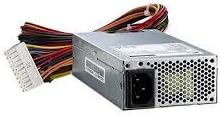
انځور 1: The ADVANTECH PS8-500FATX-GB 500W Flex ATX Power Supply, showing its compact form factor and various power connectors. This image illustrates the physical appearance of the unit and its attached cabling.
عملیاتي لارښوونې
Once installed, operating the power supply is straightforward:
- پاور آن: After connecting all necessary cables and the AC power cord, press the power button on your computer case. The power supply will automatically provide power to your system.
- بندول: Shut down your computer through the operating system. The power supply will enter a low-power state. For complete power disconnection, switch off the power supply's main switch (if present) or unplug the AC power cord.
- څارنه: Modern motherboards and operating systems often provide tools to monitor power supply voltages. Refer to your motherboard manual for details.
ساتنه
مناسب ساتنه ستاسو د بریښنا رسولو اوږد عمر او غوره فعالیت تضمینوي:
- د دوړو پاکول: Periodically clean the power supply fan and vents to prevent dust buildup, which can impede airflow and cause overheating. Use compressed air for this purpose, ensuring the system is powered off and unplugged.
- د کیبل معاینه: Regularly check all power cables for any signs of wear, fraying, or damage. Replace damaged cables immediately.
- د چاپیریال شرایط: Operate the power supply within its specified temperature and humidity ranges. Avoid extreme conditions.
د ستونزو حل کول
که تاسو د خپل بریښنا رسولو سره ستونزې سره مخ شئ، لاندې عامې ستونزې او حل لارې وګورئ:
| ستونزه | احتمالي لامل | د حل لاره |
|---|---|---|
| سیسټم فعال نه دی. |
|
|
| سیسټم چالان کیږي مګر سمدلاسه بندیږي. |
|
|
| د PSU څخه غیر معمولي غږونه. |
|
|
If the problem persists after trying these solutions, contact ADVANTECH customer support for further assistance.
مشخصات
| فیچر | تفصیل |
|---|---|
| ماډل | PS8-500FATX-GB |
| برانډ | ADVANTECH |
| د فارم فکتور | Flex ATX |
| د واټ محصولtage | 500 واټ |
| د موثریت درجه | ۸۰+ سره زر |
| د محصول Voltages | 3.3V, 5V, 12V, -12V |
| د نښلونکي ډول | ATX (20+4 pin, 4+4 pin EPS/ATX 12V, SATA, PCIe, Molex) |
| موافقت | RoHS |
| د توکي وزن | ۲.۴۵ پونډه |
| جوړونکی | Advantech Co |
| ASIN | B08SMRH5V8 |
| UPC | 040048829683 |
تضمین او ملاتړ
ADVANTECH products are designed for reliability and performance. For warranty information and technical support, please refer to the official ADVANTECH webسایټ یا د دوی د پیرودونکي خدماتو څانګې سره اړیکه ونیسئ.
- رسمي Webسایټ: www.vantech.com
- د پیرودونکي ملاتړ: په رسمي پاڼه کې "موږ سره اړیکه ونیسئ" برخې ته مراجعه وکړئ webد سیمه ایز ملاتړ توضیحاتو لپاره سایټ.
مهرباني وکړئ د تضمین ادعاګانو لپاره د پیرود ثبوت وساتئ.


